
An HTML dashboard to monitor your pypi projects.

Project description
Unfortunately, due to a pypi bug, download statistics got from the json API are bogus. So some of the data displayed by this program (download badges, and line charts) are bogus too… This will be fixed when the pypi bug itself will be fixed. See for instance #699 and #787.
An HTML dashboard to monitor your PyPI packages. It displays a line charts showing the evolution of downloads across versions, and a set of badges (download statistics, readthedocs badge, continuous integration, etc.). See the example below.
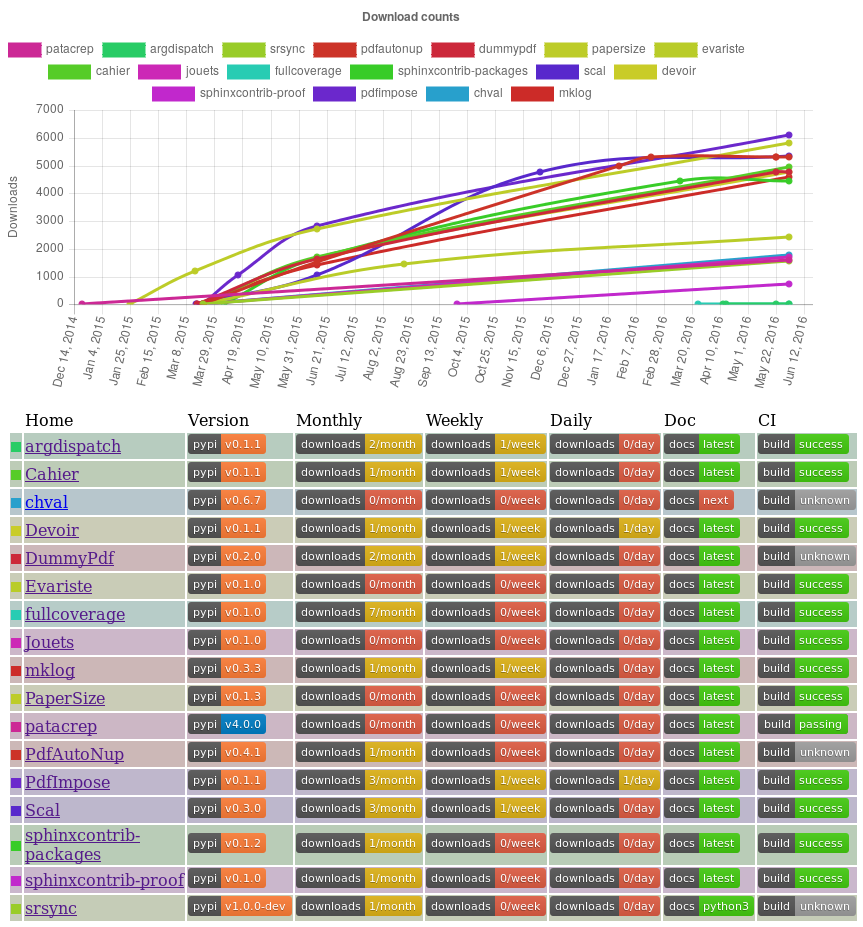
It is available as a command line interface that generates the HTML code, and as a web server, to generate and serve this dashboard.
What’s new?
See changelog.
What’s next?
This package replaces a static page that I manually updated from times to times. It does what I need, so there is little chance that I will develop it further. However, I see two directions this project could take:
break everything, remove every single line of python code, and rewrite everything in javascript, so that this can be served as a static page (from the server point of view) that can be published using gitlab pages or github pages, readthedocs, etc., and conquer the world;
or replace this quick and dirty web server using your favorite web framework, cache requests to the pypi API, publish it somewhere, and conquer the world.
I will do neither. But if you want to, you have my blessing… :)
Download and install
From sources:
Download: https://pypi.python.org/pypi/pypimonitor
Install (in a virtualenv, if you do not want to mess with your distribution installation system):
python3 setup.py install
From pip:
pip install pypimonitor
Quick and dirty Debian (and Ubuntu?) package
This requires stdeb to be installed:
python3 setup.py --command-packages=stdeb.command bdist_deb
sudo dpkg -i deb_dist/pypimonitor-<VERSION>_all.deb
Documentation
The compiled documentation is available on readthedocs
To compile it from source, download and run:
cd doc && make html


Download files
Download the file for your platform. If you're not sure which to choose, learn more about installing packages.
Source Distribution
Built Distribution
Filter files by name, interpreter, ABI, and platform.
If you're not sure about the file name format, learn more about wheel file names.
Copy a direct link to the current filters
File details
Details for the file pypimonitor-0.6.1.tar.gz.
File metadata
- Download URL: pypimonitor-0.6.1.tar.gz
- Upload date:
- Size: 23.1 kB
- Tags: Source
- Uploaded using Trusted Publishing? No
- Uploaded via: twine/6.2.0 CPython/3.13.9
File hashes
| Algorithm | Hash digest | |
|---|---|---|
| SHA256 |
06c4d81bd2275176092b631691fc0960f93c2a011ebf17918b0f4d228a0acea5
|
|
| MD5 |
c926fc86227d3e60369ab817adb2f839
|
|
| BLAKE2b-256 |
4259573846165650866aeb10abc7bc0b5aceb818c88d67cda5c8896502622bef
|
File details
Details for the file pypimonitor-0.6.1-py3-none-any.whl.
File metadata
- Download URL: pypimonitor-0.6.1-py3-none-any.whl
- Upload date:
- Size: 26.9 kB
- Tags: Python 3
- Uploaded using Trusted Publishing? No
- Uploaded via: twine/6.2.0 CPython/3.13.9
File hashes
| Algorithm | Hash digest | |
|---|---|---|
| SHA256 |
56f084ab16fddee9ccc4fc08e4038b5543f22a1718d41b478159982fcceaa430
|
|
| MD5 |
f676d5e06e3e8e25e54dc9342ea2f920
|
|
| BLAKE2b-256 |
939b69a1991b33534ce0980fad820f94a94d3d75511e68079c1b30ee49cf9794
|






