
pypinfo: View PyPI download statistics with ease.




pypinfo is a simple CLI to access PyPI download statistics via Google's BigQuery.
Table of contents
Usage
Click to unfold usage
$ pypinfo
Usage: pypinfo [OPTIONS] [PROJECT] [FIELDS]... COMMAND [ARGS]...

  Valid fields are:

  project | version | file | pyversion | percent3 | percent2 | impl | impl-version |

  openssl | date | month | year | country | installer | installer-version |

  setuptools-version | system | system-release | distro | distro-version | ci | cpu |

  libc | libc-version

Options:
  -a, --auth TEXT         Path to Google credentials JSON file.
  --run / --test          --test simply prints the query.
  -n, --dry-run           Don't run query but display how much data would be processed.
  -j, --json              Print data as JSON, with keys `rows` and `query`.
  -i, --indent INTEGER    JSON indentation level.
  -t, --timeout INTEGER   Milliseconds. Default: 120000 (2 minutes)
  -l, --limit INTEGER     Maximum number of query results. Default: 10
  -d, --days INTEGER      Number of days in the past to include. Default: 30
  -sd, --start-date TEXT  Must be negative or YYYY-MM[-DD]. Default: -31
  -ed, --end-date TEXT    Must be negative or YYYY-MM[-DD]. Default: -1
  -m, --month TEXT        Shortcut for -sd & -ed for a single YYYY-MM month.
  -w, --where TEXT        WHERE conditional. Default: file.project = "project"
  -o, --order TEXT        Field to order by. Default: download_count
  --all                   Show downloads by all installers, not only pip.
  -pc, --percent          Print percentages.
  -md, --markdown         Output as Markdown.
  -v, --verbose           Print debug messages to stderr.
  --version               Show the version and exit.
  -h, --help              Show this message and exit.
pypinfo accepts 0 or more options, followed by exactly 1 project, followed by 0 or more fields. By default only the last 30 days are queried. Let's take a look at some examples!
Tip: If queries are resulting in NoneType errors, increase timeout.
Downloads for a project
$ pypinfo requests
Served from cache: False
Data processed: 2.83 GiB
Data billed: 2.83 GiB
Estimated cost: $0.02

| download_count |
| -------------- |
|    116,353,535 |
All downloads
$ pypinfo ""
Served from cache: False
Data processed: 116.15 GiB
Data billed: 116.15 GiB
Estimated cost: $0.57

| download_count |
| -------------- |
|  8,642,447,168 |
Downloads for a project by Python version
$ pypinfo django pyversion
Served from cache: False
Data processed: 967.33 MiB
Data billed: 968.00 MiB
Estimated cost: $0.01

| python_version | download_count |
| -------------- | -------------- |
| 3.8            |      1,735,967 |
| 3.6            |      1,654,871 |
| 3.7            |      1,326,423 |
| 2.7            |        876,621 |
| 3.9            |        524,570 |
| 3.5            |        258,609 |
| 3.4            |         12,769 |
| 3.10           |          3,050 |
| 3.3            |            225 |
| 2.6            |            158 |
| Total          |      6,393,263 |
All downloads by country code
$ pypinfo "" country
Served from cache: False
Data processed: 150.40 GiB
Data billed: 150.40 GiB
Estimated cost: $0.74

| country | download_count |
| ------- | -------------- |
| US      |  6,614,473,568 |
| IE      |    336,037,059 |
| IN      |    192,914,402 |
| DE      |    186,968,946 |
| NL      |    182,691,755 |
| None    |    141,753,357 |
| BE      |    111,234,463 |
| GB      |    109,539,219 |
| SG      |    106,375,274 |
| FR      |     86,036,896 |
| Total   |  8,068,024,939 |
Downloads for a project by system and distribution
$ pypinfo cryptography system distro
Served from cache: False
Data processed: 2.52 GiB
Data billed: 2.52 GiB
Estimated cost: $0.02

| system_name | distro_name                     | download_count |
| ----------- | ------------------------------- | -------------- |
| Linux       | Ubuntu                          |     19,524,538 |
| Linux       | Debian GNU/Linux                |     11,662,104 |
| Linux       | Alpine Linux                    |      3,105,553 |
| Linux       | Amazon Linux AMI                |      2,427,975 |
| Linux       | Amazon Linux                    |      2,374,869 |
| Linux       | CentOS Linux                    |      1,955,181 |
| Windows     | None                            |      1,522,069 |
| Linux       | CentOS                          |        568,370 |
| Darwin      | macOS                           |        489,859 |
| Linux       | Red Hat Enterprise Linux Server |        296,858 |
| Total       |                                 |     43,927,376 |
Most popular projects in the past year
$ pypinfo --days 365 "" project
Served from cache: False
Data processed: 1.69 TiB
Data billed: 1.69 TiB
Estimated cost: $8.45

| project         | download_count |
| --------------- | -------------- |
| urllib3         |  1,382,528,406 |
| six             |  1,172,798,441 |
| botocore        |  1,053,169,690 |
| requests        |    995,387,353 |
| setuptools      |    992,794,567 |
| certifi         |    948,518,394 |
| python-dateutil |    934,709,454 |
| idna            |    929,781,443 |
| s3transfer      |    877,565,186 |
| chardet         |    854,744,674 |
| Total           | 10,141,997,608 |
Downloads between two YYYY-MM-DD dates
$ pypinfo --start-date 2018-04-01 --end-date 2018-04-30 setuptools
Served from cache: False
Data processed: 571.37 MiB
Data billed: 572.00 MiB
Estimated cost: $0.01

| download_count |
| -------------- |
|      8,972,826 |
Downloads between two YYYY-MM dates
- A yyyy-mm
--start-datedefaults to the first day of the month - A yyyy-mm
--end-datedefaults to the last day of the month
$ pypinfo --start-date 2018-04 --end-date 2018-04 setuptools
Served from cache: False
Data processed: 571.37 MiB
Data billed: 572.00 MiB
Estimated cost: $0.01

| download_count |
| -------------- |
|      8,972,826 |
Downloads for a single YYYY-MM month
$ pypinfo --month 2018-04 setuptools
Served from cache: False
Data processed: 571.37 MiB
Data billed: 572.00 MiB
Estimated cost: $0.01

| download_count |
| -------------- |
|      8,972,826 |
Percentage of Python 3 downloads of the top 100 projects in the past year
Let's use --test to only see the query instead of sending it.
$ pypinfo --test --days 365 --limit 100 "" project percent3
SELECT
    file.project as project,
    ROUND(100 * SUM(CASE WHEN REGEXP_EXTRACT(details.python, r"^([^\.]+)") = "3" THEN 1 ELSE 0 END) / COUNT(*), 1) as percent_3,
    COUNT(*) as download_count,
FROM `bigquery-public-data.pypi.file_downloads`
WHERE timestamp BETWEEN TIMESTAMP_ADD(CURRENT_TIMESTAMP(), INTERVAL -366 DAY) AND TIMESTAMP_ADD(CURRENT_TIMESTAMP(), INTERVAL -1 DAY)
    AND details.installer.name = "pip"
GROUP BY
    project
ORDER BY
    download_count DESC
LIMIT 100
Downloads for a given version
pypinfo supports PEP 440 version matching.
We can use it to query stats on a given major version.
$ pypinfo -pc 'pip==21.*' pyversion version
Served from cache: False
Data processed: 34.45 MiB
Data billed: 35.00 MiB
Estimated cost: $0.01

| python_version | version | percent | download_count |
| -------------- | ------- | ------- | -------------- |
| 3.6            | 21.3.1  |  78.74% |         10,430 |
| 3.8            | 21.3.1  |   7.81% |          1,034 |
| 3.7            | 21.2.1  |   3.59% |            476 |
| 3.7            | 21.3.1  |   2.60% |            345 |
| 3.7            | 21.0.1  |   2.25% |            298 |
| 3.8            | 21.0.1  |   1.58% |            209 |
| 3.8            | 21.2.1  |   1.42% |            188 |
| 3.7            | 21.1.2  |   0.81% |            107 |
| 3.9            | 21.3.1  |   0.69% |             92 |
| 3.8            | 21.1.1  |   0.51% |             67 |
| Total          |         |         |         13,246 |
We can also use it to query stats on an exact version:
$ pypinfo -pc 'numpy==1.23rc3' pyversion version
Served from cache: False
Data processed: 34.01 MiB
Data billed: 35.00 MiB
Estimated cost: $0.01

| python_version | version   | percent | download_count |
| -------------- | --------- | ------- | -------------- |
| 3.9            | 1.23.0rc3 |  63.33% |             38 |
| 3.8            | 1.23.0rc3 |  28.33% |             17 |
| 3.10           | 1.23.0rc3 |   8.33% |              5 |
| Total          |           |         |             60 |
Check how many downloads came from continuous integration servers:
❯ pypinfo --percent --days 5 pillow ci
Served from cache: False
Data processed: 384.22 MiB
Data billed: 385.00 MiB
Estimated cost: $0.01

| ci    | percent | download_count |
| ----- | ------- | -------------- |
| None  |  79.37% |     11,963,127 |
| True  |  20.63% |      3,109,931 |
| Total |         |     15,073,058 |
Installation
Click to unfold installation
pypinfo is distributed on PyPI as a universal wheel and is available on Linux, macOS and Windows.
This is relatively painless, I swear.
Create project
-
Sign up if you haven't already. The first TB of queried data each month is free. Each additional TB is $5.
-
Sign in on your account if you are not already;
-
Go to https://console.developers.google.com/cloud-resource-manager and click CREATE PROJECT if you don't already have one:

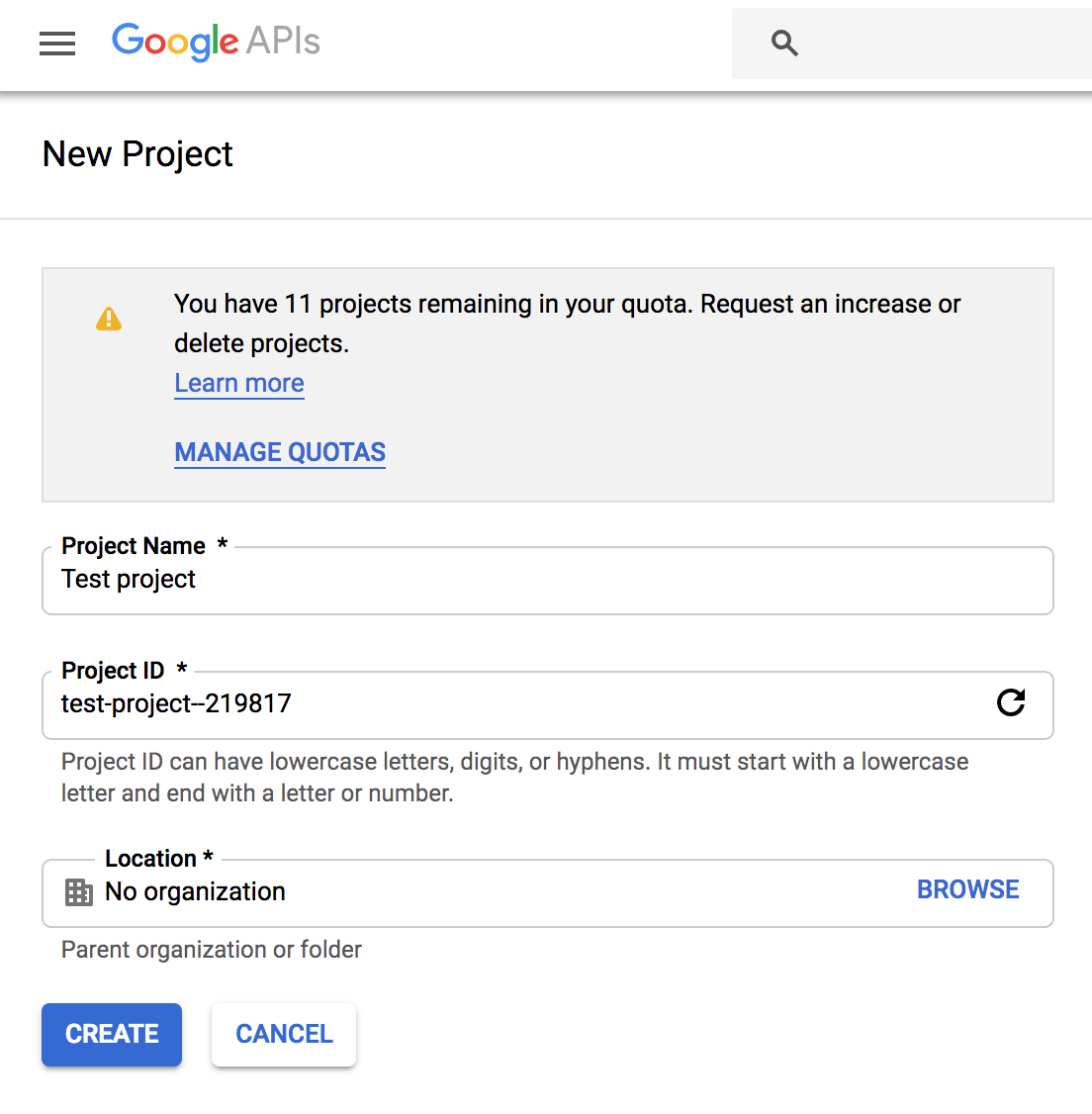
- This takes you to https://console.developers.google.com/projectcreate. Fill out the form and click CREATE. Any name is fine, but I recommend you choose something to do with PyPI like pypinfo. This way you know what the project is designated for:
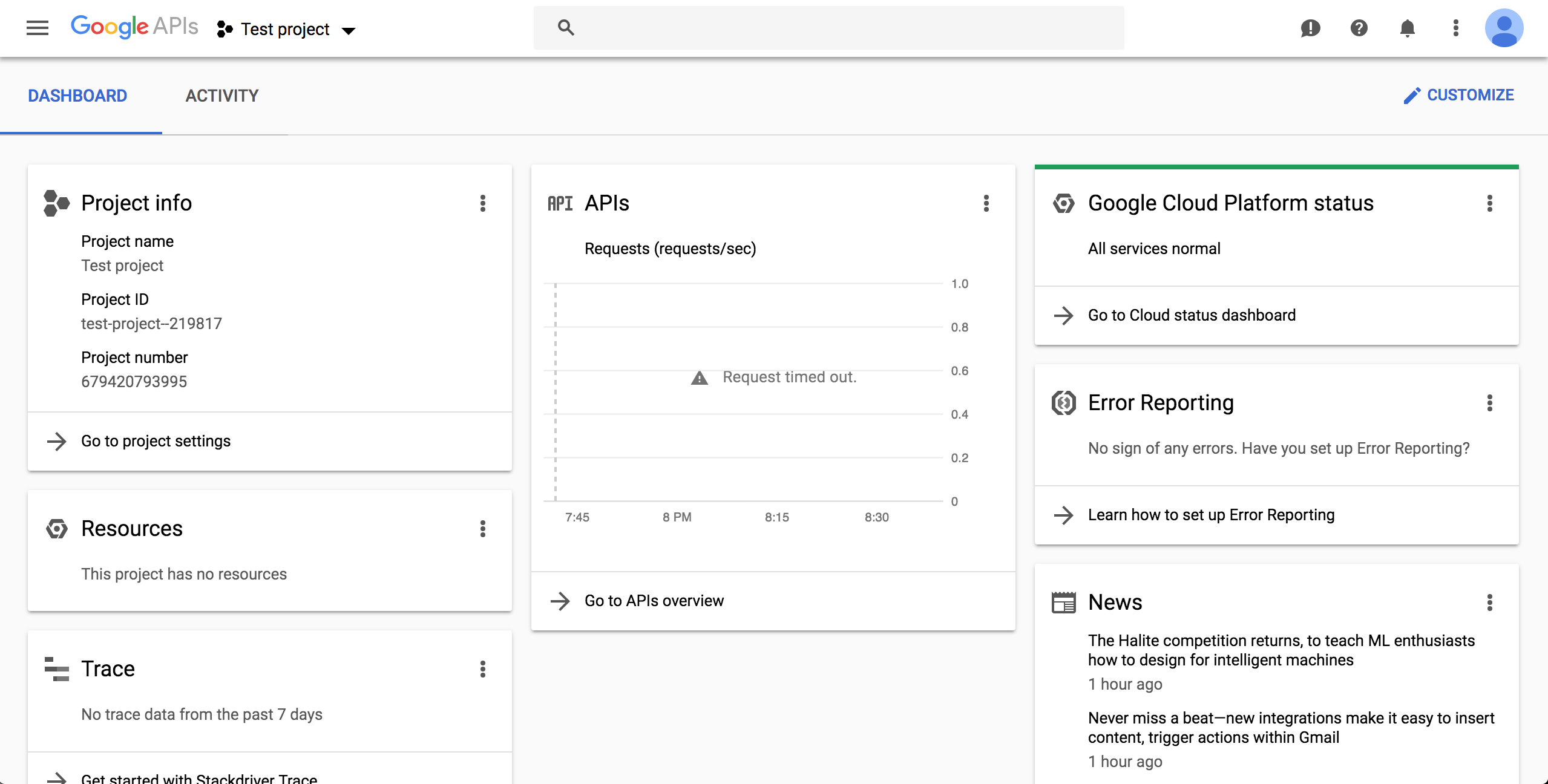
- A while after creation, at the left-top corner, select the project name of your choice on dropdown component AND at the left-top corner "Navigation Menu", select option "Cloud Overview > Dashboard":
Enable BigQuery API
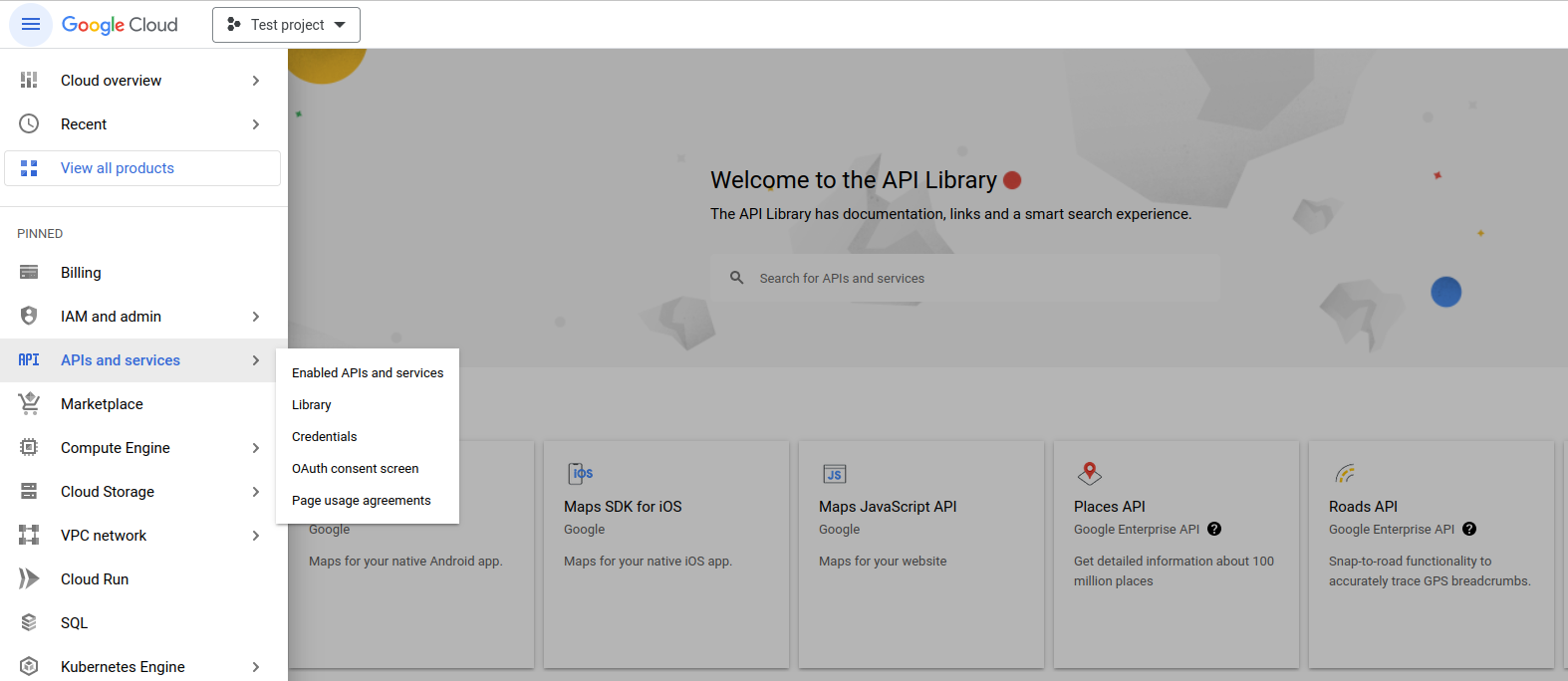
- Click on top-left button "Navigation Menu" and click on option "API and services > Library":
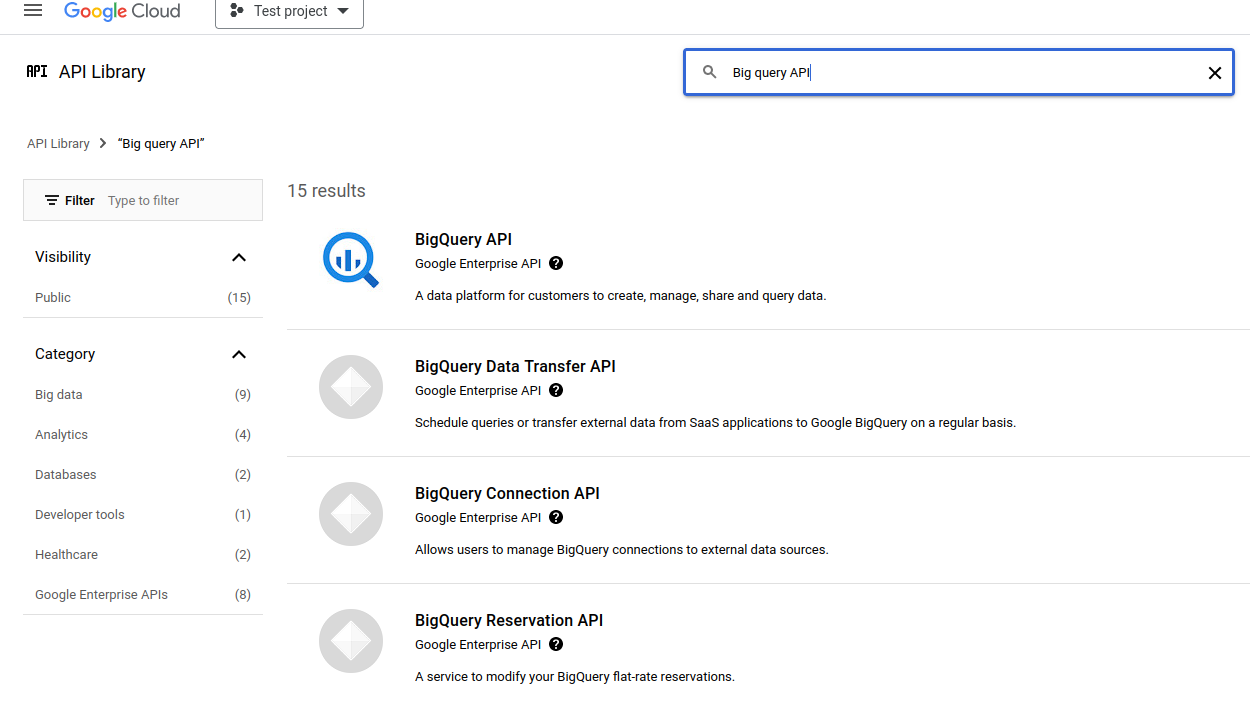
- Perform a search with keywords "big query api" on available text field:
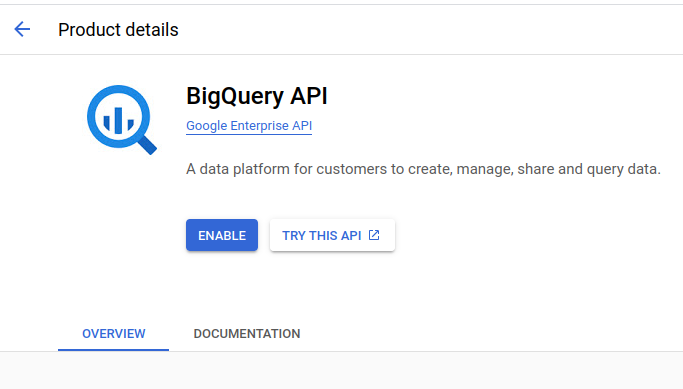
- Enable Big Query API by button "Enable" press:
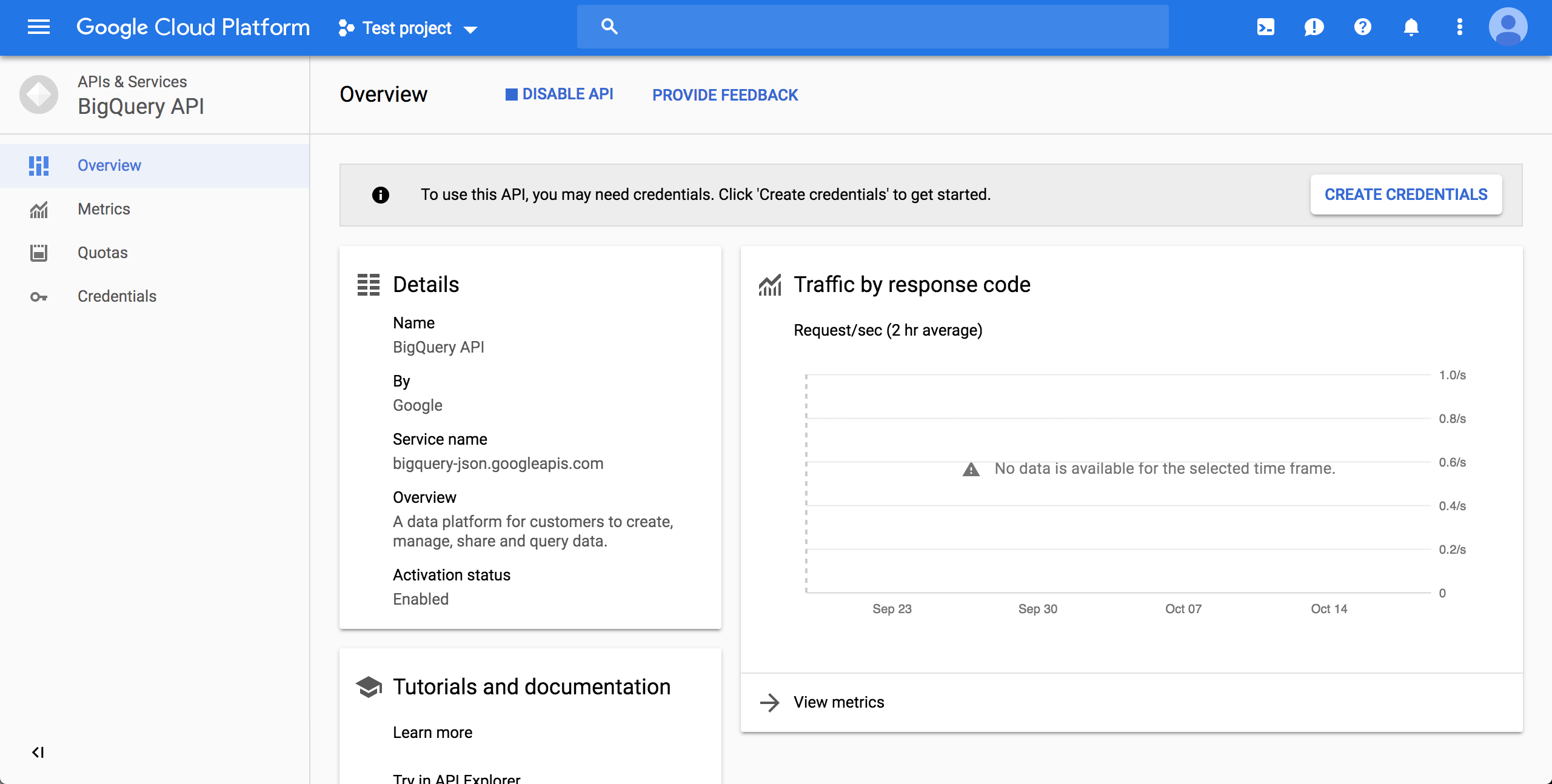
- After enabling, click CREATE CREDENTIALS:
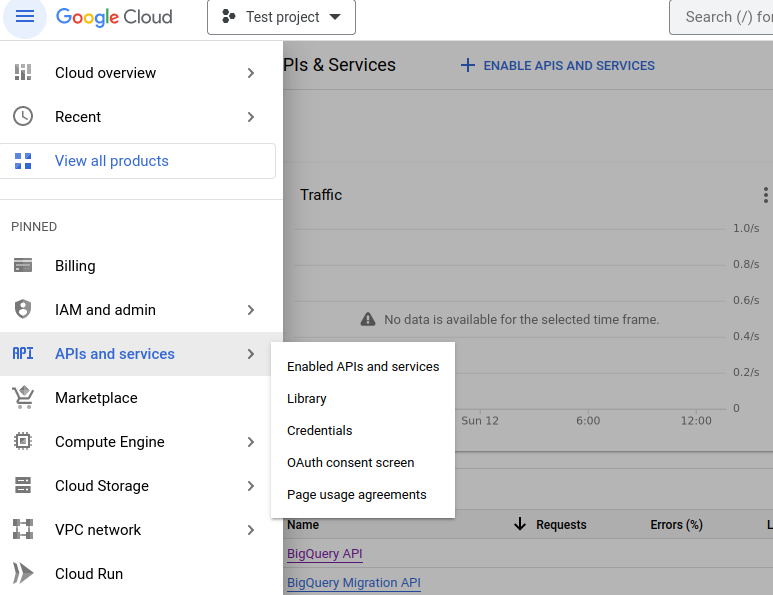
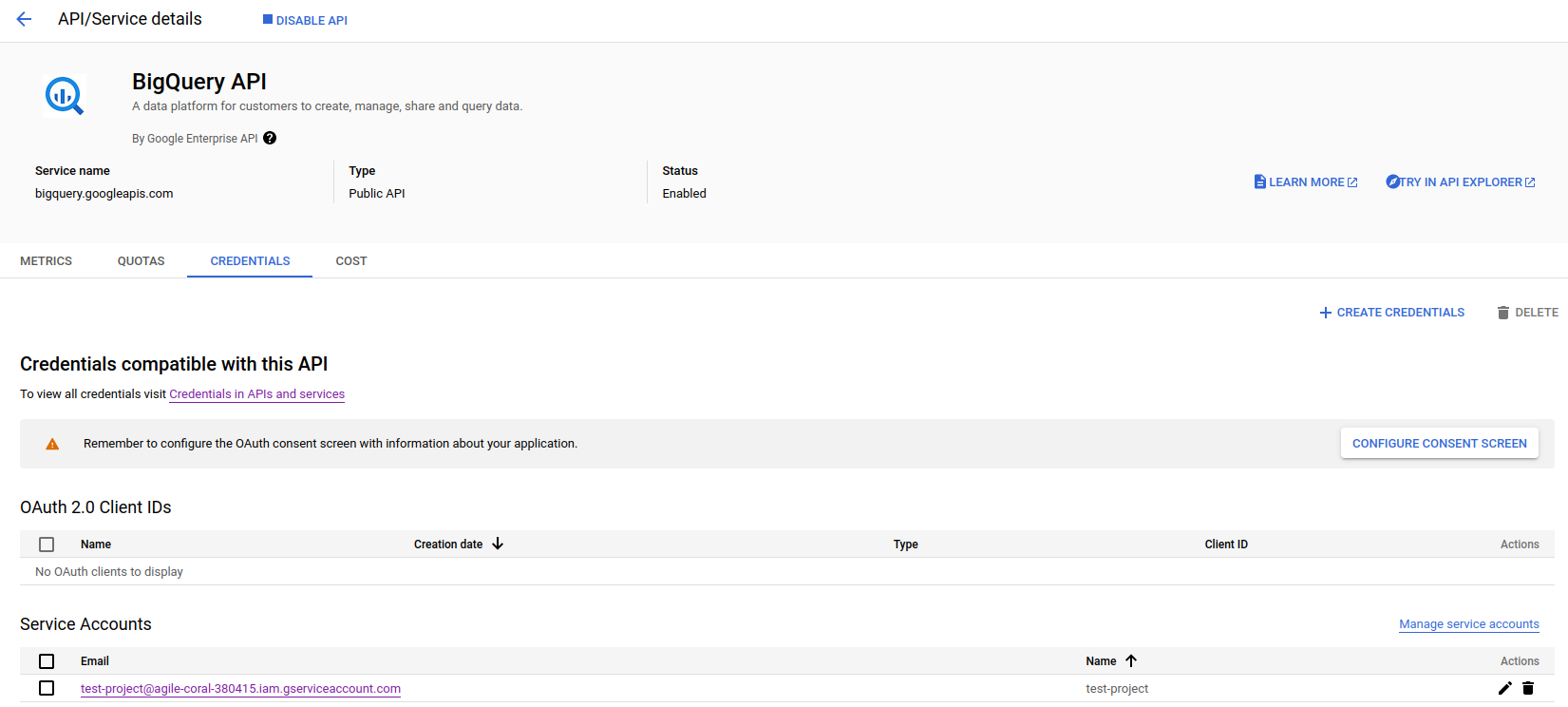
Note: You will be requested to go back to Big Query panel. In this case, click on top-left button "Navigation Menu", option "API and services > Enabled APIs and services" and on consequent page, on item "Big Query API":
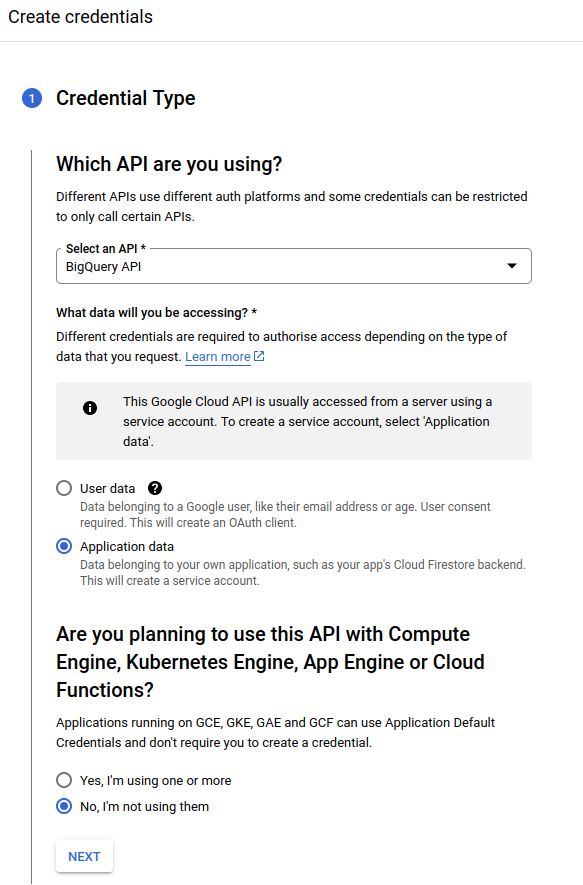
- On the page after clicking the "CREATE CREDENTIALS" button, choose "BigQuery API", "Application Data" and "No, I'm not using them":
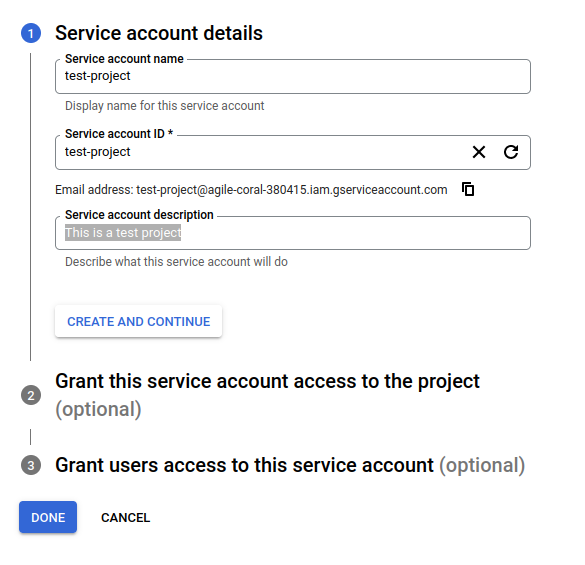
- Fill account details and press button "Create and Continue":
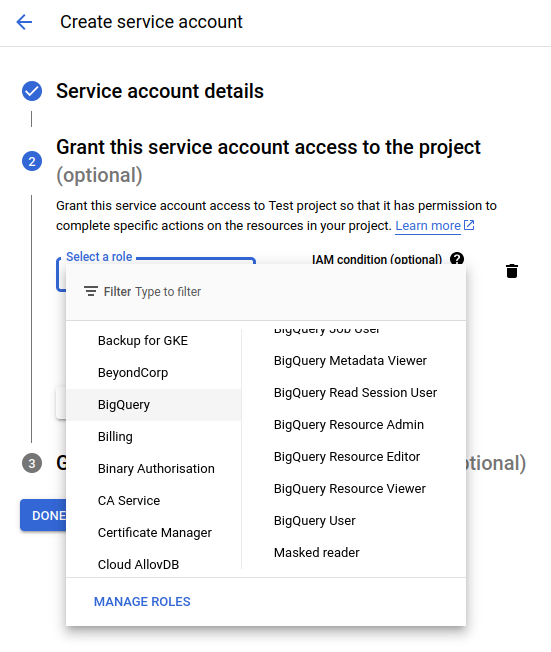
- Select role "BigQuery User" (option path "BigQuery > Big Query User"), press button "Done":
- On Big Query API panel (See Note on item 10), click on tab "CREDENTIALS". On section "Service accounts", click on created credentials on items 11, 12 and 13.
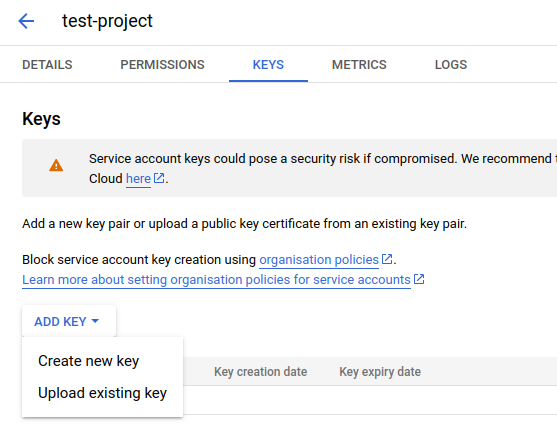
- On page from credential click, click on tab "KEYS". On dropdown menu "ADD KEY", click on option "Create new key":
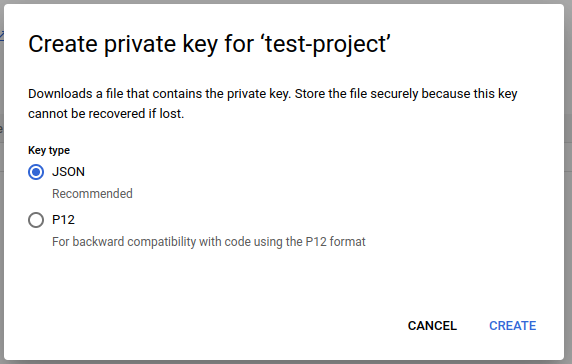
- On appearing box, click on option "JSON" and press button "CREATE": This will start the download of credentials on a JSON file with name pattern
{name}-{credentials_hash}.json:
Installation and authentication
- Run
python -m pip install pypinfoin the terminal. pypinfo --auth path/to/your_credentials.json, or set an environment variableGOOGLE_APPLICATION_CREDENTIALSthat points to the file.
Credits
- Donald Stufft for maintaining PyPI all these years;
- Google for donating BigQuery capacity to PyPI;
- Paul Kehrer for his awesome blog post.
1 maintainer

Metadata
1 maintainer
Release files for pypinfo 23.0.0
For a detailed explanation of source distributions (sdists) and built distributions (wheels), please see the package formats documentation.
Source distribution (sdist)
| File | Size | Uploaded | Provenance | Actions |
|---|---|---|---|---|
| pypinfo-23.0.0.tar.gz | 21.9 kB | Without provenance | Details for pypinfo-23.0.0.tar.gz |
Built distribution (wheel)
| File | Interpreter | ABI | Platform | Actions Reset |
|---|---|---|---|---|
| pypinfo-23.0.0-py3-none-any.whl | Python 3 | none | any | Details for pypinfo-23.0.0-py3-none-any.whl |
Total release size: 38.0 kB
Release files / pypinfo-23.0.0.tar.gz
| Download URL | pypinfo-23.0.0.tar.gz |
|---|---|
| Size | 21.9 kB |
| Tags | Source |
|
SHA-256 checksum How to use checksums |
01448119be02a363d50664fc45e44cf279627ee27092baea9a466d41eaf71653
|
|
BLAKE2b-256 checksum How to use checksums |
254eece850bfeaa0ce01d47e7a86f47a45cace5378add559dc6eab5bbea55c39
|
| Upload date | |
|
Uploaded using Trusted Publishing? What is trusted publishing? |
No |
| Uploaded via |
twine/6.2.0 CPython/3.9.24
|
Release files / pypinfo-23.0.0-py3-none-any.whl
| Download URL | pypinfo-23.0.0-py3-none-any.whl |
|---|---|
| Size | 16.1 kB |
| Tags | Python 3 |
|
SHA-256 checksum How to use checksums |
50cf32c41486daabaf029abf74f9da6c3501097b17c3abb333fe1c773634bb21
|
|
BLAKE2b-256 checksum How to use checksums |
40f358cfecca94385a69839a95ce121df48e5c1b3e3480c085cd05d311154ab6
|
| Upload date | |
|
Uploaded using Trusted Publishing? What is trusted publishing? |
No |
| Uploaded via |
twine/6.2.0 CPython/3.9.24
|
Security for pypinfo 23.0.0
Provenance
Provenance describes where a file came from. On PyPI, provenance is shared via attestations, which provide a verifiable record of the build or publishing details. View details, limitations and caveats.
No provenance found
None of the files in this release were uploaded with provenance metadata.
A note on package security
PyPI is a repository for distributing packages, not a service for auditing them. While third-party security researchers and our staff do their best to detect and remove malicious packages, PyPI cannot guarantee the quality, security or suitability of any given package.
To learn more about protecting yourself from malicious actors, visit our package security documentation.














