
pypkg-builder
A simple GUI based tool for packaging python.
**(formally template-pypackage-builder)
Table of Contents
Description
This tool walks you through the process of python packaging. Well it doesn't create actual package, more like a template with initial files to start with. The tool conatin following functions to help with package deployment.
- README maker
- LIcense creater
- setup file creater
- directory tree builder
Installation
Install from pypi
pip install pypkg-builder
Install from GitHub
pip install git+https://github.com/dipson94/packagemaker
Install requires
- pkg_resources
- pyperclip
- flask
- datetime
Usage
@terminal
pysetup
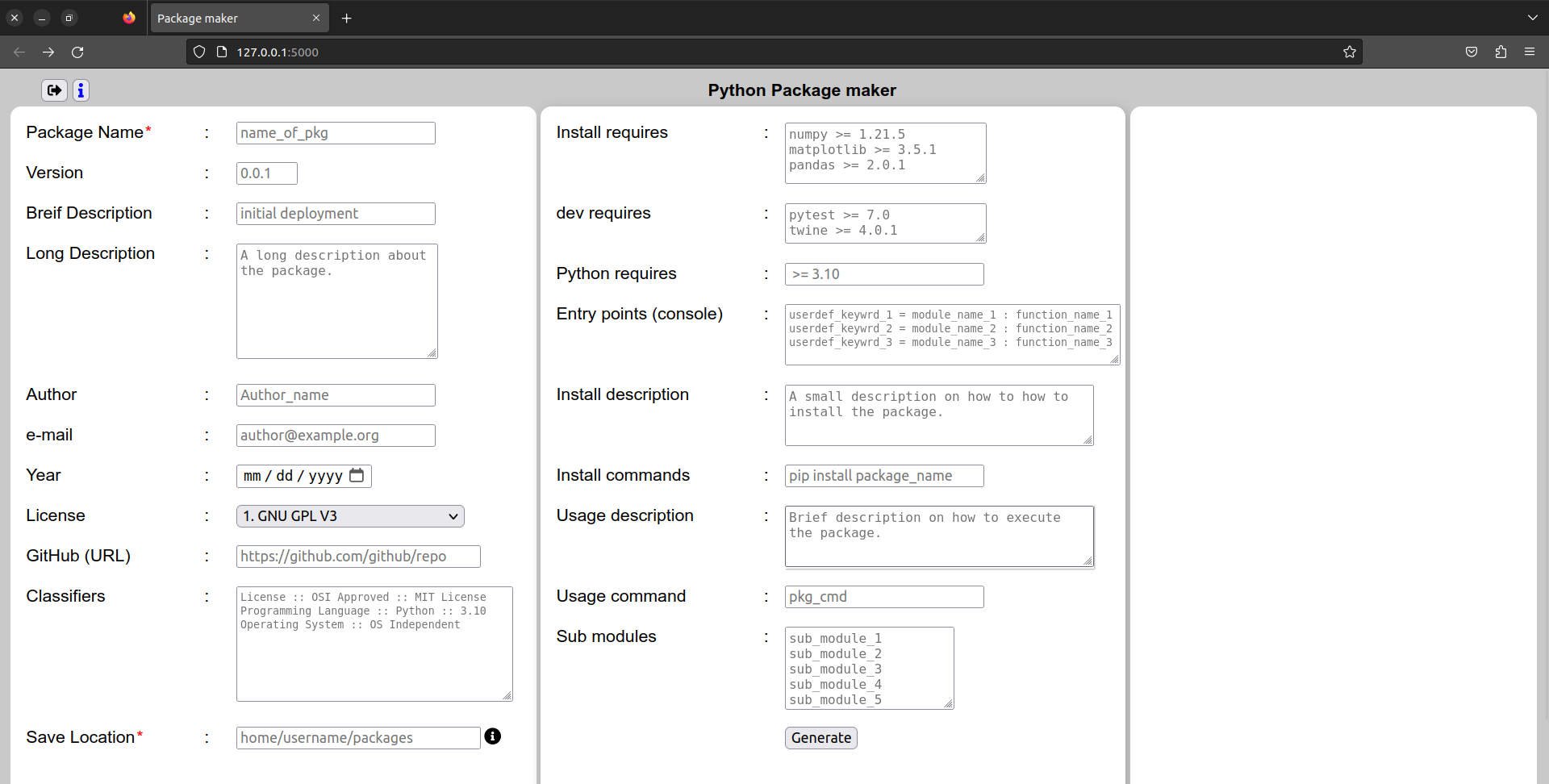
then this will appear on terminal
* Serving Flask app 'pypkg_builder.app'
* Debug mode: off
WARNING: This is a development server. Do not use it in a production deployment. Use a production WSGI server instead.
* Running on http://127.0.0.1:5000
either click on the link or go to browser and type address http://127.0.0.1:5000.
(Note that the address might change(least likely happens) if the port is not available)
Additional notes on package Building
Additional info about package building
including path
To include path in package file use the following command
import pkg_resources
relative_path=pkg_resources.resource_filename("packagemaker", "types")
This command is used if you want to use the path inside package in site-packages folder. Otherwise the path will be relative to the directory where you imported the package (while programming after importing the module). Here relative_path refers to the path to types folder inside installed package pypkg-builder.
__init__.py file handeling
The following is the tree structure of a package showing basic files and directories. From main package directory in source, each modules ( also directories) contain an __init__.py file.
└── package_name
    ├── License.txt
    ├── MANIFEST.in
    ├── README.md
    ├── setup.py
    └── src
        └── package_name
            ├── __init__.py
            ├── module_1
            │   ├── __init__.py
            │   └── module_1.py
            ├── module_2
            │   ├── __init__.py
            │   └── module_2.py
            └── module_3
                ├── __init__.py
                └── module_3.py
There are numberous ways to handel __init__.py file
Rule of thumb : keep all __init__.py files empty at first and then start addding data from main __init__.py file.
Methods
- if you wish to include all the functions and classes in one file, then write all in main
__init__.pyfile and discard other sub-directories (modules). - if you wish to follow the structure shown in the illustration then you can include those modules in main
__init__.pyfile by
from . import (module_1,module_2,module_3)
__all__ = ["module_1","module_2","module_3"]
- Another approach
from .module_1 import (function_1,function_2,function_3)
from .module_2 import (function_1,function_2,function_3)
from .module_3 import (function_1,function_2,function_3)
Here we are importing functions directly to main __init__.py file, so the functions are readly availble when the main module is called (or imported).
Final thoughts
pypkg-builder only helps with making a template or initial structure of a package. For making better package, work on the files manually using the editor.
Author
Dipson
License
GNU GPL V3
1 maintainer

Download files
Download the file for your platform. If you're not sure which to choose, learn more about installing packages.
Source Distribution
Built Distribution
Filter files by name, interpreter, ABI, and platform.
If you're not sure about the file name format, learn more about wheel file names.
Copy a direct link to the current filters
File details
Details for the file pypkg_builder-1.0.tar.gz.
File metadata
- Download URL: pypkg_builder-1.0.tar.gz
- Upload date:
- Size: 31.7 kB
- Tags: Source
- Uploaded using Trusted Publishing? No
- Uploaded via:
twine/4.0.2 CPython/3.11.3
File hashes
| Algorithm | Hash digest | |
|---|---|---|
| SHA256 |
656023652cc29e5a1f6837444a3eaec1d15d235c8c4bbbf195294be9f7234cb1
|
|
| MD5 |
da77502b50403be258b12e8763899041
|
|
| BLAKE2b-256 |
d46b65e04c7329a5d037a9ed559c5c47a10d987ad8349c935ccc69af47677753
|
File details
Details for the file pypkg_builder-1.0-py3-none-any.whl.
File metadata
- Download URL: pypkg_builder-1.0-py3-none-any.whl
- Upload date:
- Size: 34.8 kB
- Tags: Python 3
- Uploaded using Trusted Publishing? No
- Uploaded via:
twine/4.0.2 CPython/3.11.3
File hashes
| Algorithm | Hash digest | |
|---|---|---|
| SHA256 |
702ef9eaabcf0a4a642c7394e8011d5acda24e00b45e0a7622d9998d0ada9a17
|
|
| MD5 |
396c37b422be03f3ac8bf6685234b44c
|
|
| BLAKE2b-256 |
65d1ecea7c94bc0558d67dbd514e1a713b6d8909e9eaeb1778bc81e7be719715
|













