
PyPlexity


This package provides a simple interface to apply perplexity filters to any document. A possible use case for this technology could be the removal of boilerplate (sentences with a high perplexity score). Furthermore, it provides a rough HTML tag cleaner and a WARC and HTML bulk processor, with distributed capabilities.

Cite
Anyone that uses this tool, please refer to:
Fernández-Pichel, M., Prada-Corral, M., Losada, D. E., Pichel, J. C., & Gamallo, P. (2023). An unsupervised perplexity-based method for boilerplate removal. Natural Language Engineering, 1-18.
Models
Memory intensive but does not scale on CPU.
| Model | RAM usage | Download size |
|---|---|---|
| bigrams-cord19 | 2GB | 230MB |
| bigrams-bnc | 5GB | 660MB |
| trigrams-cord19 | 6,6GB | 1GB |
| trigrams-bnc | 14GB | 2,2GB |
Two different datasets were selected to build the background language model (LM): CORD-19 dataset [1] and the British National Corpus (BNC) [2].
[1] Wang, L. L., Lo, K., Chandrasekhar, Y., Reas, R., Yang, J., Eide, D., ... & Kohlmeier, S. (2020). Cord-19: The covid-19 open research dataset. ArXiv.
[2] BNC Consortium. (2007). British national corpus. Oxford Text Archive Core Collection.
Installation process
This package can be directly found in Pypi repository or installed in two ways:
python3 -m pip install pyplexity
or
pip install -r requirements.txt
python setup.py install
Examples of usage options
Compute perplexity from console
Command "perplexity". This very first command computes the perplexity score or the probability for a given sentence according to a given distribution, in this case, the background LM. By default, bigrams-bnc. Argument "--model bigrams-bnc" changes the model.
Documentation:
citius@pc:~$ pyplexity perplexity --help
Usage: pyplexity perplexity [OPTIONS] TEXT

Arguments:
  TEXT  [required]

Options:
  --model TEXT  [default: bigrams-bnc]
  --help        Show this message and exit.
By default, models are stored in ~/.cache/cached_path/, as per cached-path package documentation. Example:
citius@pc:~$ pyplexity perplexity "this is normal text"
downloading: 100%|##########| 660M/660M [00:11<00:00, 59.0MiB/s]
Loading model... Done.
1844.85540669094
citius@pc:~$ pyplexity perplexity "this is normal HTML PAGE BOI%& 678346 NOR  text"
Loading model... Done.
44787.99199563819
As can be seen, malformed sentences obtain a higher value.
Bulk perplexity computation and cleaning of a directory
The previous command was a toy example, as normally in real applications, we will want to score complete datasets to clean them up. This scenario is where the bulk-perplexity functionality that supports WARC or HTML directories comes in.
Documentation:
citius@pc:~$ pyplexity bulk-perplexity --help
Usage: pyplexity bulk-perplexity [OPTIONS] INPUT_DIR

Arguments:
  INPUT_DIR  [required]

Options:
  --output-dir TEXT                [default: out_dir]
  --model TEXT                     [default: bigrams-bnc]
  --perpl-limit FLOAT              [default: 8000.0]
  --warc-input / --no-warc-input   [default: no-warc-input]
Distributed computing options:
  --distributed / --no-distributed [default: no-distributed]
  --n-workers INTEGER              [default: 1]
  --node INTEGER                   [default: 1]
  --port INTEGER                   [default: 8866]
  --help                           Show this message and exit.
We will explain the distributed computing capabilities later. Input directory is allowed to have recursive subdirectories with files. WARC containers and HTML files should have been previously tag-cleaned with the command below. Example:
citius@pc:~$ pyplexity bulk-perplexity ./out_dir/ --output-dir cleaned_files --model bigrams-cord19
downloading: 100%|##########| 233M/233M [00:03<00:00, 63.3MiB/s]
Loading model... Done.
Computed 1124 files in 0:00:01.905390.
Perform HTML tag cleaning of a directory
Our method does not remove HTML tags by default. This fact could impoverish its global performance. That's why we recommend removing HTML tags first, and we offer this option inside our package.
Documentation:
citius@pc:~$ pyplexity tag-remover --help
Usage: pyplexity tag-remover [OPTIONS] BASE_DIR

Arguments:
  BASE_DIR  [required]

Options:
  --output-dir TEXT                [default: out_dir]
  --warc-input / --no-warc-input   [default: no-warc-input]
Distributed computing options:
  --distributed / --no-distributed [default: no-distributed]
  --n-workers INTEGER              [default: 1]
  --node INTEGER                   [default: 1]
  --port INTEGER                   [default: 8866]
  --help                           Show this message and exit.
We will explain the distributed computing capabilities later. Input directory is allowed to have recursive subdirectories with files. It can process HTML files or WARC files. In this case, it will recompress the WARC efficiently, after stripping out all the tags. Example:
citius@pc:~$ pyplexity tag-remover ./html_source --output-dir ./output
Computed 1124 files in 0:00:00.543175.
Parallel mode (cluster)
Previous documentation shows that our commands have integrated distributed computing capabilities. When using the cluster mode, all the nodes must be interconnected in a local network, having the access to the same files mounted via SSHFS or other filesystem. A master node will recursively load the folder of files to be computed, with the command:
pyplexity fileserver /mnt/input_dir --port 8866
Now, clients from the nodes will connect to the master node asking for file names to be processed. This mechanism allows for load distribution, as clients are able to ask for files in queue for processing from the master. For example, from a node:
pyplexity bulk-perplexity /mnt/input_dir --output-dir /mnt/output_dir --warc-input --distributed --n-workers 10 --node 2 --url master.local --port 8866
That command should be executed in every machine of the cluster. The node argument identifies the machine for logging purposes, and has no functional relevance. The n-workers argument controls the number of thread workers per machine that will be querying the master node for files concurrently. When the master server has served all the files, worker procceses will shutdown accordingly. In our experiments, we use this feature to run the HTML tag removal and perplexity computation in 20 threads * 15 machines.
Interfacing from Python
We also offer the possibility of utilising pyplexity from Python code. As an example, we provide an API that serves a web app to make some small tests on how to directly clean texts or raw files.
Example: computing the perplexity score for a sentence:
from pyplexity import PerplexityComputer

model = PerplexityModel.from_str("bigrams-cord19")
perpl = model.compute_sentence("this is normal text")
Example 2: Cleaning sentences from a text:
from pyplexity import PerplexityModel, PerplexityProcessor

model = PerplexityModel.from_str("bigrams-cord19")
text_processor = PerplexityProcessor(perpl_model=model, perpl_limit=8000.0)
clean_text = text_processor.process("This is a normal sentence. Meanwhile, hjldfuia HTML BODY this one will be deleted LINK URL COUISUDOANLHJWQKEJK")
Example 3: Removing HTML tags from a website:
import requests
from pyplexity.tag_remover import HTMLTagRemover

html = requests.get("https://example.com").text
text = HTMLTagRemover().process(html)
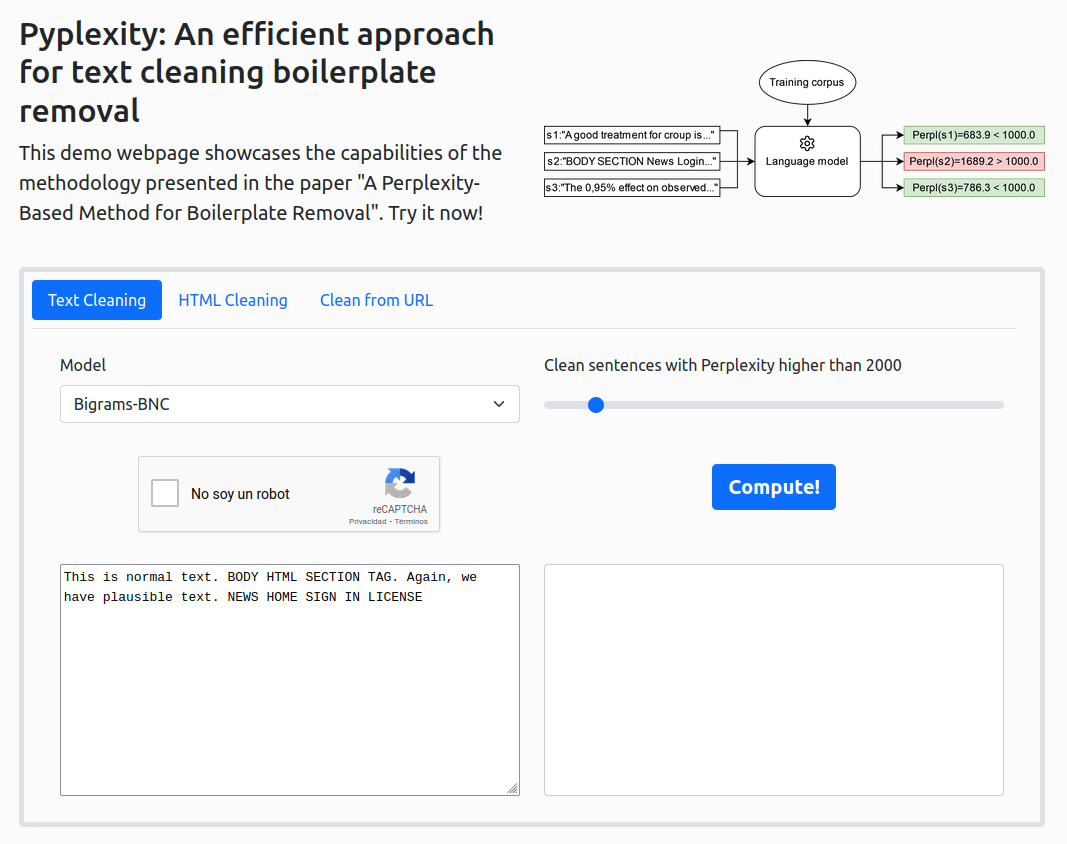
Web Demo
We also provide a web demo as a simple example of the power of our tool. Screenshot:
Building the package
If you are interested, you can also build the same package version we have currently deployed in the Pypi repository.
git clone https://github.com/citiususc/pyplexity && cd pyplexity
curl -sSL https://install.python-poetry.org | python3 -
source $HOME/.poetry/env
poetry build
pip3 install dist/pyplexity-X.X.X-py3-none-any.whl
General Advice
As you may have noticed, this is an unsupervised method that requires setting the optimal model and threshold. From our experimentation, we have concluded that the bigrams-bnc model and removing sentences with a value higher than 8k is a robust strategy both for an IR search task and a text classification task.
2 maintainers


Metadata
2 maintainers
Release files for pyplexity 0.2.12
For a detailed explanation of source distributions (sdists) and built distributions (wheels), please see the package formats documentation.
Source distribution (sdist)
| File | Size | Uploaded | |
|---|---|---|---|
| pyplexity-0.2.12.tar.gz | 30.7 kB | Details |
Built distribution (wheel)
| File | Interpreter | ABI | Platform | Reset |
|---|---|---|---|---|
| pyplexity-0.2.12-py3-none-any.whl | Python 3 | none | any | Details |
Total release size: 59.0 kB
Release files / pyplexity-0.2.12.tar.gz
| Download URL | pyplexity-0.2.12.tar.gz |
|---|---|
| Size | 30.7 kB |
| Tags | Source |
|
SHA-256 checksum How to use checksums |
89c35a2c63eb9489cfed1191958477c034150123257b8d8ae9499285bdb98190
|
|
BLAKE2b-256 checksum How to use checksums |
1ea4f331f2543738e5823694a0c5781b4138e6b3d4d9cc3689d7752ab31aa9ba
|
| Upload date | |
|
Uploaded using Trusted Publishing? What is trusted publishing? |
No |
| Uploaded via |
poetry/1.5.1 CPython/3.9.7 Linux/4.15.0-196-generic
|
Release files / pyplexity-0.2.12-py3-none-any.whl
| Download URL | pyplexity-0.2.12-py3-none-any.whl |
|---|---|
| Size | 28.3 kB |
| Tags | Python 3 |
|
SHA-256 checksum How to use checksums |
780848f0eeb521d196a7dd0fda73c7026355df14970f8a4c91d978cabd9e3c53
|
|
BLAKE2b-256 checksum How to use checksums |
d9db5204bd2a25c02fb4efbef17de85adbd2b45b0b89cdd87643b34b8de6edb9
|
| Upload date | |
|
Uploaded using Trusted Publishing? What is trusted publishing? |
No |
| Uploaded via |
poetry/1.5.1 CPython/3.9.7 Linux/4.15.0-196-generic
|














