
A lightweight solution to execute Python dependencies in an isolated fashion.

Project description
PyPods
A lightweight solution to execute Python dependencies in an isolated fashion.
This documentation will follow the classic philosophy of A picture is worth a thousand words
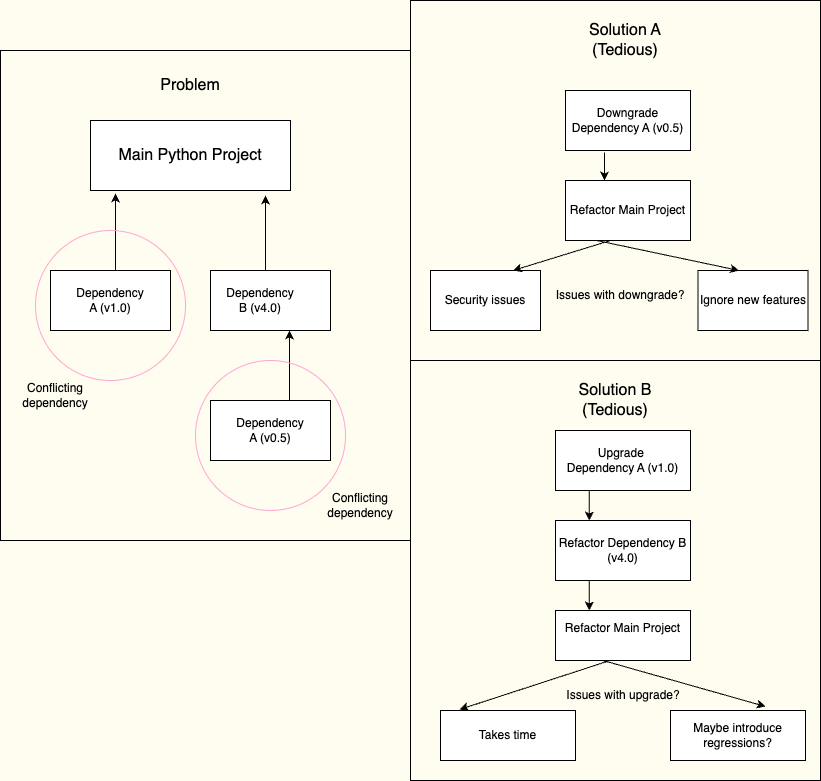
Problem
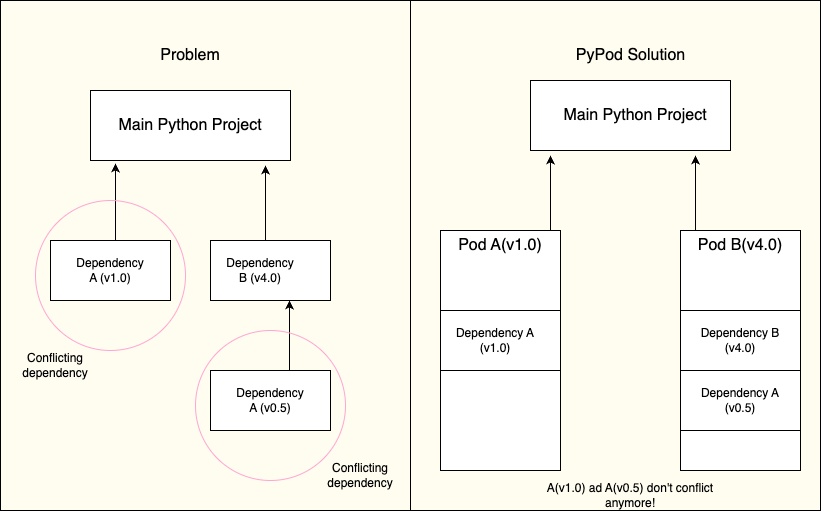
Solution
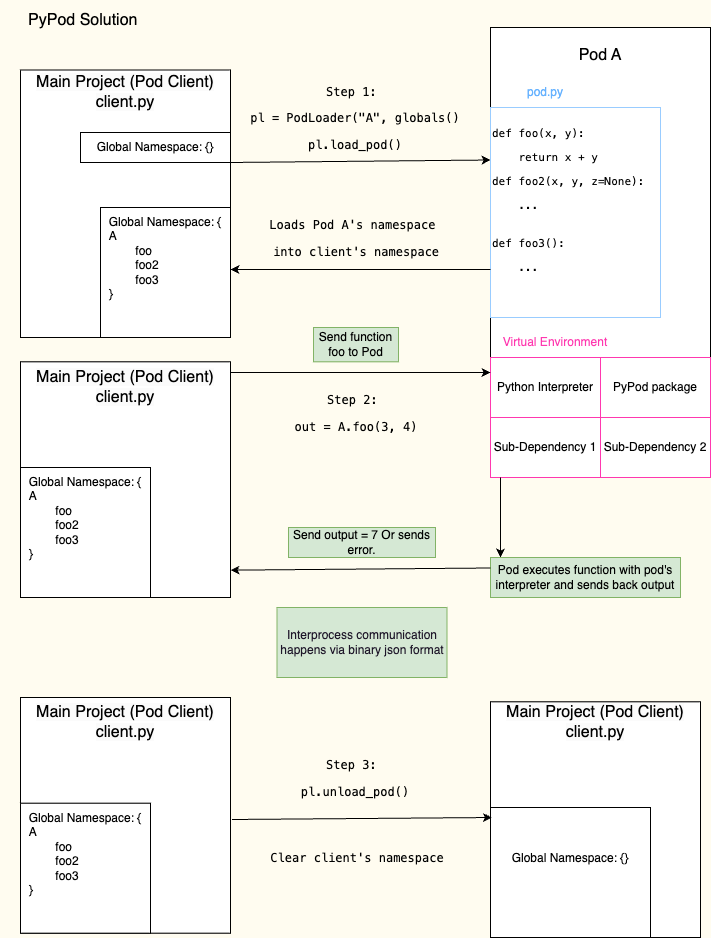
PyPod 🔎
Terminology
podsdirectory stores all the pods that will be used in the current project.- A
podis a container that contains its own Python interpreter, dependencies, and apod.pyfile that exposes specific functions defined by the user. - A
pod clientis a file that calls the specific functions defined by the user. - A
pod protocolis a way to exchange data between the pod and pod client. PyPods uses binary json or bson.
How to use PyPods?
- Install pypods package via
pip install pypods - From the project's
rootdirectory, create a file (sayclient.py) and paste the following code.
# client.py will communicate with the hello_world_pod pod
from pypods.pods import PodLoader

# name of the pod, and namespace to inject pod's functions.
pl = PodLoader("hello_world_pod", globals())
pl.load_pod()   # Load pod's namespace
pl.unload_pod() # Unload pod's namespace
if hello_world_pod does not exist then PodLoader will create a
hello_world_pod pod in the pods/hello_world_pod/ directory.
- Navigate to
pods/hello_world_pod/directory and observe the file structure. This is your pod.
hello_world_pod/
│
├── venv/
│   ├── bin/          (or Scripts/ on Windows)
│   ├── include/
│   ├── lib/
│   └── pyvenv.cfg
│
├── pod.py
├── requirements.txt
- You can define functions inside a placeholder defined in the
pod.pytemplate file. Please don't change anything else in this file!
# Template pod.py file inside the hello_world_pod pod.
"""
Write your module's functions in this area.
"""
def foo(x, y):
    return x + y

# Don't change anything here!
if __name__ == "__main__":
    from pypods.pods import PodListener
    pl = PodListener()  # PodListener will send output back to the pod client.
    msg = (
        pl.read_stdin()
    )  # Pod client writes function name and parameters to pod's stdin.
    if msg:
        # Unpack stdin to get function data
        function_name, args, kwargs = msg["name"], msg["args"], msg["kwargs"]
        try:
            # Check if function exists in pod module's namespace.
            # If yes, execute the function and send output back to the pod client.
            # If no, send error back to the pod client.
            if function_name in globals():
                function_output = globals()[function_name](*args, **kwargs)
                pl.write_stdout(function_output)
            else:
                pl.write_stderr(f"Function {function_name} does not exist in pod")
        except Exception as e:
            # Any error that occurs while calling the function is sent back to pod client.
            pl.write_stderr(str(e))
- Go back to
client.pyand add thefoofunction.
# client.py will communicate with the hello_world_pod pod
from pypods.pods import PodLoader

# name of the pod, and namespace to inject pod's functions.
pl = PodLoader("hello_world_pod", globals())
pl.load_pod()   # Load pod's namespace (This will now load the foo function).
foo_output = foo(1, 2) # Expected output = 1 + 2 = 3.
pl.unload_pod() # Unload pod's namespace
This demo shows how PyPod works. You ran a pod function foo without importing it into the client.py file!
See example/ directory for a project example.
Author
Rohan Deshpande, PyPods 2024. Inspired by the idea of Babashka pods.


Download files
Download the file for your platform. If you're not sure which to choose, learn more about installing packages.
Source Distribution
Built Distribution
Filter files by name, interpreter, ABI, and platform.
If you're not sure about the file name format, learn more about wheel file names.
Copy a direct link to the current filters
File details
Details for the file pypods-0.1.2.tar.gz.
File metadata
- Download URL: pypods-0.1.2.tar.gz
- Upload date:
- Size: 7.1 kB
- Tags: Source
- Uploaded using Trusted Publishing? No
- Uploaded via: twine/5.1.0 CPython/3.9.6
File hashes
| Algorithm | Hash digest | |
|---|---|---|
| SHA256 |
474200c80084317fc24127f3f46eb5bdd99044ae18aefff27fc6d7c98d21cbfe
|
|
| MD5 |
8839748905c54f241d20f6502a862325
|
|
| BLAKE2b-256 |
cff49e0db5f6cb2a96a147d4f3245e6bc4ed2cb32bb636d82e5965309c63561e
|
File details
Details for the file pypods-0.1.2-py3-none-any.whl.
File metadata
- Download URL: pypods-0.1.2-py3-none-any.whl
- Upload date:
- Size: 8.2 kB
- Tags: Python 3
- Uploaded using Trusted Publishing? No
- Uploaded via: twine/5.1.0 CPython/3.9.6
File hashes
| Algorithm | Hash digest | |
|---|---|---|
| SHA256 |
0686caa1df43e5359f5cc6dc555ff09b73f1396851ace42d1b9ffd3b7def27c0
|
|
| MD5 |
d9652c7a671cae4273b0d9d527ae3613
|
|
| BLAKE2b-256 |
dd6bfc7d8d6c6cc7e4caa9972f3f7f5618ca8ce9a9b030dd573d38d39f884bdc
|






