
Execute scripts from pyproject.toml, installing tools on-the-fly

Project description

Pyprojectx: All-inclusive Python Projects
Execute scripts from pyproject.toml, installing tools on-the-fly
Full documentation
Introduction
Pyprojectx makes it easy to create all-inclusive Python projects; no need to install any tools upfront, not even Pyprojectx itself!
Tools that are specified within your pyproject.toml file will be installed on demand when invoked from Pyprojectx:
> ./pw black src
Collecting black ...
Successfully installed black-23.9.1 ...

All done! ✨ 🍰 ✨
18 files left unchanged.
Feature highlights
- Reproducible builds by treating tools and utilities as (versioned) dev-dependencies
- No global installs, everything is stored inside your project directory (like npm's node_modules)
- Bootstrap your entire build process with a small wrapper script (like Gradle's gradlew wrapper)
- Configure shortcuts for routine tasks
- Simple configuration in pyproject.toml
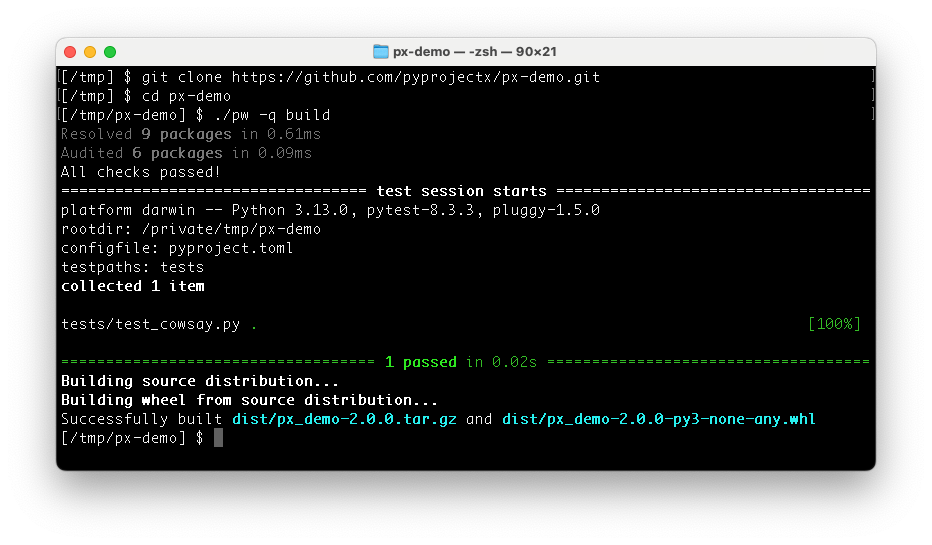
Projects can be build/tested/used immediately without explicit installation nor initialization:
git clone https://github.com/pyprojectx/px-demo.git
cd px-demo
./pw build
Installation
One of the key features is that there is no need to install anything explicitly (except a Python 3.8+ interpreter).
cd into your project directory and download the
wrapper scripts:
Linux/Mac
curl -LO https://github.com/pyprojectx/pyprojectx/releases/latest/download/wrappers.zip && unzip wrappers.zip && rm -f wrappers.zip
Windows
Invoke-WebRequest https://github.com/pyprojectx/pyprojectx/releases/latest/download/wrappers.zip -OutFile wrappers.zip; Expand-Archive -Path wrappers.zip -DestinationPath .; Remove-Item -Path wrappers.zip
Getting started
Initialize a new or existing project by adding tools (on Windows, replace ./pw with pw):
./pw --add pdm,ruff,pre-commit,px-utils
For reproducible builds and developer experience, it is recommended to lock the versions of the tools and add the generated pw.lock file to your repository:
./pw --lock
Create command shortcuts
The tool.pyprojectx.aliases section in pyproject.toml can contain commandline aliases:
[tool.pyprojectx.aliases]
# convenience shortcuts
run = "poetry run"
test = "poetry run pytest"
lint = ["ruff check"]
check = ["@lint", "@test"]
Usage
Instead of calling the CLI of a tool directly, prefix it with ./pw (pw on Windows).
Examples:
./pw poetry add -D pytest
cd src
../pw lint
Aliases can be invoked as is or with extra arguments:
./pw poetry run my-script --foo bar
# same as above, but using the run alias
./pw run my-script --foo bar
Why yet another tool?
- As Python noob I had hard times setting up a project and building existing projects
- There is always someone in the team having issues with his setup, either with a specific tool, with Homebrew, pipx, ...
- Using (PDM or Poetry) dev-dependencies to install tools, impacts your production dependencies and can even lead to dependency conflicts
- Different projects often require different versions of the same tool
Example projects
- This project (using PDM)
- px-demo (using PDM)
Development
- Build/test:
git clone https://github.com/pyprojectx/pyprojectx.git
cd pyprojectx
./pw build
- Use your local pyprojectx copy in another project: set the path to pyprojectx in the PYPROJECTX_PACKAGE environment variable and create a symlink to the wrapper script.
# Linux, Mac
export PYPROJECTX_PACKAGE=path/to/pyprojectx
ln -s $PYPROJECTX_PACKAGE/src/pyprojectx/wrapper/pw.py pw
# windows
set PYPROJECTX_PACKAGE=path/to/pyprojectx
mklink %PYPROJECTX_PACKAGE%\src\pyprojectx\wrapper\pw.py pw
Release history Release notifications | RSS feed


Download files
Download the file for your platform. If you're not sure which to choose, learn more about installing packages.
Source Distribution
Built Distribution
Filter files by name, interpreter, ABI, and platform.
If you're not sure about the file name format, learn more about wheel file names.
Copy a direct link to the current filters
File details
Details for the file pyprojectx-2.0.8.tar.gz.
File metadata
- Download URL: pyprojectx-2.0.8.tar.gz
- Upload date:
- Size: 26.4 kB
- Tags: Source
- Uploaded using Trusted Publishing? No
- Uploaded via: pdm/2.12.1 CPython/3.12.1
File hashes
| Algorithm | Hash digest | |
|---|---|---|
| SHA256 |
d18e98966345e3d9d6d1db9787b5c8c1b06d68a47abc1a16bb0620c7076c3e13
|
|
| MD5 |
c681a6c7e198484bebc8772c6d494d7a
|
|
| BLAKE2b-256 |
bf1c108f796426785bc8976292b514f05fa0943e18361e766299eb8806e7bb24
|
File details
Details for the file pyprojectx-2.0.8-py3-none-any.whl.
File metadata
- Download URL: pyprojectx-2.0.8-py3-none-any.whl
- Upload date:
- Size: 20.3 kB
- Tags: Python 3
- Uploaded using Trusted Publishing? No
- Uploaded via: pdm/2.12.1 CPython/3.12.1
File hashes
| Algorithm | Hash digest | |
|---|---|---|
| SHA256 |
864c8423206756f73a1da9cb3e90a640abf6f8157698ec8168ce88821917d9b0
|
|
| MD5 |
f13f817299b9d2fbce2a5347fa27e2ff
|
|
| BLAKE2b-256 |
e16562826ffb14a41fe0acbe4fbe1adfa290dcda1c233dbe221b0b07bef608fb
|






