







:newspaper: What's NEW! :sparkling_heart:
Recent released features
Introducing  : LLM-Based Autonomous Evolving Agents for Industrial Data-Driven R&D
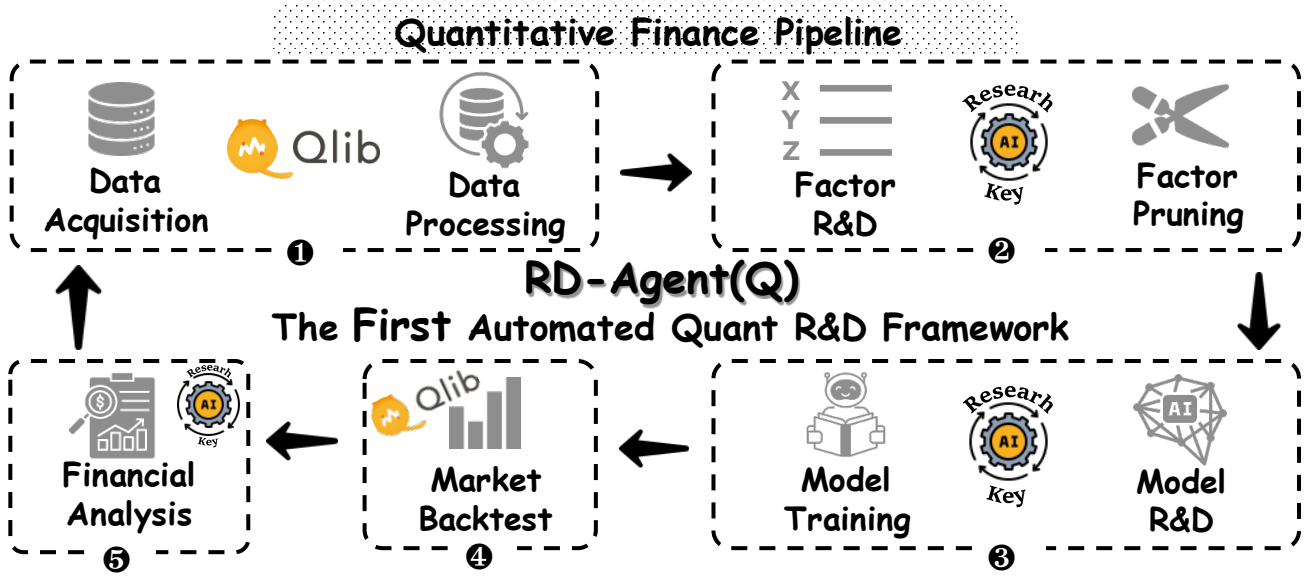
We are excited to announce the release of RD-Agent📢, a powerful tool that supports automated factor mining and model optimization in quant investment R&D.
RD-Agent is now available on GitHub, and we welcome your star🌟!
To learn more, please visit our ♾️Demo page. Here, you will find demo videos in both English and Chinese to help you better understand the scenario and usage of RD-Agent.
We have prepared several demo videos for you:
| Scenario | Demo video (English) | Demo video (中文) |
|---|---|---|
| Quant Factor Mining | Link | Link |
| Quant Factor Mining from reports | Link | Link |
| Quant Model Optimization | Link | Link |
- 📃Paper: R&D-Agent-Quant: A Multi-Agent Framework for Data-Centric Factors and Model Joint Optimization
- 👾Code: https://github.com/microsoft/RD-Agent/
@misc{li2025rdagentquant,
    title={R\&D-Agent-Quant: A Multi-Agent Framework for Data-Centric Factors and Model Joint Optimization},
    author={Yuante Li and Xu Yang and Xiao Yang and Minrui Xu and Xisen Wang and Weiqing Liu and Jiang Bian},
    year={2025},
    eprint={2505.15155},
    archivePrefix={arXiv},
    primaryClass={cs.AI}
}
| Feature | Status |
|---|---|
| R&D-Agent-Quant Published | Apply R&D-Agent to Qlib for quant trading |
| BPQP for End-to-end learning | 📈Coming soon!(Under review) |
| 🔥LLM-driven Auto Quant Factory🔥 | 🚀 Released in ♾️RD-Agent on Aug 8, 2024 |
| KRNN and Sandwich models | :chart_with_upwards_trend: Released on May 26, 2023 |
| Release Qlib v0.9.0 | :octocat: Released on Dec 9, 2022 |
| RL Learning Framework | :hammer: :chart_with_upwards_trend: Released on Nov 10, 2022. #1332, #1322, #1316,#1299,#1263, #1244, #1169, #1125, #1076 |
| HIST and IGMTF models | :chart_with_upwards_trend: Released on Apr 10, 2022 |
| Qlib notebook tutorial | 📖 Released on Apr 7, 2022 |
| Ibovespa index data | :rice: Released on Apr 6, 2022 |
| Point-in-Time database | :hammer: Released on Mar 10, 2022 |
| Arctic Provider Backend & Orderbook data example | :hammer: Released on Jan 17, 2022 |
| Meta-Learning-based framework & DDG-DA | :chart_with_upwards_trend: :hammer: Released on Jan 10, 2022 |
| Planning-based portfolio optimization | :hammer: Released on Dec 28, 2021 |
| Release Qlib v0.8.0 | :octocat: Released on Dec 8, 2021 |
| ADD model | :chart_with_upwards_trend: Released on Nov 22, 2021 |
| ADARNN model | :chart_with_upwards_trend: Released on Nov 14, 2021 |
| TCN model | :chart_with_upwards_trend: Released on Nov 4, 2021 |
| Nested Decision Framework | :hammer: Released on Oct 1, 2021. Example and Doc |
| Temporal Routing Adaptor (TRA) | :chart_with_upwards_trend: Released on July 30, 2021 |
| Transformer & Localformer | :chart_with_upwards_trend: Released on July 22, 2021 |
| Release Qlib v0.7.0 | :octocat: Released on July 12, 2021 |
| TCTS Model | :chart_with_upwards_trend: Released on July 1, 2021 |
| Online serving and automatic model rolling | :hammer: Released on May 17, 2021 |
| DoubleEnsemble Model | :chart_with_upwards_trend: Released on Mar 2, 2021 |
| High-frequency data processing example | :hammer: Released on Feb 5, 2021 |
| High-frequency trading example | :chart_with_upwards_trend: Part of code released on Jan 28, 2021 |
| High-frequency data(1min) | :rice: Released on Jan 27, 2021 |
| Tabnet Model | :chart_with_upwards_trend: Released on Jan 22, 2021 |
Features released before 2021 are not listed here.

Qlib is an open-source, AI-oriented quantitative investment platform that aims to realize the potential, empower research, and create value using AI technologies in quantitative investment, from exploring ideas to implementing productions. Qlib supports diverse machine learning modeling paradigms, including supervised learning, market dynamics modeling, and reinforcement learning.
An increasing number of SOTA Quant research works/papers in diverse paradigms are being released in Qlib to collaboratively solve key challenges in quantitative investment. For example, 1) using supervised learning to mine the market's complex non-linear patterns from rich and heterogeneous financial data, 2) modeling the dynamic nature of the financial market using adaptive concept drift technology, and 3) using reinforcement learning to model continuous investment decisions and assist investors in optimizing their trading strategies.
It contains the full ML pipeline of data processing, model training, back-testing; and covers the entire chain of quantitative investment: alpha seeking, risk modeling, portfolio optimization, and order execution. For more details, please refer to our paper "Qlib: An AI-oriented Quantitative Investment Platform".
| Frameworks, Tutorial, Data & DevOps | Main Challenges & Solutions in Quant Research |
|---|---|
|
|
Plans
New features under development(order by estimated release time). Your feedbacks about the features are very important.
Framework of Qlib

The high-level framework of Qlib can be found above(users can find the detailed framework of Qlib's design when getting into nitty gritty). The components are designed as loose-coupled modules, and each component could be used stand-alone.
Qlib provides a strong infrastructure to support Quant research. Data is always an important part. A strong learning framework is designed to support diverse learning paradigms (e.g. reinforcement learning, supervised learning) and patterns at different levels(e.g. market dynamic modeling). By modeling the market, trading strategies will generate trade decisions that will be executed. Multiple trading strategies and executors in different levels or granularities can be nested to be optimized and run together. At last, a comprehensive analysis will be provided and the model can be served online in a low cost.
Quick Start
This quick start guide tries to demonstrate
- It's very easy to build a complete Quant research workflow and try your ideas with Qlib.
- Though with public data and simple models, machine learning technologies work very well in practical Quant investment.
Here is a quick demo shows how to install Qlib, and run LightGBM with qrun. But, please make sure you have already prepared the data following the instruction.
Installation
This table demonstrates the supported Python version of Qlib:
| install with pip | install from source | plot | |
|---|---|---|---|
| Python 3.8 | :heavy_check_mark: | :heavy_check_mark: | :heavy_check_mark: |
| Python 3.9 | :heavy_check_mark: | :heavy_check_mark: | :heavy_check_mark: |
| Python 3.10 | :heavy_check_mark: | :heavy_check_mark: | :heavy_check_mark: |
| Python 3.11 | :heavy_check_mark: | :heavy_check_mark: | :heavy_check_mark: |
| Python 3.12 | :heavy_check_mark: | :heavy_check_mark: | :heavy_check_mark: |
Note:
- Conda is suggested for managing your Python environment. In some cases, using Python outside of a
condaenvironment may result in missing header files, causing the installation failure of certain packages. - Please pay attention that installing cython in Python 3.6 will raise some error when installing
Qlibfrom source. If users use Python 3.6 on their machines, it is recommended to upgrade Python to version 3.8 or higher, or useconda's Python to installQlibfrom source.
Install with pip
Users can easily install Qlib by pip according to the following command.
pip install pyqlib
Note: pip will install the latest stable qlib. However, the main branch of qlib is in active development. If you want to test the latest scripts or functions in the main branch. Please install qlib with the methods below.
Install from source
Also, users can install the latest dev version Qlib by the source code according to the following steps:
-
Before installing
Qlibfrom source, users need to install some dependencies:pip install numpy pip install --upgrade cython
-
Clone the repository and install
Qlibas follows.git clone https://github.com/microsoft/qlib.git && cd qlib pip install . # `pip install -e .[dev]` is recommended for development. check details in docs/developer/code_standard_and_dev_guide.rst
Tips: If you fail to install Qlib or run the examples in your environment, comparing your steps and the CI workflow may help you find the problem.
Tips for Mac: If you are using Mac with M1, you might encounter issues in building the wheel for LightGBM, which is due to missing dependencies from OpenMP. To solve the problem, install openmp first with brew install libomp and then run pip install . to build it successfully.
Data Preparation
❗ Due to more restrict data security policy. The official dataset is disabled temporarily. You can try this data source contributed by the community. Here is an example to download the latest data.
wget https://github.com/chenditc/investment_data/releases/latest/download/qlib_bin.tar.gz
mkdir -p ~/.qlib/qlib_data/cn_data
tar -zxvf qlib_bin.tar.gz -C ~/.qlib/qlib_data/cn_data --strip-components=1
rm -f qlib_bin.tar.gz
The official dataset below will resume in short future.
Load and prepare data by running the following code:
Get with module
# get 1d data
python -m qlib.cli.data qlib_data --target_dir ~/.qlib/qlib_data/cn_data --region cn

# get 1min data
python -m qlib.cli.data qlib_data --target_dir ~/.qlib/qlib_data/cn_data_1min --region cn --interval 1min
Get from source
# get 1d data
python scripts/get_data.py qlib_data --target_dir ~/.qlib/qlib_data/cn_data --region cn

# get 1min data
python scripts/get_data.py qlib_data --target_dir ~/.qlib/qlib_data/cn_data_1min --region cn --interval 1min
This dataset is created by public data collected by crawler scripts, which have been released in the same repository. Users could create the same dataset with it. Description of dataset
Please pay ATTENTION that the data is collected from Yahoo Finance, and the data might not be perfect. We recommend users to prepare their own data if they have a high-quality dataset. For more information, users can refer to the related document.
Automatic update of daily frequency data (from yahoo finance)
This step is Optional if users only want to try their models and strategies on history data.
It is recommended that users update the data manually once (--trading_date 2021-05-25) and then set it to update automatically.
NOTE: Users can't incrementally update data based on the offline data provided by Qlib(some fields are removed to reduce the data size). Users should use yahoo collector to download Yahoo data from scratch and then incrementally update it.
For more information, please refer to: yahoo collector
-
Automatic update of data to the "qlib" directory each trading day(Linux)
-
use crontab:
crontab -e -
set up timed tasks:
* * * * 1-5 python <script path> update_data_to_bin --qlib_data_1d_dir <user data dir>- script path: scripts/data_collector/yahoo/collector.py
-
-
Manual update of data
python scripts/data_collector/yahoo/collector.py update_data_to_bin --qlib_data_1d_dir <user data dir> --trading_date <start date> --end_date <end date>- trading_date: start of trading day
- end_date: end of trading day(not included)
Checking the health of the data
- We provide a script to check the health of the data, you can run the following commands to check whether the data is healthy or not.
python scripts/check_data_health.py check_data --qlib_dir ~/.qlib/qlib_data/cn_data - Of course, you can also add some parameters to adjust the test results, such as this.
python scripts/check_data_health.py check_data --qlib_dir ~/.qlib/qlib_data/cn_data --missing_data_num 30055 --large_step_threshold_volume 94485 --large_step_threshold_price 20 - If you want more information about
check_data_health, please refer to the documentation.
Docker images
- Pulling a docker image from a docker hub repository
docker pull pyqlib/qlib_image_stable:stable
- Start a new Docker container
docker run -it --name <container name> -v <Mounted local directory>:/app qlib_image_stable
- At this point you are in the docker environment and can run the qlib scripts. An example:
>>> python scripts/get_data.py qlib_data --name qlib_data_simple --target_dir ~/.qlib/qlib_data/cn_data --interval 1d --region cn
>>> python qlib/cli/run.py examples/benchmarks/LightGBM/workflow_config_lightgbm_Alpha158.yaml
- Exit the container
>>> exit
- Restart the container
docker start -i -a <container name>
- Stop the container
docker stop <container name>
- Delete the container
docker rm <container name>
- If you want to know more information, please refer to the documentation.
Auto Quant Research Workflow
Qlib provides a tool named qrun to run the whole workflow automatically (including building dataset, training models, backtest and evaluation). You can start an auto quant research workflow and have a graphical reports analysis according to the following steps:
-
Quant Research Workflow: Run
qrunwith lightgbm workflow config (workflow_config_lightgbm_Alpha158.yaml as following.cd examples # Avoid running program under the directory contains `qlib` qrun benchmarks/LightGBM/workflow_config_lightgbm_Alpha158.yaml
If users want to use
qrununder debug mode, please use the following command:python -m pdb qlib/cli/run.py examples/benchmarks/LightGBM/workflow_config_lightgbm_Alpha158.yaml
The result of
qrunis as follows, please refer to docs for more explanations about the result.'The following are analysis results of the excess return without cost.' risk mean 0.000708 std 0.005626 annualized_return 0.178316 information_ratio 1.996555 max_drawdown -0.081806 'The following are analysis results of the excess return with cost.' risk mean 0.000512 std 0.005626 annualized_return 0.128982 information_ratio 1.444287 max_drawdown -0.091078
Here are detailed documents for
qrunand workflow. -
Graphical Reports Analysis: First, run
python -m pip install .[analysis]to install the required dependencies. Then runexamples/workflow_by_code.ipynbwithjupyter notebookto get graphical reports.-
Forecasting signal (model prediction) analysis
- Cumulative Return of groups
- Return distribution
- Information Coefficient (IC)
- Auto Correlation of forecasting signal (model prediction)
- Cumulative Return of groups
-
Portfolio analysis
- Backtest return
- Backtest return
-
Explanation of above results
-


Building Customized Quant Research Workflow by Code
The automatic workflow may not suit the research workflow of all Quant researchers. To support a flexible Quant research workflow, Qlib also provides a modularized interface to allow researchers to build their own workflow by code. Here is a demo for customized Quant research workflow by code.
Main Challenges & Solutions in Quant Research
Quant investment is a very unique scenario with lots of key challenges to be solved. Currently, Qlib provides some solutions for several of them.
Forecasting: Finding Valuable Signals/Patterns
Accurate forecasting of the stock price trend is a very important part to construct profitable portfolios. However, huge amount of data with various formats in the financial market which make it challenging to build forecasting models.
An increasing number of SOTA Quant research works/papers, which focus on building forecasting models to mine valuable signals/patterns in complex financial data, are released in Qlib
Quant Model (Paper) Zoo
Here is a list of models built on Qlib.
- GBDT based on XGBoost (Tianqi Chen, et al. KDD 2016)
- GBDT based on LightGBM (Guolin Ke, et al. NIPS 2017)
- GBDT based on Catboost (Liudmila Prokhorenkova, et al. NIPS 2018)
- MLP based on pytorch
- LSTM based on pytorch (Sepp Hochreiter, et al. Neural computation 1997)
- GRU based on pytorch (Kyunghyun Cho, et al. 2014)
- ALSTM based on pytorch (Yao Qin, et al. IJCAI 2017)
- GATs based on pytorch (Petar Velickovic, et al. 2017)
- SFM based on pytorch (Liheng Zhang, et al. KDD 2017)
- TFT based on tensorflow (Bryan Lim, et al. International Journal of Forecasting 2019)
- TabNet based on pytorch (Sercan O. Arik, et al. AAAI 2019)
- DoubleEnsemble based on LightGBM (Chuheng Zhang, et al. ICDM 2020)
- TCTS based on pytorch (Xueqing Wu, et al. ICML 2021)
- Transformer based on pytorch (Ashish Vaswani, et al. NeurIPS 2017)
- Localformer based on pytorch (Juyong Jiang, et al.)
- TRA based on pytorch (Hengxu, Dong, et al. KDD 2021)
- TCN based on pytorch (Shaojie Bai, et al. 2018)
- ADARNN based on pytorch (YunTao Du, et al. 2021)
- ADD based on pytorch (Hongshun Tang, et al.2020)
- IGMTF based on pytorch (Wentao Xu, et al.2021)
- HIST based on pytorch (Wentao Xu, et al.2021)
- KRNN based on pytorch
- Sandwich based on pytorch
Your PR of new Quant models is highly welcomed.
The performance of each model on the Alpha158 and Alpha360 datasets can be found here.
Run a single model
All the models listed above are runnable with Qlib. Users can find the config files we provide and some details about the model through the benchmarks folder. More information can be retrieved at the model files listed above.
Qlib provides three different ways to run a single model, users can pick the one that fits their cases best:
-
Users can use the tool
qrunmentioned above to run a model's workflow based from a config file. -
Users can create a
workflow_by_codepython script based on the one listed in theexamplesfolder. -
Users can use the script
run_all_model.pylisted in theexamplesfolder to run a model. Here is an example of the specific shell command to be used:python run_all_model.py run --models=lightgbm, where the--modelsarguments can take any number of models listed above(the available models can be found in benchmarks). For more use cases, please refer to the file's docstrings.- NOTE: Each baseline has different environment dependencies, please make sure that your python version aligns with the requirements(e.g. TFT only supports Python 3.6~3.7 due to the limitation of
tensorflow==1.15.0)
- NOTE: Each baseline has different environment dependencies, please make sure that your python version aligns with the requirements(e.g. TFT only supports Python 3.6~3.7 due to the limitation of
Run multiple models
Qlib also provides a script run_all_model.py which can run multiple models for several iterations. (Note: the script only support Linux for now. Other OS will be supported in the future. Besides, it doesn't support parallel running the same model for multiple times as well, and this will be fixed in the future development too.)
The script will create a unique virtual environment for each model, and delete the environments after training. Thus, only experiment results such as IC and backtest results will be generated and stored.
Here is an example of running all the models for 10 iterations:
python run_all_model.py run 10
It also provides the API to run specific models at once. For more use cases, please refer to the file's docstrings.
Break change
In pandas, group_key is one of the parameters of the groupby method. From version 1.5 to 2.0 of pandas, the default value of group_key has been changed from no default to True, which will cause qlib to report an error during operation. So we set group_key=False, but it doesn't guarantee that some programmes will run correctly, including:
- qlib\examples\rl_order_execution\scripts\gen_training_orders.py
- qlib\examples\benchmarks\TRA\src\dataset.MTSDatasetH.py
- qlib\examples\benchmarks\TFT\tft.py
Adapting to Market Dynamics
Due to the non-stationary nature of the environment of the financial market, the data distribution may change in different periods, which makes the performance of models build on training data decays in the future test data. So adapting the forecasting models/strategies to market dynamics is very important to the model/strategies' performance.
Here is a list of solutions built on Qlib.
Reinforcement Learning: modeling continuous decisions
Qlib now supports reinforcement learning, a feature designed to model continuous investment decisions. This functionality assists investors in optimizing their trading strategies by learning from interactions with the environment to maximize some notion of cumulative reward.
Here is a list of solutions built on Qlib categorized by scenarios.
RL for order execution
Here is the introduction of this scenario. All the methods below are compared here.
- TWAP
- PPO: "An End-to-End Optimal Trade Execution Framework based on Proximal Policy Optimization", IJCAL 2020
- OPDS: "Universal Trading for Order Execution with Oracle Policy Distillation", AAAI 2021
Quant Dataset Zoo
Dataset plays a very important role in Quant. Here is a list of the datasets built on Qlib:
| Dataset | US Market | China Market |
|---|---|---|
| Alpha360 | √ | √ |
| Alpha158 | √ | √ |
Here is a tutorial to build dataset with Qlib.
Your PR to build new Quant dataset is highly welcomed.
Learning Framework
Qlib is high customizable and a lot of its components are learnable.
The learnable components are instances of Forecast Model and Trading Agent. They are learned based on the Learning Framework layer and then applied to multiple scenarios in Workflow layer.
The learning framework leverages the Workflow layer as well(e.g. sharing Information Extractor, creating environments based on Execution Env).
Based on learning paradigms, they can be categorized into reinforcement learning and supervised learning.
- For supervised learning, the detailed docs can be found here.
- For reinforcement learning, the detailed docs can be found here. Qlib's RL learning framework leverages
Execution EnvinWorkflowlayer to create environments. It's worth noting thatNestedExecutoris supported as well. This empowers users to optimize different level of strategies/models/agents together (e.g. optimizing an order execution strategy for a specific portfolio management strategy).
More About Qlib
If you want to have a quick glance at the most frequently used components of qlib, you can try notebooks here.
The detailed documents are organized in docs. Sphinx and the readthedocs theme is required to build the documentation in html formats.
cd docs/
conda install sphinx sphinx_rtd_theme -y
# Otherwise, you can install them with pip
# pip install sphinx sphinx_rtd_theme
make html
You can also view the latest document online directly.
Qlib is in active and continuing development. Our plan is in the roadmap, which is managed as a github project.
Offline Mode and Online Mode
The data server of Qlib can either deployed as Offline mode or Online mode. The default mode is offline mode.
Under Offline mode, the data will be deployed locally.
Under Online mode, the data will be deployed as a shared data service. The data and their cache will be shared by all the clients. The data retrieval performance is expected to be improved due to a higher rate of cache hits. It will consume less disk space, too. The documents of the online mode can be found in Qlib-Server. The online mode can be deployed automatically with Azure CLI based scripts. The source code of online data server can be found in Qlib-Server repository.
Performance of Qlib Data Server
The performance of data processing is important to data-driven methods like AI technologies. As an AI-oriented platform, Qlib provides a solution for data storage and data processing. To demonstrate the performance of Qlib data server, we compare it with several other data storage solutions.
We evaluate the performance of several storage solutions by finishing the same task, which creates a dataset (14 features/factors) from the basic OHLCV daily data of a stock market (800 stocks each day from 2007 to 2020). The task involves data queries and processing.
| HDF5 | MySQL | MongoDB | InfluxDB | Qlib -E -D | Qlib +E -D | Qlib +E +D | |
|---|---|---|---|---|---|---|---|
| Total (1CPU) (seconds) | 184.4±3.7 | 365.3±7.5 | 253.6±6.7 | 368.2±3.6 | 147.0±8.8 | 47.6±1.0 | 7.4±0.3 |
| Total (64CPU) (seconds) | 8.8±0.6 | 4.2±0.2 |
+(-)Eindicates with (out)ExpressionCache+(-)Dindicates with (out)DatasetCache
Most general-purpose databases take too much time to load data. After looking into the underlying implementation, we find that data go through too many layers of interfaces and unnecessary format transformations in general-purpose database solutions. Such overheads greatly slow down the data loading process. Qlib data are stored in a compact format, which is efficient to be combined into arrays for scientific computation.
Related Reports
Contact Us
- If you have any issues, please create issue here or send messages in gitter.
- If you want to make contributions to
Qlib, please create pull requests. - For other reasons, you are welcome to contact us by email(qlib@microsoft.com).
- We are recruiting new members(both FTEs and interns), your resumes are welcome!
Join IM discussion groups:
| Gitter |
|---|
 |
Contributing
We appreciate all contributions and thank all the contributors!
Before we released Qlib as an open-source project on Github in Sep 2020, Qlib is an internal project in our group. Unfortunately, the internal commit history is not kept. A lot of members in our group have also contributed a lot to Qlib, which includes Ruihua Wang, Yinda Zhang, Haisu Yu, Shuyu Wang, Bochen Pang, and Dong Zhou. Especially thanks to Dong Zhou due to his initial version of Qlib.
Guidance
This project welcomes contributions and suggestions.
Here are some
code standards and development guidance for submiting a pull request.
Making contributions is not a hard thing. Solving an issue(maybe just answering a question raised in issues list or gitter), fixing/issuing a bug, improving the documents and even fixing a typo are important contributions to Qlib.
For example, if you want to contribute to Qlib's document/code, you can follow the steps in the figure below.

If you don't know how to start to contribute, you can refer to the following examples.
| Type | Examples |
|---|---|
| Solving issues | Answer a question; issuing or fixing a bug |
| Docs | Improve docs quality ; Fix a typo |
| Feature | Implement a requested feature like this; Refactor interfaces |
| Dataset | Add a dataset |
| Models | Implement a new model, some instructions to contribute models |
Good first issues are labelled to indicate that they are easy to start your contributions.
You can find some impefect implementation in Qlib by rg 'TODO|FIXME' qlib
If you would like to become one of Qlib's maintainers to contribute more (e.g. help merge PR, triage issues), please contact us by email(qlib@microsoft.com). We are glad to help to upgrade your permission.
License
Most contributions require you to agree to a Contributor License Agreement (CLA) declaring that you have the right to, and actually do, grant us the right to use your contribution. For details, visit https://cla.opensource.microsoft.com.
When you submit a pull request, a CLA bot will automatically determine whether you need to provide a CLA and decorate the PR appropriately (e.g., status check, comment). Simply follow the instructions provided by the bot. You will only need to do this once across all repos using our CLA.
This project has adopted the Microsoft Open Source Code of Conduct. For more information see the Code of Conduct FAQ or contact opencode@microsoft.com with any additional questions or comments.


Download files
Download the file for your platform. If you're not sure which to choose, learn more about installing packages.
Source Distributions
Built Distributions
Filter files by name, interpreter, ABI, and platform.
If you're not sure about the file name format, learn more about wheel file names.
Copy a direct link to the current filters
File details
Details for the file pyqlib-0.9.7-cp312-cp312-win_amd64.whl.
File metadata
- Download URL: pyqlib-0.9.7-cp312-cp312-win_amd64.whl
- Upload date:
- Size: 877.8 kB
- Tags: CPython 3.12, Windows x86-64
- Uploaded using Trusted Publishing? No
- Uploaded via:
twine/6.1.0 CPython/3.12.10
File hashes
| Algorithm | Hash digest | |
|---|---|---|
| SHA256 |
dfbee9f0f3005fe805798e2a21c73b198272f1341d5f0d7771e127166faac08e
|
|
| MD5 |
79f0a613bc8311a6bfa7c9c81c09dcb6
|
|
| BLAKE2b-256 |
a1dfc3bb02726eda61b9711e7a3a21e1a1a43102c8d97fcd86d52ba75c1b1a49
|
File details
Details for the file pyqlib-0.9.7-cp312-cp312-manylinux2014_x86_64.manylinux_2_17_x86_64.whl.
File metadata
- Download URL: pyqlib-0.9.7-cp312-cp312-manylinux2014_x86_64.manylinux_2_17_x86_64.whl
- Upload date:
- Size: 1.4 MB
- Tags: CPython 3.12, manylinux: glibc 2.17+ x86-64
- Uploaded using Trusted Publishing? No
- Uploaded via:
twine/6.1.0 CPython/3.12.3
File hashes
| Algorithm | Hash digest | |
|---|---|---|
| SHA256 |
b50e70d127976d973c447af667b51aa2bb088d79bc0c344e295e9aadc753b86e
|
|
| MD5 |
15dac6649476ec417b8089be2f7bee30
|
|
| BLAKE2b-256 |
dbef0551c323968fedc41b05a211c0766a5379337d34c822b1c091130c0aa95d
|
File details
Details for the file pyqlib-0.9.7-cp312-cp312-macosx_10_13_universal2.whl.
File metadata
- Download URL: pyqlib-0.9.7-cp312-cp312-macosx_10_13_universal2.whl
- Upload date:
- Size: 961.5 kB
- Tags: CPython 3.12, macOS 10.13+ universal2 (ARM64, x86-64)
- Uploaded using Trusted Publishing? No
- Uploaded via:
twine/6.1.0 CPython/3.12.10
File hashes
| Algorithm | Hash digest | |
|---|---|---|
| SHA256 |
9adffd819e0414cf288c84f6136fb397c63eb3d4bcadf063fd1ec8f4100857fc
|
|
| MD5 |
8bac4b7a95dea984c9492a1a20f8e4de
|
|
| BLAKE2b-256 |
6e5a7e1af776e42abe0650709c2df2108cc4910ac48e527cb48bcac59628577b
|
File details
Details for the file pyqlib-0.9.7-cp311-cp311-win_amd64.whl.
File metadata
- Download URL: pyqlib-0.9.7-cp311-cp311-win_amd64.whl
- Upload date:
- Size: 877.5 kB
- Tags: CPython 3.11, Windows x86-64
- Uploaded using Trusted Publishing? No
- Uploaded via:
twine/6.1.0 CPython/3.11.9
File hashes
| Algorithm | Hash digest | |
|---|---|---|
| SHA256 |
703fb3fd8a6aded26a67b1ade4432799b1a6f36ca505dabc786dd1da2166ea44
|
|
| MD5 |
1b6a1ae0a252987b4cc52673daab0b09
|
|
| BLAKE2b-256 |
d8b46f2a27207966fbb61efbb5a2ded10b9b24ae2c50b0ee20e51ffc2f258e3f
|
File details
Details for the file pyqlib-0.9.7-cp311-cp311-manylinux2014_x86_64.manylinux_2_17_x86_64.whl.
File metadata
- Download URL: pyqlib-0.9.7-cp311-cp311-manylinux2014_x86_64.manylinux_2_17_x86_64.whl
- Upload date:
- Size: 1.4 MB
- Tags: CPython 3.11, manylinux: glibc 2.17+ x86-64
- Uploaded using Trusted Publishing? No
- Uploaded via:
twine/6.1.0 CPython/3.12.3
File hashes
| Algorithm | Hash digest | |
|---|---|---|
| SHA256 |
f74d6344984dce6e774a90dc0b8ef7ff78d85036aba81b4bdc7bfa9e9184ecae
|
|
| MD5 |
7e33179933caba6e1f0a9dba4b9686f8
|
|
| BLAKE2b-256 |
34559182c71101c246327d5c5483cffd14cc4feb02683aa93814bfc2a3ababf9
|
File details
Details for the file pyqlib-0.9.7-cp311-cp311-macosx_10_9_universal2.whl.
File metadata
- Download URL: pyqlib-0.9.7-cp311-cp311-macosx_10_9_universal2.whl
- Upload date:
- Size: 961.9 kB
- Tags: CPython 3.11, macOS 10.9+ universal2 (ARM64, x86-64)
- Uploaded using Trusted Publishing? No
- Uploaded via:
twine/6.1.0 CPython/3.11.9
File hashes
| Algorithm | Hash digest | |
|---|---|---|
| SHA256 |
2d12fd1078dd7cba954c6ff0750391c252b6bca42e7c905eeba772308cf52bec
|
|
| MD5 |
3119f06a06a94ba46972193e216d3b08
|
|
| BLAKE2b-256 |
a1661ec8a3af20e1df5487881975bfb94f4198db7b691cb16868d961d86b882d
|
File details
Details for the file pyqlib-0.9.7-cp310-cp310-win_amd64.whl.
File metadata
- Download URL: pyqlib-0.9.7-cp310-cp310-win_amd64.whl
- Upload date:
- Size: 876.9 kB
- Tags: CPython 3.10, Windows x86-64
- Uploaded using Trusted Publishing? No
- Uploaded via:
twine/6.1.0 CPython/3.10.11
File hashes
| Algorithm | Hash digest | |
|---|---|---|
| SHA256 |
118c364b896c6594d719b47ab84bf86ee65dcbe9d48dd3a58535d37ecb94de08
|
|
| MD5 |
656cb11f2f15e5a206954259e7d26f02
|
|
| BLAKE2b-256 |
524f7476a3e76113bb0687efedb6683a7d4f9900edb8a44d641f158ce8c4b059
|
File details
Details for the file pyqlib-0.9.7-cp310-cp310-manylinux2014_x86_64.manylinux_2_17_x86_64.whl.
File metadata
- Download URL: pyqlib-0.9.7-cp310-cp310-manylinux2014_x86_64.manylinux_2_17_x86_64.whl
- Upload date:
- Size: 1.4 MB
- Tags: CPython 3.10, manylinux: glibc 2.17+ x86-64
- Uploaded using Trusted Publishing? No
- Uploaded via:
twine/6.1.0 CPython/3.12.3
File hashes
| Algorithm | Hash digest | |
|---|---|---|
| SHA256 |
ce445d9a948f451cdd8f21b5cf7551301fbda41d16f74caa7fd2a53036d253df
|
|
| MD5 |
0c7c1d9e966a39b9998e61a979e8d7e5
|
|
| BLAKE2b-256 |
a442167e0a8ce468726c31dbc42e5408f02e9e9996e47a889a643a02ccf0943f
|
File details
Details for the file pyqlib-0.9.7-cp310-cp310-macosx_13_0_x86_64.whl.
File metadata
- Download URL: pyqlib-0.9.7-cp310-cp310-macosx_13_0_x86_64.whl
- Upload date:
- Size: 876.1 kB
- Tags: CPython 3.10, macOS 13.0+ x86-64
- Uploaded using Trusted Publishing? No
- Uploaded via:
twine/6.1.0 CPython/3.10.18
File hashes
| Algorithm | Hash digest | |
|---|---|---|
| SHA256 |
694f182ad4ce575bfad06f111d37b3fc835c573182bb642cff73d86ff8be97b4
|
|
| MD5 |
37e9800721a3e03e86abbb6870218650
|
|
| BLAKE2b-256 |
b53350aef0652f02df0dfa8e5b0ba02ba991edca40f944df97626f7f6c17285b
|
File details
Details for the file pyqlib-0.9.7-cp310-cp310-macosx_10_9_universal2.whl.
File metadata
- Download URL: pyqlib-0.9.7-cp310-cp310-macosx_10_9_universal2.whl
- Upload date:
- Size: 960.0 kB
- Tags: CPython 3.10, macOS 10.9+ universal2 (ARM64, x86-64)
- Uploaded using Trusted Publishing? No
- Uploaded via:
twine/6.1.0 CPython/3.10.11
File hashes
| Algorithm | Hash digest | |
|---|---|---|
| SHA256 |
62c2e042094aa340b8833111e14b4b6919725d6b5c049adbead963d0c4f309d9
|
|
| MD5 |
8307b89177edecdee7e2f1de80ba9b53
|
|
| BLAKE2b-256 |
93e87da8847867194de1eb060fd7ac173c89f113e0bccd8788c0b56eb32019e4
|
File details
Details for the file pyqlib-0.9.7-cp39-cp39-win_amd64.whl.
File metadata
- Download URL: pyqlib-0.9.7-cp39-cp39-win_amd64.whl
- Upload date:
- Size: 877.8 kB
- Tags: CPython 3.9, Windows x86-64
- Uploaded using Trusted Publishing? No
- Uploaded via:
twine/6.1.0 CPython/3.9.13
File hashes
| Algorithm | Hash digest | |
|---|---|---|
| SHA256 |
a9a0007d07ae091cf22b0b1eb3a6a253b61ccab8945beb269e1701b33fc53feb
|
|
| MD5 |
e482b47886da195822b9850226c11012
|
|
| BLAKE2b-256 |
60fa34f3b661518ca498f1b95d64084f75237ceda75f64a149b1f1189181ba1d
|
File details
Details for the file pyqlib-0.9.7-cp39-cp39-manylinux2014_x86_64.manylinux_2_17_x86_64.whl.
File metadata
- Download URL: pyqlib-0.9.7-cp39-cp39-manylinux2014_x86_64.manylinux_2_17_x86_64.whl
- Upload date:
- Size: 1.4 MB
- Tags: CPython 3.9, manylinux: glibc 2.17+ x86-64
- Uploaded using Trusted Publishing? No
- Uploaded via:
twine/6.1.0 CPython/3.12.3
File hashes
| Algorithm | Hash digest | |
|---|---|---|
| SHA256 |
16f8572d7c88a854991c6c3f560978a7e919d88398e21afc4b6071c4d533bbaf
|
|
| MD5 |
c0390c04d79f81327e667c343afb274b
|
|
| BLAKE2b-256 |
8363c534fd661a3afc5f85a04d5ba0cd1d05fa2aa50b7d8ad1028734e28ec4a5
|
File details
Details for the file pyqlib-0.9.7-cp39-cp39-macosx_13_0_x86_64.whl.
File metadata
- Download URL: pyqlib-0.9.7-cp39-cp39-macosx_13_0_x86_64.whl
- Upload date:
- Size: 877.0 kB
- Tags: CPython 3.9, macOS 13.0+ x86-64
- Uploaded using Trusted Publishing? No
- Uploaded via:
twine/6.1.0 CPython/3.9.23
File hashes
| Algorithm | Hash digest | |
|---|---|---|
| SHA256 |
0935778655d471e8e7cf9efc58f942cc0b58b495fc03d98e80bb5b97e17d54cb
|
|
| MD5 |
b1dfc6e5b2b965b30399dae13621acca
|
|
| BLAKE2b-256 |
dba68877e37e3153b01ad566658533164298d85ae7d81bef4c2cd9910dd9b335
|
File details
Details for the file pyqlib-0.9.7-cp39-cp39-macosx_10_9_universal2.whl.
File metadata
- Download URL: pyqlib-0.9.7-cp39-cp39-macosx_10_9_universal2.whl
- Upload date:
- Size: 961.6 kB
- Tags: CPython 3.9, macOS 10.9+ universal2 (ARM64, x86-64)
- Uploaded using Trusted Publishing? No
- Uploaded via:
twine/6.1.0 CPython/3.9.13
File hashes
| Algorithm | Hash digest | |
|---|---|---|
| SHA256 |
29f7a46dd1dcfe935d8d357920b560ec9e5461fcaf5d90436c05d6cd1c9b476d
|
|
| MD5 |
e76641a45284923ceac10cf7a1bd90fc
|
|
| BLAKE2b-256 |
93aec6b38b0687bab91c15cfdb4ec9c10bdf89faee7280a0c1da8f30b806361c
|
File details
Details for the file pyqlib-0.9.7-cp38-cp38-win_amd64.whl.
File metadata
- Download URL: pyqlib-0.9.7-cp38-cp38-win_amd64.whl
- Upload date:
- Size: 875.6 kB
- Tags: CPython 3.8, Windows x86-64
- Uploaded using Trusted Publishing? No
- Uploaded via:
twine/6.1.0 CPython/3.8.10
File hashes
| Algorithm | Hash digest | |
|---|---|---|
| SHA256 |
cae970a520e0c3d05cac6345ff67fd5c74425fc4f2669add012960c25803b65e
|
|
| MD5 |
42d06d5196b2ba1930874bee03c0454f
|
|
| BLAKE2b-256 |
a3935a4e890325234cdfba7624b0781dd64a25aba7ccc0f4120a1d8140325b27
|
File details
Details for the file pyqlib-0.9.7-cp38-cp38-manylinux2014_x86_64.manylinux_2_17_x86_64.whl.
File metadata
- Download URL: pyqlib-0.9.7-cp38-cp38-manylinux2014_x86_64.manylinux_2_17_x86_64.whl
- Upload date:
- Size: 1.2 MB
- Tags: CPython 3.8, manylinux: glibc 2.17+ x86-64
- Uploaded using Trusted Publishing? No
- Uploaded via:
twine/6.1.0 CPython/3.12.3
File hashes
| Algorithm | Hash digest | |
|---|---|---|
| SHA256 |
b6e994f76353b31e8200021cff7e9c254c613746aecf80085c7fb1efe3dbd044
|
|
| MD5 |
c44cb5c66ed8879dd167e3c7683871c1
|
|
| BLAKE2b-256 |
2223a66867eadfbc5be2a8d28eb670cf2a5ac7c49cac129da543daebb9cae2a0
|
File details
Details for the file pyqlib-0.9.7-cp38-cp38-macosx_13_0_x86_64.whl.
File metadata
- Download URL: pyqlib-0.9.7-cp38-cp38-macosx_13_0_x86_64.whl
- Upload date:
- Size: 876.4 kB
- Tags: CPython 3.8, macOS 13.0+ x86-64
- Uploaded using Trusted Publishing? No
- Uploaded via:
twine/6.1.0 CPython/3.8.18
File hashes
| Algorithm | Hash digest | |
|---|---|---|
| SHA256 |
5404deebc4ab68e801fd7ae86db16e4852490a1a51fd842dfbd017643853e554
|
|
| MD5 |
bcc63990fc87bb4c58ba4d3777547562
|
|
| BLAKE2b-256 |
badd3a9713befbe1c10377778730bbddee8a1a2a258c41fb3568c9d296d3b846
|
File details
Details for the file pyqlib-0.9.7-cp38-cp38-macosx_11_0_universal2.whl.
File metadata
- Download URL: pyqlib-0.9.7-cp38-cp38-macosx_11_0_universal2.whl
- Upload date:
- Size: 963.9 kB
- Tags: CPython 3.8, macOS 11.0+ universal2 (ARM64, x86-64)
- Uploaded using Trusted Publishing? No
- Uploaded via:
twine/6.1.0 CPython/3.8.10
File hashes
| Algorithm | Hash digest | |
|---|---|---|
| SHA256 |
650f062092168eacfacb2becbf445e5f770f385a4ac19b7f2c8b28ffac3813d1
|
|
| MD5 |
52afaa42cd320d5350cf0a36b14da287
|
|
| BLAKE2b-256 |
d1fa35625c6543ecea7cda34becd4b6caf14a22a7734890a88d1db96f0c1ce09
|














