
PyQt Animated LineEdit


A modern and animated version of the QLineEdit widget for PyQt and PySide.
About
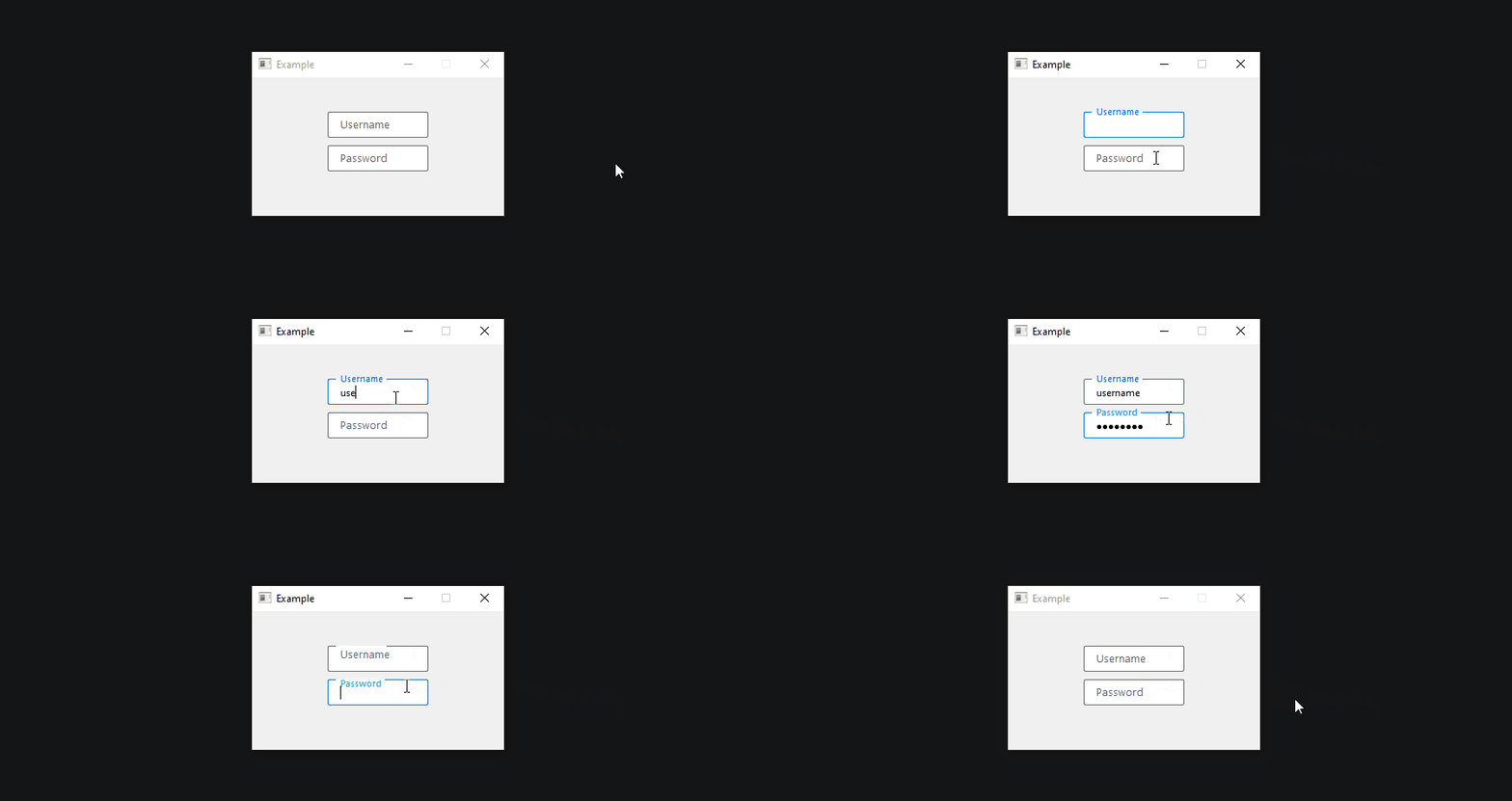
The widget is based on Qt's QLineEdit widget and improves it by animating the placeholder text between two positions. If the widget is not in focus and does not contain any text, the placeholder will be in the normal (inside) position. When the widget is focused, however, the placeholder text moves to the top of the widget (outside position), creating a gap in the border. If the widget loses focus and does not contain any text, the placeholder moves to the normal position again. If the widget contains text, the placeholder will stay in position. This way the placeholder is always visible. The widget is highly customizable with options such as changing the duration and easing curve of the animation and changing the font and color for both placeholder positions independently.
Installation
pip install pyqt-animated-line-edit
Example
from PyQt6.QtCore import QMargins
from PyQt6.QtWidgets import QMainWindow
from pyqt_animated_line_edit import AnimatedLineEdit


class Window(QMainWindow):

    def __init__(self):
        super().__init__(parent=None)

        # AnimatedLineEdit
        self.animated_line_edit = AnimatedLineEdit('Username', self)
        self.animated_line_edit.setBorderRadius(2)
        self.animated_line_edit.setPlaceholderFontSizeInner(10)
        self.animated_line_edit.setPlaceholderFontSizeOuter(8)
        self.animated_line_edit.setPadding(QMargins(12, 0, 12, 0))
Documentation
IMPORTANT:
Styling of the widget must not be done by setting the stylesheet manually as the widget calculates the stylesheet itself and overrides it. Use the provided methods such assetBackgroundColor(),setHoveredBackgroundColor(),setFocusedBackgroundColor()andsetDisabledBackgroundColor()instead.
- Setting the placeholder text:
animated_line_edit.setPlaceholderText('Username')
- Setting the placeholder font family:
animated_line_edit.setPlaceholderFontFamily('Arial')
- Setting the placeholder font size (inside position):
animated_line_edit.setPlaceholderFontSizeInner(14)
- Setting the placeholder font size (outside position):
animated_line_edit.setPlaceholderFontSizeOuter(12)
- Setting the placeholder color (affects both positions if no color is set for the outside position):
animated_line_edit.setPlaceholderColor(QColor(0, 0, 0))
- Setting the placeholder color (outside position):
animated_line_edit.setPlaceholderColorOutside(QColor(0, 0, 0))
- Setting the placeholder transition duration:
animated_line_edit.setTransitionDuration(500)
- Setting the placeholder transition easing curve:
animated_line_edit.setEasingCurve(QEasingCurve.Type.Linear)
All methods:
| Method | Description |
|---|---|
setPlaceholderText(self, text: str) |
Set the text displayed as placeholder |
setTransitionDuration(self, duration: int) |
Set the duration of the placeholder transition animation |
setEasingCurve(self, easing_curve: QEasingCurve.Type) |
Set the easing curve of the placeholder transition animation |
setPlaceholderColor(self, color: QColor) |
Set the color of the placeholder text (for both positions if the color for the outside position is not set) |
setPlaceholderColorOutside(self, color: QColor) |
Set the color of the placeholder text for the outside position |
setPlaceholderFontFamily(self, family: str) |
Set the font family of the placeholder text (both positions) |
setPlaceholderFontSizeInner(self, size: int) |
Set the font size of the placeholder text for the inside position |
setPlaceholderFontSizeOuter(self, size: int) |
Set the font size of the placeholder text for the outside position |
setPlaceholderFontBold(self, enable: bool) |
Set the weight of the placeholder text to be bold or regular |
setPlaceholderFontItalic(self, enable: bool) |
Set the placeholder text to be italic or regular |
setColor(self, color: QColor) |
Set the regular color of the text |
setBackgroundColor(self, color: QColor) |
Set the regular color of the background |
setBorderColor(self, color: QColor) |
Set the regular color of the border |
setBorderWidth(self, width: int) |
Set the regular width of the border |
setBorderRadius(self, radius: int) |
Set the radius of the border |
setPadding(self, padding: QMargins) |
Set the padding of the widget |
setHoveredColor(self, color: QColor) |
Set the text color for when the widget is hovered over |
setHoveredBackgroundColor(self, color: QColor) |
Set the background color for when the widget is hovered over |
setHoveredBorderColor(self, color: QColor) |
Set the border color for when the widget is hovered over |
setHoveredBorderWidth(self, width: int) |
Set the border width for when the widget is hovered over |
setFocusedColor(self, color: QColor) |
Set the text color for when the widget is focused |
setFocusedBackgroundColor(self, color: QColor) |
Set the background color for when the widget is focused |
setFocusedBorderColor(self, color: QColor) |
Set the border color for when the widget is focused |
setFocusedBorderWidth(self, width: int) |
Set the border width for when the widget is focused |
setDisabledColor(self, color: QColor) |
Set the text color for when the widget is disabled |
setDisabledBackgroundColor(self, color: QColor) |
Set the background color for when the widget is disabled |
setDisabledBorderColor(self, color: QColor) |
Set the border color for when the widget is disabled |
setDisabledBorderWidth(self, width: int) |
Set the border width for when the widget is disabled |
License
This software is licensed under the MIT license.
1 maintainer

Metadata
1 maintainer
Release files for pyqt-animated-line-edit 1.0.1
For a detailed explanation of source distributions (sdists) and built distributions (wheels), please see the package formats documentation.
Source distribution (sdist)
| File | Size | Uploaded | |
|---|---|---|---|
| pyqt-animated-line-edit-1.0.1.tar.gz | 9.3 kB | Details |
Built distribution (wheel)
| File | Interpreter | ABI | Platform | Reset |
|---|---|---|---|---|
| pyqt_animated_line_edit-1.0.1-py3-none-any.whl | Python 3 | none | any | Details |
Total release size: 17.3 kB
Release files / pyqt-animated-line-edit-1.0.1.tar.gz
| Download URL | pyqt-animated-line-edit-1.0.1.tar.gz |
|---|---|
| Size | 9.3 kB |
| Tags | Source |
|
SHA-256 checksum How to use checksums |
044546e8977dcf56a250452778520a45b4874946a7c1d1637b2a18be5b8ab514
|
|
BLAKE2b-256 checksum How to use checksums |
57f35a2ec9afeda9d4bfc36b5403dfa2a44c379bfa0843da736e08be89b1f3ae
|
| Upload date | |
|
Uploaded using Trusted Publishing? What is trusted publishing? |
No |
| Uploaded via |
twine/5.1.1 CPython/3.11.3
|
Release files / pyqt_animated_line_edit-1.0.1-py3-none-any.whl
| Download URL | pyqt_animated_line_edit-1.0.1-py3-none-any.whl |
|---|---|
| Size | 8.0 kB |
| Tags | Python 3 |
|
SHA-256 checksum How to use checksums |
2b1a042a2e997ea000e11af5159b41350f778bb417d4f208103e4d6eceefec47
|
|
BLAKE2b-256 checksum How to use checksums |
41aa15b954795fc3ea0e457a42b14f767c4e10a1d9265a828bd1dc24999bc99f
|
| Upload date | |
|
Uploaded using Trusted Publishing? What is trusted publishing? |
No |
| Uploaded via |
twine/5.1.1 CPython/3.11.3
|














