
pyqt-checkbox-table-widget
PyQt's QTableWidget which has checkbox as first header item
Requirements
PyQt5 >= 5.8
Setup
python -m pip install pyqt-checkbox-table-widget
Method Overview
Many methods is changed/overriden because of the fact that check box being used in first column.
-
setHorizontalHeaderLabels(labels: typing.Iterable[str])- Sets horizontal header label except for first column (for check box) -
clearContents(start_r_idx=0)- Remove all contents including check box from start_r_idx -
setDefaultValueOfCheckBox(flag: bool)- Self-explanatory. -
stretchEveryColumnExceptForCheckBox()- Apply self.horizontalHeader().setSectionResizeMode(QHeaderView.Stretch) except for first column, which is for check box. -
setRowCount(rows: int) -
toggleState(state)- Toggle every single checkbox. State should be Qt.CheckState. You can see how to use this feature in Code Example 2 below. -
getCheckedRows()- Return the list of indexes of row which are checked. -
getUncheckedRows() -
setCheckedAt(idx: int, f: bool)- If f is True, the check box at idx is checked. f is False, the check box at idx is unchecked. -
removeCheckedRows() -
removeUncheckedRows()
Example
Code Example 1
from PyQt5.QtWidgets import QApplication, QTableWidgetItem

from pyqt_checkbox_table_widget.checkBoxTableWidget import CheckBoxTableWidget


if __name__ == "__main__":

    import sys


    app = QApplication(sys.argv)

    widget = CheckBoxTableWidget()

    widget.setRowCount(3)

    widget.setItem(0, 1, QTableWidgetItem('abc')) # Remember column argument should be at least 1 (if it is zero, item will cover the checkbox cell)

    widget.show()

    app.exec_()
Result
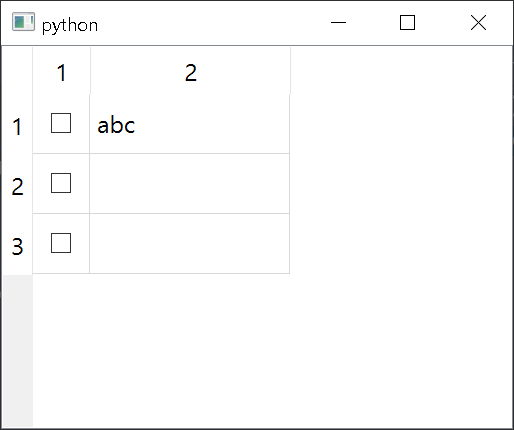
Code Example 2
from PyQt5.QtCore import Qt

from PyQt5.QtWidgets import QApplication, QTableWidgetItem, QMainWindow, QCheckBox, QVBoxLayout, QWidget

from pyqt_checkbox_table_widget.checkBoxTableWidget import CheckBoxTableWidget


class MainWindow(QMainWindow):

    def __init__(self):

        super().__init__()

        self.__initUi()


    def __initUi(self):

        allChkBox = QCheckBox('Check all')

        tableWidget = CheckBoxTableWidget()

        tableWidget.setRowCount(10)

        tableWidget.stretchEveryColumnExceptForCheckBox() # stretch every section of tablewidget except for check box section

        for i in range(tableWidget.rowCount()):

            item = QTableWidgetItem()

            item.setTextAlignment(Qt.AlignCenter) # align

            item.setText(str(i)*50) # text sample

            tableWidget.setItem(i, 1, item)

        allChkBox.stateChanged.connect(tableWidget.toggleState) # if allChkBox is checked, tablewidget checkboxes will also be checked


        lay = QVBoxLayout()

        lay.addWidget(allChkBox)

        lay.addWidget(tableWidget)


        mainWidget = QWidget()

        mainWidget.setLayout(lay)


        self.setCentralWidget(mainWidget)


if __name__ == "__main__":

    import sys


    app = QApplication(sys.argv)

    window = MainWindow()

    window.show()

    app.exec_()
Result
Similar package
1 maintainer

Metadata
1 maintainer
Release files for pyqt-checkbox-table-widget 0.0.14
For a detailed explanation of source distributions (sdists) and built distributions (wheels), please see the package formats documentation.
Source distribution (sdist)
| File | Size | Uploaded | |
|---|---|---|---|
| pyqt-checkbox-table-widget-0.0.14.tar.gz | 4.3 kB | Details |
Built distribution (wheel)
| File | Interpreter | ABI | Platform | Reset |
|---|---|---|---|---|
| pyqt_checkbox_table_widget-0.0.14-py3-none-any.whl | Python 3 | none | any | Details |
Total release size: 9.9 kB
Release files / pyqt-checkbox-table-widget-0.0.14.tar.gz
| Download URL | pyqt-checkbox-table-widget-0.0.14.tar.gz |
|---|---|
| Size | 4.3 kB |
| Tags | Source |
|
SHA-256 checksum How to use checksums |
556b02d89f93877f55e4605616ad82e6e403b36c1efebf883a68b4421f5b2ef5
|
|
BLAKE2b-256 checksum How to use checksums |
d05c8727d6ba428fc6afc78640e02f37fab2d00649c6b7a6e8004a9c905e3fcb
|
| Upload date | |
|
Uploaded using Trusted Publishing? What is trusted publishing? |
No |
| Uploaded via |
twine/0.0.0 CPython/3.7.6
|
Release files / pyqt_checkbox_table_widget-0.0.14-py3-none-any.whl
| Download URL | pyqt_checkbox_table_widget-0.0.14-py3-none-any.whl |
|---|---|
| Size | 5.5 kB |
| Tags | Python 3 |
|
SHA-256 checksum How to use checksums |
4860271b179368f3985a833530e2cc382a1cfbe26cc79867e5959e5a1b6cd77b
|
|
BLAKE2b-256 checksum How to use checksums |
c314d18a05625d18e1f33c90a54d22c245758c78b6b33fdbc216f0e81377db9d
|
| Upload date | |
|
Uploaded using Trusted Publishing? What is trusted publishing? |
No |
| Uploaded via |
twine/0.0.0 CPython/3.7.6
|














