
PyQt custom titlebar window (resizable, movable, minimize/maximize/close, etc.)

Project description
pyqt-custom-titlebar-window
PyQt custom titlebar window(resizable, movable, minimize/maximize/close).
User can set modernized and customized frame surrounding the widget you made.
You can set the title bar separately or set the menu bar as title bar.
Basic buttons like min/max/close are automatically set by user's OS.
You can drag title bar or menu bar on widget to move the window, double-click it to show maximize/normal.
If you want to set custom titlebar easily than use pyqt-custom-titlebar-setter.
If you want to use this in various ways than use this directly. see the example below.
Table of Contents
Requirements
PyQt5 >= 5.15 - This package is using startSystemMove, startSystemResize which were both introduced in Qt 5.15.
Setup
python -m pip install pyqt-custom-titlebar-window
Included Packages
-
pyqt-frameless-window - To import parent class
FramelessWindow -
pyqt-windows-buttons-widget - To provide Windows 10 OS style min/max/close buttons with menu bar
-
pyqt-mac-buttons-widget - To provide macOS style of min/max/close buttons with menu bar
-
pyqt-top-titlebar-widget - For adding top title bar feature
-
absresgetter - For get absoulte resource path of svg icon to set window icon
Feature
-
If you drag the frame, window will be resized.
-
If you drag the title bar(menu bar if there is no title bar) of inner widget, window will be moved.
-
If you double-click the menu bar, window will be maximized/normalized.
-
Set the window title by itself if you set your inner widget's title with
setWindowTitle. It also catches thewindowTitleChangedsignal of your inner widget. -
Support full screen feature. When full screen feature turns on, top title bar will disappear. Reappear when it turns off.
-
CustomTitlebarWindow(CustomizedWidgetByUser())- Constructor. -
setTopTitleBar(self, title: str = '', icon_filename: str = '', font: QFont = QFont('Arial', 12), align=Qt.AlignCenter, bottom_separator=False)to set title bar on the top of the window. -
setButtons()to add min/max/close button on the top right corner of title/menu bar -
setButtonHint(hint)to set hints of buttons. There are three options available(close, min/close, min/max/close). Default value is min/max/close. -
setMenuTitle(title: str, icon_filename: str, font=QFont('Arial', 12))to set the icon and title not only on the left side of menu bar, but also set it as window icon and title. -
Frame's color synchronizes with the
QMenuBar's background color or innerQWidget's color if inner widget is notQMainWindow. -
getCornerWidget()to get corner widget ofQMenuBareasily -
getInnerWidget()to get inner widget easily
Example
Code Sample (Menu bar only)
from PyQt5.QtWidgets import QApplication

from pyqt_custom_titlebar_window import CustomTitlebarWindow

from pyqt_dark_calculator import Calculator


if __name__ == "__main__":

  import sys


  app = QApplication(sys.argv)

  customTitlebarWindow = CustomTitlebarWindow(Calculator())

  # customTitlebarWindow.setButtonHint(hint=['close'])

  customTitlebarWindow.setButtons()

  customTitlebarWindow.show()

  app.exec_()
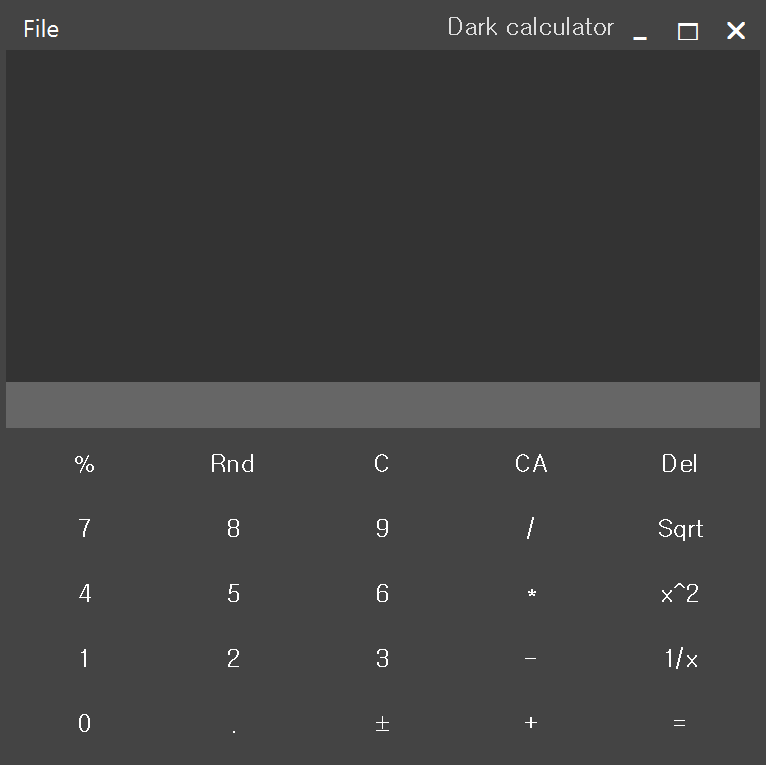
In the code sample, pyqt-dark-calculator is being used as inner widget.
Result
Here's another example with pyqt-dark-notepad.
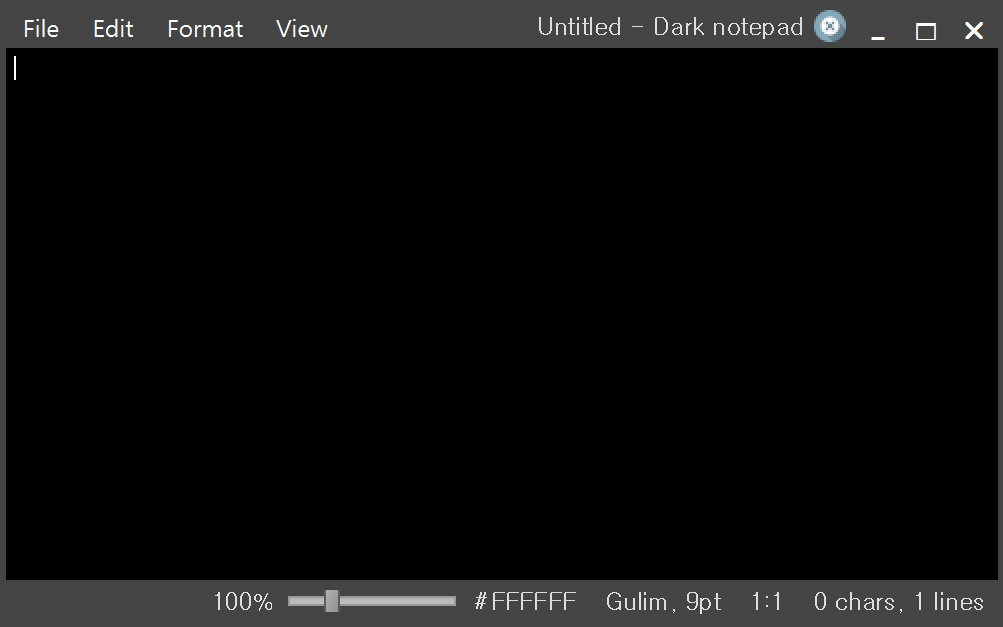
As you see, existing corner widget doesn't matter.
Code Sample (Including title bar)
from PyQt5.QtWidgets import QApplication

from pyqt_custom_titlebar_window import CustomTitlebarWindow

from pyqt_dark_notepad import DarkNotepad


if __name__ == "__main__":

  import sys


  app = QApplication(sys.argv)

  window = DarkNotepad()

  customTitlebarWindow = CustomTitlebarWindow(window)

  customTitlebarWindow.setTopTitleBar(icon_filename='dark-notepad.svg')

  # customTitlebarWindow.setButtonHint(['close'])

  customTitlebarWindow.setButtons()

  customTitlebarWindow.show()

  app.exec_()
Result
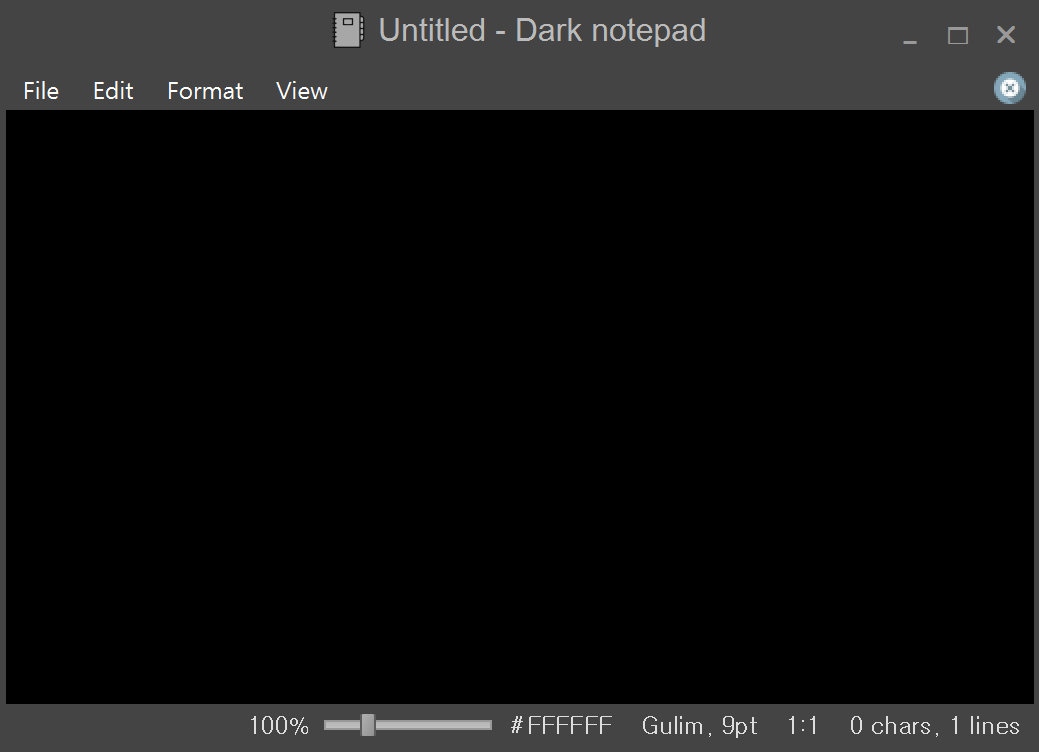
Release history Release notifications | RSS feed


Download files
Download the file for your platform. If you're not sure which to choose, learn more about installing packages.
Source Distribution
Built Distribution
Filter files by name, interpreter, ABI, and platform.
If you're not sure about the file name format, learn more about wheel file names.
Copy a direct link to the current filters
File details
Details for the file pyqt-custom-titlebar-window-0.0.15.tar.gz.
File metadata
- Download URL: pyqt-custom-titlebar-window-0.0.15.tar.gz
- Upload date:
- Size: 6.3 kB
- Tags: Source
- Uploaded using Trusted Publishing? No
- Uploaded via: twine/0.0.0 CPython/3.7.6
File hashes
| Algorithm | Hash digest | |
|---|---|---|
| SHA256 |
01583086b9ef37fbbd364f9954076b95f932566db0443f5d74d1d76666c80cdc
|
|
| MD5 |
9580a3f2867cc1e641621e4cbe769d0c
|
|
| BLAKE2b-256 |
46fb93101ba997ed0a4953e1cfc3aee16a6a88b05f8e3d8cfc108b3a2772cf45
|
File details
Details for the file pyqt_custom_titlebar_window-0.0.15-py3-none-any.whl.
File metadata
- Download URL: pyqt_custom_titlebar_window-0.0.15-py3-none-any.whl
- Upload date:
- Size: 7.0 kB
- Tags: Python 3
- Uploaded using Trusted Publishing? No
- Uploaded via: twine/0.0.0 CPython/3.7.6
File hashes
| Algorithm | Hash digest | |
|---|---|---|
| SHA256 |
48f59b5b2f10ddb577bfbe049a98471b2d13c0d45deadea7d5af5385b2eb51b7
|
|
| MD5 |
54d409cd89b700415aeb8e13debcc5a8
|
|
| BLAKE2b-256 |
ed257fac7ae15e0c5f2359cc210f8d48e392d4291faf7fcfb59d7dc1e7cca4f4
|






