
pyqt-dark-gray-theme
PyQt dark-gray theme
Note
This is deprecated except for my personal project. If you want to use the dark-gray style, use qtsasstheme.
Requirements
- PyQt5 >= 5.8
Setup
python -m pip install pyqt-dark-gray-theme
Included Packages
- qtsasstheme - For get dark-gray theme css code
Usage
-
getThemeStyle() -> str- use it toQMainWindow,QDialog. -
getIconButtonStyle() -> str- use it toQPushButton/QToolButtonwhich has an icon. This is for button which contains icon only. -
getIconTextButtonStyle() -> str- use it toQPushButton/QToolButtonwhich has no icon. This is for button which contains text only or icon and text. -
getMenuBarStyle(menu_bar: QMenuBar) -> struse it toQMenuBar. This is for dealing with menu bar. You have to give the menu bar you want to change its style. -
getMainWidgetStyle() -> struse it to top levelQWidget. This is for dealing with the case ofQWidgetas a main window.
Example
Code Sample
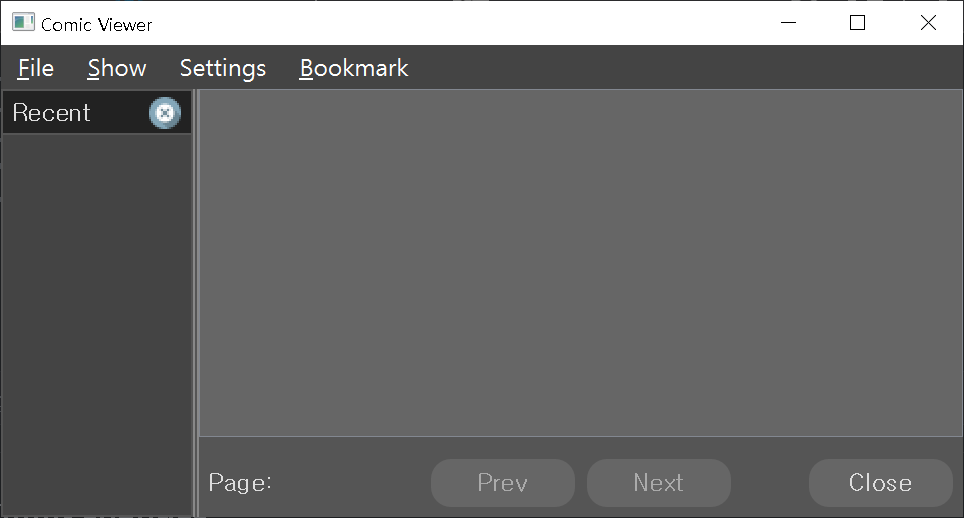
Example GUI app - pyqt-comic-viewer (which is QMainWindow as a parent class)
from PyQt5.QtWidgets import QApplication, QPushButton

from pyqt_comic_viewer.comicBookViewer import ComicBookViewer

from pyqt_dark_gray_theme.darkGrayTheme import getThemeStyle, getIconButtonStyle, getIconTextButtonStyle, \

    getMenuBarStyle


if __name__ == "__main__":

    import sys


    app = QApplication(sys.argv)

    ex = ComicBookViewer()

    ex.setStyleSheet(getThemeStyle()) # whole theme

    btns = ex.findChildren(QPushButton) # buttons

    for btn in btns:

        # check if text exists

        if btn.text().strip() == '':

            btn.setStyleSheet(getIconButtonStyle()) # no text - icon button style

        else:

            btn.setStyleSheet(getIconTextButtonStyle()) # text - icon-text button style

    menu_bar = ex.menuBar() # menu bar

    menu_bar_style = getMenuBarStyle(menu_bar)

    menu_bar.setStyleSheet(menu_bar_style)

    ex.show()

    app.exec_()
Result
1 maintainer

Metadata
1 maintainer
Release files for pyqt-dark-gray-theme 0.0.4
For a detailed explanation of source distributions (sdists) and built distributions (wheels), please see the package formats documentation.
Source distribution (sdist)
| File | Size | Uploaded | |
|---|---|---|---|
| pyqt-dark-gray-theme-0.0.4.tar.gz | 3.0 kB | Details |
Built distribution (wheel)
| File | Interpreter | ABI | Platform | Reset |
|---|---|---|---|---|
| pyqt_dark_gray_theme-0.0.4-py3-none-any.whl | Python 3 | none | any | Details |
Total release size: 6.7 kB
Release files / pyqt-dark-gray-theme-0.0.4.tar.gz
| Download URL | pyqt-dark-gray-theme-0.0.4.tar.gz |
|---|---|
| Size | 3.0 kB |
| Tags | Source |
|
SHA-256 checksum How to use checksums |
6a0fd7e79e4c5de9975f267dab3a1c4136a74fdeb3736408e0b8a6ef4d39b537
|
|
BLAKE2b-256 checksum How to use checksums |
016654d26c7533705fe5fe660796cf1098c36c3cab890d6012d370ad0e24b6f2
|
| Upload date | |
|
Uploaded using Trusted Publishing? What is trusted publishing? |
No |
| Uploaded via |
twine/0.0.0 CPython/3.7.6
|
Release files / pyqt_dark_gray_theme-0.0.4-py3-none-any.whl
| Download URL | pyqt_dark_gray_theme-0.0.4-py3-none-any.whl |
|---|---|
| Size | 3.7 kB |
| Tags | Python 3 |
|
SHA-256 checksum How to use checksums |
b9e2084e52addb086a1146ad66008f1ad66e3891df4621a75eae1661e1356b05
|
|
BLAKE2b-256 checksum How to use checksums |
c6830f4a22e4cd07bbaf004f2795fb55c4e425cbb3ae2252ee754a3bd26191a1
|
| Upload date | |
|
Uploaded using Trusted Publishing? What is trusted publishing? |
No |
| Uploaded via |
twine/0.0.0 CPython/3.7.6
|














