
pyqt-darktheme
A dark themed QPalette class for use in GUI's implemented using PyQt5 and PyQt6, some many-used widgets that are by default clickable and decorators to change the mouse to an hourglass and back in certain circumstances.
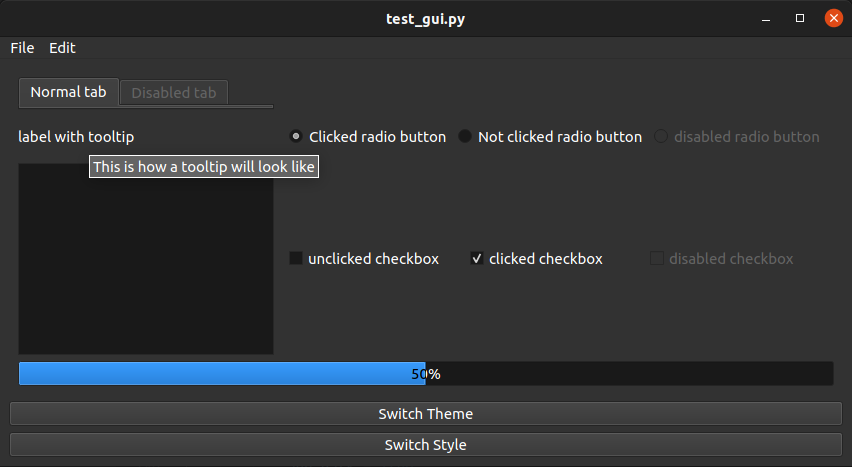
Test and examples
Run the 'test_gui.py' (for pyqt5) or 'test_gui_pyqt6.py file to see how it compares to the normal light theme and to test the library on your device.
Version
1.3
1.3.1 Only some readme edits
1.3.0 Added a pyqt6 implementation, but does not automatically install either PyQt5 or PyQt6 as you can now choose between them
1.2
1.2.5 Added a test_gui to showcase the themes and for testing
1.2.4 changed elements for tabs, radio buttons, and checkboxes when they are disabled
1.2.3 Changed folder name to darktheme
1.1
1.1.1 Changed pip name to pyqt-darktheme
Install
Make sure you have PyQt5 or PyQt6 installed
pip install pyqt-darktheme
How to use the dark theme
See the 'test_gui.py' and 'test_gui_pyqt6.py' files for configuration examples
Import
To import the dark theme as a class based on QPalette
PyQt5
from darktheme.widget_template import DarkApplication, DarkPalette
PyQt6
from darktheme.widget_template_pyqt6 import DarkApplication, DarkPalette
Configure
using DarkPalette
Create a QApplication object and set the DarkPalette like below
app = QApplication()
app.setPalette(DarkPalette())
using DarkApplication
For an application that is fixed in a dark theme, you can use the DarkApplication class
app = QDarkApplication()
How to use the Clickable Widgets
Import
To import the clickable widgets, i.e. a clickable label widget
For PyQt5
from darktheme.widget_template import QClickLabel
For PyQt6
from darktheme.widget_template_pyqt6 import QClickLabel
Configure
label = QClickLabel()
label.setText('This label is clickable')
label.clicked.connect(clicklabel)

def clicklabel:
    print("This label is clicked")
Decorators
Import
To import the decorators
For PyQt5
from darktheme.decorators import (
    Decorators,
    QInputDialogUserInterruption,
    QMessageBoxUserInterruption,
)
For PyQt6
from darktheme.decorators_pyqt6 import (
    Decorators,
    QInputDialogUserInterruption,
    QMessageBoxUserInterruption,
)
How to use normal decorators
to add a loading cursor to a called method:
@Decorators.loading_cursor
to revert back to normal cursor manually for some reason, i.e. to ask user for input:
@Decorators.user_input_interruption
How to use the decorated dialogs
Two dialogs are given that have the decorator 'user_input_interruption' built-in:
- QInputDialogUserInterruption
- QMessageBoxUserInterruption
to use these dialogs:
@Decorators.loading_cursor
def program():

    print(doing stuff and showing loading cursor)

    result, okPressed = QInputDialogUserInterruption.getText(
        self, "User input requested", "This dialog box shows a regular cursor, letting the user know input is requested")
    if result and okPressed:
        print(result)

    print(continue doing stuff and showing loading cursor)
Build
Pypirc file
Create a .pypirc file in home directory
[distutils]
index-servers=
    pypi
    test

[test]
repository = https://test.pypi.org/legacy/
username = __token__
password = <PyPI token>

[pypi]
repository = https://upload.pypi.org/legacy/
username = __token__
password = <PyPI token>
Distributions
python3 -m pip install --upgrade build && python3 -m build
Upload
python3 -m pip install --upgrade twine && python3 -m twine upload --repository pypi dist/*
License
Licensed under GPL-3.0-or-later, see LICENSE file for details.
Copyright © 2020 Michael-Yongshi.
This program is free software: you can redistribute it and/or modify it under the terms of the GNU General Public License as published by the Free Software Foundation, either version 3 of the License, or (at your option) any later version.
This program is distributed in the hope that it will be useful, but WITHOUT ANY WARRANTY; without even the implied warranty of MERCHANTABILITY or FITNESS FOR A PARTICULAR PURPOSE. See the GNU General Public License for more details.
You should have received a copy of the GNU General Public License along with this program. If not, see http://www.gnu.org/licenses/.
1 maintainer

Metadata
1 maintainer
Release files for pyqt-darktheme 1.3.1
For a detailed explanation of source distributions (sdists) and built distributions (wheels), please see the package formats documentation.
Source distribution (sdist)
| File | Size | Uploaded | Provenance | |
|---|---|---|---|---|
| pyqt-darktheme-1.3.1.tar.gz | 18.7 kB | Without provenance | Details |
Built distribution (wheel)
| File | Interpreter | ABI | Platform | Reset |
|---|---|---|---|---|
| pyqt_darktheme-1.3.1-py3-none-any.whl | Python 3 | none | any | Details |
Total release size: 37.9 kB
Release files / pyqt-darktheme-1.3.1.tar.gz
| Download URL | pyqt-darktheme-1.3.1.tar.gz |
|---|---|
| Size | 18.7 kB |
| Tags | Source |
|
SHA-256 checksum How to use checksums |
1e9a05a4c330952a1d27523e097adeab0849a1a5549b3d8cfc012681789781ce
|
|
BLAKE2b-256 checksum How to use checksums |
72356b8141ccee29fced9db4363efe5eb2b22b1dcef1d606a151f4817d09c39a
|
| Upload date | |
|
Uploaded using Trusted Publishing? What is trusted publishing? |
No |
| Uploaded via |
twine/4.0.2 CPython/3.11.3
|
Release files / pyqt_darktheme-1.3.1-py3-none-any.whl
| Download URL | pyqt_darktheme-1.3.1-py3-none-any.whl |
|---|---|
| Size | 19.2 kB |
| Tags | Python 3 |
|
SHA-256 checksum How to use checksums |
2c78f8033f272f429b7f15a311f9aab222d493f7ed6da54336d89a9845f7e068
|
|
BLAKE2b-256 checksum How to use checksums |
24ea9bba26445dc171922a1ba792cc369d63512f9f157c5eed569ae5ae246d4b
|
| Upload date | |
|
Uploaded using Trusted Publishing? What is trusted publishing? |
No |
| Uploaded via |
twine/4.0.2 CPython/3.11.3
|
Security for pyqt-darktheme 1.3.1
Provenance
Provenance describes where a file came from. On PyPI, provenance is shared via attestations, which provide a verifiable record of the build or publishing details. View details, limitations and caveats.
No provenance found
None of the files in this release were uploaded with provenance metadata.
A note on package security
PyPI is a repository for distributing packages, not a service for auditing them. While third-party security researchers and our staff do their best to detect and remove malicious packages, PyPI cannot guarantee the quality, security or suitability of any given package.
To learn more about protecting yourself from malicious actors, visit our package security documentation.














