
pyqt-font-dialog
PyQt "select the font" dialog and widget
Requirements
PyQt5 >= 5.8
Setup
python -m pip install pyqt-font-dialog
Class/Method Overview
-
FontDialog(font: QFont = QFont('Arial', 10), title='Font')- font is font, title is title of the dialog.getFont()- get the selected font.
-
FontWidget(font: QFont = QFont('Arial', 10))-
fontChanged(QFont)- When current font item is changed, this will be emitted. -
getFont()- get the selected font.
-
Usage
1. As a dialog
dialog = FontDialog(textEdit.currentFont())

reply = dialog.exec()

if reply == QDialog.Accepted:

    textEdit.setCurrentFont(dialog.getFont())
Preview
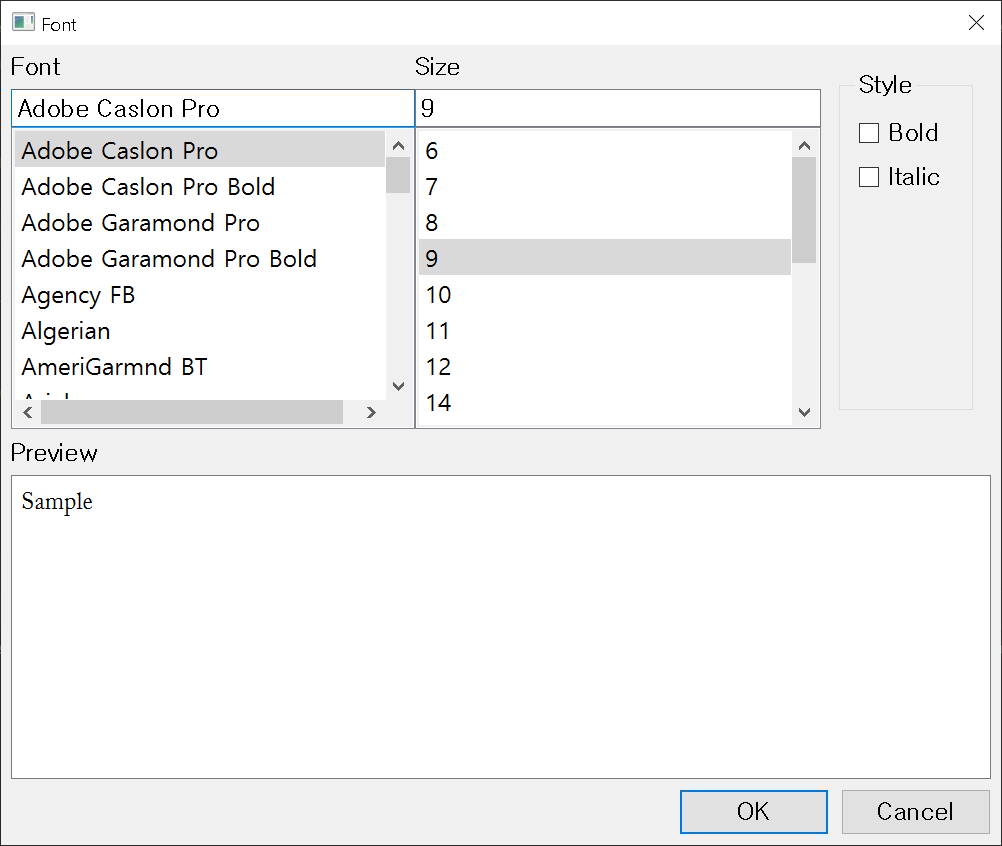
2. As a part of window
from PyQt5.QtWidgets import QMainWindow, QApplication, QHBoxLayout, QWidget, QTextEdit

from pyqt_font_dialog.fontWidget import FontWidget


class Window(QMainWindow):

    def __init__(self):

        super().__init__()

        self.__initUi()


    def __initUi(self):

        self.__te = QTextEdit()

        fontWidget = FontWidget()

        fontWidget.fontChanged.connect(self.fontChanged)

        lay = QHBoxLayout()

        lay.addWidget(self.__te)

        lay.addWidget(fontWidget)

        mainWidget = QWidget()

        mainWidget.setLayout(lay)

        self.setCentralWidget(mainWidget)


    def fontChanged(self, font):

        self.__te.selectAll()

        self.__te.setFont(font)

        cur = self.__te.textCursor()

        cur.clearSelection()

        self.__te.setTextCursor(cur)


if __name__ == "__main__":

    import sys


    app = QApplication(sys.argv)

    ex = Window()

    ex.show()

    sys.exit(app.exec_())
Preview
1 maintainer

Metadata
1 maintainer
Release files for pyqt-font-dialog 0.0.14
For a detailed explanation of source distributions (sdists) and built distributions (wheels), please see the package formats documentation.
Source distribution (sdist)
| File | Size | Uploaded | |
|---|---|---|---|
| pyqt-font-dialog-0.0.14.tar.gz | 4.9 kB | Details |
Built distribution (wheel)
| File | Interpreter | ABI | Platform | Reset |
|---|---|---|---|---|
| pyqt_font_dialog-0.0.14-py3-none-any.whl | Python 3 | none | any | Details |
Total release size: 12.3 kB
Release files / pyqt-font-dialog-0.0.14.tar.gz
| Download URL | pyqt-font-dialog-0.0.14.tar.gz |
|---|---|
| Size | 4.9 kB |
| Tags | Source |
|
SHA-256 checksum How to use checksums |
dc2085a736cbee7da7593e9bf9e3bab239e6308b9f79eff41e2333db807469f6
|
|
BLAKE2b-256 checksum How to use checksums |
e31013f735e20beb9c0bf2a520f98277c76b091ee8bfa18b504653034d5ca719
|
| Upload date | |
|
Uploaded using Trusted Publishing? What is trusted publishing? |
No |
| Uploaded via |
twine/0.0.0 CPython/3.7.6
|
Release files / pyqt_font_dialog-0.0.14-py3-none-any.whl
| Download URL | pyqt_font_dialog-0.0.14-py3-none-any.whl |
|---|---|
| Size | 7.4 kB |
| Tags | Python 3 |
|
SHA-256 checksum How to use checksums |
2ce162f75806a8065cb61ee196ffb2212a9276ea64313bdd3dd0bb0fe98c504b
|
|
BLAKE2b-256 checksum How to use checksums |
ab42e456e3b0008cdd1669dadbef3866aaa9ffa0a2405b10fbdd3db9e6ab6dd9
|
| Upload date | |
|
Uploaded using Trusted Publishing? What is trusted publishing? |
No |
| Uploaded via |
twine/0.0.0 CPython/3.7.6
|














