
PyQt Loading Button


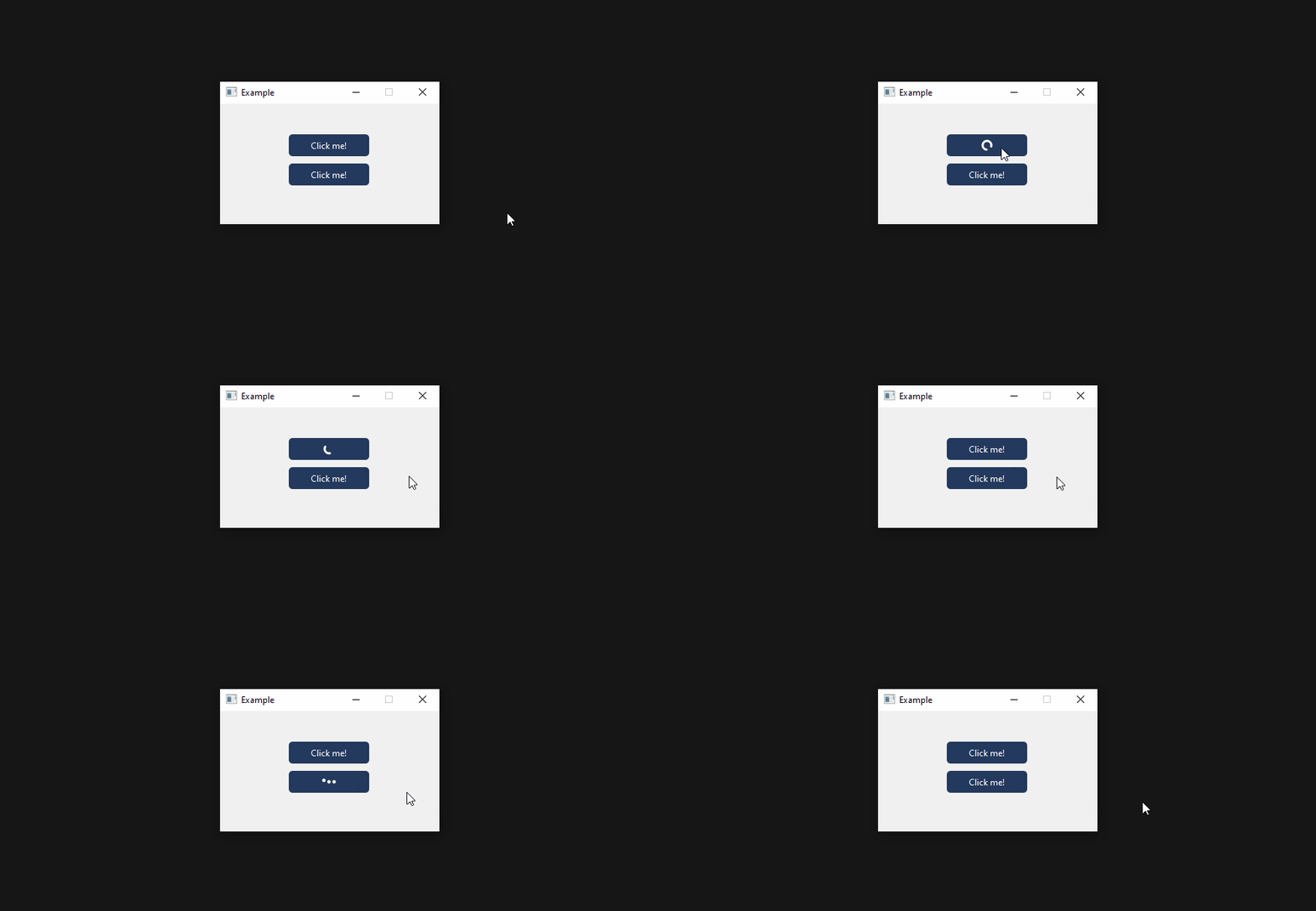
A QPushButton with built-in loading animations for PyQt and PySide.
About
The widget functions exactly like PyQt's regular QPushButton with the only exception being the way methods are connected to the clicked event. Normally you would connect a method to the clicked event by using the connect() method. On this button you use the setAction() method instead, passing a callable object as its parameter the same way you would do with the connect() method. The method will then get executed in a QThread, allowing the button to display a loading animation.
Installation
pip install pyqt-loading-button
Example
import time
from PyQt6.QtGui import QColor
from PyQt6.QtWidgets import QMainWindow
from pyqt_loading_button import LoadingButton, AnimationType


class Window(QMainWindow):

    def __init__(self):
        super().__init__(parent=None)

        # LoadingButton
        self.button_1 = LoadingButton(self)
        self.button_1.setText('Click me!')
        self.button_1.setAnimationType(AnimationType.Circle)
        self.button_1.setAnimationSpeed(2000)
        self.button_1.setAnimationColor(QColor(0, 0, 0))
        self.button_1.setAnimationWidth(15)
        self.button_1.setAnimationStrokeWidth(3)
        self.button_1.setAction(self.do_something)

    def do_something(self):
        time.sleep(5)  # Simulate long task
Documentation
- Setting the button text:
loading_button.setText('Click me!')
- Setting the action connected to the clicked event:
def do_something():
    time.sleep(5)  # Simulate long task

loading_button.setAction(do_something)
- Setting the animation type:
loading_button.setAnimationType(AnimationType.Circle)  # Circular animation
loading_button.setAnimationType(AnimationType.Dots)    # Dotted animation
- Setting the animation speed:
# 2000 means each loop of the animation takes 2000 ms to complete
loading_button.setAnimationSpeed(2000)
- Setting the animation width:
loading_button.setAnimationWidth(15) # Total width of the animation is 15 px
- Setting the animation stroke width:
loading_button.setAnimationStrokeWidth(3) # Stroke width of the brush is 3 px
- Setting the animation color:
loading_button.setAnimationColor(QColor(0, 0, 0))
- Checking whether the action is currently being executed:
loading_button.isRunning()
All methods:
| Method | Description |
|---|---|
text(self) |
Get the current button text |
setText(self, text: str) |
Set the button text |
setAction(self, action: callable) |
Set the action connected to the clicked event |
isRunning(self) |
Get whether the action is currently being executed |
getAnimationType(self) |
Get the current animation type |
setAnimationType(self, animation_type: AnimationType) |
Set the animation type |
getAnimationSpeed(self) |
Get the current animation speed (time it takes the animation to complete one loop in ms) |
setAnimationSpeed(self, speed: int) |
Set the animation speed (time it takes the animation to complete one loop in ms) |
getAnimationWidth(self) |
Get the current width of the animation |
setAnimationWidth(self, width: int) |
Set the width of the animation |
getAnimationStrokeWidth(self) |
Get the current width of the brush stroke |
setAnimationStrokeWidth(self, width: int) |
Set the width of the brush stroke |
getAnimationColor(self) |
Get the current animation color |
setAnimationColor(self, color: QColor) |
Set the animation color |
License
This software is licensed under the MIT license.
1 maintainer

Metadata
1 maintainer
Release files for pyqt-loading-button 1.0.0
For a detailed explanation of source distributions (sdists) and built distributions (wheels), please see the package formats documentation.
Source distribution (sdist)
| File | Size | Uploaded | |
|---|---|---|---|
| pyqt-loading-button-1.0.0.tar.gz | 7.4 kB | Details |
Built distribution (wheel)
| File | Interpreter | ABI | Platform | Reset |
|---|---|---|---|---|
| pyqt_loading_button-1.0.0-py3-none-any.whl | Python 3 | none | any | Details |
Total release size: 14.5 kB













