
VividNode(pyqt-openai)

A cross-platform AI desktop chatbot application for LLM such as GPT, Claude, Gemini, Llama chatbot interaction and image generation, offering customizable features, local chat history, and enhanced performance—no browser required!
Basically for free, powered by GPT4Free and LiteLLM.





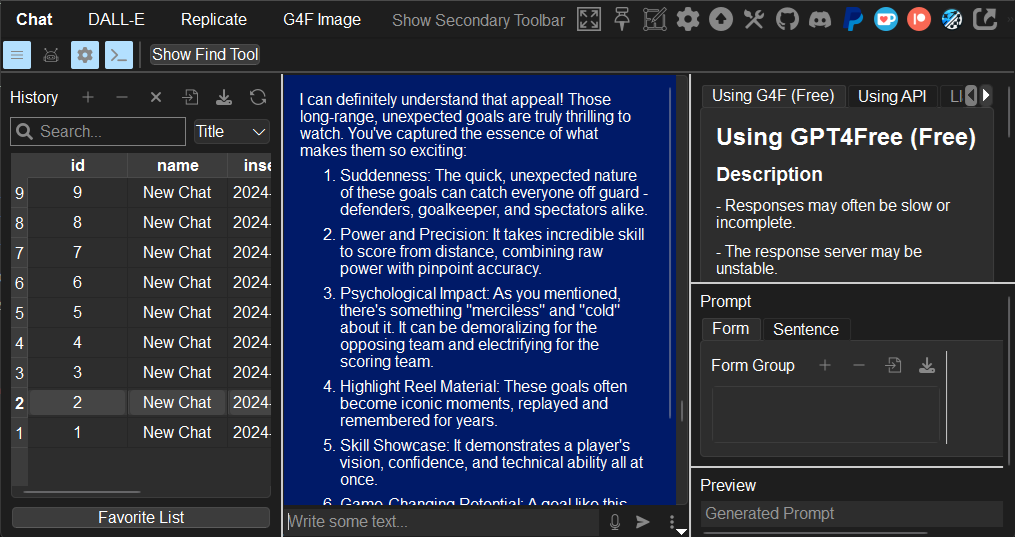
What is VividNode? 🤔
VividNode is a cross-platform desktop application that allows you to interact directly with LLM(GPT, Claude, Gemini, Llama) chatbots and generate images without needing a browser. Built with PySide6, VividNode (formerly known as pyqt-openai) supports Windows, Mac, and Linux, and securely stores your chat history locally in a database.
Key Features:
- Chat Interface: Enjoy a seamless chat experience with a customizable interface, fast thread and message search, and advanced conversation settings. You can also import/export chat histories and use prompt management tools for efficient prompt engineering.
- Image Generation: Generate images using OpenAI’s DALL-E 3 or models from Replicate or GPT4Free, directly within your chat sessions. The app supports endless image generation, randomly generated prompt, automatic saving, and integrated image management.
- Focus and Accessibility Modes: Utilize Focus Mode, “Always on Top” Mode, transparency adjustments, and background notifications to keep the chat accessible and responsive without overwhelming system resources.
- Customization and Shortcuts: VividNode offers extensive customization options, including language settings, memory management, and a comprehensive list of keyboard shortcuts for faster operations.
- Support for interactive chatting (STT & TTS): It features a recording function using OpenAI's STT capabilities and allows responses to be heard in various voices through OpenAI Whisper or the TTS functionality of the Edge browser (using edge-tts, which is free).
With VividNode, you can experience a more powerful and resource-efficient alternative to browser-based GPT interfaces, making it easier to manage both text and image-based interactions.
Sidenote 🗒️
Although this is named 'pyqt-openai', the model does not use only OpenAI-related models, and the GUI is created using PySide6, not PyQt. 'pyqt-openai' was the package name decided initially, and we are still using it as changing the package name now would likely result in a huge disaster.
How to Install
Standard Way
- git clone ~
- cd pyqt-openai
- pip install -r requirements.txt --upgrade
- cd pyqt_openai
- python main.py
With Makefile
- make venv
- make run
Wanna download this without doing stuffs like above? You can download installer or zip file here.
How to Use 🧐
Test Scenario
This is the default test scenario page. If you want to test it out and be sure nothing is wrong, try it :)
Troubleshooting
Common Issues
Issues Related to PyAudio
- This issue is often due to the absence of PortAudio. Make sure to install PortAudio before you install PyAudio.
Issues Related to PySide6 During Installation
- As of October 14, 2024, PySide6 supports Python versions above 3.9 and below 3.13. If support for Python 3.13 is added in the future, you can remove this note.
Handling Error Messages Related to Software Updates (Windows)
- If you encounter the following error message when trying to update VividNode via the auto-update feature: PermissionError: [Errno 13] Permission denied, To resolve this issue, run VividNode as an administrator.
- Also, if VividNode keeps asking "Wanna update?" even though you've updated it already, just install this again and everything will be fine.
Runtime error
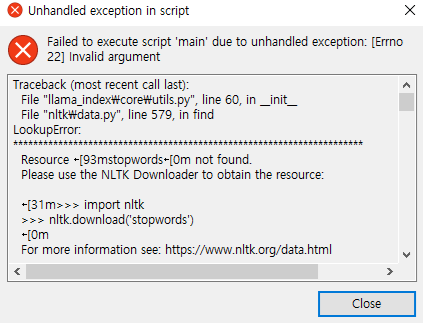
- If you see the error above, run the application again. It is likely to be shown in old version(below v1.5.0) so update to the latest version.
Incomplete or Inaccurate Translations
- If you come across incomplete or unnatural translations, please update the pyqt_openai/lang/translations.json file.
If the solutions listed here don’t resolve your issue, please report it by opening an issue.
Help Needed 🆘
Managing this project alone has become quite challenging so i'm reaching out for support. If you have experience with coding, documentation, design, or even providing constructive feedback, I would greatly appreciate your involvement. Your contribution could make a significant difference.
Your contribution, even just a fix a simple typo in readme or simple refactoring can be very helpful. Of course there are a lot of official TODOs i need helping hand as well. So see here if you are willing to contribute.
You can contact me 24/7 by sending me an email to yjg30737@gmail.com or join Discord server to talk in real time
Contributors
- Me (WizMiner) 😊
- Creator of VividNode 🐐
Disclaimer
Please do not distribute this commercially without my permission, by claiming it as your own creation.
1 maintainer

Metadata
1 maintainer
Release files for pyqt-openai 1.8.3
For a detailed explanation of source distributions (sdists) and built distributions (wheels), please see the package formats documentation.
Source distribution (sdist)
| File | Size | Uploaded | |
|---|---|---|---|
| pyqt_openai-1.8.3.tar.gz | 244.0 kB | Details |
Built distribution (wheel)
| File | Interpreter | ABI | Platform | Reset |
|---|---|---|---|---|
| pyqt_openai-1.8.3-py3-none-any.whl | Python 3 | none | any | Details |
Total release size: 498.6 kB
Release files / pyqt_openai-1.8.3.tar.gz
| Download URL | pyqt_openai-1.8.3.tar.gz |
|---|---|
| Size | 244.0 kB |
| Tags | Source |
|
SHA-256 checksum How to use checksums |
5a1fc1c8084bd10911ce7f21ac320435afdbd3cf9d7707f5f78e67a35ab477c6
|
|
BLAKE2b-256 checksum How to use checksums |
8e0b2879c05ed77f4fa7b4776dc25add0b197f3e9c4389490f294489b83ef122
|
| Upload date | |
|
Uploaded using Trusted Publishing? What is trusted publishing? |
No |
| Uploaded via |
twine/5.1.1 CPython/3.12.7
|
Release files / pyqt_openai-1.8.3-py3-none-any.whl
| Download URL | pyqt_openai-1.8.3-py3-none-any.whl |
|---|---|
| Size | 254.6 kB |
| Tags | Python 3 |
|
SHA-256 checksum How to use checksums |
832b81ab6efabfdc5284cbd93d245344bee9124dc24f5ef057627aa1c73ad2c3
|
|
BLAKE2b-256 checksum How to use checksums |
6a48acd68aea21eae6a0c6d9a5bfba8dd1bd349fa1b32fdc4318e1bcef099a91
|
| Upload date | |
|
Uploaded using Trusted Publishing? What is trusted publishing? |
No |
| Uploaded via |
twine/5.1.1 CPython/3.12.7
|














