
pyqt-svg-icon-pushbutton
PyQt QPushButton which user can set svg icon(not a low quality).
I have to say that setIcon of QPushButton doensn't help that much in terms of setting SVG image as an icon. It's just another good old fashioned pixmap icon.
So i overrides the setIcon mtehod to set SVG icon with the power of CSS.
Requirements
- PyQt5 >= 5.8
Setup
python -m pip install pyqt-svg-icon-pushbutton
Usage
-
SvgIconPushButton(base_widget: QWidget = None)- Constructor. Base widget is the widget that the button's background color based of when button get hovered/pressed by mouse cursor. If value is default(None), background color of button which is getting hovered/pressed will set to #DDDDDD, #FFFFFF. -
setIcon(icon: str)- set the icon. Icon should be a SVG file's name. This is overriding method. -
setPadding(padding: int)- set the button's padding. -
setBorderRadius(border_radius: int) -
setBackground(background=None)- you can givebackgroundargument's value either 'transparent' or 6-digits or 3-digits hex color string or color's name like 'red', 'green'. As you see, default is set toNone. If you set the value as default, background will automatically be set. -
setAsCircle()- set button's shape as circle.
Included Packages
Example
Code Sample
from PyQt5.QtWidgets import QWidget, QApplication, QHBoxLayout


from pyqt_svg_icon_pushbutton.svgIconPushButton import SvgIconPushButton


class SvgIconPushButtonExample(QWidget):

    def __init__(self):

        super().__init__()

        self.__initUi()


    def __initUi(self):

        newButton = SvgIconPushButton()

        newButton.setIcon('new.svg')


        openButton = SvgIconPushButton()

        openButton.setIcon('open.svg')


        saveButton = SvgIconPushButton()

        saveButton.setIcon('save.svg')


        lay = QHBoxLayout()

        lay.addWidget(newButton)

        lay.addWidget(openButton)

        lay.addWidget(saveButton)


        self.setLayout(lay)


if __name__ == "__main__":

    import sys


    app = QApplication(sys.argv)

    ex = SvgIconPushButtonExample()

    ex.show()

    sys.exit(app.exec_())
Result
Sorry for the video quality.
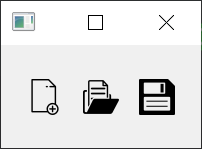
Image quality is not perfect, but much better than video. Above image is slightly bigger than actual size.
I wish i know how to resize the video and image which are dropped on the README.md.
1 maintainer

Metadata
1 maintainer
Release files for pyqt-svg-icon-pushbutton 0.0.15
For a detailed explanation of source distributions (sdists) and built distributions (wheels), please see the package formats documentation.
Source distribution (sdist)
| File | Size | Uploaded | |
|---|---|---|---|
| pyqt-svg-icon-pushbutton-0.0.15.tar.gz | 4.4 kB | Details |
Built distribution (wheel)
| File | Interpreter | ABI | Platform | Reset |
|---|---|---|---|---|
| pyqt_svg_icon_pushbutton-0.0.15-py3-none-any.whl | Python 3 | none | any | Details |
Total release size: 9.6 kB














