
pyqt-transparent-centralwidget-window
PyQt window which can set the QMainWindow as main widget and make central widget of QMainWindow transparent. Simply put, frame with no image.
Frame will be removed when full screen is being activated.
This module directly inherits the pyqt-custom-titlebar-window.
Requirements
PyQt5 >= 5.15
Setup
python -m pip install pyqt-transparent-centralwidget-window
Included Package
- pyqt-custom-titlebar-window - Parent widget
Example
Code Sample
from PyQt5.QtWidgets import QMainWindow, QMenuBar, QMenu, QApplication

from pyqt_transparent_centralwidget_window import TransparentCentralWidgetWindow


class MainWindow(QMainWindow):

    def __init__(self):

        super().__init__()

        self.__initUi()


    def __initUi(self):

        menuBar = QMenuBar()

        filemenu = QMenu('File', self)

        menuBar.addMenu(filemenu)

        self.setMenuBar(menuBar)


if __name__ == "__main__":

    import sys


    app = QApplication(sys.argv)

    example = TransparentCentralWidgetWindow(MainWindow())

    example.setButtons()

    example.show()

    app.exec_()
Result
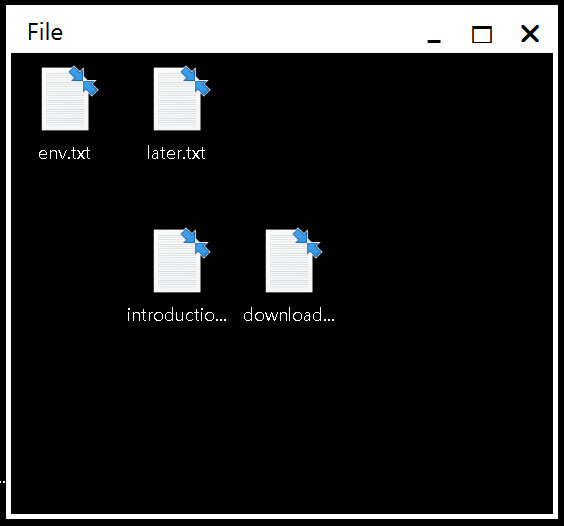
Example by App
1 maintainer

Metadata
1 maintainer
Release files for pyqt-transparent-centralwidget-window 0.0.13
For a detailed explanation of source distributions (sdists) and built distributions (wheels), please see the package formats documentation.
Source distribution (sdist)
| File | Size | Uploaded | |
|---|---|---|---|
| pyqt_transparent_centralwidget_window-0.0.13.tar.gz | 3.3 kB | Details |
Built distribution (wheel)
| File | Interpreter | ABI | Platform | Reset |
|---|---|---|---|---|
| pyqt_transparent_centralwidget_window-0.0.13-py3-none-any.whl | Python 3 | none | any | Details |
Total release size: 7.2 kB
Release files / pyqt_transparent_centralwidget_window-0.0.13.tar.gz
| Download URL | pyqt_transparent_centralwidget_window-0.0.13.tar.gz |
|---|---|
| Size | 3.3 kB |
| Tags | Source |
|
SHA-256 checksum How to use checksums |
4eba5c9f7c1f300cfc7e2204c7f6af8ed55ea4cfd73e5219b675ef0f774e0cd8
|
|
BLAKE2b-256 checksum How to use checksums |
47d25e1c2da668c089cc4c82e91c14ea9c909b369f61cf33698c60b13704be7f
|
| Upload date | |
|
Uploaded using Trusted Publishing? What is trusted publishing? |
No |
| Uploaded via |
twine/5.1.1 CPython/3.12.2
|
Release files / pyqt_transparent_centralwidget_window-0.0.13-py3-none-any.whl
| Download URL | pyqt_transparent_centralwidget_window-0.0.13-py3-none-any.whl |
|---|---|
| Size | 3.9 kB |
| Tags | Python 3 |
|
SHA-256 checksum How to use checksums |
2e8d3c9330afa5ca10abe7e0d06c78c574f9b08dd8ecae262f1e2de3fdfccec4
|
|
BLAKE2b-256 checksum How to use checksums |
aff5273c75c593afebc8fd2e05c898b63c342fd8621918be9d65d161d01c7e52
|
| Upload date | |
|
Uploaded using Trusted Publishing? What is trusted publishing? |
No |
| Uploaded via |
twine/5.1.1 CPython/3.12.2
|














