
qt-tile-layout

A tile layout for PyQt where you can put any widget in a tile. The user is then able to drag and drop the tiles and resize them
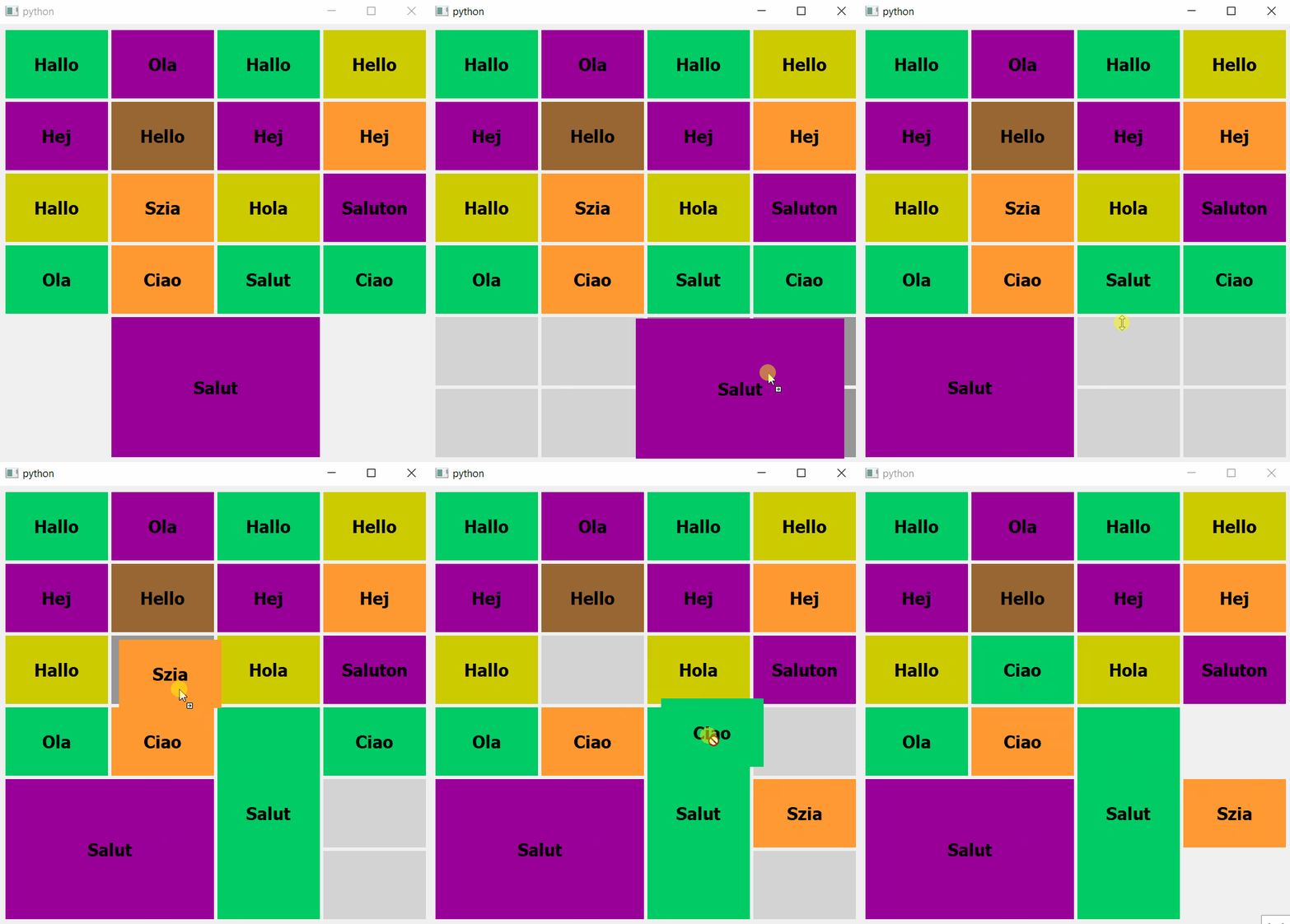
Quick example
Just launch the test.py script to have a first look (be sure to have installed PyQt5 from the requirements.txt file).
You can have an overview of how to use the different methods in this script.
Moreover, you can change the value of static_layout variable to False to experiment a tile layout where the tile sizes are dynamics with the parent widget size (like a classic layout)
If you are interested about drag and drop widgets between several QTileLayouts, check the testLink.py script.
Create and use a tile layout
First, you have to install the PyPi package:
pip install pyqt5-tile-layout
And import the QTileLayout:
from QTileLayout import QTileLayout
Then, let's create a tile layout with 8 rows and 5 columns.
We also give the vertical and horizontal spawn in pixel:
layout = QTileLayout(
    rowNumber=8,
    columnNumber=5,
    verticalSpawn=100,
    horizontalSpan=150,
    verticalSpacing=5,
    horizontalSpacing=5,
)
We can now add a widget in a specific position: it's the same as the grid layout:
layout.addWidget(
    widget=QtWidgets.QLabel('Hello world'),
    fromRow=3,
    fromColumn=2,
    rowSpan=1,
    columnSpan=2,
)
Finally, if you put your layout into a window, you will be able to drag and drop the above widget and resize its
Documentation
QTileLayout(int fromRow, int fromColumn, int rowSpan, int columnSpan, int verticalSpacing, int horizontalSpacing)
Constructs a new tile layout
Methods:
acceptDragAndDrop(bool value)
Allows or not the drag and drop of tiles in the layout
acceptResizing(bool value)
Allows or not the resizing of tiles in the layout
activateFocus(bool focus)
Activates or not the widget focus after drag & drop or resize. This feature can lead to unexpected behaviours in some cases, please set focus on false if you notice any of them
addcolumns(int columnNumber)
Adds columns at the right of the layout
addRows(int rowNumber)
Adds rows at the bottom of the layout
addWidget(QWidget widget, int fromRow, int fromColumn, int rowSpan, int columnSpan)
Adds the given widget to the layout, spanning multiple rows/columns. The tile will start at fromRow, fromColumn spanning rowSpan rows and columnSpan columns
columnCount() -> int
Returns the number of column in the layout
columnsMinimumwidth() -> int
Returns the minimal tile width of span one
getId() -> str
Returns the layout id
horizontalSpacing() -> int
Returns the horizontal spacing between two tiles
linkLayout(QTileLayout layout)
Allows the drag and drop between several layouts (see testLink.py)
removecolumns(int columnNumber)
Removes columns at the right of the layout, raises an error if a widget is in the target area
removeRows(int rowNumber)
Adds rows at the bottom of the layout, raises an error if a widget is in the target area
removeWidget(QWidget widget)
Removes the given widget from the layout
rowCount() -> int
Returns the number of row in the layout
rowsMinimumHeight() -> int
Returns the minimal tile height of span one
setColorDragAndDrop(tuple color)
Sets the RGB color of the tiles during drag and drop
setColorIdle(tuple color)
Sets the default RGB color of the tiles
setColorResize(tuple color)
Sets the RGB color of the tiles during resizing
setColorEmptyCheck(tuple color)
Sets the RGB color of the tiles where the dragged tile fits during drag and drop
setColumnsWidth(int width)
Sets the tiles width (in pixels) of span one
setColumnsMinimumWidth(int width)
Sets the minimum tiles width (in pixels) of span one
setCursorGrab(QtCore.Qt.CursorShape value)
Changes the cursor shape when it is possible to drag a tile
setCursorIdle(QtCore.Qt.CursorShape value)
Changes the cursor shape when it is over a tile
setCursorResizeHorizontal(QtCore.Qt.CursorShape value)
Changes the cursor shape when it is possible to resize a tile horizontally
setCursorResizeVertical(QtCore.Qt.CursorShape value)
Changes the cursor shape when it is possible to resize a tile vertically
setHorizontalSpacing(int spacing)
Changes the horizontal spacing between two tiles
setRowsHeight(int height)
Sets the tiles height (in pixels) of span one
setRowsMinimumHeight(int height)
Sets the minimum tiles height (in pixels) of span one
setVerticalSpacing(int spacing)
Changes the vertical spacing between two tiles
tileRect(int row, int column) -> QRect
Returns the geometry of the tile at (row, column)
unLinkLayout(QTileLayout layout)
Forbids the drag and drop between several layouts (see testLink.py)
verticalSpacing() -> int
Returns the vertical spacing between two tiles
widgetList() -> list
Returns the widgets that are currently in the layout
Signals:
tileMoved(QWidget widget, str fromLayoutId, str toLayoutId, int fromRow, int fromColumn, int toRow, int toColumn)
Emits when a tile is moved successfully. When the source layout is not the same than the destination one, the signal is emitted from the destination layout
tileResized(QWidget widget, int fromRow, int fromColumn, int rowSpan, int columnSpan)
Emits when a tile is resized successfully
Last word
Feel free to use this layout and to notice me if there are some bugs or useful features to add
1 maintainer

Metadata
1 maintainer
Release files for pyqt5-tile-layout 0.1.7
For a detailed explanation of source distributions (sdists) and built distributions (wheels), please see the package formats documentation.
Source distribution (sdist)
| File | Size | Uploaded | |
|---|---|---|---|
| pyqt5-tile-layout-0.1.7.tar.gz | 11.9 kB | Details |
Built distribution (wheel)
| File | Interpreter | ABI | Platform | Reset |
|---|---|---|---|---|
| pyqt5_tile_layout-0.1.7-py3-none-any.whl | Python 3 | none | any | Details |
Total release size: 35.0 kB
Release files / pyqt5-tile-layout-0.1.7.tar.gz
| Download URL | pyqt5-tile-layout-0.1.7.tar.gz |
|---|---|
| Size | 11.9 kB |
| Tags | Source |
|
SHA-256 checksum How to use checksums |
293b3a23b39857bb813819a59540bc757bc7eee308fba1965ed301819934d288
|
|
BLAKE2b-256 checksum How to use checksums |
9ce1e170ed785e1a627527fa8267231f7290c9028d8fb1a5e24236fc790020ea
|
| Upload date | |
|
Uploaded using Trusted Publishing? What is trusted publishing? |
No |
| Uploaded via |
twine/3.4.1 importlib_metadata/4.6.1 pkginfo/1.7.1 requests/2.25.1 requests-toolbelt/0.9.1 tqdm/4.61.2 CPython/3.9.6
|
Release files / pyqt5_tile_layout-0.1.7-py3-none-any.whl
| Download URL | pyqt5_tile_layout-0.1.7-py3-none-any.whl |
|---|---|
| Size | 23.0 kB |
| Tags | Python 3 |
|
SHA-256 checksum How to use checksums |
8975c43b70bf43861985f00d0c8564472c3061dbf72836f399c8d86642dbaabd
|
|
BLAKE2b-256 checksum How to use checksums |
fb4ff5d1bfe6c806ce6a5e55ad112304176a41eaf992ee43ac75077f539a7cbd
|
| Upload date | |
|
Uploaded using Trusted Publishing? What is trusted publishing? |
No |
| Uploaded via |
twine/3.4.1 importlib_metadata/4.6.1 pkginfo/1.7.1 requests/2.25.1 requests-toolbelt/0.9.1 tqdm/4.61.2 CPython/3.9.6
|














