
PyQt Toast


Language: ➡️English | 中文
An enhanced fork of pyqt-toast-notification with additional features and improvements
Note: This is an enhanced fork of the original pyqt-toast-notification by Niklas Henning. All credit for the original work goes to the original author.
✨ Key Features
- Modern Margin API - Flexible and efficient margin management with multiple input formats
- Advanced Animation Control - Independent position and animation direction control
- Performance Optimized - Cached stylesheets, regex patterns, and optimized rendering
- Multi-toast Support - Show multiple toasts simultaneously with intelligent queueing
- 7 Position Options - Flexible positioning including screen center
- Multi-screen Support - Works seamlessly across multiple monitors
- Widget-relative Positioning - Position toasts relative to specific widgets
- Modern UI - Fully customizable appearance with preset styles
- Cross-platform - Works with
PyQt5,PyQt6,PySide2, andPySide6
Installation
Enhanced Version (This Fork)
Install the enhanced version with additional features:
pip install pyqttoast-enhanced
Original Version (Stable)
If you want to use the original author's stable version:
pip install pyqt-toast-notification
Development Installation
For development or to get the latest features:
git clone https://github.com/Cassianvale/pyqttoast.git
cd pyqttoast
pip install -e .

1. **Clone this repository:**
```bash
git clone https://github.com/Cassianvale/pyqttoast.git
cd pyqttoast
- Install dependencies:
pip install -r requirements.txt
- Install in development mode:
pip install -e .
- Or run directly without installation:
# Add project root directory to Python path
import sys
sys.path.insert(0, '/path/to/pyqttoast')
from src.pyqttoast import Toast, ToastPreset
Note: This project includes modern margin API, performance optimizations, and other enhancements not available in the original version.
Usage
Import the Toast class, instantiate it, and show the toast notification with the show() method:
from PyQt6.QtWidgets import QMainWindow, QPushButton
from pyqttoast import Toast, ToastPreset


class Window(QMainWindow):
    def __init__(self):
        super().__init__(parent=None)

        # Add button and connect click event
        self.button = QPushButton(self)
        self.button.setText('Show toast')
        self.button.clicked.connect(self.show_toast)

    # Shows a toast notification every time the button is clicked
    def show_toast(self):
        toast = Toast(self)
        toast.setDuration(5000)  # Hide after 5 seconds
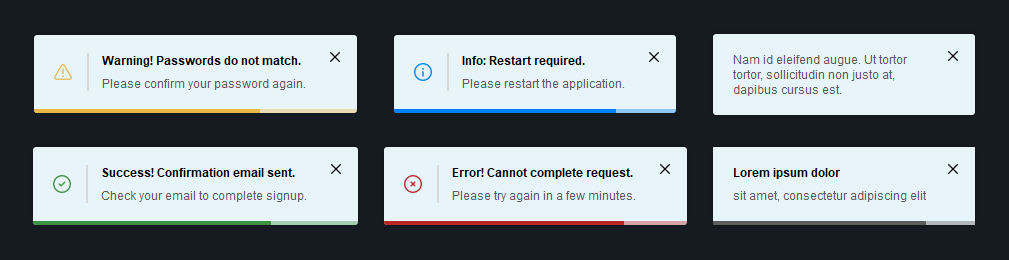
        toast.setTitle('Success! Confirmation email sent.')
        toast.setText('Check your email to complete signup.')
        toast.applyPreset(ToastPreset.SUCCESS)  # Apply style preset
        toast.show()
IMPORTANT:
An instance ofToastcan only be shown once. If you want to show another one, even if the content is exactly the same, you have to create another instance.
Customization
- Setting the position of the toasts (static):
Toast.setPosition(ToastPosition.BOTTOM_MIDDLE) # Default: ToastPosition.BOTTOM_RIGHT
AVAILABLE POSITIONS:
BOTTOM_LEFT,BOTTOM_MIDDLE,BOTTOM_RIGHT,TOP_LEFT,TOP_MIDDLE,TOP_RIGHT,CENTER
- Setting whether the toasts should always be shown on the main screen (static):
Toast.setAlwaysOnMainScreen(True) # Default: False
- Positioning the toasts relative to a widget instead of a screen (static):
Toast.setPositionRelativeToWidget(some_widget) # Default: None
- Setting a limit on how many toasts can be shown at the same time (static):
Toast.setMaximumOnScreen(5) # Default: 3
If you try to show more toasts than the maximum amount on screen, they will get added to a queue and get shown as soon as one of the currently showing toasts is closed.
- Setting the vertical spacing between the toasts (static):
Toast.setSpacing(20) # Default: 10
- Setting the x and y offset of the toast position (static):
Toast.setOffset(30, 55) # Default: 20, 45
- Making the toast show forever until it is closed:
toast.setDuration(0) # Default: 5000
- Enabling or disabling the duration bar:
toast.setShowDurationBar(False) # Default: True
- Adding an icon:
toast.setIcon(ToastIcon.SUCCESS)  # Default: ToastIcon.INFORMATION
toast.setShowIcon(True)           # Default: False

# Or setting a custom icon:
toast.setIcon(QPixmap('path/to/your/icon.png'))

# If you want to show the icon without recoloring it, set the icon color to None:
toast.setIconColor(None)  # Default: #5C5C5C
AVAILABLE ICONS:
SUCCESS,WARNING,ERROR,INFORMATION,CLOSE
- Setting the icon size:
toast.setIconSize(QSize(14, 14)) # Default: QSize(18, 18)
- Enabling or disabling the icon separator:
toast.setShowIconSeparator(False) # Default: True
- Setting the close button alignment:
toast.setCloseButtonAlignment(ToastButtonAlignment.MIDDLE) # Default: ToastButtonAlignment.TOP
AVAILABLE ALIGNMENTS:
TOP,MIDDLE,BOTTOM
- Enabling or disabling the close button:
toast.setShowCloseButton(False) # Default: True
- Customizing the duration of the fade animations (milliseconds):
toast.setFadeInDuration(100)   # Default: 250
toast.setFadeOutDuration(150)  # Default: 250
- Controlling animation direction:
toast.setAnimationDirection(ToastAnimationDirection.FROM_LEFT) # Default: ToastAnimationDirection.AUTO
AVAILABLE DIRECTIONS:
AUTO- Direction based on toast position (backward compatible)
FROM_TOP- Slide in/out from top
FROM_BOTTOM- Slide in/out from bottom
FROM_LEFT- Slide in/out from left
FROM_RIGHT- Slide in/out from right
FADE_ONLY- Pure opacity animation, no position movement
- Enabling or disabling duration reset on hover:
toast.setResetDurationOnHover(False) # Default: True
- Making the corners rounded:
toast.setBorderRadius(3) # Default: 0
- Setting custom colors:
toast.setBackgroundColor(QColor('#292929'))       # Default: #E7F4F9
toast.setTitleColor(QColor('#FFFFFF'))            # Default: #000000
toast.setTextColor(QColor('#D0D0D0'))             # Default: #5C5C5C
toast.setDurationBarColor(QColor('#3E9141'))      # Default: #5C5C5C
toast.setIconColor(QColor('#3E9141'))             # Default: #5C5C5C
toast.setIconSeparatorColor(QColor('#585858'))    # Default: #D9D9D9
toast.setCloseButtonIconColor(QColor('#C9C9C9'))  # Default: #000000
- Setting custom fonts:
# Init font
font = QFont('Times', 10, QFont.Weight.Bold)

# Set fonts
toast.setTitleFont(font)  # Default: QFont('Arial', 9, QFont.Weight.Bold)
toast.setTextFont(font)   # Default: QFont('Arial', 9)
- Modern margin management (NEW):
# Simple - all margins the same
toast.setMargins(20)

# Precise - left, top, right, bottom
toast.setMargins((15, 10, 15, 20))

# Symmetric - horizontal, vertical
toast.setMargins((25, 15))

# Partial update - only specific margins
toast.setMargins({'left': 30, 'right': 35})

# Different component margins
toast.setMargins(10, 'icon')           # Icon margins
toast.setMargins(5, 'text_section')   # Text section margins
toast.setMargins(8, 'close_button')   # Close button margins

# Fine-tune existing margins
toast.adjustMargins(top=8, bottom=12)
toast.adjustMargins('icon', left=5, right=10)
MARGIN TYPES:
content(default),icon,icon_section,text_section,close_button
- Applying a style preset:
toast.applyPreset(ToastPreset.ERROR)
AVAILABLE PRESETS:
SUCCESS,WARNING,ERROR,INFORMATION,SUCCESS_DARK,WARNING_DARK,ERROR_DARK,INFORMATION_DARK
- Setting toast size constraints:
# Minimum and maximum size
toast.setMinimumWidth(100)
toast.setMaximumWidth(350)
toast.setMinimumHeight(50)
toast.setMaximumHeight(120)

# Fixed size (not recommended)
toast.setFixedSize(QSize(350, 80))
Other customization options:
| Option | Description | Default |
|---|---|---|
setFixedScreen() |
Fixed screen where the toasts will be shown (static) | None |
setMovePositionWithWidget() |
Whether the toasts should move with widget if positioned relative to a widget | True |
setIconSeparatorWidth() |
Width of the icon separator that separates the icon and text section | 2 |
setCloseButtonIcon() |
Icon of the close button | ToastIcon.CLOSE |
setCloseButtonIconSize() |
Size of the close button icon | QSize(10, 10) |
setCloseButtonSize() |
Size of the close button | QSize(24, 24) |
setStayOnTop() |
Whether the toast stays on top of other windows even when they are focused | True |
setTextSectionSpacing() |
Vertical spacing between the title and the text | 8 |
API Documentation
For complete API reference and advanced usage examples, see:
- Toast API Reference Table (English) - Detailed documentation with examples
Demo
https://github.com/niklashenning/pyqt-toast/assets/58544929/f4d7f4a4-6d69-4087-ae19-da54b6da499d
The demos for PyQt5, PyQt6, and PySide6 can be found in the demo folder.
Tests
Installing the required test dependencies PyQt6, pytest, and coveragepy:
pip install PyQt6 pytest coverage
To run the tests with coverage, clone this repository, go into the main directory and run:
coverage run -m pytest
coverage report --ignore-errors -m
License
This software is licensed under the MIT license.
1 maintainer

Metadata
1 maintainer
Release files for pyqttoast-enhanced 2.0.0
For a detailed explanation of source distributions (sdists) and built distributions (wheels), please see the package formats documentation.
Source distribution (sdist)
| File | Size | Uploaded | |
|---|---|---|---|
| pyqttoast_enhanced-2.0.0.tar.gz | 79.5 kB | Details |
Built distribution (wheel)
| File | Interpreter | ABI | Platform | Reset |
|---|---|---|---|---|
| pyqttoast_enhanced-2.0.0-py3-none-any.whl | Python 3 | none | any | Details |
Total release size: 125.4 kB
Release files / pyqttoast_enhanced-2.0.0.tar.gz
| Download URL | pyqttoast_enhanced-2.0.0.tar.gz |
|---|---|
| Size | 79.5 kB |
| Tags | Source |
|
SHA-256 checksum How to use checksums |
c289761990636c8e8c460350b4375d6859517ec73b43aa732292c08b9fd56960
|
|
BLAKE2b-256 checksum How to use checksums |
a91b2c474c41d443a6aaccb19a019009c8b6c593eae970d9bd994893b3fec791
|
| Upload date | |
|
Uploaded using Trusted Publishing? What is trusted publishing? |
No |
| Uploaded via |
twine/6.1.0 CPython/3.9.23
|
Release files / pyqttoast_enhanced-2.0.0-py3-none-any.whl
| Download URL | pyqttoast_enhanced-2.0.0-py3-none-any.whl |
|---|---|
| Size | 45.9 kB |
| Tags | Python 3 |
|
SHA-256 checksum How to use checksums |
726d8440e87384afd89948085966cb9a025683fd3872cdf29d08293f0de7dc75
|
|
BLAKE2b-256 checksum How to use checksums |
c0f4d2c99c6672d377781ad11c62dcbf00b55e31494357a90e774c54eeae7009
|
| Upload date | |
|
Uploaded using Trusted Publishing? What is trusted publishing? |
No |
| Uploaded via |
twine/6.1.0 CPython/3.9.23
|













