
PyQt Tooltip


A modern and fully customizable tooltip library for PyQt and PySide
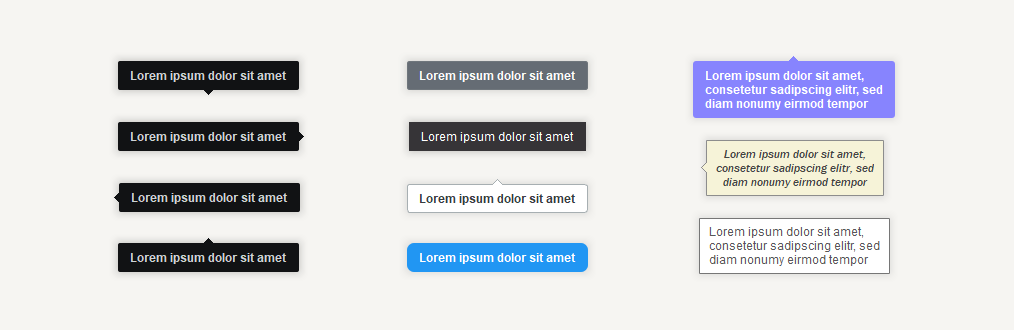
Features
- Fixed and automatic placement
- Supports fallback placements
- Customizable triangle
- Customizable animations and delays
- Fully customizable and modern UI
- Works with
PyQt5,PyQt6,PySide2, andPySide6
Installation
pip install pyqttooltip
Usage
from PyQt6.QtWidgets import QMainWindow, QPushButton
from pyqttooltip import Tooltip, TooltipPlacement


class Window(QMainWindow):
    def __init__(self):
        super().__init__(parent=None)

        # Add button
        self.button = QPushButton('Button', self)

        # Add tooltip to button
        self.tooltip = Tooltip(self.button, 'This is a tooltip')
The tooltip will automatically be shown while hovering the widget. If you want to manually
show and hide the tooltip, you can use the show() and hide() methods:
tooltip.show()
tooltip.hide()
To delete a tooltip, you can use the deleteLater() method:
tooltip.deleteLater()
To get notified when a tooltip gets shown or hidden, you can subscribe to the shown and hidden signals:
tooltip.shown.connect(lambda: print('shown'))
tooltip.hidden.connect(lambda: print('hidden'))
Customization
- Setting the widget:
tooltip.setWidget(widget) # Default: None
- Setting the text:
tooltip.setText('Text of the tooltip') # Default: ''
- Setting the placement:
tooltip.setPlacement(TooltipPlacement.RIGHT) # Default: TooltipPlacement.AUTO
AVAILABLE PLACEMENTS:
AUTO,LEFT,RIGHT,TOP,BOTTOM
- Setting the fallback placements:
tooltip.setFallbackPlacements([TooltipPlacement.TOP, TooltipPlacement.BOTTOM]) # Default: []
If the tooltip doesn't fit on the screen with the primary placement, one of the fallback placements will be chosen instead in the order of the provided list.
To get the current placement of the tooltip, you can use thegetActualPlacement()method.
- Enabling or disabling the triangle:
tooltip.setTriangleEnabled(False) # Default: True
- Setting the size of the triangle:
tooltip.setTriangleSize(7) # Default: 5
- Setting a duration:
tooltip.setDuration(1000) # Default: 0
The duration is the time in milliseconds after which the tooltip will start fading out again. If the duration is set to
0, the tooltip will stay visible for as long as the widget is hovered.
- Setting the offsets:
# Setting the offset for a specific placement
tooltip.setOffsetByPlacement(TooltipPlacement.LEFT, QPoint(-10, 5))

# Using a dict that specifies the offset for each placement you want to set
offsets = {
    TooltipPlacement.LEFT:   QPoint(-10, 5),
    TooltipPlacement.RIGHT:  QPoint(10, 5),
    TooltipPlacement.TOP:    QPoint(5, -10),
    TooltipPlacement.BOTTOM: QPoint(5, 10)
}
tooltip.setOffsets(offsets)

# Setting the offsets for all the placements to a single value
tooltip.setOffsetsAll(QPoint(10, 5))
Each placement / side has its own offset to allow for full customizability. Each offset is a QPoint, which is made up of an x and y value.
By default, all the offsets are set toQPoint(0, 0).
- Adding delays to the fade in / out animations after hovering the widget:
tooltip.setShowDelay(500)  # Default: 50
tooltip.setHideDelay(500)  # Default: 50
- Setting the durations of the fade in / out animations:
tooltip.setFadeInDuration(250)   # Default: 150
tooltip.setFadeOutDuration(250)  # Default: 150
- Setting the border radius:
tooltip.setBorderRadius(0) # Default: 2
- Enabling or disabling the border:
tooltip.setBorderEnabled(True) # Default: False
- Setting custom colors:
tooltip.setBackgroundColor(QColor('#FCBA03'))   # Default: QColor('#111214')
tooltip.setTextColor(QColor('#000000'))         # Default: QColor('#CFD2D5')
tooltip.setBorderColor(QColor('#A38329'))       # Default: QColor('#403E41')
- Setting a custom font:
tooltip.setFont(QFont('Consolas', 10)) # Default: QFont('Arial', 9, QFont.Weight.Bold)
- Applying margins to the content of the tooltip:
tooltip.setMargins(QMargins(10, 8, 10, 8)) # Default: QMargins(12, 8, 12, 7)
- Setting a maximum width:
tooltip.setMaximumWidth(150) # Default: 16777215 (QWIDGETSIZE_MAX)
- Enabling or disabling text centering for wrapped text:
tooltip.setTextCenteringEnabled(False) # Default: True
- Enabling or disabling the drop shadow:
tooltip.setDropShadowEnabled(False) # Default: True
- Changing the drop shadow strength:
tooltip.setDropShadowStrength(3.5) # Default: 2.0
- Making the tooltip translucent:
tooltip.setOpacity(0.8) # Default: 1.0
Other customization options:
| Option | Description | Default |
|---|---|---|
setShowingOnDisabled() |
Whether the tooltips should also be shown on disabled widgets | False |
setFadeInEasingCurve() |
The easing curve of the fade in animation | QEasingCurve.Type.Linear |
setFadeOutEasingCurve() |
The easing curve of the fade out animation | QEasingCurve.Type.Linear |
setMarginLeft() |
Set left margin individually | 12 |
setMarginRight() |
Set right margin individually | 12 |
setMarginTop() |
Set top margin individually | 8 |
setMarginBottom() |
Set bottom margin individually | 7 |
Demo
https://github.com/user-attachments/assets/fa768d30-f3cc-4883-aa8b-fed3a8824b23
The demos for PyQt5, PyQt6, and PySide6 can be found in the demo folder.
To keep the demo simple, only the most important features are included. To get an overview of all the customization options, check out the documentation above.
Tests
Installing the required test dependencies PyQt6, pytest, and coveragepy:
pip install PyQt6 pytest coverage
To run the tests with coverage, clone this repository, go into the main directory and run:
coverage run -m pytest
coverage report --ignore-errors -m
License
This software is licensed under the MIT license.
1 maintainer

Metadata
1 maintainer
Release files for pyqttooltip 1.0.0
For a detailed explanation of source distributions (sdists) and built distributions (wheels), please see the package formats documentation.
Source distribution (sdist)
| File | Size | Uploaded | Provenance | |
|---|---|---|---|---|
| pyqttooltip-1.0.0.tar.gz | 15.8 kB | Without provenance | Details |
Built distribution (wheel)
| File | Interpreter | ABI | Platform | Reset |
|---|---|---|---|---|
| pyqttooltip-1.0.0-py3-none-any.whl | Python 3 | none | any | Details |
Total release size: 31.2 kB
Release files / pyqttooltip-1.0.0.tar.gz
| Download URL | pyqttooltip-1.0.0.tar.gz |
|---|---|
| Size | 15.8 kB |
| Tags | Source |
|
SHA-256 checksum How to use checksums |
4f6056c3c8d53a9873b3337905d669ba5632729ace8935d55d45fec2614a9f01
|
|
BLAKE2b-256 checksum How to use checksums |
562d1db43cbe060c520de42b031eacad4828946c47d63b58fa75dac629b4ac41
|
| Upload date | |
|
Uploaded using Trusted Publishing? What is trusted publishing? |
No |
| Uploaded via |
twine/5.0.0 CPython/3.11.3
|
Release files / pyqttooltip-1.0.0-py3-none-any.whl
| Download URL | pyqttooltip-1.0.0-py3-none-any.whl |
|---|---|
| Size | 15.4 kB |
| Tags | Python 3 |
|
SHA-256 checksum How to use checksums |
a2d81b0544baea3cb8f171d908c5976125322de7721a634e5bd5f9d713bb442f
|
|
BLAKE2b-256 checksum How to use checksums |
5145627fbd7a6dddf3a55010607e7fb354755b9ae792991a8e66a588f6dfa2a0
|
| Upload date | |
|
Uploaded using Trusted Publishing? What is trusted publishing? |
No |
| Uploaded via |
twine/5.0.0 CPython/3.11.3
|
Security for pyqttooltip 1.0.0
Provenance
Provenance describes where a file came from. On PyPI, provenance is shared via attestations, which provide a verifiable record of the build or publishing details. View details, limitations and caveats.
No provenance found
None of the files in this release were uploaded with provenance metadata.
A note on package security
PyPI is a repository for distributing packages, not a service for auditing them. While third-party security researchers and our staff do their best to detect and remove malicious packages, PyPI cannot guarantee the quality, security or suitability of any given package.
To learn more about protecting yourself from malicious actors, visit our package security documentation.













