
AI-powered QA and Security Analysis CLI Tool

Project description
PyQualify - AI-Powered QA & Security Analysis Tool
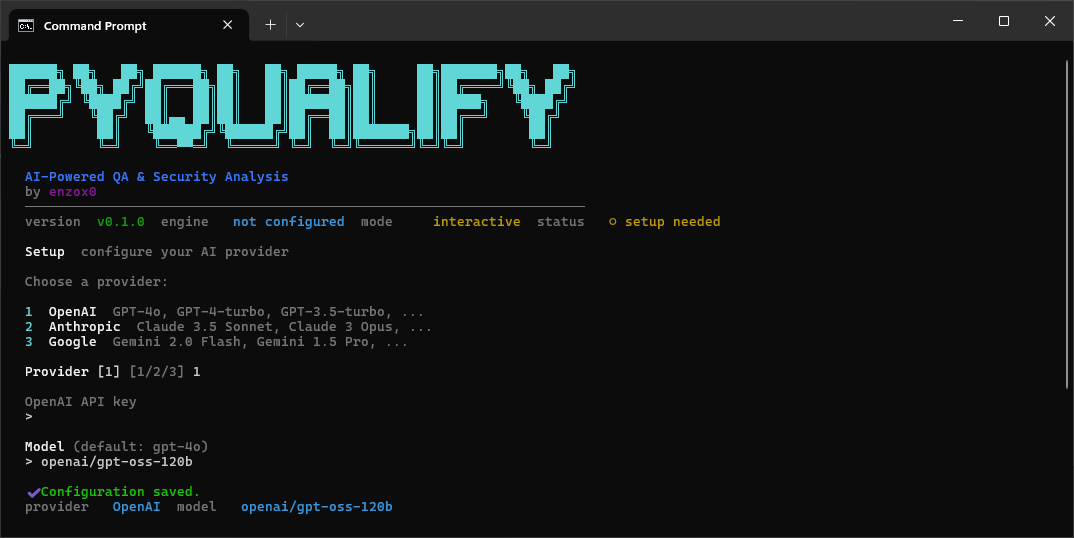
PyQualify is a command-line tool that performs automated quality assurance and security analysis across three modes: Web, Code, and API. It leverages LLM-based intelligence to classify findings, produce severity ratings, and generate actionable recommendations.
Features
- Web Analysis - Security headers, form CSRF detection, SEO completeness, accessibility compliance, performance signals, broken link detection, CAPTCHA checks, HTTP request smuggling, case-sensitivity bypass detection, JSON hijacking, DOM-based XSS, open redirect, and server version disclosure
- Code Analysis - Security vulnerabilities, bug risk detection, code quality metrics, test gap identification, dependency risk assessment, audit log checks, case-sensitivity bypass detection, known CVE detection, and password policy enforcement
- API Analysis - Authentication enforcement, response integrity, schema conformance, injection vector testing, rate limiting verification, audit log manipulation, CAPTCHA bypass, HTTP request smuggling, case-sensitivity bypass, JSON hijacking, open redirect, server version disclosure, internal IP leakage, and application-level DoS
- AI-Powered Classification - Findings are processed through an LLM for intelligent severity assignment, CWE/OWASP mapping, and contextual recommendations
- Scoring & Grading - Numeric score (0-100), letter grade (A-F), and risk level for every analysis run
- PDF Reports - Professionally formatted PDF reports saved automatically to
~/Documents/PyQualify/ - Tool Filtering - Enable or disable individual checks per run with
--onlyand--disable - Color-Coded CLI Output - Severity-based coloring with graceful fallback for terminals without color support
- Hierarchical Configuration - TOML config file, environment variables, and CLI arguments with clear precedence
- Interactive Config Editor - Nano-like terminal editor for managing configuration
Requirements
- uv - used for Python version management, dependency locking, and running the project
- An API key for one of the supported AI providers:
- OpenAI - GPT-4o, GPT-4-turbo, GPT-3.5-turbo, ...
- Anthropic - Claude 3.5 Sonnet, Claude 3 Opus, ... (
uv add anthropicrequired) - Google - Gemini 2.0 Flash, Gemini 1.5 Pro, ...
- Groq - Llama 3.3 70B, Mixtral 8x7B, ... (free API keys available at console.groq.com/keys)
Installation
Via pip (recommended)
pip install pyqualify
Via uv
uv add pyqualify
From source
git clone <repo-url> pyqualify
cd pyqualify

# Install dependencies
uv sync

# Optional: add Anthropic SDK for Claude models
uv add anthropic
First Run - Setup
Before running any analysis, configure your AI provider:
uv run pyqualify setup
  Choose a provider:

  1  OpenAI      GPT-4o, GPT-4-turbo, GPT-3.5-turbo, ...
  2  Anthropic   Claude 3.5 Sonnet, Claude 3 Opus, ...
  3  Google      Gemini 2.0 Flash, Gemini 1.5 Pro, ...
  4  Groq        Llama 3.3 70B, Mixtral 8x7B, ...

  Provider [1/2/3/4]: 1

  OpenAI API key
  > sk-...

  Model (default: gpt-4o)
  >

  ✔ Configuration saved.
  provider   OpenAI  model   gpt-4o
Configuration is stored in ~/.pyqualify/config.toml. Sensitive values (API keys) are masked when listed. You can re-run setup at any time to switch providers or update your key.
Quick Start
Run setup first, then launch the interactive menu:
pyqualify setup   # one-time configuration
pyqualify         # interactive mode selector
  Select analysis mode:

  1  Web     Analyze a website for security, SEO, accessibility & performance
  2  Code    Analyze source code for vulnerabilities, quality & test gaps
  3  API     Analyze REST API endpoints for security & integrity

  Mode [1/2/3]: 1

  Target URL (e.g. https://example.com)
  > https://example.com

  Save PDF report to Documents/PyQualify/? [Y/n]: y

  Analyzing web page...
You can also pass arguments directly for scripting:
uv run pyqualify web https://example.com
uv run pyqualify code ./src --pdf
uv run pyqualify api https://api.example.com --json
Configuration
PyQualify uses a layered configuration system with the following precedence (highest wins):
- CLI arguments
- Environment variables (prefixed with
PYQUALIFY_) - Configuration file (
~/.pyqualify/config.toml)
The setup command writes to the config file. You can also manage values manually:
Setting Configuration
# Switch model after setup
uv run pyqualify config set model claude-3-5-sonnet-20241022

# List all configuration (sensitive values are masked)
uv run pyqualify config list

# Open interactive editor (not available on Windows - use config set instead)
uv run pyqualify config edit
Environment Variables
Any environment variable prefixed with PYQUALIFY_ is recognized:
export PYQUALIFY_API_KEY=sk-your-key
export PYQUALIFY_PROVIDER=openai        # openai | anthropic | google | groq
export PYQUALIFY_MODEL=gpt-4o
export PYQUALIFY_TIMEOUT=60
export PYQUALIFY_RATE_LIMIT_BURST=50
export PYQUALIFY_RATE_LIMIT_WINDOW=10
Configuration File
Located at ~/.pyqualify/config.toml:
provider    = "openai"
api_key     = "sk-your-openai-key"
model       = "gpt-4o"
timeout     = 60
max_retries = 3
retry_delay = 2.0
Commands
| Command | Description |
|---|---|
pyqualify setup |
Run first - configure AI provider and API key |
pyqualify web <url> |
Analyze a web page |
pyqualify code <path> |
Analyze source code (file or directory) |
pyqualify api <base_url> |
Analyze API endpoints |
pyqualify tools [category] |
List available tools for a category |
pyqualify config set <key> <value> |
Set a configuration value |
pyqualify config list |
List all configuration |
pyqualify config edit |
Open interactive config editor |
Common Options
| Option | Description |
|---|---|
--pdf |
Save a PDF report to ~/Documents/PyQualify/ |
--json |
Output raw JSON to stdout |
--only <tools> |
Run only the specified tools (comma-separated or repeated) |
--disable <tools> |
Skip the specified tools (comma-separated or repeated) |
--version |
Show version |
--help |
Show help |
Tool Filtering
Each analysis mode has a set of named tools that can be individually enabled or disabled:
# List all available tools
uv run pyqualify tools

# List tools for a specific mode
uv run pyqualify tools web
uv run pyqualify tools code
uv run pyqualify tools api

# Run only specific tools
uv run pyqualify web https://example.com --only security-headers,seo
uv run pyqualify api https://api.example.com --only authentication,injection

# Skip specific tools
uv run pyqualify code ./src --disable test-gaps,quality
Web tools
| Tool | Description |
|---|---|
security-headers |
Check for missing or misconfigured security headers |
forms |
Check forms for CSRF tokens and sensitive autocomplete |
seo |
Check for missing SEO elements (title, meta, OG tags) |
accessibility |
Check accessibility compliance (alt, headings, ARIA, labels) |
performance |
Check performance signals (inline scripts, lazy loading, load time) |
links |
Verify links for broken URLs and suspicious domains |
captcha |
Detect missing or weak CAPTCHA on sensitive forms |
smuggling-headers |
Check for Transfer-Encoding/Content-Length co-existence |
case-sensitivity |
Check if URL path casing changes bypass access controls |
json-hijacking |
Detect JSON hijacking vectors in HTML scripts |
open-redirect |
Detect open redirect parameters in forms and links |
server-version-disclosure |
Detect server version/technology in response headers |
dom-xss |
Detect DOM-based XSS sinks reading from URL fragments or query strings |
Code tools
| Tool | Description |
|---|---|
security |
Detect injection vulnerabilities, hardcoded secrets, insecure patterns |
bug-risks |
Detect null dereferences, uncaught exceptions, race conditions |
quality |
Detect dead code, duplicated logic, high complexity, magic numbers |
test-gaps |
Detect missing tests, weak assertions, untested branches |
dependencies |
Detect typosquatting, deprecated packages, wildcard imports |
audit-log |
Detect log injection, log suppression, audit log deletion |
case-sensitivity |
Detect missing case normalization in auth/routing comparisons |
known-vulnerabilities |
Detect imports of packages with known CVEs |
password-policy |
Detect weak or missing password policy enforcement |
API tools
| Tool | Description |
|---|---|
authentication |
Test authentication enforcement (no creds, expired/malformed tokens) |
response-integrity |
Test for information leakage and status code mismatches |
injection |
Test SQL, NoSQL, and command injection via payloads |
rate-limiting |
Test rate limiting by sending burst requests |
schema-conformance |
Validate response schema consistency across requests |
audit-log-manipulation |
Test for log injection via headers/params |
captcha-bypass |
Test if auth endpoints work without CAPTCHA |
http-request-smuggling |
Test for CL.TE / TE.CL request smuggling |
case-sensitivity |
Test for case-sensitive route/auth bypass |
json-hijacking |
Test for unprotected top-level JSON arrays |
open-redirect |
Test for open redirect via common redirect parameters |
server-version-disclosure |
Detect server version/technology in response headers |
internal-ip-leakage |
Detect private IP addresses and internal hostnames in responses |
application-dos |
Test for missing payload size and JSON depth limits |
Output
CLI Output
Results are displayed with color-coded severity levels:
- CRITICAL - Immediate action required
- HIGH - Should be addressed soon
- MEDIUM - Moderate risk
- LOW - Minor improvement opportunity
- INFO - Informational finding
A summary block shows the overall Score, Grade, and Risk Level before individual issues.
JSON Output
{
  "score": 72,
  "grade": "C",
  "risk_level": "high",
  "issues": [
    {
      "check": "missing-csp-header",
      "severity": "high",
      "title": "Missing Content-Security-Policy Header",
      "description": "The web server does not include a CSP header...",
      "evidence": "Response headers: {...}",
      "recommendation": "Add CSP header with restrictive directives...",
      "cwe": "CWE-693",
      "owasp": "A05:2021"
    }
  ],
  "summary": "Analysis found 12 issues across security and quality categories...",
  "metadata": {
    "timestamp": "2024-01-15T10:30:00Z",
    "target": "https://example.com",
    "mode": "web"
  }
}
PDF Report
The --pdf flag generates a professionally formatted PDF saved to ~/Documents/PyQualify/<target>/<timestamp>.pdf. The report includes:
- Cover page with score, grade, and risk level
- Executive summary from the AI engine
- Severity breakdown
- Full issues table with CWE/OWASP references
- Top 5 prioritized recommendations
Scoring
The scoring algorithm starts at 100 and subtracts penalties per issue:
| Severity | Penalty |
|---|---|
| CRITICAL | -20 |
| HIGH | -10 |
| MEDIUM | -5 |
| LOW | -2 |
| INFO | 0 |
The score is clamped to 0-100. Letter grades map as:
| Grade | Score Range |
|---|---|
| A | 90-100 |
| B | 80-89 |
| C | 70-79 |
| D | 60-69 |
| F | 0-59 |
Architecture
PyQualify follows a layered pipeline architecture:
CLI Layer -> Analysis Engine -> AI Engine -> Scoring -> Report Generator
Key design decisions:
- Dependency Injection - Lightweight custom container for testability
- Protocol-based interfaces - All major components implement Python protocols
- Async I/O -
httpx.AsyncClientfor all network operations - Modular analyzers - Each analysis mode is an independent module with individually toggleable tools
Development
# Install dev dependencies
uv sync --extra dev

# Run tests
uv run pytest

# Run tests with coverage
uv run pytest --cov=pyqualify --cov-report=html

# Run a specific test file
uv run pytest tests/test_scoring_engine.py

# Add a new dependency
uv add some-package

# Update the lock file
uv lock
Project Structure
pyqualify/
    pyproject.toml
    uv.lock
    README.md
    pyqualify/
        __init__.py
        __main__.py
        models.py
        container.py
        utils.py
        tool_registry.py
        cli/
        analyzers/
        ai/
        reporting/
        scoring/
        config/
        logging/
    tests/
    docs/
Dependencies
click- CLI frameworkhttpx- Async HTTP clientbeautifulsoup4+lxml- HTML parsingopenai- LLM integration (also used for Google Gemini and Groq via compatible API)jinja2- HTML template renderingreportlab- PDF report generation
License
MIT
Release history Release notifications | RSS feed


Download files
Download the file for your platform. If you're not sure which to choose, learn more about installing packages.
Source Distribution
Built Distribution
Filter files by name, interpreter, ABI, and platform.
If you're not sure about the file name format, learn more about wheel file names.
Copy a direct link to the current filters
File details
Details for the file pyqualify-0.2.0b1.tar.gz.
File metadata
- Download URL: pyqualify-0.2.0b1.tar.gz
- Upload date:
- Size: 118.5 kB
- Tags: Source
- Uploaded using Trusted Publishing? No
- Uploaded via: twine/6.2.0 CPython/3.14.5
File hashes
| Algorithm | Hash digest | |
|---|---|---|
| SHA256 |
0ebecec128f1b71089d8a5a5840f5f62e7521c454a02aafa5b98142e018dcccd
|
|
| MD5 |
2fe575fb97ffeec8b9a0d0b166edbd5f
|
|
| BLAKE2b-256 |
79c12fc6b4f86477ba4a2ea777fce8b5517888fa37f788b4c453052eebf4c8d0
|
File details
Details for the file pyqualify-0.2.0b1-py3-none-any.whl.
File metadata
- Download URL: pyqualify-0.2.0b1-py3-none-any.whl
- Upload date:
- Size: 93.0 kB
- Tags: Python 3
- Uploaded using Trusted Publishing? No
- Uploaded via: twine/6.2.0 CPython/3.14.5
File hashes
| Algorithm | Hash digest | |
|---|---|---|
| SHA256 |
d396cef42f39ef327022c3d821e2e2c3dd7b2c8927ff277270454d822718ed16
|
|
| MD5 |
b4ab35f0ce087290e49b85c110c93a76
|
|
| BLAKE2b-256 |
8ee306e87ecc94a45cbf68e792a3a7f6f69db49fe549c04a3957d63e5a2669b5
|






