
A fast quantile estimator for streamed data. Produces a quantile estimate without storing any data points.

Project description
PyQuantile
Pyquantile's main goal is to estimate a given quantile, with next to no overhead, on streaming data. The idea is that it must satisfy these conditions:
- Provide extremely fast estimation for streaming data, suitable for real-time analytics and large-scale applications.
- Low overhead regardless of the size of the data stream, with minimal CPU usage per update.
- Optimized for maximum throughput and minimize latency.
- Achieve strong accuracy for most quantiles and distributions, with error rates that are acceptable for real-world use cases.
- Incoming datapoints in the stream cannot be stored, making the estimator ideal for environments with strict memory or privacy constraints.
PyQuantile is a modified implementation of the P² algorithm. It dynamically estimates the p-th quantile of a stream of incoming data points without storing them, maintaining just a few markers and adjusting them as the data comes in.
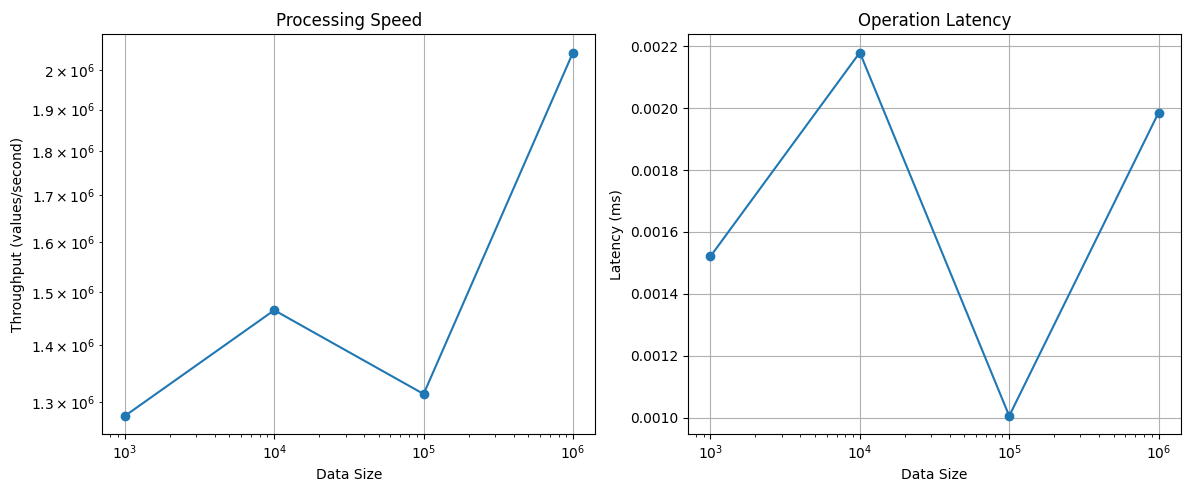
So far PyQuantile demonstrates good performance characteristics for streaming quantile estimation. Memory usage remains constant (O(1)) regardless of data volume, using only about 2 MiB of base memory with no growth even after processing millions of values. Processing speed is impressive at 1.2-2.0 million values per second with consistent sub-millisecond latency (0.001-0.002ms per operation).
- Initial memory allocation only ~2.0 MiB, which is a one-time cost
- Different quantile values (0.25 to 0.99) uses the same memory
- Processing 100 values: No additional memory
- Processing 1,000 values: No additional memory
- Processing 10,000 values: No additional memory
- Processing 100,000 values: No additional memory
- Processing 1,000,000 values: Only 0.13 MiB increase
The graph below shows how PyQuantile gets more efficient with larger data sizes. Peak performance reaches about 2 million values per second at the largest data size. The latency is generally very stable regardless of the data size.
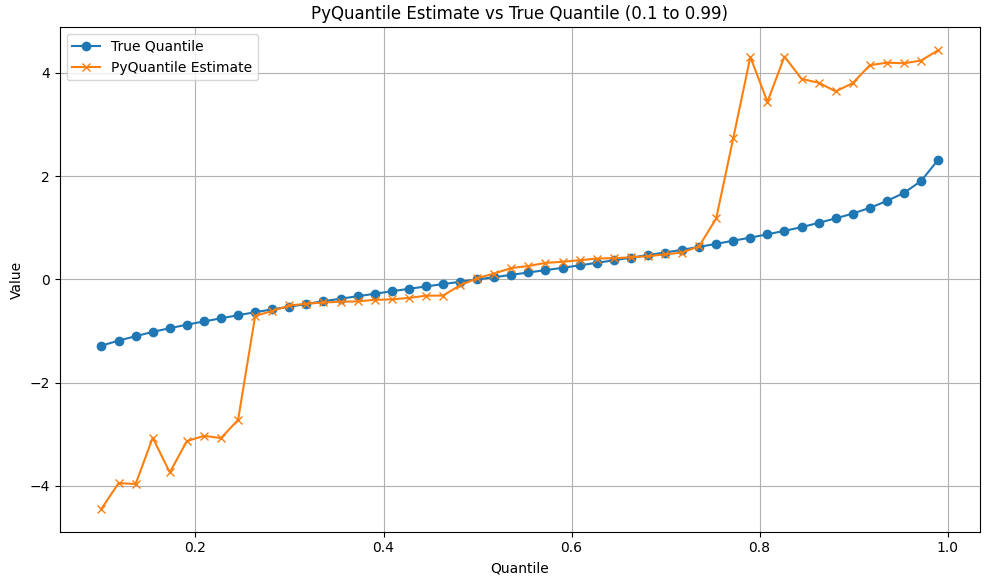
PyQuantile is accurate for central quantiles but less reliable at the distribution tails. This is a common for streaming quantile estimators, which often struggle with extreme quantiles.
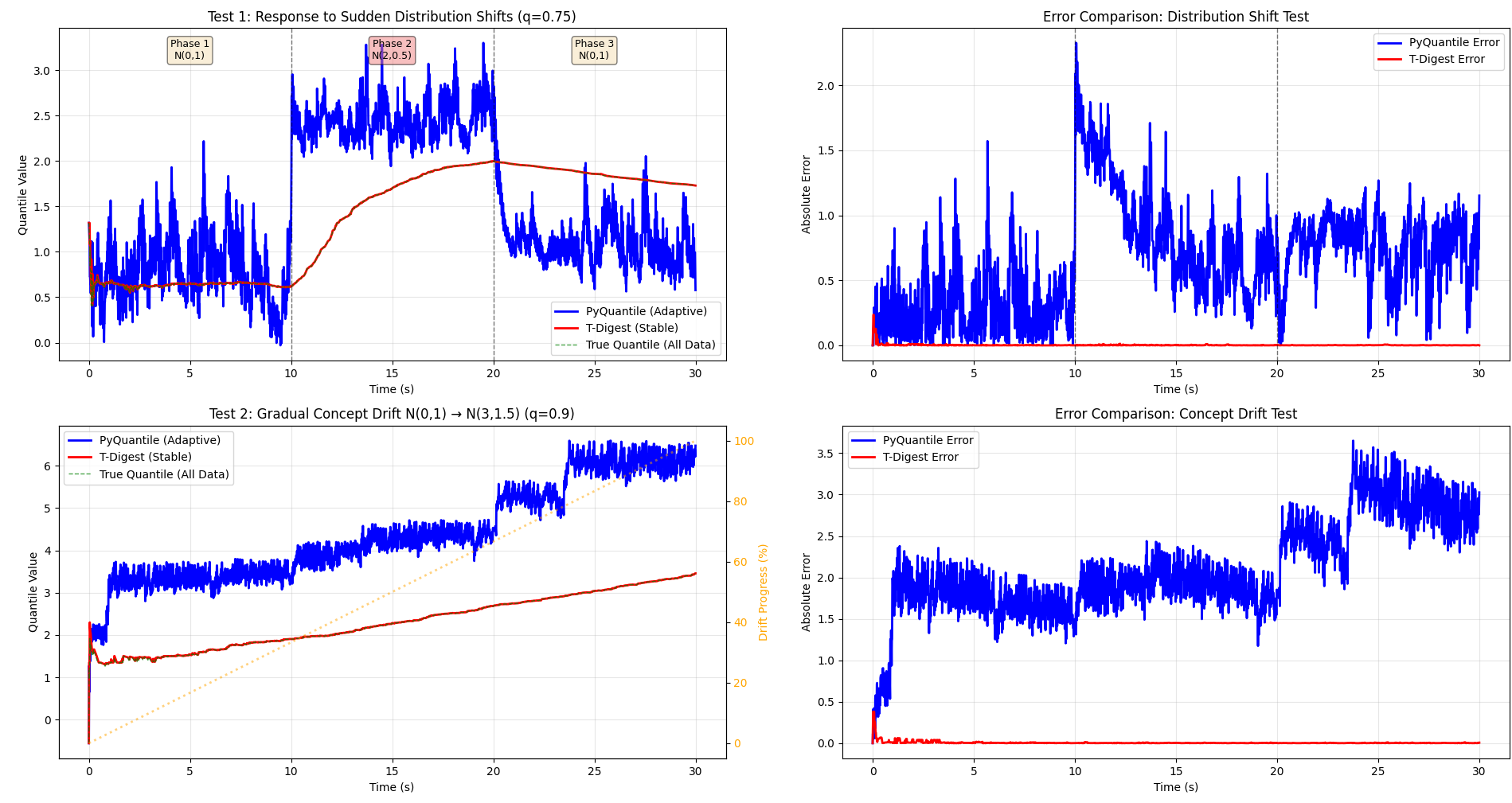
PyQuantile is adaptive, which is visible in the plots below. When the distribution suddenly shifts from N(0,1) to N(2,0.5) at t=10s, PyQuantile's blue line quickly tracks the new quantile value (jumping to ~2.5). To compare it with another estimator (albeit different) T-Digest's red line gradually drifts upward as it accumulates the new data with all historical observations. Similarly, during gradual concept drift (bottom-left plot), PyQuantile stays close to the current distribution's true quantile, maintaining a relatively constant offset, whereas T-Digest represents the aggregate quantile of all data seen so far, causing it to lag behind the actual current quantile. This makes PyQuantile ideal for non-stationary data streams where recent observations are more relevant than historical ones.
Installation
You can install PyQuantile via pip:
pip install pyquantile
Usage
Using PyQuantile is simple. Here is an example of how to import it and add samples to an estimator:
import pyquantile as pq
estimator = pq.QuantileEstimator(0.75)
Samples are added to an estimator like this:
estimator.add(10)
estimator.add(20)
estimator.add(30)
We can add samples via a loop, and .quantile() can be called at any time to get the latest estimate. The following code will simulate a stream of data for 60 seconds and plot accuracy of quantile estimates over time:
duration_seconds = 60
quantile = 0.75
stream = []
estimator = pq.QuantileEstimator(quantile)
accuracies = []
estimates = []
true_quantiles = []
timestamps = []

start = time.time()
while time.time() - start < duration_seconds:
    x = np.random.normal(loc=0, scale=1)
    stream.append(x)
    estimator.add(x)
    current_estimate = estimator.quantile()
    current_true = np.quantile(stream, quantile)
    accuracy = abs(current_estimate - current_true)
    estimates.append(current_estimate)
    true_quantiles.append(current_true)
    accuracies.append(accuracy)
    timestamps.append(time.time() - start)
    time.sleep(0.01)

plt.figure(figsize=(10, 6))
plt.plot(timestamps, estimates, label=f'Estimated {quantile} Quantile')
plt.plot(timestamps, true_quantiles, label=f'True {quantile} Quantile')
plt.plot(timestamps, accuracies, label='Absolute Error', color='green')
plt.xlabel('Time (s)')
plt.ylabel('Value')
plt.title('Quantile Estimation Accuracy Over Time')
plt.legend()
plt.show()
Kafka Integration Example
You can use PyQuantile in real-time streaming scenarios. For example, to process data from a Kafka topic:
from pyquantile import QuantileEstimator
from kafka import KafkaConsumer
import json

estimator = QuantileEstimator(0.75)
consumer = KafkaConsumer('my_topic', bootstrap_servers='localhost:9092')

for message in consumer:
	data_point = float(json.loads(message.value))
	estimator.add(data_point)
	print("Current estimate:", estimator.quantile())
You can adapt this pattern for other streaming services (RabbitMQ, AWS Kinesis, etc.) by feeding each incoming data point to estimator.add().
Development
To build and install the library locally, clone the repository and run: git clone https://github.com/richardsmythe/pyquantile.git cd pyquantile pip install .
Demo
A python file named test_pyquantile.py is included. This file demonstrates PyQuantile in action and plots the results against the exact quantile. Run it with python .\test_pyquantile.py. This simple script will show how PyQuantile performs against an exact quantile. With more data the absolute errors begin to even out the estimator becomes more accurate.
Contributing
Contributions are welcome! If you would like to contribute, please fork the repository and submit a pull request.
License
This project is licensed under the MIT License. See the LICENSE file for details.
Release history Release notifications | RSS feed


Download files
Download the file for your platform. If you're not sure which to choose, learn more about installing packages.
Source Distribution
Built Distribution
Filter files by name, interpreter, ABI, and platform.
If you're not sure about the file name format, learn more about wheel file names.
Copy a direct link to the current filters
File details
Details for the file pyquantile-0.2.1.tar.gz.
File metadata
- Download URL: pyquantile-0.2.1.tar.gz
- Upload date:
- Size: 7.9 kB
- Tags: Source
- Uploaded using Trusted Publishing? No
- Uploaded via: twine/6.1.0 CPython/3.11.9
File hashes
| Algorithm | Hash digest | |
|---|---|---|
| SHA256 |
1ccb44a5726b138112fddf1ae2b3d4b73ee47944d76bd92590b8416908454e69
|
|
| MD5 |
1ad0d6fc996d9ad1d0631cc98e69f1ca
|
|
| BLAKE2b-256 |
c5b3171824fcc44198a36aa330dea37bf6339146f1df8f8ed2617a294c481aa3
|
File details
Details for the file pyquantile-0.2.1-cp311-cp311-win_amd64.whl.
File metadata
- Download URL: pyquantile-0.2.1-cp311-cp311-win_amd64.whl
- Upload date:
- Size: 84.4 kB
- Tags: CPython 3.11, Windows x86-64
- Uploaded using Trusted Publishing? No
- Uploaded via: twine/6.1.0 CPython/3.11.9
File hashes
| Algorithm | Hash digest | |
|---|---|---|
| SHA256 |
e0d92d324108564162542ef86f04fbb5e7c3f5c8dd48d9222e35fbd85b2a7929
|
|
| MD5 |
ff71a3375817652864165ee916ea0b11
|
|
| BLAKE2b-256 |
073d55e175f5f48e0fb5939344106e1a53f8e78d9961326421274dc7019d6835
|






