
PyraFuse




Paper · Model zoo · Inference · Dataset
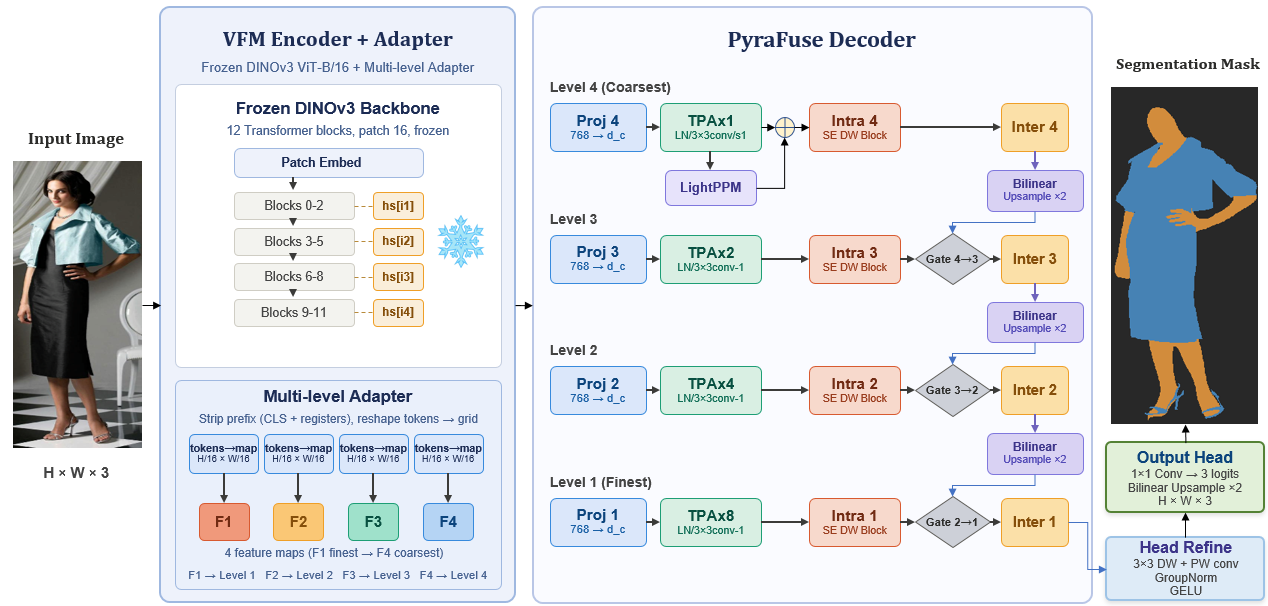
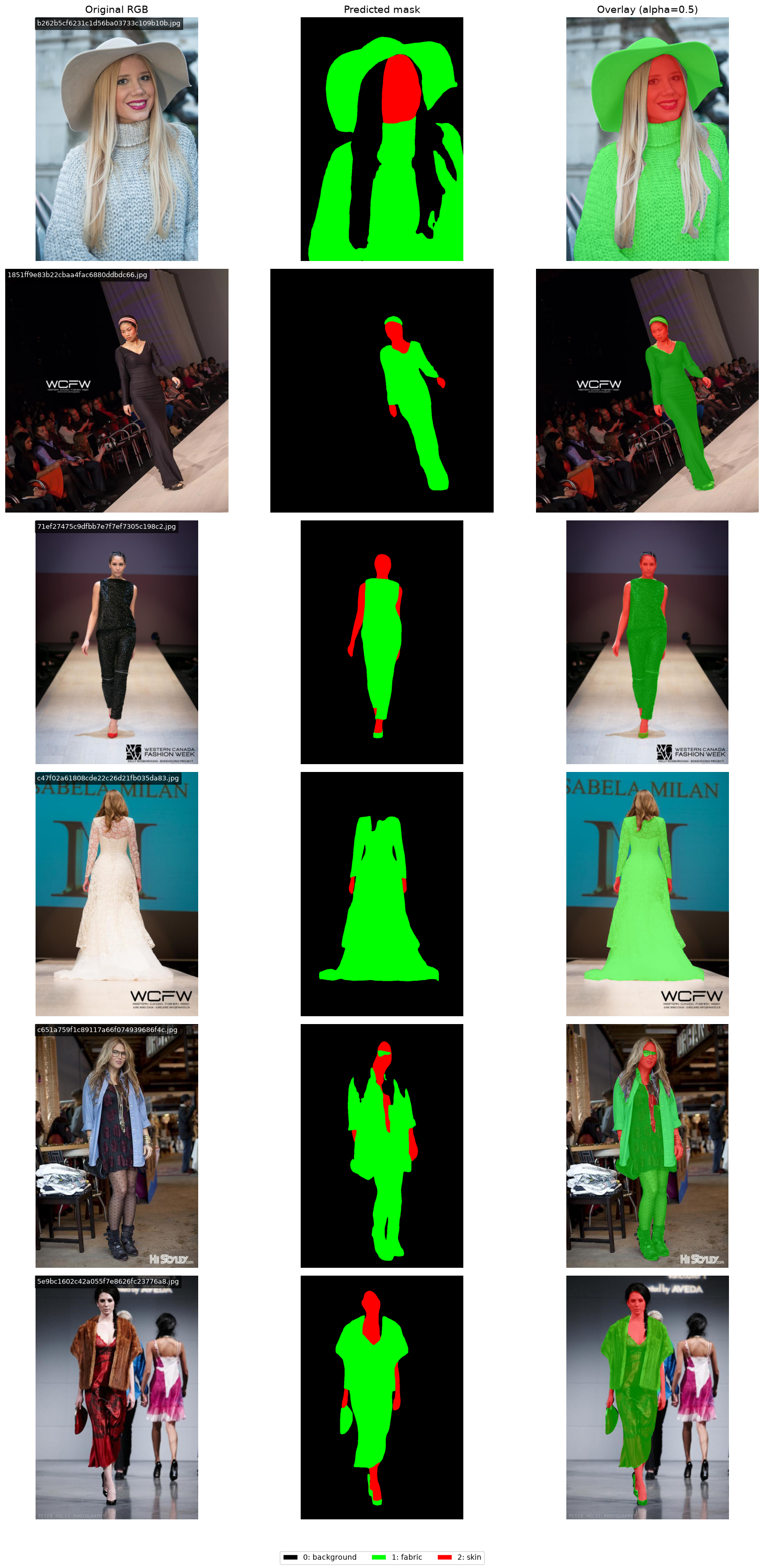
PyraFuse is a DINOv3-based semantic-segmentation framework for skin, fabric, and background. It combines multi-scale vision-foundation-model features with a lightweight PyraFuse decoder, and supports research-grade PyTorch inference as well as GPU-specific TensorRT deployment. The current release is v1.1.0.
The accompanying paper has been accepted at AIMLSystems 2026. This repository contains the code, reproducible data-preparation pipeline, inference notebooks, model-zoo interface, and accepted manuscript.
Highlights
- Three-class dense prediction:
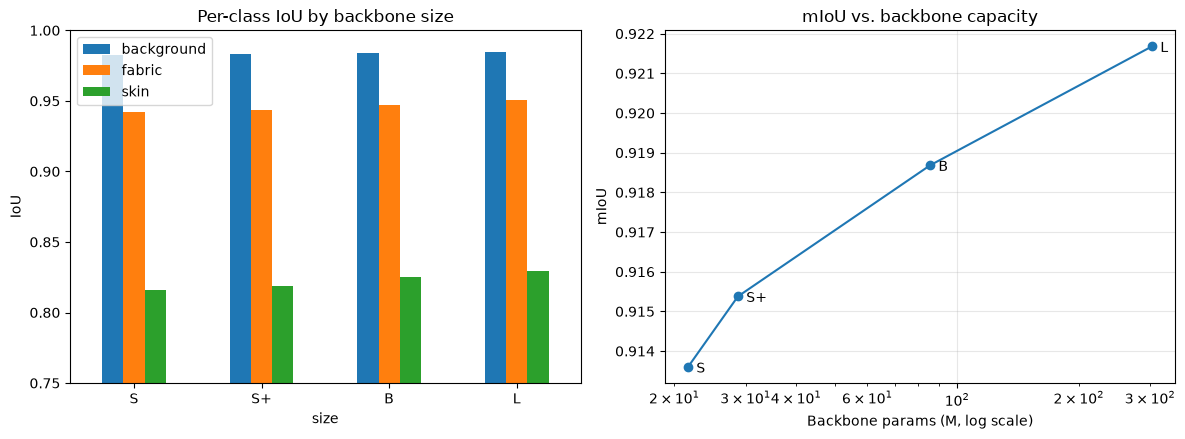
0 = background,1 = fabric,2 = skin. - DINOv3 ViT-S, ViT-S+, ViT-B, and ViT-L encoder variants.
- A self-contained checkpoint format: configuration, decoder, adapter calibration layers, complete backbone, and optional EMA weights.
- One model-zoo API for a local checkpoint or a Hugging Face model repository.
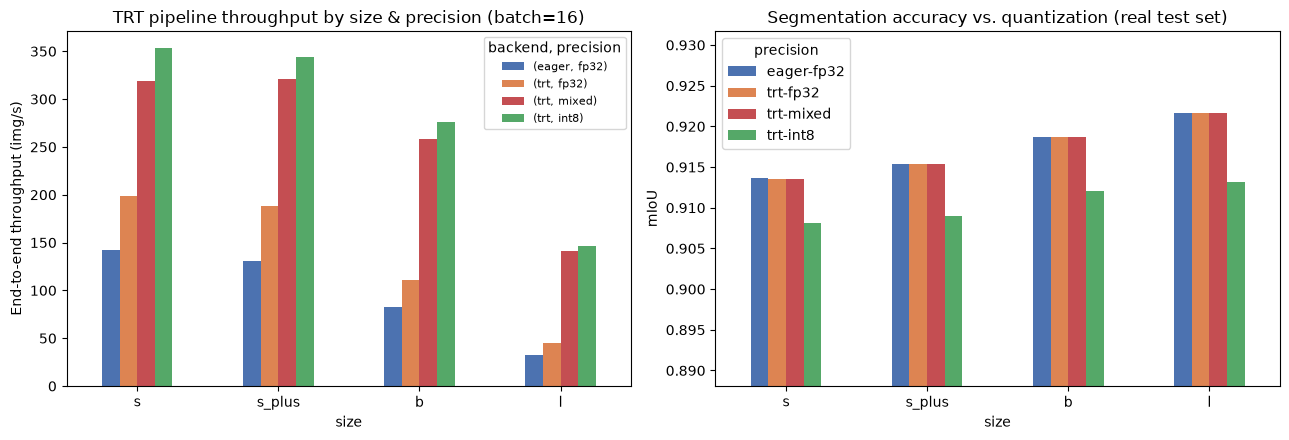
- ONNX/TensorRT export with FP32, mixed FP16, and INT8 build options.
Installation
Python 3.12+ is required. Install the base package for PyTorch/Hugging Face inference, then add the extras needed for data preparation or deployment.
When the first release is published, install the package directly from PyPI:
python -m pip install pyrafuse
Optional extras are available through the same package name:
python -m pip install "pyrafuse[data,deploy]"
For a development checkout, install the local project in editable mode:
git clone https://github.com/jamal-saeedi/PyraFuse.git
cd PyraFuse
python -m venv .venv
source .venv/bin/activate
pip install --upgrade pip
pip install -e ".[data,deploy]"
For TensorRT, use the NVIDIA TensorRT package that matches the CUDA runtime on the deployment machine; it is intentionally an optional dependency:
pip install -e ".[trt]"
The package also exposes the data-mask builder as pyrafuse-data when the
data extra is installed:
pyrafuse-data --split val
Model zoo
The four checkpoint variants are directory bundles, not single pickled files. The bundles are excluded from Git because the full backbones are large. On a development checkout, place them under models/finals/; the public bundles are available in the jamal-one/PyraFuse Hugging Face model repository.
| Variant | Encoder | Local checkpoint directory |
|---|---|---|
small |
DINOv3 ViT-S/16 | models/finals/small |
small_plus |
DINOv3 ViT-S+/16 | models/finals/small_plus |
base |
DINOv3 ViT-B/16 | models/finals/base |
large |
DINOv3 ViT-L/16 | models/finals/large |
Each variant uses this portable layout:
<variant>/
├── config.json
├── decoder.pt
├── ema.pt                     # evaluation weights, when available
└── backbone/
    ├── config.json
    ├── model.safetensors
    └── feature_norms.pt
The official public model repository is jamal-one/PyraFuse. It is the default model source; set an environment variable only to use a private mirror or fork:
export PYRAFUSE_MODEL_REPO=your-namespace/PyraFuse
load_pretrained checks a local models/finals/<variant> first, then downloads only the requested variant from that Hub repository. Pin revision to a Hub tag or commit SHA when reproducing an experiment.
from pyrafuse import load_pretrained

model = load_pretrained(
    "base",
    revision="v1.0.0",  # recommended for reproducibility
    device="cuda",
)
The initial download is cached by huggingface_hub; later use can be offline:
model = load_pretrained("base", local_files_only=True, device="cuda")
See models/README.md for the release checklist and exact upload command. Do not commit .pt, .safetensors, ONNX, or TensorRT engine binaries to this Git repository.
Inference
PyraFuse expects ImageNet-normalised RGB tensors with spatial dimensions that are multiples of 16. The following minimal example predicts the class map for one image using an EMA checkpoint:
import numpy as np
import torch
from PIL import Image
from pyrafuse import load_pretrained

device = "cuda" if torch.cuda.is_available() else "cpu"
model = load_pretrained("base", device=device)

image = Image.open("example.jpg").convert("RGB").resize((448, 448))
array = np.asarray(image, dtype=np.float32) / 255.0
mean = torch.tensor((0.485, 0.456, 0.406)).view(3, 1, 1)
std = torch.tensor((0.229, 0.224, 0.225)).view(3, 1, 1)
pixel_values = (torch.from_numpy(array).permute(2, 0, 1) - mean) / std

with torch.inference_mode():
    prediction = model(pixel_values.unsqueeze(0).to(device)).argmax(1)[0]

# prediction values: 0=background, 1=fabric, 2=skin
Image.fromarray(prediction.cpu().numpy().astype(np.uint8)).save("prediction.png")
For a complete visual PyTorch/TensorRT walkthrough, use notebooks/inference_torch_and_tensorrt.ipynb.
TensorRT deployment
TensorRT engines are compiled artifacts, not portable checkpoints: an engine must match the target GPU architecture, TensorRT version, CUDA runtime, precision, and optimization profile. Distribute the eager PyTorch checkpoint as the source of truth and either build engines on the target host or publish them in a clearly labelled, separate Hub subfolder.
python scripts/export_trt.py \
  --ckpt models/finals/base \
  --out-dir models/trt_pipeline/base \
  --label base \
  --precision fp32 mixed int8 \
  --min-batch 1 --opt-batch 1 --max-batch 1 \
  --verify
INT8 should be calibrated with representative, preprocessed images for production. Always run --verify and evaluate on held-out images after building an engine.
Dataset
The training labels fuse Fashionpedia fashion annotations with visuAAL skin masks. Data is not versioned in Git. The preparation script downloads missing source files and builds three-class masks; it is safe to re-run.
python scripts/prepare_data.py
python scripts/prepare_data.py --help
The dataset notebook documents source data, label creation, dataloaders, class balance, and skin-tone analysis. Please comply with the licences and terms of the source datasets.
Training
scripts/train_segmenter.py is the reproducible training CLI. It combines the
train and validation sources, creates the fixed 75/15/15 split (seed 42 by
default), estimates class weights, trains with Focal+Dice and EMA, and writes
run_config.json, metrics.json, best/, and last/ to the run directory.
Install the data and development extras, then prepare the labels:
python -m pip install -e ".[data,dev]"
python scripts/prepare_data.py
Run a one-batch CPU smoke test using the published small checkpoint. The
checkpoint is intentionally not stored in Git; download it from the PyraFuse
Hub repository first:
hf download jamal-one/PyraFuse --include "small/**" --local-dir models/finals

python scripts/train_segmenter.py \
  --resume models/finals/small \
  --device cpu --batch-size 1 --num-workers 0 \
  --no-class-weights --mix-prob 0 --smoke --skip-test \
  --checkpoint-path /tmp/pyrafuse-train-smoke
Fine-tune a published checkpoint on CUDA, or train a fresh DINOv3-S encoder
after configuring your Hugging Face access in HF_TOKEN:
# Warm-start (architecture is read from config.json)
python scripts/train_segmenter.py \
  --resume models/finals/small --device cuda \
  --epochs 25 --batch-size 16 \
  --checkpoint-path models/checkpoints/pyrafuse-small-finetune

# Fresh DINOv3-S run (the backbone remains frozen unless --finetune-backbone)
python scripts/train_segmenter.py \
  --encoder-size s --decoder pyrafuse --loss focal_dice \
  --device cuda --epochs 150 --batch-size 16 \
  --checkpoint-path models/checkpoints/pyrafuse-s
Use --dry-run to validate paths, split sizes, model construction, and loss
configuration without fitting. Use --finetune-backbone only when the target
GPU and dataset size justify end-to-end fine-tuning. See
python scripts/train_segmenter.py --help for all data, augmentation,
precision, checkpoint, and monitoring options.
Repository layout
pyrafuse/
├── pyrafuse/       # model, data, training, deployment, and model-zoo code
├── scripts/        # data preparation, training, and TensorRT export CLIs
├── notebooks/      # dataset and inference walkthroughs
├── models/         # ignored local checkpoints; tracked manifests and guidance
├── images/         # paper figures and qualitative results
├── paper/          # accepted AIMLSystems 2026 manuscript
└── tests/          # lightweight API tests
Reproducibility and release practice
- Use the EMA weights for evaluation (
load_pretrained(..., use_ema=True)). - Record the Git commit, Hub revision, model variant, input size, dataset split, metric implementation, CUDA/TensorRT versions, and precision.
- Tag each GitHub code release with a semantic version. Update the Hugging Face model revision when the published weights change; the current pretrained bundles remain at
v1.0.0. - Keep raw data, credentials, experiment logs, and binary model artifacts out of Git. The current
.gitignoreenforces this policy.
PyPI release
The repository includes a two-stage release path: CI builds and validates a
wheel on every push, while .github/workflows/publish-pypi.yml
publishes only a GitHub published release. To enable it, register
jamal-saeedi/PyraFuse as a PyPI Trusted Publisher for the pypi environment,
then update version in pyproject.toml, commit, tag, and publish the GitHub
release. The workflow uses short-lived OpenID Connect credentials and does not
require a stored PyPI token.
The intended PyPI publisher account is @jamal_one.
For this first release, open PyPI Account settings → Publishing → Add a new pending publisher and enter:
| Field | Value |
|---|---|
| Owner | jamal-saeedi |
| Repository | PyraFuse |
| Workflow filename | publish-pypi.yml |
| Environment | pypi |
Save the pending publisher, then create a GitHub Release from tag v1.1.0.
The workflow creates the pyrafuse project page on its first successful run.
For a local dry run, install the release tools and run the same checks used by
CI:
python -m pip install -e ".[release]"
python -m build
twine check dist/*
Citation
The manuscript is accepted at AIMLSystems 2026 and is not yet formally published. Citation metadata will be added with the camera-ready bibliographic details. Until then, please link this repository and included accepted manuscript rather than inventing a DOI or page range.
Licence
The original PyraFuse source code is released under Apache-2.0. The published checkpoint bundles include Meta DINOv3 backbone material and therefore remain subject to the DINOv3 License, provided alongside each public model release. Fashionpedia and visuAAL data are not redistributed and remain subject to their respective terms. See NOTICE before redistributing code or weights.
Tags
skin-fabric-detection · skin-segmentation · fabric-segmentation · semantic-segmentation · DINOv3 · TensorRT
1 maintainer

Download files
Download the file for your platform. If you're not sure which to choose, learn more about installing packages.
Source Distribution
Built Distribution
Filter files by name, interpreter, ABI, and platform.
If you're not sure about the file name format, learn more about wheel file names.
Copy a direct link to the current filters
File details
Details for the file pyrafuse-1.1.0.tar.gz.
File metadata
- Download URL: pyrafuse-1.1.0.tar.gz
- Upload date:
- Size: 62.9 kB
- Tags: Source
- Uploaded using Trusted Publishing? Yes
- Uploaded via:
twine/7.0.0 CPython/3.13.14
File hashes
| Algorithm | Hash digest | |
|---|---|---|
| SHA256 |
e570575728acf2b799b925bec90070072c7d8f464810ef99be1e1e672dc47ece
|
|
| MD5 |
1a4aa3868a243dec3a71932cd17b774d
|
|
| BLAKE2b-256 |
e79b7996378ead9d7919e83a663ce1e0721ef55e2988c1f44201296dd139c723
|
Provenance
The following attestation bundles were made for pyrafuse-1.1.0.tar.gz:
Publisher:
publish-pypi.yml on jamal-saeedi/PyraFuse
-
Statement:
-
Statement type:
https://in-toto.io/Statement/v1 -
Predicate type:
https://docs.pypi.org/attestations/publish/v1 -
Subject name:
pyrafuse-1.1.0.tar.gz -
Subject digest:
e570575728acf2b799b925bec90070072c7d8f464810ef99be1e1e672dc47ece - Sigstore transparency entry: 2591190865
- Sigstore integration time:
-
Permalink:
jamal-saeedi/PyraFuse@9a8f178079f65a900b91fc673934501e327e3a73 -
Branch / Tag:
refs/tags/v1.1.0 - Owner: https://github.com/jamal-saeedi
-
Access:
public
-
Token Issuer:
https://token.actions.githubusercontent.com -
Runner Environment:
github-hosted -
Publication workflow:
publish-pypi.yml@9a8f178079f65a900b91fc673934501e327e3a73 -
Trigger Event:
release
-
Statement type:
File details
Details for the file pyrafuse-1.1.0-py3-none-any.whl.
File metadata
- Download URL: pyrafuse-1.1.0-py3-none-any.whl
- Upload date:
- Size: 72.0 kB
- Tags: Python 3
- Uploaded using Trusted Publishing? Yes
- Uploaded via:
twine/7.0.0 CPython/3.13.14
File hashes
| Algorithm | Hash digest | |
|---|---|---|
| SHA256 |
36f11cbbc50f97b4cb7f1db4c5cdf10110971ba722835fc993317f83e05962c2
|
|
| MD5 |
c05816b157bcf9329b3d5ccbe64341bf
|
|
| BLAKE2b-256 |
40df2e05921c6f5eaf482955a3413e7a69462cabc88ce6e81acd17b6e2382570
|
Provenance
The following attestation bundles were made for pyrafuse-1.1.0-py3-none-any.whl:
Publisher:
publish-pypi.yml on jamal-saeedi/PyraFuse
-
Statement:
-
Statement type:
https://in-toto.io/Statement/v1 -
Predicate type:
https://docs.pypi.org/attestations/publish/v1 -
Subject name:
pyrafuse-1.1.0-py3-none-any.whl -
Subject digest:
36f11cbbc50f97b4cb7f1db4c5cdf10110971ba722835fc993317f83e05962c2 - Sigstore transparency entry: 2591191174
- Sigstore integration time:
-
Permalink:
jamal-saeedi/PyraFuse@9a8f178079f65a900b91fc673934501e327e3a73 -
Branch / Tag:
refs/tags/v1.1.0 - Owner: https://github.com/jamal-saeedi
-
Access:
public
-
Token Issuer:
https://token.actions.githubusercontent.com -
Runner Environment:
github-hosted -
Publication workflow:
publish-pypi.yml@9a8f178079f65a900b91fc673934501e327e3a73 -
Trigger Event:
release
-
Statement type:














