




Website · Documentation · PyPI · Paper (coming soon)
ragX is an open-source, training-free agentic retrieval framework. On millions of documents,
single-shot RAG misses the evidence a question does not name. ragX names it: an agent ranks and
reads passages, a chain of sub-questions resolves each hop, and one call answers with exact
path:line citations. It works with any LLM.
from ragx import RagX

rag = RagX("./docs")
answer = rag.ask("Who founded the university the author of Harbor Light attended?")

print(answer.text)      # Thomas Wren
print(answer.sources)   # ['ashford_university.md:1-5', 'thomas_wren.md:1-5']
News
- 2026-10-20 · ragX 0.0.1 is on PyPI:
pip install pyragx. All seven variants of the paper's method, BM25 and dense, fused and reranked ranking, a command line and an OpenAI-compatible server. - 2026-10-20 · The website and the documentation are live.
- Coming soon · The paper, ragX: Agentic Retrieval at Scale, on arXiv.
Why ragX
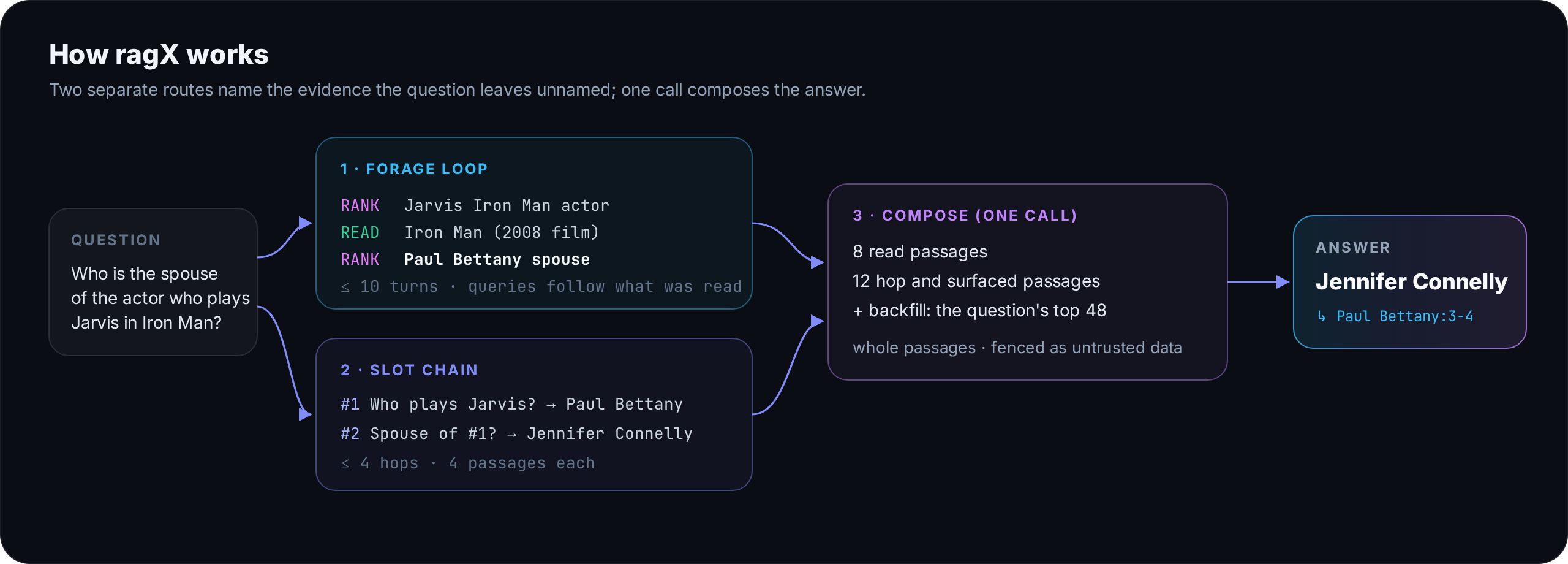
A question such as "Who is the spouse of the actor who plays Jarvis in Iron Man?" names Iron Man and Jarvis, but not Paul Bettany, whose article holds the answer. On all of Wikipedia that passage ranks 146,602th for the question itself, so single-shot retrieval cannot reach it. As a corpus grows, single-shot retrieval loses such unnamed evidence about four times faster than named evidence.
ragX reaches it through two separate routes, then composes once:
- Forage loop. An agent
RANKs the corpus andREADs passages for up to ten turns. It writes each query after reading, so a query can name what the question never did. - Slot chain. The question becomes up to four sub-questions with
#Nslots; each hop is retrieved with the earlier answers filled in. - Compose. One call answers over the read passages, the hop passages, the other surfaced ones and, in the full method, the question's own top 48.
Results
Benchmarked on nested samples of Wikipedia from 240K to 21M passages, with 27 language models on five QA datasets, against single-shot retrieval, ReAct, Self-Ask, IRCoT, DCI-Agent-Lite and Search-R1:
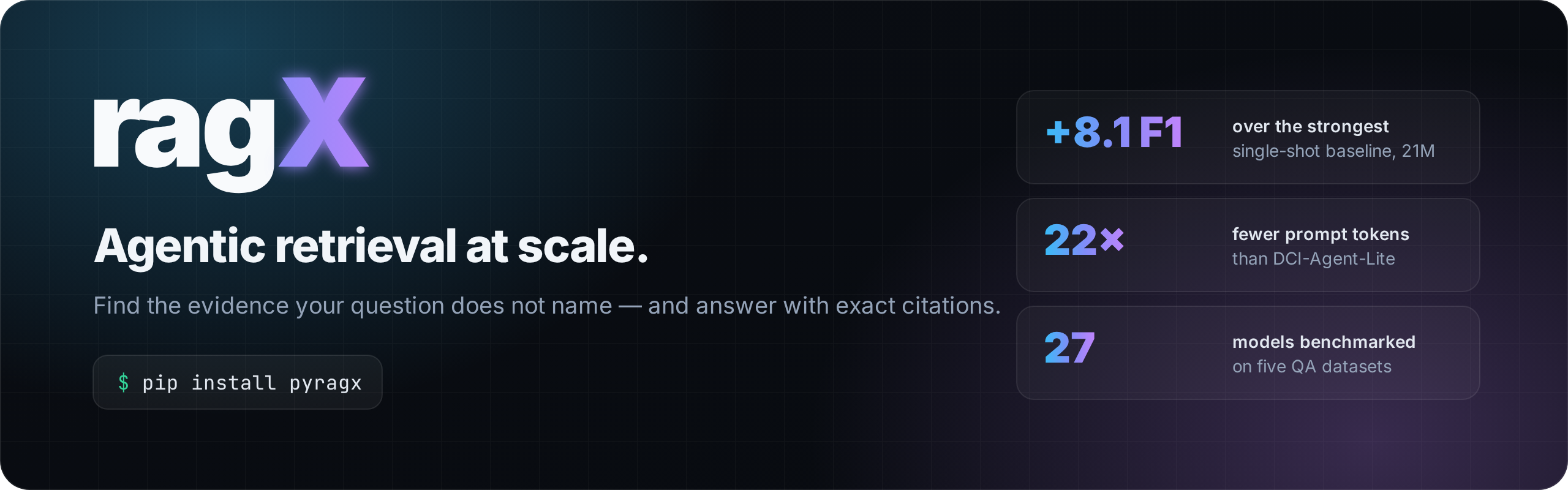
| +8.1 F1 | over the strongest single-shot baseline on all of Wikipedia (21M passages, eight models) |
| +5.4 → +9.0 F1 | the lead over single-shot retrieval grows as the corpus grows from 240K to 21M passages |
| 22× fewer | prompt tokens than DCI-Agent-Lite |
| 17 of 21 | open-weight models on which ragX leads single-shot retrieval (a ragX variant leads on 19) |
With BM25 alone, ragX beats every dense single-shot baseline at 21M passages. The paper is coming soon.
Install
pip install pyragx                 # ragx-lexical: BM25, no embedding index, no GPU
pip install "pyragx[dense]"        # every variant (dense, fused and reranked ranking)
The PyPI name is pyragx; you import ragx and run the ragx command.
Set a key for any provider (OPENAI_API_KEY, ANTHROPIC_API_KEY, GOOGLE_API_KEY,
GROQ_API_KEY, ...), point vllm: at your own server, or run a local Hugging Face model with
pyragx[local].
Variants
| Variant | Ranker | What it is |
|---|---|---|
ragx |
dense | the full method: forage loop, slot chain, 48-passage backfill |
ragx-rerank |
dense top 100 → cross-encoder | the most accurate in the benchmark |
ragx-lexical (default) |
BM25 | no embedding index, no GPU |
ragx-fused |
BM25 + dense (RRF) | exact terms and paraphrase |
ragx-core |
dense | forage loop and slot chain, no backfill |
ragx-fast |
dense | forage loop only, the cheapest |
ragx-think |
dense | ragx with thinking on |
rag = RagX("./docs", variant="ragx-rerank", model="openai:gpt-4o-mini")
Command line and server
ragx ask "Whom did the founder of Ashford University marry?" -c ./docs -v ragx-fused
ragx search "Ashford University founder" -c ./docs        # retrieval only, no LLM
ragx serve ./docs --port 8000                              # OpenAI-compatible /v1/chat/completions
Documentation
The full documentation is at ctrl-gaurav.github.io/ragX/docs: how ragX works, variants, models and providers, the Python API and every configuration option.
Contributing
Issues and pull requests are welcome; see CONTRIBUTING.md.
Citation
The paper, ragX: Agentic Retrieval at Scale, is coming soon. Until then, please cite the software:
@software{srivastava2026ragx,
  author  = {Srivastava, Gaurav},
  title   = {ragX: Agentic Retrieval at Scale},
  year    = {2026},
  url     = {https://github.com/ctrl-gaurav/ragX},
  version = {0.0.1}
}
License
1 maintainer

Metadata
1 maintainer
Release files for pyragx 0.0.1
For a detailed explanation of source distributions (sdists) and built distributions (wheels), please see the package formats documentation.
Source distribution (sdist)
| File | Size | Uploaded | Provenance | Actions |
|---|---|---|---|---|
| pyragx-0.0.1.tar.gz | 67.8 kB | Without provenance | Details for pyragx-0.0.1.tar.gz |
Built distribution (wheel)
| File | Interpreter | ABI | Platform | Actions Reset |
|---|---|---|---|---|
| pyragx-0.0.1-py3-none-any.whl | Python 3 | none | any | Details for pyragx-0.0.1-py3-none-any.whl |
Total release size: 132.5 kB
Release files / pyragx-0.0.1.tar.gz
| Download URL | pyragx-0.0.1.tar.gz |
|---|---|
| Size | 67.8 kB |
| Tags | Source |
|
SHA-256 checksum How to use checksums |
e4efd47696bd6aeb303aba5fd79b1d79b845cf6289f6d861e02408b82f68c894
|
|
BLAKE2b-256 checksum How to use checksums |
33732793df765daf9e7aef887415b31130758b94c27a8734ad684c1e515d2894
|
| Upload date | |
|
Uploaded using Trusted Publishing? What is trusted publishing? |
No |
| Uploaded via |
twine/7.0.0 CPython/3.11.16
|
Release files / pyragx-0.0.1-py3-none-any.whl
| Download URL | pyragx-0.0.1-py3-none-any.whl |
|---|---|
| Size | 64.7 kB |
| Tags | Python 3 |
|
SHA-256 checksum How to use checksums |
d5279eec6a95261704419cace9035aa7249b3c6e3603dff20b87ba85df90ace4
|
|
BLAKE2b-256 checksum How to use checksums |
ddb2c1d92dd8d50ad5d29f046e7c426860b2a7914a516215a94c517af798a1b4
|
| Upload date | |
|
Uploaded using Trusted Publishing? What is trusted publishing? |
No |
| Uploaded via |
twine/7.0.0 CPython/3.11.16
|
Security for pyragx 0.0.1
Provenance
Provenance describes where a file came from. On PyPI, provenance is shared via attestations, which provide a verifiable record of the build or publishing details. View details, limitations and caveats.
No provenance found
None of the files in this release were uploaded with provenance metadata.
A note on package security
PyPI is a repository for distributing packages, not a service for auditing them. While third-party security researchers and our staff do their best to detect and remove malicious packages, PyPI cannot guarantee the quality, security or suitability of any given package.
To learn more about protecting yourself from malicious actors, visit our package security documentation.













