
pyramid_debugtoolbar_dogpile
Build Status:

dogpile caching support for pyramid_debugtoolbar
This package tracks the following dogpile api calls :
get
get_multi
set
set_multi
delete
delete_multi
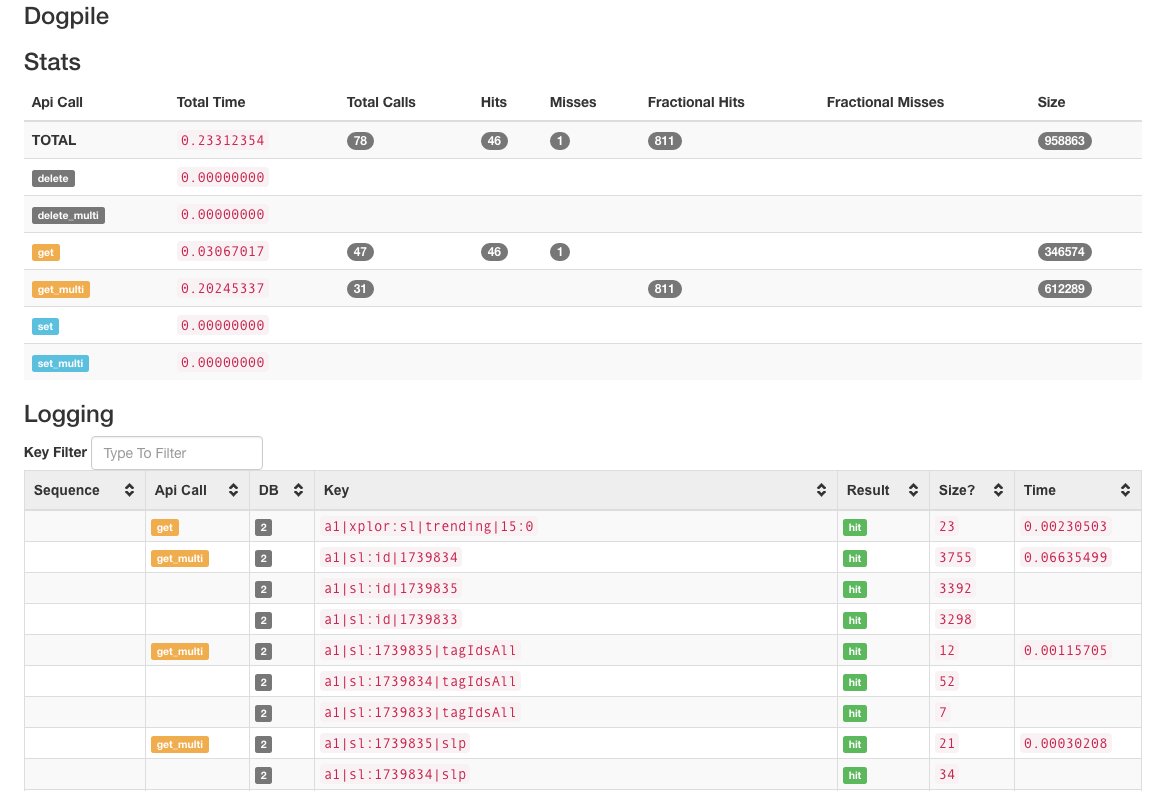
Your pyramid_debugtoolbar will have a "Dogpile" panel that lists:
- the number of calls (in tab header)
- statistics on cache hits/misses/timing per api call type
- a listing of all calls that features: call, key, hit/miss, timing
As of v0.1.4 you can filter the keys on the panel. yay.
This package works by wrapping requests to dogpile regions into a Proxy Backend. This has a significant performance overhead and relies on the DEBUG ONLY get_current_request, so make sure that you disable this LoggingProxy on production machines.
As of v0.1.5 you can sort-of track payload sizes. This is very experimental. See below.
This package requires Python 3.5 or later.
how to use this package
install via github's main or grab a pypi distribution!
pip install pyramid_debugtoolbar_dogpile
easy_install pyramid_debugtoolbar_dogpile
update your ENVIRONMENT.ini file
pyramid.includes = pyramid_debugtoolbar
debugtoolbar.includes = pyramid_debugtoolbar_dogpile
update your caching configuration to use the proxy:
from pyramid_debugtoolbar_dogpile import LoggingProxy as DogpileLoggingProxy

cache_config = {}
...
cache_config['wrap'] = [DogpileLoggingProxy, ]
region = make_region()
region.configure_from_config(cache_config)
Tracking Payload Size
Tracking Payload Size is experimental and VERY TRICKY because the correct hooks do not live in the standard packages. Most users will not be able to do it -- or want to do it.
NOTE: This breaks/abuses dogpile's API.
In order to track payload size, you must write a custom backend OR use a backend that supports custom serializers, and "repack" the CachedValues with a "sz" attribute in the metadata.
This specialized serialize for an alternate Redis backend, https://github.com/jvanasco/dogpile_backend_redis_advanced, injects a payload size attribute into CachedValues
def SerializerPickleInt_loads(value):
	"""build a new CachedValue"""
	serialized_size = len(value)
	value = cPickle.loads(value)
	return CachedValue(value[0],
					   {"ct": value[1],
						"v": value_version,
						"sz": serialized_size,
						})
If this package detects any size payloads in the tracked values, it will display size columns that report the number of bytes per key (and in aggregate reports). If the package
does not detect any sz payloads, it will not display the "Size" columns.
Why track size?
Some routes in a project were taking too much time, even with caching. Tracking size - in addition to time - made it easier to pinpoint problematic objects and create a different/leaner caching object.
What does it look like?
The panel renders in two parts:
First Section - topline statistics
Second Section - chronological list of cache operations. API calls and results are color-coded for quick review.
1 maintainer

Metadata
1 maintainer
Release files for pyramid-debugtoolbar-dogpile 1.0.0
For a detailed explanation of source distributions (sdists) and built distributions (wheels), please see the package formats documentation.
Source distribution (sdist)
| File | Size | Uploaded | Provenance | Actions |
|---|---|---|---|---|
| pyramid_debugtoolbar_dogpile-1.0.0.tar.gz | 13.2 kB | Without provenance | Details for pyramid_debugtoolbar_dogpile-1.0.0.tar.gz |
Built distribution (wheel)
| File | Interpreter | ABI | Platform | Actions Reset |
|---|---|---|---|---|
| pyramid_debugtoolbar_dogpile-1.0.0-py3-none-any.whl | Python 3 | none | any | Details for pyramid_debugtoolbar_dogpile-1.0.0-py3-none-any.whl |
Total release size: 22.0 kB
Release files / pyramid_debugtoolbar_dogpile-1.0.0.tar.gz
| Download URL | pyramid_debugtoolbar_dogpile-1.0.0.tar.gz |
|---|---|
| Size | 13.2 kB |
| Tags | Source |
|
SHA-256 checksum How to use checksums |
1f65b728814b86bf55ee92bc06aa83393e14d9464fa1098e13116a0099475cb7
|
|
BLAKE2b-256 checksum How to use checksums |
bb0146aba3b0ee1264dbfc25afff7c42782f3fe1c6a70eaea927bc5298128863
|
| Upload date | |
|
Uploaded using Trusted Publishing? What is trusted publishing? |
No |
| Uploaded via |
twine/7.0.0 CPython/3.14.6
|
Release files / pyramid_debugtoolbar_dogpile-1.0.0-py3-none-any.whl
| Download URL | pyramid_debugtoolbar_dogpile-1.0.0-py3-none-any.whl |
|---|---|
| Size | 8.8 kB |
| Tags | Python 3 |
|
SHA-256 checksum How to use checksums |
d4157b7f7fa55c3485dd611a5dabb5223dbed508273ddfb011f6bfd57707f2f3
|
|
BLAKE2b-256 checksum How to use checksums |
1d33110a6bd32b4ca32a9695639c39bae46f77eb174071c73816ddd4923c8de1
|
| Upload date | |
|
Uploaded using Trusted Publishing? What is trusted publishing? |
No |
| Uploaded via |
twine/7.0.0 CPython/3.14.6
|
Security for pyramid-debugtoolbar-dogpile 1.0.0
Provenance
Provenance describes where a file came from. On PyPI, provenance is shared via attestations, which provide a verifiable record of the build or publishing details. View details, limitations and caveats.
No provenance found
None of the files in this release were uploaded with provenance metadata.
A note on package security
PyPI is a repository for distributing packages, not a service for auditing them. While third-party security researchers and our staff do their best to detect and remove malicious packages, PyPI cannot guarantee the quality, security or suitability of any given package.
To learn more about protecting yourself from malicious actors, visit our package security documentation.














