
pyrava
A Python client for Barava smart devices, built from the vendor's network.md
and animation.md, then corrected against firmware 1.0.1 on real hardware.
pip install pyrava              # core client, zero dependencies
pip install "pyrava[all]"       # + mDNS discovery and faster HTTP
The core client talks HTTP through the standard library, so a plain install pulls in nothing. Two optional extras:
| Extra | Brings | Needed for |
|---|---|---|
discovery |
zeroconf |
discover_devices(); not needed if you connect by IP |
screen |
pillow |
dominant_colors() screen sampling |
fast |
requests |
connection reuse, lower latency at short ping intervals |
Requires Python 3.8+.
Command line
pyrava discover                       # list devices via mDNS
pyrava info --host 192.168.1.249      # dump device state
pyrava heater --host 192.168.1.249    # temperatures, scaled
pyrava set --host 192.168.1.249 --power on --fill-color '#FF8000'
pyrava raw --host 192.168.1.249 DVIFO # send any handler, see the raw frames
pyrava watch --host 192.168.1.249     # live status, redrawn in place
pyrava doctor                         # diagnose mDNS when discovery is empty
Add -v to log every frame in both directions, or --json for
machine-readable output.
pyrava watch redraws a fixed status block in place rather than scrolling —
device state, light state, and heater temperatures, refreshed as the device
answers, coloured when the terminal supports it: green/dim for on/off,
green/yellow/red for heater status, and a truecolour swatch previewing the
fill hue (approximate — FCLR is only a hue, so the swatch assumes full
saturation and brightness, which the field doesn't actually carry). Data
appears from the second tick onward (replies are deferred by one ping; see
below). --json switches to one JSON object per line instead, since a
redrawn screen isn't machine-readable. Output that isn't a real
terminal (piped to a file, an unsupported console) falls back to plain
scrolling automatically.
Quick start
from pyrava import discover_devices

devices = discover_devices(timeout=5)      # mDNS, then DVIFO on each hit
light = devices[0]

print(light.device_id, light.name)   # from the response key block
print(light.groups)                  # {'545d577b': 'My-Room'}
light.set_state(True)
light.set_fill_color((255, 40, 0))      # RGB tuple -> hue, see below
light.set_fill_brightness(180)
Already know the address:
from pyrava import BaravaDevice

light = BaravaDevice("192.168.1.42")
light.register()                # DVIFO; populates light.device_id
print(light.get_device_info())
How the connection actually works
Everything goes to one endpoint:
POST http://{device_ip}:8080/barava-host-post
Real HTTP headers, packet as a raw body. That's the default; you shouldn't need to configure it.
Discovery is the slow step, which is why the vendor app sits on a loading indicator: nothing can be transmitted or synced until the mDNS query resolves.
- Browse
_barava._tcp.local.for device addresses. - Ping a resolved address with your own session ID in the
device-idheader and ask forDVIFO. That registers you in the device's queue and returns the device's real ID inDVID. - Keep pinging at your declared
ping-interval. The device never initiates — it parks responses in a per-sender queue and flushes them, batched, on your next ping. Miss your interval and it unregisters you.
Replies arrive late
This is not a matched request/response protocol. A command's reply lands in your session queue and comes back on a later ping, so the HTTP response to one command frequently carries the answer to an earlier one.
request() handles this: it sends the command, then fires bare queue-pop pings
until a packet tagged with your handler comes back.
light.request(Handler.DEVICE_INFO)                 # polls for the DVIFO reply
light.request(Handler.SET_FILL_COLOR, {...}, wait=False)   # setter, no reply
light.ping()                                       # pop the queue, send nothing
A plain ping sends no body-handler header and an empty body. Setters use
wait=False already, so they cost one round trip.
Because a single response can hold replies to several commands, filter before reading:
batch = light.request(Handler.GET_HEATER_INFO)
batch.handlers                      # ['DVIFO', 'HTIFO']
batch.flatten(Handler.GET_HEATER_INFO)   # only the heater packet's variables
batch.first(Handler.GET_HEATER_INFO)     # the packet itself
sender_id identifies your script, not the device, and can be anything
stable for the session. new_sender_id() generates one; the vendor app makes a
fresh one at every launch, which is why the IDs you captured kept changing.
light = BaravaDevice("192.168.1.42", sender_id="my-script", ping_interval=200)
Shorter intervals mean faster updates (worth it for heater telemetry) at the cost of more traffic.
Never use * as a sender ID
The library raises on it. A wildcard in the sender block tells every listening device that the keep-alive interval is being set, and sending it fires a network interrupt to extend the keep-alive signal. Use a concrete ID.
Commands
light.set_state(True)                   # DVSTT
light.set_fill_color((255, 40, 0))      # COLFL -- RGB, converted to hue
light.set_fill_hue(240)                 # COLFL -- raw hue, 0-360, no conversion
light.set_fill_state(True)              # COLST
light.set_fill_brightness(180)          # COLBR
light.set_desk_color(292)               # DSKCL -- colour temp, not RGB
light.set_desk_brightness(140)          # DSKBR
light.set_desk_state(True)              # DSKST
light.set_heater_state(True)            # HTSTT
light.set_device_name("Desk Lamp")      # DVSNM
light.add_group("office", "g7")         # DVAGR
light.remove_group("g7")                # DVRGR
light.wipe_groups()                     # WIPGR
light.set_spectrum(True, [255,0,0, 0,255,0])   # SSPEC
light.get_heater_info()                 # HTIFO
light.read_temperature_f()              # HTCT / 100 -> 69.3 (Fahrenheit)
light.read_temperatures_f()             # current + target, one exchange
light.heater_status()                   # HTHH -> "OK" / "Fault" / "Fault (code N)"
light.is_heater_ok()                    # HTHH == 0 -> True / False / None
light.check_for_updates()               # CHUPD
light.wipe_device()                     # WPDVI -- factory reset
Anything not wrapped is one call away:
from pyrava import Handler, Var
light.request(Handler.SET_FILL_COLOR, {Var.FILL_COLOR: 0xFF0000})
Batching
A batch is many packets aimed at one device, delivered as one request — not one packet fanned out to many devices. One round trip instead of three.
The batch key block is the target device's ID, so register() (or any
prior request) must have run first — that's where the ID comes from. Your own
session ID stays in the device-id HTTP header.
from pyrava import SubPacket, Handler, Var

light.send_batch([
    SubPacket(Handler.SET_DESK_STATE, {Var.DESK_STATE: 1}),
    SubPacket(Handler.SET_DESK_BRIGHTNESS, {Var.DESK_BRIGHTNESS: 200}),
    SubPacket(Handler.SET_FILL_COLOR, {Var.FILL_COLOR: 0x00FF80}),
])
The target device ID never goes on the wire outside the packet headers; only batches carry an inline ID, in the sender block.
Animations
Scripts compile to bytecode, hex-encode, and go out via CMPAM. The builder
tracks scopes so unclosed blocks and out-of-range zones fail at compile time
rather than on the device.
from pyrava import AnimationScript, disassemble

script = AnimationScript()

with script.header(0):                    # runs atomically, one tick
    script.select_zones(0, 3)
    script.gradient((0, 255, 0, 0), (255, 0, 0, 255), smooth=True)
    script.deselect_all()                 # don't leak selection to other threads

with script.thread(0):                    # one command per tick
    with script.main():                   # repeats forever
        with script.atomic():             # ...unless wrapped like this
            script.select_zones(0, 3)
            script.rotate_left(5)
            script.deselect_zones(0, 3)

light.upload_animation(script)
print("\n".join(disassemble(script.compile())))
loop(n) gives a finite repeat. Header and thread indices must match or the
two halves fall out of sync — the compiler warns when they don't. Board
Revision 1 has 5 zones, so 5 threads maximum, and the engine targets 41 Hz.
Transforms are destructive: applying the inverse will not restore a buffer.
LED zones
The lamp has five addressable zones. Set them with real RGB -- unlike the
single-hue FCLR path, the zone path carries all three channels:
from pyrava import Zone

light.set_zone_colors({Zone.TOP: (255, 0, 0), Zone.MIDDLE_INNER: (0, 255, 0)})
light.set_zone_gradient(Zone.BOTTOM_INNER, (0, 7, 0, 63), (255, 0, 4, 54))
light.clear_zones()
Gradients across several zones
set_gradient(colors, zones=...) puts the same colour set on every target
zone. By default that means an identical gradient repeated on each one
(style="repeat"); three other styles vary that:
light.set_gradient(colors, zones="lava_lamp", style="rotate")  # shifted start per zone
light.set_gradient(colors, zones="lava_lamp", style="vary")    # independent shuffle per zone
light.set_gradient(colors, zones="lava_lamp", style="span")    # one gradient split across them
| Style | What it does |
|---|---|
repeat (default) |
Identical gradient, same colours and positions, everywhere |
rotate |
Same colours, starting point shifted by one per zone -- cheap and deterministic |
vary |
Each zone gets its own independent shuffle of the same colours; seed= for reproducibility |
span |
Treats the target zones as one continuous ring; splits a single gradient across them so each zone's last colour blends into the next zone's first |
span is the one worth a caveat: it's a client-side construction, not a
device feature. span_gradient_stops() guarantees the seam colours match
exactly between adjacent zones, which only looks right if the physical
zones are actually adjacent in the order you gave -- for a named group like
lava_lamp that's true by construction, since the group order already
matches the physical top-to-bottom layout. It hasn't been checked against
real hardware for anything beyond the even-spacing case a single zone uses;
try it and see.
Zones not named are left dark, which is exactly how the app writes an
all-off theme. build_theme(...) returns the script without sending it if
you want to inspect or extend it first.
Under the hood this compiles a static animation and uploads it to CMPAM,
reproducing the structure the app emits: a header selecting every zone, then
one atomic scope with a per-zone fill.
Zone numbering, confirmed by lighting each ring in turn:
Zone |
Index | Ring |
|---|---|---|
TOP |
4 | top |
MIDDLE_INNER |
2 | middle, inner |
MIDDLE_OUTER |
3 | middle, outer |
BOTTOM_INNER |
0 | bottom, inner |
BOTTOM_OUTER |
1 | bottom, outer |
Zone is an IntEnum, so a plain int still works anywhere -- ZONE_ORDER
is (Zone.TOP, Zone.MIDDLE_INNER, Zone.MIDDLE_OUTER, Zone.BOTTOM_INNER,
Zone.BOTTOM_OUTER), the order the app selects them in a theme header.
examples/zone_probe.py re-lights each ring by name, useful for a quick
sanity check after a firmware update.
Previewing and sampling colours
pyrava.palette has preview helpers with no dependencies at all -- seeing
what you're about to send saves a lot of squinting at the lamp:
from pyrava import print_palette, sort_by_hue

print_palette(colors)          # ANSI swatches + hex, one line
sort_by_hue(colors)            # order around the wheel
Screen sampling needs the screen extra (Pillow only):
from pyrava import dominant_colors
light.set_zone_palette(dominant_colors(5))
Or from the shell:
pyrava screen --host 192.168.1.249 --punch          # flat colour per zone (default)
pyrava screen --host 192.168.1.249 --solid --zones lava_lamp --n 3
pyrava screen --host 192.168.1.249 --gradient --sort --zones 4
pyrava screen --preview                              # swatches, send nothing
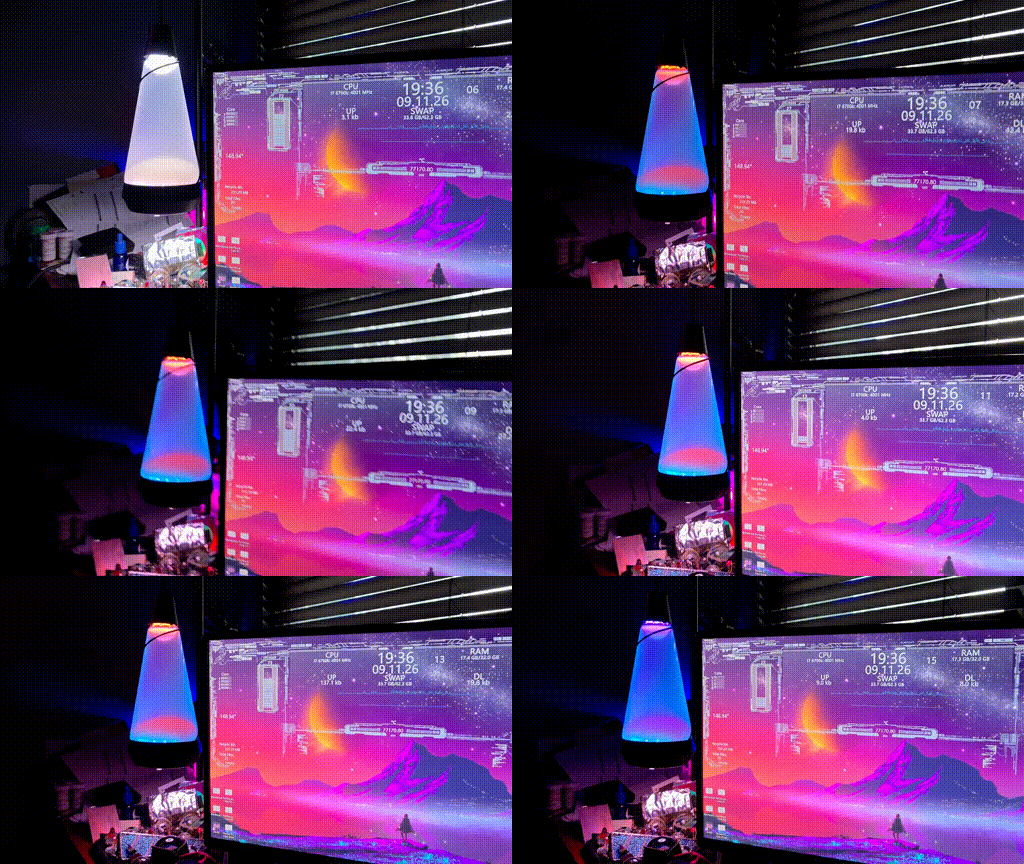
| Flag | Effect |
|---|---|
--n |
colours to sample (default 5) |
--solid |
one flat colour per zone -- the default; exists for --help clarity |
--gradient |
blend the colours instead; mutually exclusive with --solid |
--zones |
a zone index (4) or group name (lava_lamp); default = all zones |
--punch |
boost saturation |
--sort |
order by hue, before gradients or assignment |
--preview |
print swatches, send nothing |
Selection is by salience, not by area. Counting pixels picks whatever
covers the most screen — usually a dark editor background — so a small patch
of bright magenta loses to a huge field of dark navy, even though the magenta
is what you actually notice. Instead each pixel is weighted by
saturation × value², binned by hue, and the heaviest bins win. Each returned
colour is the weighted mean of its bin, so it's a real representative rather
than the single most extreme pixel.
--min-sat (0.25) and min_value (0.20) drop washed-out and near-black
pixels first; both matter far more than any post-hoc boost, since brightening
a dark grey just gives a lighter grey. Results are kept at least min_hue_gap
(25°) apart so no two zones show the same colour; if that can't fill --n,
the gap is relaxed rather than returning fewer — a few similar colours in a
large sample is fine, since re-running reshuffles which reach the lamp.
--min-share (default 0.01) ignores hue bins carrying less than that
fraction of the screen's total visual weight, so a bright taskbar or desktop
icon can't claim a slot. Raise it if something small keeps sneaking in; lower
it to catch subtler accents. Unlike the hue gap, this floor is never relaxed
to reach --n — padding a palette with icon colours is the thing it exists
to prevent, so you may get fewer colours on a plain screen.
ImageGrab captures the primary monitor only. On a multi-monitor setup
the colours come from whichever display Windows considers primary, not from
everything you can see.
dominant_colors() uses Pillow's median-cut quantiser rather than k-means,
which keeps this to one dependency instead of pulling in numpy and
scikit-learn. If you already have a k-means palette from elsewhere, pass it
straight to set_zone_palette() -- nothing here is required.
sort_by_hue() matters mainly for gradients: sampled colours come back in
arbitrary order, and adjacent stops with distant hues blend through muddy
intermediates.
One flat colour per zone
Often the better choice for a sampled palette:
light.set_zone_palette([(255, 80, 0), (0, 200, 255), (120, 0, 255)])
light.set_zone_palette(colors, zones="lava_lamp")
Colours are assigned to zones in ZONE_ORDER, cycling if there are fewer
colours than zones. Each zone holds a lot of LEDs, so a three-stop gradient
spreads its colours far apart and spends most of the ring on blended
intermediates -- which reads as washed out. One flat colour per zone keeps
every sampled colour at full strength.
Gradients from any number of colours
light.set_gradient([(255, 80, 0), (255, 0, 160), (40, 0, 255)])          # all zones
light.set_gradient(colors, zones="lava_lamp")                             # one group
light.set_gradient(colors, zones=[Zone.TOP, "downlamp"])                  # mixed
generate_gradient_stops() turns a flat list of colours into positioned
stops: i * (256 // N) for the i-th of N colours. That spacing is confirmed
against two independently captured gradients that both used exactly 0, 85,
170 for three stops -- not the more obvious i * 255 / (N-1) that would run
edge-to-edge. It matters because every zone is a physical ring: this spacing
divides the ring evenly over all N segments including the wraparound seam
back to the first colour, rather than compressing everything into 0-255 and
leaving one oddly-sized gap. Only independently confirmed at N=3; other
counts follow the same formula on the assumption it generalises.
This is the natural hook for a generated palette -- cluster centres from a k-means pass over screen colours, for instance -- since it's just a flat list of RGB tuples with no positions to work out yourself.
Stops are plain RGB and render faithfully, including dark ones: a captured
theme the app calls a "dimmed blue" is three fully saturated stops at ~20-25%
brightness, and it reads as a clean deep blue. Washed-out output tracks low
saturation, not low brightness. A screen-derived colour like (68, 43, 43)
is only 37% saturated at similar brightness, and that is what looks pale.
punch_color(rgb) is an optional saturation boost (hue and brightness left
alone) for exactly that case:
device.set_gradient([punch_color(c) for c in colors])
It deliberately does not raise brightness by default -- that would wash out the dim-but-saturated colours the device handles well.
Saturation and brightness are separate levers and neither implies the other:
| effect | (68, 43, 43) becomes |
|
|---|---|---|
punch_color(c) |
deeper, same brightness | (68, 31, 31) |
punch_color(c, value=1.0) |
brighter and deeper | (255, 114, 114) |
punch_color(c, saturation=1.0, value=1.0) |
brighter only | (255, 161, 161) |
value=1.0 is what a pipeline that normalises brightness to 1 does -- common
when driving lights that handle brightness as a separate channel. It changes
muted colours substantially rather than just deepening them, so it's opt-in.
min_value= floors brightness instead of pinning it.
smooth=True is not usable on firmware 1.0.1. MAP_SMOOTH (0x15) is
reported to switch the affected LEDs off, and no captured theme from the
device's own app ever emits it -- every one ends in MAP_LINEAR (0x14). It
now warns if you ask for it.
Zone groups
Named aliases for faster reference, matching the lamp's own theming:
| Group | Zones |
|---|---|
lava_lamp |
TOP, MIDDLE_INNER, MIDDLE_OUTER |
downlamp |
BOTTOM_INNER, BOTTOM_OUTER |
top_ooze |
TOP |
bottom_ooze |
MIDDLE_INNER |
fluid |
MIDDLE_OUTER |
These overlap on purpose -- top_ooze is one zone within lava_lamp as a
whole. A group name works anywhere a zone does:
light.set_zone_colors({"lava_lamp": (255, 80, 0), "downlamp": (0, 40, 255)})
When two entries touch the same physical zone (a group and one of its own members, say), whichever is given later in the mapping wins.
On naming: kept your scheme rather than substituting one -- downlamp
already avoids colliding with set_desk_state()/set_desk_color(), which
control the lamp's separate, actual desk-light hardware feature (DSTT/
DCLR) despite the visual overlap you mentioned. If you'd rather rename any
of these, they're one dict in pyrava/const.py.
Changing one zone without touching the rest
There's no per-zone update on the wire, and no way to read the device's
current colours back -- every set_zone_colors() call replaces the whole
theme. set_zone_state() works around this with a client-side shadow of
what this BaravaDevice has itself sent:
light.set_zone_state("lava_lamp", (255, 80, 0))
light.set_zone_state("downlamp", (0, 40, 255))

light.clear_zone("downlamp")   # lava_lamp survives untouched
The limitation you already suspected is real. This only knows about
state sent through this session. If the app, another client, or an earlier
run changed the theme since, this doesn't see it, and calling
set_zone_state() will silently replay this session's last-known colours
over whatever's actually on the device now. known_zone_colors and
known_zone_gradients expose the shadow if you want to inspect it. Short of
firmware adding a readback, there's no fully correct fix for this -- it's a
genuine gap, not something the client can paper over completely.
The cyclical model
The vendor's design notes (barava_network_impl.md) describe the interface as
a cycle, not a request/response API: a keepalive loop runs continuously in
both directions, device state updates ride on it, and your commands are
appended to the pending keepalive packet rather than sent as separate
exchanges. poll() is that cycle, and it's the intended primary mode:
session = light.poll(keepalive=[Handler.DEVICE_INFO, Handler.GET_HEATER_INFO])
session.on(Handler.GET_HEATER_INFO, update_my_ui)
session.enqueue(Handler.SET_FILL_COLOR, {Var.FILL_COLOR: 240}, urgent=True)
Commands come in two priorities, matching the notes:
| Goes out | Use for | |
|---|---|---|
enqueue(...) |
next tick, merged into the keepalive | passive updates |
enqueue(..., urgent=True) |
immediately, still merged | colour, privilege, anything user-visible |
One-shot calls like light.set_fill_hue(240) still work and are fine for
scripts. When a session is running they're serialised against it, so they
won't interleave — but they are a separate exchange rather than a merged one,
so prefer enqueue(urgent=True) inside a running cycle.
Timing
The notes give a hard floor of 500ms between keepalives "for maximum
network and device stability", with 800–1000ms preferred and 500ms reserved
for data polling like heater temperature. pyrava enforces that:
DEFAULT_PING_INTERVAL_MSis 1000.poll(interval=...)is clamped to 500ms, with a warning.- The device's response key block carries a second number
(
<<...=&200>=&{...}>) that we read as its ping interval, following thenetwork.mdbatch format. On the observed hardware that value is 200, below the floor.follow_device_intervalrecords it asreported_ping_intervalbut clamps the value actually used. If that field turns out not to be an interval at all, passfollow_device_interval=Falseto ignore it.
Not flooding the device with uploads
Loading a compiled animation is expensive on the device — the firmware
author warns of heavy driver/interpreter context switching per upload, and
that flooding it with colour packets can wedge it. So upload_animation()
(and everything built on it: set_zone_colors, set_gradient,
set_zone_state, etc.) spaces consecutive uploads at least
min_animation_gap seconds apart, inserting a short blocking sleep if you
call faster. Default is 1s; set light.min_animation_gap = 0 to disable if
you know a sequence is safe.
The animation compiler also refuses a zero rotation amount
(rotate_left(0) and friends), which the firmware author reports deadlocks
the animation engine. Use a non-zero step or omit the rotation.
Receiving events
session = light.poll(interval=0.2, keepalive=[Handler.DEVICE_INFO, Handler.GET_HEATER_INFO])
session.on(Handler.GET_HEATER_INFO, lambda p: print(p.get(Var.HEATER_CUR_TEMP)))
session.enqueue(Handler.SET_FILL_COLOR, {Var.FILL_COLOR: 0xFF0000})
...
session.stop()
keepalive controls what goes out each tick when nothing else is queued:
None(default) — a bare ping. Pops whatever's already queued but requests nothing new; your callbacks only fire for replies to commands sent some other way.- a single handler — re-sent every tick.
- a list of handlers — all re-sent together as one batch every tick.
This is what you want for a general watch loop with several
session.on(...)subscriptions; a bare ping alone never triggers a reply, since the device only answers requests it's actually received.
Replies are deferred by one ping (see above), so a handler passed here starts showing up in callbacks on the second tick, not the first.
Queued commands (session.enqueue(...)) ride out on the next tick alongside
any keepalive handlers, and everything the device returns is dispatched by
handler.
Callbacks may return a reply, which the notes describe as the normal shape of
a mirrored handler ("callbacks ... should always produce a client response").
Return None for no reply, or a SubPacket (or several) to queue one:
session.on(Handler.DEVICE_INFO, lambda p: SubPacket(Handler.GET_HEATER_INFO, {}))
Privilege
Levels are USER, BETA, ALPHA, DEV, set with a BARAVA-... key via
DVSTP and persistent across sessions. An invalid key immediately revokes
elevated privileges and forces the device to user mode, so don't call this
speculatively:
import os
light.set_device_type(os.environ["BARAVA_KEY"])
print(light.privilege)
The dev-key header is deprecated in favour of this.
When discovery finds nothing
The _barava._tcp.local. service type comes from the docs and has never been
confirmed against hardware, so discover_devices() tries several candidate
types and then falls back to enumerating every type on the network, keeping
anything whose name looks like a Barava device.
If it still comes back empty, find out why:
python examples/mdns_debug.py
That reports your local adapters, every service type answering on the network, each candidate type tried individually, and every service it can resolve.
Two common outcomes:
Nothing answers mDNS at all. The cause is local, not in this library — a
firewall blocking inbound UDP 5353 for python.exe, a VPN or hypervisor
adapter capturing multicast, or client isolation on the access point. On a
multi-homed machine, pin the right adapter:
discover_devices(interfaces=["192.168.1.50"]) # your LAN address
The device shows up under a different type. Pass it directly:
discover_devices(service_type="_http._tcp.local.")
Either way, discovery is only a convenience. Connecting by IP needs no mDNS and behaves identically:
light = BaravaDevice("192.168.1.249")
light.register()
Working with packets directly
from pyrava import encode_body, parse_body, parse_batch, HexInt

encode_body({"SPLT": [255, 0, 0], "SPON": 1})   # '<SPLT=!{255,0,0}><SPON=!1>'
parse_body("<HEX_ARRAY=${00,FF,0F}>")           # {'HEX_ARRAY': [0, 255, 15]}
encode_body({"FCLR": HexInt(0xFF00FF)})         # '<FCLR=$FF00FF>'
Hex values decode to decimal on the way in, as the spec requires. HexInt is
only about formatting on the way out — the device treats $FF and !255
identically.
The format has no escaping, so string values containing < > = { } , ! & $
are unrepresentable and raise EncodeError rather than silently corrupting the
frame.
Unit correction (0.1.x)
HTCT/HTST are Fahrenheit, not Celsius. An earlier version of
this README and library assumed Celsius and just relabeled the raw
value. read_temperature_c() / read_temperatures_c() /
read_target_temperature_c() still work but now do a real F→C
conversion and raise DeprecationWarning; switch to the _f methods:
light.read_temperature_f()        # was read_temperature_c()
light.read_temperatures_f()       # was read_temperatures_c()
light.read_target_temperature_f() # was read_target_temperature_c()
Fill colour correction (0.1.x)
FCLR is not a packed 0xRRGGBB int, which earlier versions assumed.
Testing against real hardware: rgb(0, 0, 255) (== 255) showed purple,
rgb(0, 80, 255) (== 20735) showed red, and rgb(0, 0, 128) (== 128)
showed green. A packed-RGB read doesn't explain any of that. What does: every
value inside roughly 0–360 produced a distinct, plausible hue (128 →
green, 255 → violet, 360 → magenta near the wraparound seam), while every
value outside that range came back red regardless of size — consistent
with an out-of-range fallback, not a colour.
So FCLR is treated as a hue, 0–360, with brightness handled separately
by FBRT as it already was:
light.set_fill_hue(240)             # raw hue, no conversion
light.set_fill_color((0, 0, 255))   # RGB -> hue via rgb_to_hue(); saturation/lightness are lost
This rotation is inferred from six data points, not confirmed against
firmware source. examples/fill_color_probe.py sweeps the range and asks
what you see at each value, if you want to verify or correct it:
python examples/fill_color_probe.py 192.168.1.249
set_fill_color() no longer accepts a bare packed int — there's no
non-ambiguous way to tell "a packed RGB int" from "a raw hue" apart, so
passing a plain number is now treated as the hue directly. If you had code
calling light.set_fill_color(0xFF0000), change it to a tuple:
light.set_fill_color((255, 0, 0)).
Confirmed against hardware
| Detail | Value |
|---|---|
| Endpoint | POST http://{ip}:8080/barava-host-post |
| Request shape | Real HTTP headers, raw body — not a JSON envelope |
device-id outbound |
Your session ID, not the device's |
| Session ID shape | ~ plus 12 uppercase hex, regenerated per run |
| Response timing | Deferred to a later ping via the session queue |
| Response key block | The device's ID and interval: <<68b6b33d3b38=&200>=&{...}> |
| Batch array marker | String-marked (&{...}), not bare |
| Batch key | The target device's ID, not your session ID |
DVID |
Not sent — firmware 1.0.1 omits it from DVIFO |
DVGR |
Array of blocks: &{<545d577b=&My-Room>} |
DCLR |
Colour temperature, not packed RGB |
HTCT scaling |
Hundredths of a degree Fahrenheit (confirmed; not Celsius as first assumed) |
HTHH |
Boolean heater fault flag. 0 confirmed against the app's "Heater Status: Ok" readout; nonzero → fault is inferred, not yet observed. Use heater_status() / is_heater_ok() rather than the raw int |
FCLR |
Hue, roughly 0–360, not packed RGB. See "Fill colour correction" above — rotation inferred from six data points, values outside 0–360 fall back to red |
Assumptions still worth verifying
Each guess below is isolated and easy to flip.
| Area | Assumption | Change it with |
|---|---|---|
| Sub-packet separator | Comma. The Sub Parsing section uses one; the group/desk-light example doesn't. The parser accepts both | encode_batch(..., separator="") |
| Loop counter U16 | Big-endian; the spec doesn't say | U16_BYTEORDER in animation.py |
FCLR rotation/zero-point |
Standard HSL-ish (0=red, 120=green, 240=blue); only spot-checked, not independently verified | examples/fill_color_probe.py, then rgb_to_hue() in client.py |
DDSN DPIN HTVR CHRV DPEN |
Real labels seen in DVIFO, absent from the spec. Names in Var are inferred from their values |
const.py |
| L2 param widths | 1 byte each; that column is blank in the table | SPEC in animation.py |
| HTTP method/path | POST / |
HttpTransport(..., method=..., path=...) |
Turn on logging.getLogger("pyrava").setLevel(logging.DEBUG) to see every
frame in both directions — that's the fastest way to settle these against a
real device.
Tests
python -m pytest tests/ -q
50 tests, pinned to the worked examples in both spec documents: every key/value, array, and batch sample decodes to exactly the JSON the docs show, and the practical gradient-rotate script compiles to the expected bytes. A mock firmware that defers every reply by one ping covers the queue logic, every plausible response shape is parsed in a parametrised test, and a real captured firmware 1.0.1 frame is decoded field by field.
When a frame won't parse
Responses decode leniently: an unrecognised frame yields an empty batch with
the original text on .raw rather than raising, so one odd response can't kill
a polling loop. Pass strict=True to parse_response when you'd rather see
the error.
To see exactly what your device sends:
python examples/dump_frames.py 192.168.1.249
Or inline, after any call:
light.get_device_info()
print(light.last_request)   # (headers, body) that went out
print(light.last_raw)       # exact text that came back
Layout
pyrava/
  const.py       handlers, variables, headers, privilege levels
  packet.py      the wire codec: blocks, arrays, batches
  discovery.py   mDNS browsing
  transport.py   HTTP, raw or JSON-enveloped
  client.py      BaravaDevice, PollingSession, discover_devices
  animation.py   bytecode compiler, builder, disassembler
  errors.py      exception hierarchy
  __main__.py    the `pyrava` command-line interface
Releasing
python -m pytest tests/ -q
python -m build
python -m twine check dist/*
python -m twine upload dist/*
Version lives in one place, pyrava/__init__.py; pyproject.toml reads it
via dynamic = ["version"].
1 maintainer

Release files for pyrava 0.4.3
For a detailed explanation of source distributions (sdists) and built distributions (wheels), please see the package formats documentation.
Source distribution (sdist)
| File | Size | Uploaded | |
|---|---|---|---|
| pyrava-0.4.3.tar.gz | 127.3 kB | Details |
Built distribution (wheel)
| File | Interpreter | ABI | Platform | Reset |
|---|---|---|---|---|
| pyrava-0.4.3-py3-none-any.whl | Python 3 | none | any | Details |
Total release size: 196.9 kB
Release files / pyrava-0.4.3.tar.gz
| Download URL | pyrava-0.4.3.tar.gz |
|---|---|
| Size | 127.3 kB |
| Tags | Source |
|
SHA-256 checksum How to use checksums |
d61f6017a02a4cda724059456b2518ed9897d041b3fa4b748c5b828b3b4d8956
|
|
BLAKE2b-256 checksum How to use checksums |
d5f52055d1715e8c922633551e662aca692b2e698a82733ebe40517d365c8c7a
|
| Upload date | |
|
Uploaded using Trusted Publishing? What is trusted publishing? |
No |
| Uploaded via |
twine/6.1.0 CPython/3.8.10
|
Release files / pyrava-0.4.3-py3-none-any.whl
| Download URL | pyrava-0.4.3-py3-none-any.whl |
|---|---|
| Size | 69.6 kB |
| Tags | Python 3 |
|
SHA-256 checksum How to use checksums |
80acfa4aa3a786ef4b91f29f9f0a70fbeb7ccf22f6a92d1e6338de3d2992428f
|
|
BLAKE2b-256 checksum How to use checksums |
7a41146289920fbf61bc247b8c3fa65415cdb91b6be19ac7bad12faf0a32573b
|
| Upload date | |
|
Uploaded using Trusted Publishing? What is trusted publishing? |
No |
| Uploaded via |
twine/6.1.0 CPython/3.8.10
|














