
Interactive redshifting of 1D astronomical spectra (Python successor of pdlredshift / redshift.f)

Project description
pyredshift
Interactive redshifting of 1D astronomical spectra, by eye.
pyredshift plots a spectrum histogram-style with a full-window crosshair
cursor and overlays rest-frame line identifications that follow a trial
redshift. Mark a feature you recognise, and the line labels jump to that
redshift; refine, zoom, bin, smooth, fit a continuum and measure equivalent
widths — all from single keypresses. It is the Python descendant of the
author's venerable redshift.f (Fortran/Figaro, 1990s) via pdlredshift
(Perl/PDL/PGPLOT), and deliberately keeps that fast keyboard-driven feel.
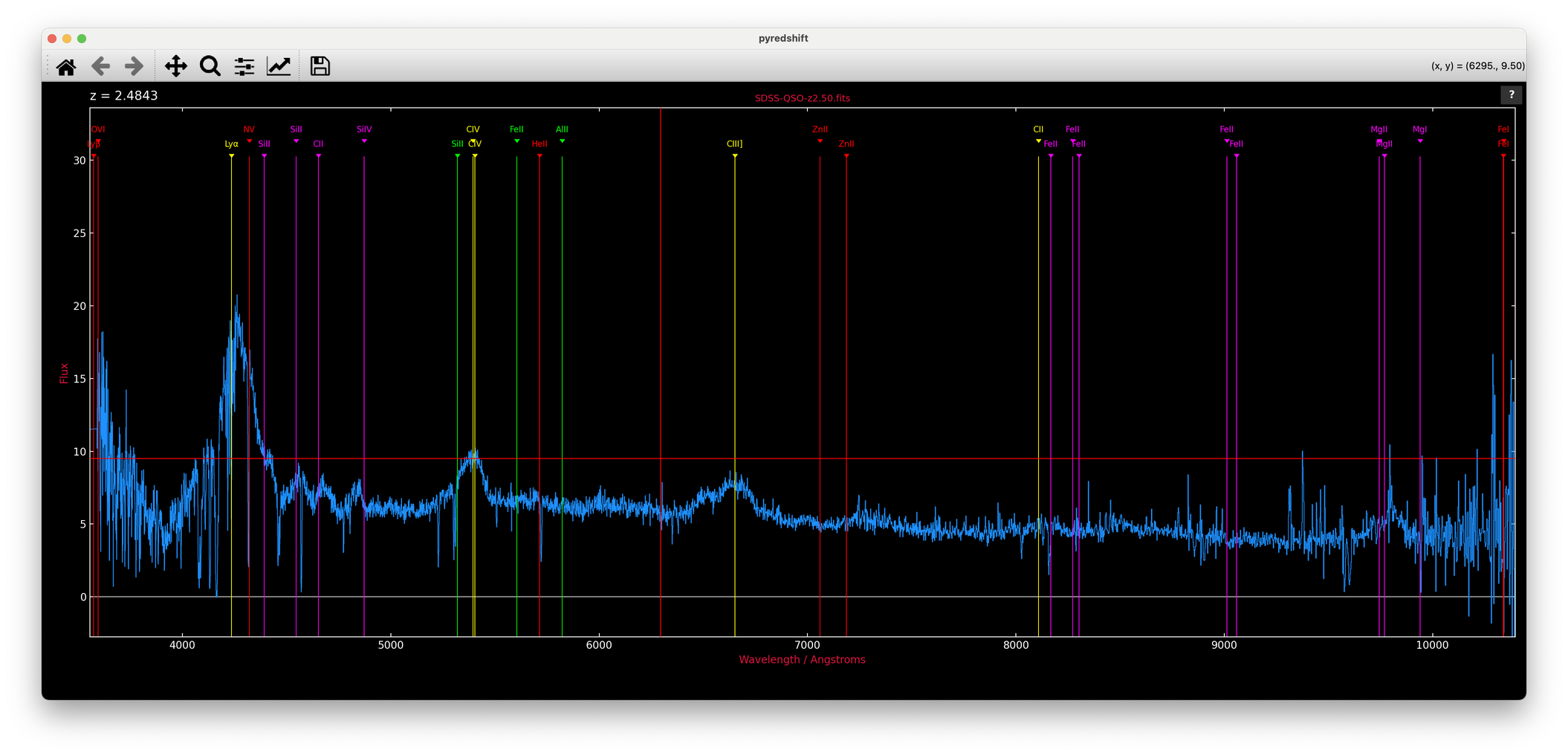
An SDSS quasar from Example-Spectra at z = 2.48 and
counting, in --retro mode: Lyα, CIV and CIII] lined up; the crosshair
cursor mid-hunt.
Install
pip install git+https://github.com/karlglazebrook/pyredshift
or from a checkout:
pip install .
This installs the pyredshift command into the active python's bin/
(e.g. anaconda3/bin) and the pyredshift package into site-packages.
Requires python ≥ 3.9 with numpy, matplotlib, astropy and scipy.
Usage
pyredshift spectrum.fits              # format auto-detected
pyredshift spectrum.fits -f sdss      # force a format
pyredshift spectrum.fits -z 2.19      # start from a known redshift
pyredshift spectrum.fits --retro      # retro PGPLOT-style black background
pyredshift spectrum.fits --microns    # keep micron wavelengths (no A conversion)
The file format is auto-detected by inspecting the FITS structure and column names/units:
| Format | Description |
|---|---|
fits |
1D (or 2D — row 1) FITS image with WCS; CD1_1 overrides CDELT1, IRAF/SDSS log-λ flags handled |
sdss |
SDSS binary table (LOGLAM/FLUX, either case) |
table |
generic binary table with wave+flux columns; TUNIT (µm, nm, Å) converted automatically (aliases: jwst, gabe, dja) |
xs |
XSHOOTER 1D table spectrum (nm) |
xs2 |
XSHOOTER as a FITS image in extension 1 |
outthere |
OutThere multi-extension grism spectra, stitched and flat-calibrated |
csv |
comma-separated, header rows skipped |
ascii |
2-column text |
Wavelengths that look like microns are converted to Ångstroms; NaNs are treated as bad pixels and plot as gaps, with orange markers along the bottom of the frame.
Real spectra to practice on are included in Example-Spectra — the true redshifts are hidden in their FITS headers.
From a Jupyter notebook
The interactive module also works straight from a notebook, given numpy arrays:
from pyredshift import redshift as redshift_module
z = redshift_module.redshift(wave, flux)
The interactive window opens outside the notebook (inline backends
cannot deliver events to it) and the cell blocks until you quit with
q; the final annotated view is then embedded in the cell output and
the redshift returned. Any non-interactive backend (e.g. %matplotlib inline) is switched to a GUI backend for the session and restored
afterwards — including if you interrupt the kernel mid-session.
Local kernels only: the window opens on the machine where the kernel runs, so remote kernels (JupyterHub, cloud, ssh without X forwarding) cannot work — pyredshift detects this and says so rather than hanging or crashing the kernel.
Interaction
Press ? (or click the ? button) for the full command reference — it
opens as a themed page in your browser, with the complete line list and a
short guide in separate tabs. The essentials:
- Identify a line: put the crosshair on a feature and press
ESCfollowed by a shortcut key (a= Hα,b= Hβ,l= Lyα,o= [OII],c= CIV ...) — or right-click the feature and pick the line from the popup menu, orgto type any rest wavelength. PressESC ESCon a sharp line to refine the redshift;=enters a redshift directly. - Navigate: drag the mouse for a rubber-band zoom (a purely horizontal
drag zooms X only),
z/uandi/ozoom about the cursor,[]pan,wwhole range,aautoscale,hhome. The matplotlib toolbar works too and stays in sync. - Analyse:
bbin,ssmooth,_iterative continuum fit,mequivalent width and line flux,Bzap artefacts,pprint to PDF. - Quit:
q— the final redshift is reported on the terminal.
Line identifications come from pyredshift.lines (CSV: wavelength, name,
label, matplotlib colour, comment — all vacuum wavelengths; a colour may
be a light/dark pair for the two backgrounds), installed
alongside the module and easy to customise. The window size and aspect
ratio are remembered between runs in ~/.pyredshift.json. A template
spectrum can be overlaid with t (searched for in $DATADIR,
$NEWMODELS/Spectra, then ~/Templates/Spectra).
Layout
pyredshift            the command-line script: format detection and reading
src/pyredshift/       the interactive module (redshift.py) + data files
The script prefers a src/pyredshift/ found next to it or under the
current directory, so a development checkout always runs its own code.
Credits
Karl Glazebrook, Swinburne University of Technology.
Lineage: redshift.f (FIGARO/Fortran, ~1992) → pdlredshift (Perl/PDL) →
pyredshift. Ported with the assistance of Claude (Anthropic).
MIT license — see LICENSE.
Release history Release notifications | RSS feed

Download files
Download the file for your platform. If you're not sure which to choose, learn more about installing packages.
Source Distribution
Built Distribution
Filter files by name, interpreter, ABI, and platform.
If you're not sure about the file name format, learn more about wheel file names.
Copy a direct link to the current filters
File details
Details for the file pyredshift-1.9.tar.gz.
File metadata
- Download URL: pyredshift-1.9.tar.gz
- Upload date:
- Size: 33.8 kB
- Tags: Source
- Uploaded using Trusted Publishing? No
- Uploaded via: twine/6.2.0 CPython/3.12.7
File hashes
| Algorithm | Hash digest | |
|---|---|---|
| SHA256 |
4f8a19a76ef632f1a5096b717ef62693758a47a6d31b9c3a3ff8f13ef46a1a73
|
|
| MD5 |
ddc98e2a945b9d1ac5ef7936526d6a9d
|
|
| BLAKE2b-256 |
d093ddf7c6ad38c07651015dc75f5335d7e930a5399d7fddcafc81522ef61c79
|
File details
Details for the file pyredshift-1.9-py3-none-any.whl.
File metadata
- Download URL: pyredshift-1.9-py3-none-any.whl
- Upload date:
- Size: 31.9 kB
- Tags: Python 3
- Uploaded using Trusted Publishing? No
- Uploaded via: twine/6.2.0 CPython/3.12.7
File hashes
| Algorithm | Hash digest | |
|---|---|---|
| SHA256 |
8f40671692525b70da3b1b25375fd712d9fdf499799993377ec705765796e642
|
|
| MD5 |
6659d379fa6cbed4f756b8e7a8b87e5b
|
|
| BLAKE2b-256 |
86ebd78c5677881bb7482d4c543c3eadcd8ac49627d8f4622e79f78475b53995
|






