






pyregeon
Reusable Python utilities to work with geospatial regions.
pyregeon stands for Python Region Geospatial utilities
Usage
The main idea of pyregeon is to make it as easy as possible to associate any Python object to a geospatial region. The first approach is with the object-oriented RegionMixin. We can set the region property attribute to any object that inherits from RegionMixin, e.g.:
from pyregeon import RegionMixin


class MyAnalysisCase(..., RegionMixin):
    # optionally define a `crs` or `CRS` attribute
    pass


analysis = MyAnalysisCase(...)
analysis.region = "Lausanne, Switzerland"
The region property setter accepts the following values:
- A string with a place name (Nominatim query) to geocode (requires osmnx).
- A sequence with the west, south, east and north bounds.
- A geometric object, e.g., shapely geometry, or a sequence of geometric objects (polygon or multi-polygon). In such a case, the value is passed as the
dataargument of the GeoSeries constructor, and needs to be in the same CRS as the one provided through thecrsargument. - A geopandas geo-series or geo-data frame.
- A filename or URL, a file-like object opened in binary ('rb') mode, or a Path object that will be passed to
geopandas.read_file.
Then, the processed region attribute can be accessed as a geo-data frame:
analysis.region
| geometry | bbox_west | bbox_south | bbox_east | bbox_north | place_id | osm_type | osm_id | lat | lon | class | type | place_rank | importance | addresstype | name | display_name | |
|---|---|---|---|---|---|---|---|---|---|---|---|---|---|---|---|---|---|
| 0 | MULTIPOLYGON (((6.58387 46.55187, 6.58632 46.5... | 6.583868 | 46.454873 | 6.720814 | 46.602577 | 83952532 | relation | 1685018 | 46.521827 | 6.632702 | boundary | administrative | 16 | 0.6941 | city | Lausanne | Lausanne, District de Lausanne, Vaud, Switzerland |
Note that when setting region to a naive geometry, i.e, without associated coordinate reference system (CRS), the setter will try to retrieve a CRS by looking whether the object has a crs or CRS attribute (in that order). In absence of these, a ValueError will be raised.
With the region attribute properly set, we can also generate regular grids using the generate_regular_grid_gser method:
import contextily as cx

res = 0.05
ax = analysis.generate_regular_grid_gser(res).plot(alpha=0.5, edgecolor="black")
cx.add_basemap(ax, crs=analysis.region.crs, attribution=False)
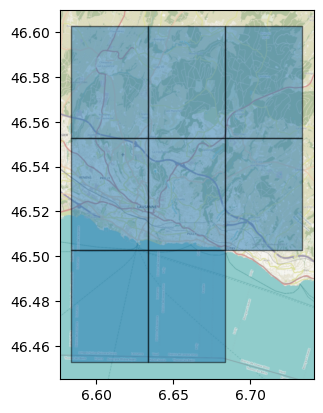
Alternatively, it is possible to use the standalone pyregeon.generate_regular_grid_gser function without any class by prepending a geo-series with the region as first positional argument (and optionally providing the crs keyword argument if the provided geo-series is naive).
See the API documentation for more details or the multiurbanpy library for an example use case of pyregeon.
Installation
pip install pyregeon
Acknowledgements
- This package was created with the martibosch/cookiecutter-geopy-package project template.
1 maintainer

Download files
Download the file for your platform. If you're not sure which to choose, learn more about installing packages.
Source Distribution
Built Distribution
Filter files by name, interpreter, ABI, and platform.
If you're not sure about the file name format, learn more about wheel file names.
Copy a direct link to the current filters
File details
Details for the file pyregeon-0.2.1.tar.gz.
File metadata
- Download URL: pyregeon-0.2.1.tar.gz
- Upload date:
- Size: 21.5 kB
- Tags: Source
- Uploaded using Trusted Publishing? Yes
- Uploaded via:
uv/0.9.26 {"installer":{"name":"uv","version":"0.9.26","subcommand":["publish"]},"python":null,"implementation":{"name":null,"version":null},"distro":{"name":"Ubuntu","version":"24.04","id":"noble","libc":null},"system":{"name":null,"release":null},"cpu":null,"openssl_version":null,"setuptools_version":null,"rustc_version":null,"ci":true}
File hashes
| Algorithm | Hash digest | |
|---|---|---|
| SHA256 |
23b9db4fdfd91d4f0e5ec945a2316f49d724a88c42cc97a4405df23bf6a59b8b
|
|
| MD5 |
d5e00644f647b4f1acc89f758ec73455
|
|
| BLAKE2b-256 |
d59811d26dfb57d18f6897fbb0d35802f3a90555eb782820293f0e68c7d28fa1
|
File details
Details for the file pyregeon-0.2.1-py3-none-any.whl.
File metadata
- Download URL: pyregeon-0.2.1-py3-none-any.whl
- Upload date:
- Size: 20.2 kB
- Tags: Python 3
- Uploaded using Trusted Publishing? Yes
- Uploaded via:
uv/0.9.26 {"installer":{"name":"uv","version":"0.9.26","subcommand":["publish"]},"python":null,"implementation":{"name":null,"version":null},"distro":{"name":"Ubuntu","version":"24.04","id":"noble","libc":null},"system":{"name":null,"release":null},"cpu":null,"openssl_version":null,"setuptools_version":null,"rustc_version":null,"ci":true}
File hashes
| Algorithm | Hash digest | |
|---|---|---|
| SHA256 |
9862289e01e3add51b64b84e76f619a416b76ded6a367a20c0df4fee72bf9726
|
|
| MD5 |
0bffbaacb1eb69457408b83bc5a12cae
|
|
| BLAKE2b-256 |
f07166f9ab78deb90234185b357b9367fa6177aa6200411f37a5a5e1cac1ff2f
|














