
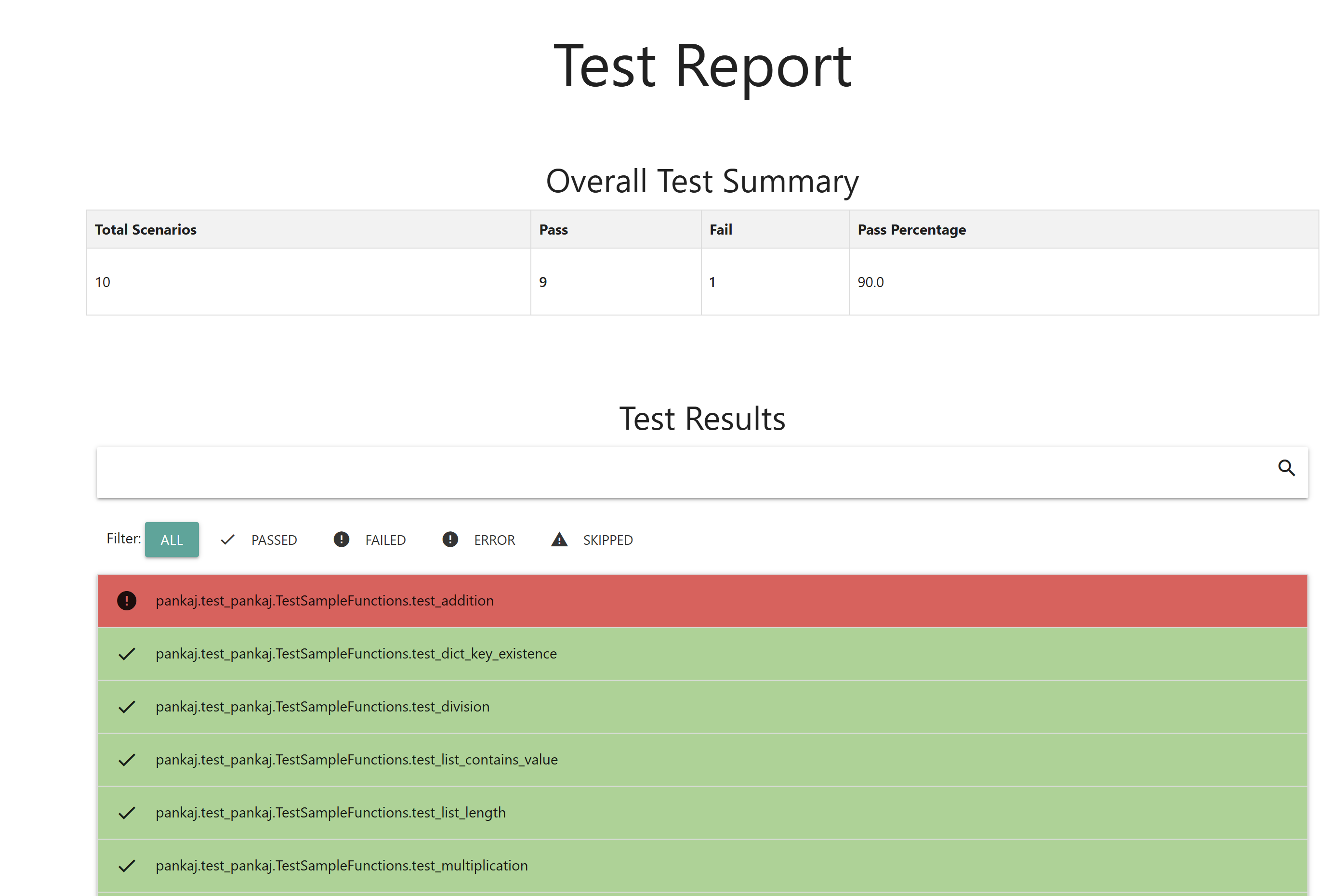
This library generates both HTML and JSON reports for your Nose unit tests, providing a clear and structured overview of test results.
Verified details
These details have been verified by PyPIProject links
GitHub Statistics
Maintainers

Project description
Python Unit Test HTML JSON Report Generator




Introduction
A [Nose2] plugin for generating detailed, searchable, and user-friendly HTML and JSON reports of your test results.
Key Features:
- Rich Test Descriptions: Automatically captures docstrings from tests as descriptions, making the reports more informative and readable.
- Failure Tracebacks: Includes complete traceback details for any failed tests, enabling quick identification and resolution of issues.
- Searchable and Filterable Reports: Allows users to search and filter results by status (e.g., passed, failed, skipped, or error), making it easy to navigate through large test suites.
- Customizable Outputs: Supports customization options to fit specific reporting needs.
- JSON Integration: Provides JSON reports for easy integration with other tools or automated workflows.
- This plugin is ideal for enhancing test visibility and making debugging more efficient.
Installation
You can install the Nose2 HTML Report Plugin using pip:
pip install pyrept
Configuration
To get nose2 to recognize the plugin add an entry into the plugin key of the unittest section of your nose2.cfg file. Configurations for the plugin should be placed into an html-report section of the configuration file. Below is a working example:
[unittest]
plugins = pyrept.html_report

[html-report]
always-on = True
Additional Settings
Specify the path for the HTML report. Defaults to report.html
[unittest]
plugins = pyrept.html_report

[html-report]
always-on = True
path = test_results/my_custom_report_file.html
Usage
Command line flag:
nose2 --html-report
If you have always-on=True inside your nose2.cfg:
nose2
Project details
Verified details
These details have been verified by PyPIProject links
GitHub Statistics
Maintainers
Release history Release notifications | RSS feed


Download files
Download the file for your platform. If you're not sure which to choose, learn more about installing packages.
Source Distribution
Built Distribution
Filter files by name, interpreter, ABI, and platform.
If you're not sure about the file name format, learn more about wheel file names.
Copy a direct link to the current filters
File details
Details for the file pyrept-1.0.1.tar.gz.
File metadata
- Download URL: pyrept-1.0.1.tar.gz
- Upload date:
- Size: 132.8 kB
- Tags: Source
- Uploaded using Trusted Publishing? Yes
- Uploaded via: twine/6.1.0 CPython/3.11.11
File hashes
| Algorithm | Hash digest | |
|---|---|---|
| SHA256 |
07c13604f4e25b673bf5f65cbe4ebe8d70f6e1e1f1cfe5a11393b7bf1ac46a67
|
|
| MD5 |
834bcfb1240eaa375a4d401371452c52
|
|
| BLAKE2b-256 |
6ead48fc76555b2f1537bdbe2863c1fac6f661474b2ca35804fb98e4b1274c21
|
File details
Details for the file pyrept-1.0.1-py2.py3-none-any.whl.
File metadata
- Download URL: pyrept-1.0.1-py2.py3-none-any.whl
- Upload date:
- Size: 9.6 kB
- Tags: Python 2, Python 3
- Uploaded using Trusted Publishing? Yes
- Uploaded via: twine/6.1.0 CPython/3.11.11
File hashes
| Algorithm | Hash digest | |
|---|---|---|
| SHA256 |
07a23952c84fd6c43bb5d241b22eea47d70f11a3882fac8ab35a2c2df27eacf4
|
|
| MD5 |
8843b69bd347c83d1b0ef30d8e26f1f8
|
|
| BLAKE2b-256 |
71adf95cd56d7ccf44f5ddb9e8c631897265e5a4ca0cf7e5c98e7d3e6d918993
|






