
Resume Parser Written in Python3 . The module supports .pdf and .docx files

Project description

Introduction
pyresumize is a python module to extract useful information from resume and generate a json string out of it. Currently it supports only pdf,docx files as input .
Todo
- Proper Logging to be added
- Support for other formats
- Performance Improvements
- Bug Fixes
- Custom configuration of input data
Note
The Skills , Employers and Education is given as .csv inputs to the engine and you can see a reference implementation in the data folder.
Todo
Log Integration custom model
Design
Class Diagram
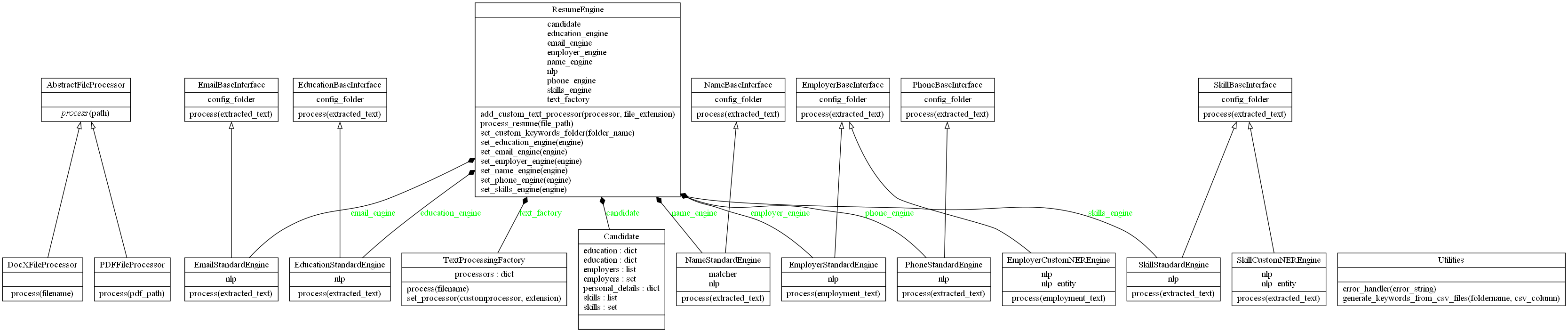
Package Diagram

I have changed the Design in such a way that the developers can create own parsing rules and set those to the Parser to bring in flexibility.
Currently we have the below interfaces exposed and the developers can override the process method to bring in custom processing rules.
- EmployerBaseInterface:
Searches for company information in the resume and identifies the employers
- EducationBaseInterface
Process Education Details together with universities .The results are stored in a map
- EmailBaseInterface
Check for email addresses in the resume and returns if found one.
- PhoneBaseInterface
Process phone numbers in the resume text, if there are more than one phone number found , returns a concatenated string with commas.
- NameBaseInterface
Proces the Name of the candidate .
- SkillBaseInterface:
Process the skills section . returns a list of identified skills in a resume.
One of these interfaces can be implemented like below .
class RemoteCompaniesChecker (EmployerBaseInterface):
    def process(self,resumetext):
    #Call a remote API and pass the text info
    return list[]
Currently the Engine supports PDF and DOCX File extensions , By implementing AbstractFileProcessor you can create your own parser to insert it to the engine via the method add_custom_text_processor.
The ResumeEngine class has below member functions and with one of these you can apply your custom engine
set_skills_engine(self, engine):
set_name_engine(self, engine):
set_name_engine(self, engine):
set_email_engine(self, engine):
set_education_engine(self, engine):
set_employer_engine(self, engine):
Usage
https://pypi.org/project/pyresumize/ . The module can be installed using
pip install pyresumize
Then do the below
python -m spacy download en_core_web_lg
python -m nltk.downloader words
python -m nltk.downloader stopwords
from pyresumize import ResumeEngine
r_parser=ResumeEngine()
r_parser.set_custom_keywords_folder("data")
json=r_parser.process_resume(file)
print(json)
Release history Release notifications | RSS feed


Download files
Download the file for your platform. If you're not sure which to choose, learn more about installing packages.
Source Distribution
Built Distribution
Filter files by name, interpreter, ABI, and platform.
If you're not sure about the file name format, learn more about wheel file names.
Copy a direct link to the current filters
File details
Details for the file pyresumize-0.2.0.tar.gz.
File metadata
- Download URL: pyresumize-0.2.0.tar.gz
- Upload date:
- Size: 11.1 kB
- Tags: Source
- Uploaded using Trusted Publishing? No
- Uploaded via: twine/4.0.2 CPython/3.11.2
File hashes
| Algorithm | Hash digest | |
|---|---|---|
| SHA256 |
1b38f49c8a81b5c0e7fda37343c679131e86988200c0145cf0a2fb7d256c3146
|
|
| MD5 |
ea1347c75d54eb636dff582067a2dba5
|
|
| BLAKE2b-256 |
7524cbf6c820c62f798105a4c58aa7be90f437f94364488d08f300eb15892cb2
|
File details
Details for the file pyresumize-0.2.0-py3-none-any.whl.
File metadata
- Download URL: pyresumize-0.2.0-py3-none-any.whl
- Upload date:
- Size: 10.5 kB
- Tags: Python 3
- Uploaded using Trusted Publishing? No
- Uploaded via: twine/4.0.2 CPython/3.11.2
File hashes
| Algorithm | Hash digest | |
|---|---|---|
| SHA256 |
0ebacbcad637d895fb7e711ade4257681e81ff831aab90ab234a3fa8a3d4db43
|
|
| MD5 |
442eaafd627586fb9e1f8209be7bd16d
|
|
| BLAKE2b-256 |
36b0d262d5e6d0aff6c619dc3015924eed2d2d5142361acb412c083d8e02af28
|






