
PyRetroPrint
Welcome to PyRetroPrint, your one-stop shop for Reagan-era hardcopy!
Introduction
Retro-printing emulation in python!
This utility is designed be used in a printing pipeline from obsolete software. Anything that is equipped to print to an Epson FX-80 IBM Proprinter, or HP Laserjet I or II can now use your modern CUPS-supported printer, or simply output PDF documents.
For applications that support Atari 825, FX-80 and Compatibles, you can:
- Render PRN files or streams to PDF
- Print formatted text to the terminal
- Send PDF output to networked printers
- Be used as a pipe for AtariSIO's
atariserver - Print directly from Atari 800XL to e.g. CUPS-compatible printers
Installation
PyRetroPrint can be installed using pip:
pip install pyretroprint
For development versions (recommended):
	python3 -mvenv prptest
	cd prptest
	. bin/activate
	pip install cairo
	pip install -i https://test.pypi.org/simple/ pyretroprint
How to Use
Once the software is installed, simply pipe output of your prints to the main script:
|pyretroprint -p pdf -o /tmp/myretroprint.pdf
--input or -i, specifies the source PRN file (defaults to stdin).
--size or -s, sets A4 or Letter sizes, defaults to A4.
--printer or -P will tell PyRetroPrint which printer type to emulate.
--presenter or -p determines which output type to use: pdf or terminal
which prints formatted text to the terminal (default).
--output or -o, specifies the destination file (defaults to
default.pdf for PDF, or stdout for terminal).
Philosophy
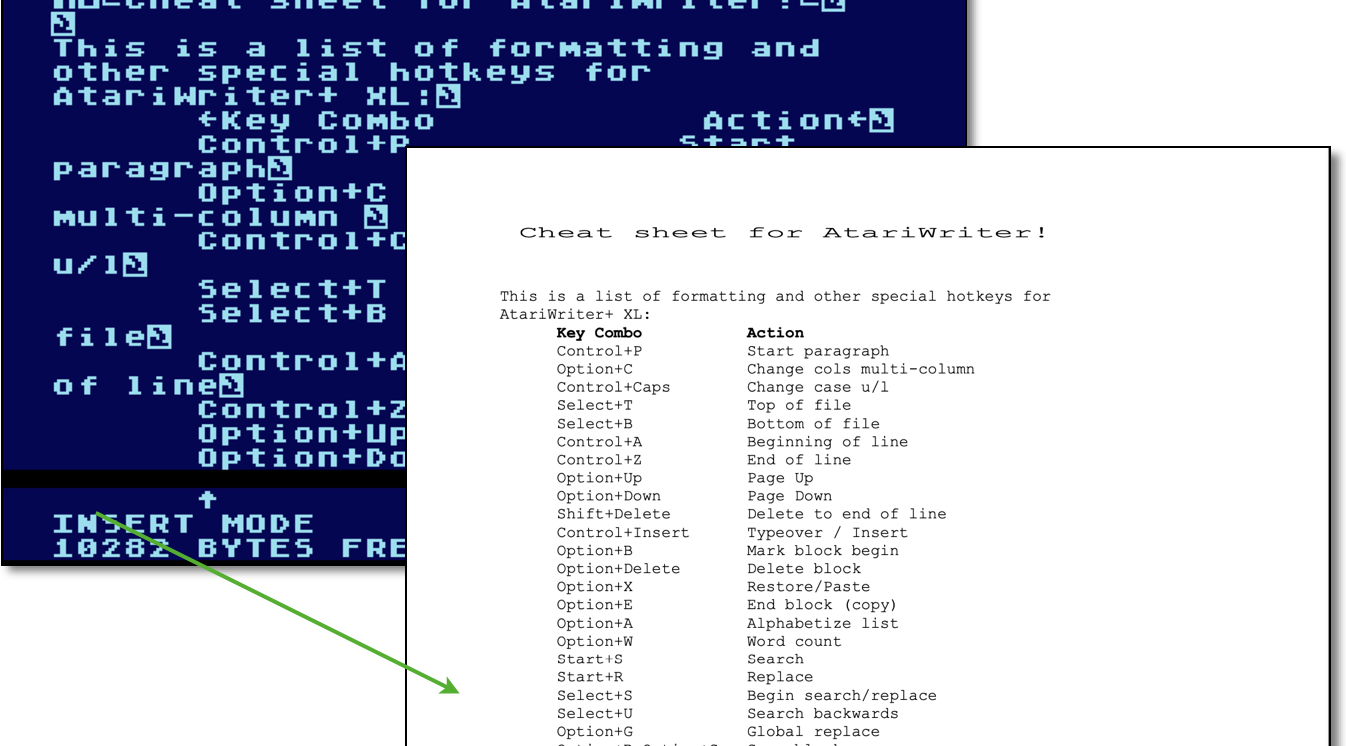
We think you should be able boot your Atari 800 XL, start AtariWriter+ and type in your document, hit print, and walk over to your networked laser printer and pick up your beautiful, monospaced hard-copy.
The same goes for your old term paper, your 80s diary, or anything else you might have on a computer or piece of software specced out before 1990.
1 maintainer

Metadata
1 maintainer
Release files for pyretroprint 0.1.10
For a detailed explanation of source distributions (sdists) and built distributions (wheels), please see the package formats documentation.
Source distribution (sdist)
| File | Size | Uploaded | Provenance | Actions |
|---|---|---|---|---|
| pyretroprint-0.1.10.tar.gz | 15.4 kB | Without provenance | Details for pyretroprint-0.1.10.tar.gz |
Built distribution (wheel)
| File | Interpreter | ABI | Platform | Actions Reset |
|---|---|---|---|---|
| pyretroprint-0.1.10-py3-none-any.whl | Python 3 | none | any | Details for pyretroprint-0.1.10-py3-none-any.whl |
Total release size: 31.6 kB
Release files / pyretroprint-0.1.10.tar.gz
| Download URL | pyretroprint-0.1.10.tar.gz |
|---|---|
| Size | 15.4 kB |
| Tags | Source |
|
SHA-256 checksum How to use checksums |
0ec96b0033ccfe1c2f16f0f20d106e75f6e4c94bffd18f4da11d3aa1067ed0cb
|
|
BLAKE2b-256 checksum How to use checksums |
8929c2c210e8ff51a1c013acb281654681c4244ca4acb719b27039c7005413a5
|
| Upload date | |
|
Uploaded using Trusted Publishing? What is trusted publishing? |
No |
| Uploaded via |
twine/3.4.2 importlib_metadata/4.8.1 pkginfo/1.7.1 requests/2.26.0 requests-toolbelt/0.9.1 tqdm/4.62.3 CPython/3.9.7
|
Release files / pyretroprint-0.1.10-py3-none-any.whl
| Download URL | pyretroprint-0.1.10-py3-none-any.whl |
|---|---|
| Size | 16.2 kB |
| Tags | Python 3 |
|
SHA-256 checksum How to use checksums |
1fcf870bd0867ca9609f8586152c145c09ed40959d64b64996ca69a2c048876d
|
|
BLAKE2b-256 checksum How to use checksums |
996306d033b48505c99af306b6f60f131418e87705c67ae91e6eff066ea422b3
|
| Upload date | |
|
Uploaded using Trusted Publishing? What is trusted publishing? |
No |
| Uploaded via |
twine/3.4.2 importlib_metadata/4.8.1 pkginfo/1.7.1 requests/2.26.0 requests-toolbelt/0.9.1 tqdm/4.62.3 CPython/3.9.7
|
Security for pyretroprint 0.1.10
Provenance
Provenance describes where a file came from. On PyPI, provenance is shared via attestations, which provide a verifiable record of the build or publishing details. View details, limitations and caveats.
No provenance found
None of the files in this release were uploaded with provenance metadata.
A note on package security
PyPI is a repository for distributing packages, not a service for auditing them. While third-party security researchers and our staff do their best to detect and remove malicious packages, PyPI cannot guarantee the quality, security or suitability of any given package.
To learn more about protecting yourself from malicious actors, visit our package security documentation.














