
Sail Python library
Verified details
These details have been verified by PyPIProject links
GitHub Statistics
Maintainers

Project description
Sail




Sail is an open-source unified and distributed multimodal computation framework created by LakeSail.
Our mission is to unify batch processing, stream processing, and compute-intensive AI workloads. Sail is a compute engine that is:
- Compatible with the Spark Connect protocol, supporting the Spark SQL and DataFrame API with no code rewrites required.
- ~4x faster than Spark in benchmarks (up to 8x in specific workloads).
- 94% cheaper on infrastructure costs.
- 100% Rust-native with no JVM overhead, delivering memory safety, instant startup, and predictable performance.
✨Using Sail? Tell us your story and get free merch!✨
Documentation
The documentation of the latest Sail version can be found here.
Installation
Quick Start
Sail is available as a Python package on PyPI. You can install it along with PySpark in your Python environment.
pip install pysail
pip install "pyspark[connect]"
Alternatively, you can install the lightweight client package pyspark-client since Spark 4.0.
The pyspark-connect package, which is equivalent to pyspark[connect], is also available since Spark 4.0.
Advanced Use Cases
You can install Sail from source to optimize performance for your specific hardware architecture. The detailed Installation Guide walks you through this process step-by-step.
If you need to deploy Sail in production environments, the Deployment Guide provides comprehensive instructions for deploying Sail on Kubernetes clusters and other infrastructure configurations.
Getting Started
Starting the Sail Server
Option 1: Command Line Interface. You can start the local Sail server using the sail command.
sail spark server --port 50051
Option 2: Python API. You can start the local Sail server using the Python API.
from pysail.spark import SparkConnectServer

server = SparkConnectServer(port=50051)
server.start(background=False)
Option 3: Kubernetes. You can deploy Sail on Kubernetes and run Sail in cluster mode for distributed processing. Please refer to the Kubernetes Deployment Guide for instructions on building the Docker image and writing the Kubernetes manifest YAML file.
kubectl apply -f sail.yaml
kubectl -n sail port-forward service/sail-spark-server 50051:50051
Connecting to the Sail Server
Once you have a running Sail server, you can connect to it in PySpark. No changes are needed in your PySpark code!
from pyspark.sql import SparkSession

spark = SparkSession.builder.remote("sc://localhost:50051").getOrCreate()
spark.sql("SELECT 1 + 1").show()
Please refer to the Getting Started guide for further details.
Feature Highlights
Storage
Sail supports a variety of storage backends for reading and writing data. You can read more details in our Storage Guide.
Here are the storage options supported:
- AWS S3
- Cloudflare R2
- Azure
- Google Cloud Storage
- Hugging Face
- HDFS
- File systems
- HTTP/HTTPS
- In-memory storage
Lakehouse Formats
Sail provides native support for modern lakehouse table formats, offering reliable storage layers with strong data management guarantees and ensuring interoperability with existing datasets.
Please refer to the following guides for the supported formats:
Catalog Providers
Sail supports multiple catalog providers, such as the Apache Iceberg REST Catalog and Unity Catalog. You can manage datasets as external tables and integrate with broader data-platform ecosystems.
For more details on usage and best practices, see the Catalog Guide.
Benchmark Results
Derived TPC-H results show that Sail outperforms Apache Spark in every query:
- Execution Time: ~4× faster across diverse SQL workloads.
- Hardware Cost: 94% lower with significantly lower peak memory usage and zero shuffle spill.
| Metric | Spark | Sail |
|---|---|---|
| Total Query Time | 387.36 s | 102.75 s |
| Query Speed-Up | Baseline | 43% – 727% |
| Peak Memory Usage | 54 GB | 22 GB (1 s) |
| Disk Write (Shuffle Spill) | > 110 GB | 0 GB |
These results come from a derived TPC-H benchmark (22 queries, scale factor 100, Parquet format) on AWS r8g.4xlarge instances.
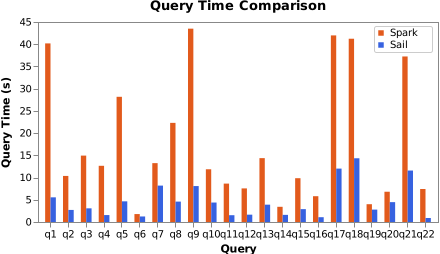
See the full analysis and graphs on our Benchmark Results page.
Contributing
Contributions are more than welcome!
Please submit GitHub issues for bug reports and feature requests. You are also welcome to ask questions in GitHub discussions.
Feel free to create a pull request if you would like to make a code change. You can refer to the Development Guide to get started.
Additionally, please join our Slack Community if you haven’t already!
Why Choose Sail?
When Spark was invented over 15 years ago, it was revolutionary. It redefined distributed data processing and powered ETL, machine learning, and analytics pipelines across industries.
But Spark’s JVM-based architecture now struggles to meet modern demands for performance and cloud efficiency:
- Garbage collection pauses introduce latency spikes.
- Serialization overhead slows data exchange between JVM and Python.
- Heavy executors drive up cloud costs and complicate scaling.
- Row-based processing performs poorly on analytical workloads and leaves hardware efficiency untapped.
- Slow startup delays workloads, hurting interactive and on-demand use cases.
Sail solves these problems with a modern, Rust-native design.
Sail is Spark-compatible
Sail offers a drop-in replacement for Spark SQL and the Spark DataFrame API. Existing PySpark code works out of the box once you connect your Spark client session to Sail over the Spark Connect protocol.
- Spark SQL Dialect Support. A custom Rust parser (built with parser combinators and Rust procedural macros) covers Spark SQL syntax with production-grade accuracy.
- DataFrame API Support. Spark DataFrame operations run on Sail with identical semantics.
- Python UDF, UDAF, UDWF, and UDTF Support. Python, Pandas, and Arrow UDFs all follow the same conventions as Spark.
Sail’s Advantages over Spark
- Rust-Native Engine. No garbage collection pauses, no JVM memory tuning, and low memory footprint.
- Columnar Format and Vectorized Execution. Built on top of Apache Arrow and Apache DataFusion, the columnar in-memory format and SIMD instructions unlock blazing-fast query execution.
- Lightning-Fast Python UDFs. Python code runs inside Sail with zero serialization overhead as Arrow array pointers enable zero-copy data sharing.
- Performant Data Shuffling. Workers exchange Arrow columnar data directly, minimizing shuffle costs for joins and aggregations.
- Lightweight, Stateless Workers. Workers start in seconds, consume only a few megabytes of memory at idle, and scale elastically to cut cloud costs and simplify operations.
- Concurrency and Memory Safety You Can Trust. Rust’s ownership model prevents null pointers, race conditions, and unsafe memory access for unmatched reliability.
Curious about how Sail stacks up against Spark? Explore our Why Sail? page. Ready to bring your existing workloads over? Our Migration Guide shows you how.
Further Reading
- Architecture – Overview of Sail’s design for both local and cluster modes, and how it transitions seamlessly between them.
- Query Planning – Detailed explanation of how Sail parses SQL and Spark relations, builds logical and physical plans, and handles execution for local and cluster modes.
- SQL and DataFrame Features – Complete reference for Spark SQL and DataFrame API compatibility.
- LakeSail Blog – Updates on Sail releases, benchmarks, and technical insights.
Project details
Verified details
These details have been verified by PyPIProject links
GitHub Statistics
Maintainers
Release history Release notifications | RSS feed


Download files
Download the file for your platform. If you're not sure which to choose, learn more about installing packages.
Source Distribution
Built Distributions
Filter files by name, interpreter, ABI, and platform.
If you're not sure about the file name format, learn more about wheel file names.
Copy a direct link to the current filters
File details
Details for the file pysail-0.4.4.tar.gz.
File metadata
- Download URL: pysail-0.4.4.tar.gz
- Upload date:
- Size: 1.4 MB
- Tags: Source
- Uploaded using Trusted Publishing? Yes
- Uploaded via: maturin/1.10.2
File hashes
| Algorithm | Hash digest | |
|---|---|---|
| SHA256 |
f3c6217b5a2c95fce897c561ccf1cd125a5d663eacc17196473066815cf1092c
|
|
| MD5 |
aa217e804bfa23e32755aaa1306f7f76
|
|
| BLAKE2b-256 |
982832d448c276ae82e757f1799072ca2bd27cc67eee2f5e2c7fd05d13544626
|
File details
Details for the file pysail-0.4.4-pp39-pypy39_pp73-manylinux_2_24_aarch64.whl.
File metadata
- Download URL: pysail-0.4.4-pp39-pypy39_pp73-manylinux_2_24_aarch64.whl
- Upload date:
- Size: 45.4 MB
- Tags: PyPy, manylinux: glibc 2.24+ ARM64
- Uploaded using Trusted Publishing? Yes
- Uploaded via: maturin/1.10.2
File hashes
| Algorithm | Hash digest | |
|---|---|---|
| SHA256 |
679dc097888baec8038b59021d550be5f49e2e560a3d9973c2456a3e4f8d8dde
|
|
| MD5 |
cf25b3610acb0f890b9bbaa99f2aa348
|
|
| BLAKE2b-256 |
5306d87fbd3eeccac9c0b4ac1ca410291c29b49c4f73d697cdd220e0914db9f9
|
File details
Details for the file pysail-0.4.4-cp38-abi3-win_amd64.whl.
File metadata
- Download URL: pysail-0.4.4-cp38-abi3-win_amd64.whl
- Upload date:
- Size: 53.2 MB
- Tags: CPython 3.8+, Windows x86-64
- Uploaded using Trusted Publishing? Yes
- Uploaded via: maturin/1.10.2
File hashes
| Algorithm | Hash digest | |
|---|---|---|
| SHA256 |
0700ebb37ac69c353ab98841175c03f1ceaf4547591dfd9024648f6c8278405b
|
|
| MD5 |
b60214695e4e1ab0c5a6248c45fe0637
|
|
| BLAKE2b-256 |
ca0c9e60a67ace11c1c24a454b69370f15e04ea3cbd0481c10a9a2cbc15c17f9
|
File details
Details for the file pysail-0.4.4-cp38-abi3-manylinux_2_24_aarch64.whl.
File metadata
- Download URL: pysail-0.4.4-cp38-abi3-manylinux_2_24_aarch64.whl
- Upload date:
- Size: 45.4 MB
- Tags: CPython 3.8+, manylinux: glibc 2.24+ ARM64
- Uploaded using Trusted Publishing? Yes
- Uploaded via: maturin/1.10.2
File hashes
| Algorithm | Hash digest | |
|---|---|---|
| SHA256 |
a4bed5c89537f3219a8f03ad5689cba3c8bcc53c75b2a4ca5d930fffd8f92621
|
|
| MD5 |
69b6444caac6812aa41a24e89873618c
|
|
| BLAKE2b-256 |
24c72b958a482d6b776f126eb5fcfc7b95704ad9f48cfb02838d95cf9e660fbb
|
File details
Details for the file pysail-0.4.4-cp38-abi3-manylinux_2_17_x86_64.manylinux2014_x86_64.whl.
File metadata
- Download URL: pysail-0.4.4-cp38-abi3-manylinux_2_17_x86_64.manylinux2014_x86_64.whl
- Upload date:
- Size: 48.9 MB
- Tags: CPython 3.8+, manylinux: glibc 2.17+ x86-64
- Uploaded using Trusted Publishing? Yes
- Uploaded via: maturin/1.10.2
File hashes
| Algorithm | Hash digest | |
|---|---|---|
| SHA256 |
ccd1f1c0d6addb86b6b7f9d4445bc4819f9ae3db7ab836b17396b35052113333
|
|
| MD5 |
94a3b91265ee1dca9a6d83aa9077524d
|
|
| BLAKE2b-256 |
f3e42f5cc92d04632be96e907ba9a2058b76e8b9b98475fdf1a451d8f50d88bb
|
File details
Details for the file pysail-0.4.4-cp38-abi3-macosx_11_0_arm64.whl.
File metadata
- Download URL: pysail-0.4.4-cp38-abi3-macosx_11_0_arm64.whl
- Upload date:
- Size: 44.0 MB
- Tags: CPython 3.8+, macOS 11.0+ ARM64
- Uploaded using Trusted Publishing? Yes
- Uploaded via: maturin/1.10.2
File hashes
| Algorithm | Hash digest | |
|---|---|---|
| SHA256 |
8bdc6f941ed02c522a0425a91ca1d40641dbd13802a16a5a0910dcc184ce8777
|
|
| MD5 |
e470d6ba3e1bb16242a0f91edf651112
|
|
| BLAKE2b-256 |
a63e9a4e58773b3c7bcbb0f153a5a356889e4ebcb3e296fa418e512c27a9be18
|
File details
Details for the file pysail-0.4.4-cp38-abi3-macosx_10_12_x86_64.whl.
File metadata
- Download URL: pysail-0.4.4-cp38-abi3-macosx_10_12_x86_64.whl
- Upload date:
- Size: 47.9 MB
- Tags: CPython 3.8+, macOS 10.12+ x86-64
- Uploaded using Trusted Publishing? Yes
- Uploaded via: maturin/1.10.2
File hashes
| Algorithm | Hash digest | |
|---|---|---|
| SHA256 |
c37cc08d62cdae2e86ffde9446d56c58b352affd3dca0957535c3cb3b86d6f18
|
|
| MD5 |
6f7a570bf8fe23fa4c45bf267821480f
|
|
| BLAKE2b-256 |
60654e27a9499cb8545086ce137b7ed4648be7045a851379aac90d0832971d1b
|






