
Creates CF-Radial1 data from individual sweeps of IMD DWR data

Project description
[!WARNING]
New Xarray-based Package for IMD Radar Data "Radarx"
- Looking for a more modern, flexible, and efficient way to work with IMD radar data?
- Check out our new package: Radarx at https://radarx.readthedocs.io
It’s an xarray-based toolkit built on top of xradar that supports reading, visualizing, and analyzing IMD radar files with ease.
💬 Join the discussion and stay connected with the radar community at openradar.discourse.group

PyScanCf
Creates Py-ART compatible cf-radial data from individual sweeps of Indian Meteorological Department (IMD) Radar data
Description
PyScanCf is a library for creating cfradial (polar) data from IMD radars that contain all 10 sweeps from single scans which are named as (Polar_ABC.nc) as well as gridded radar data from which are named as (grid_ABC.nc). Both formats are compatible for PyART. It uses Pyart to create grid data, so please remember to cite Py-ART as well.
Latest Documentation
Latest Examples
https://github.com/syedhamidali/pyscancf_examples
Installing from source
Installing PyScanCf from source is the only way to get the latest updates and enhancement to the software that have not yet made it into a release. The latest source code for PyScanCf can be obtained from the GitHub repository, https://github.com/syedhamidali/PyScanCf.git.
How to install::
conda create -n pcf arm_pyart nbclassic git -c conda-forge
conda activate pcf
pip install git+https://github.com/syedhamidali/PyScanCf.git
Or, to install in your home directory, use::
git clone https://github.com/syedhamidali/PyScanCf.git
python setup.py install --user
Or, Install via pip::
pip install pyscancf
Citation

Syed, H. A., Sayyed, I., Kalapureddy, M. C. R., & Grandhi, K. K. (2021). PyScanCf – The library for single sweep datasets of IMD weather radars. Zenodo. doi:10.5281/zenodo.5574160.
PyScanCf Tutorial on Youtube
Documentation
Import Library::
import pyscancf as pcf
Mention the data path::
inp = '/Users/rizvi/Downloads/goa16'
Convert data to cfradial format::
pcf.cfrad(inp,inp,True,'REF')
And you'll see the beautiful gridded data plot in your notebook, the figures will be saved in the directory from where you launched the notebook
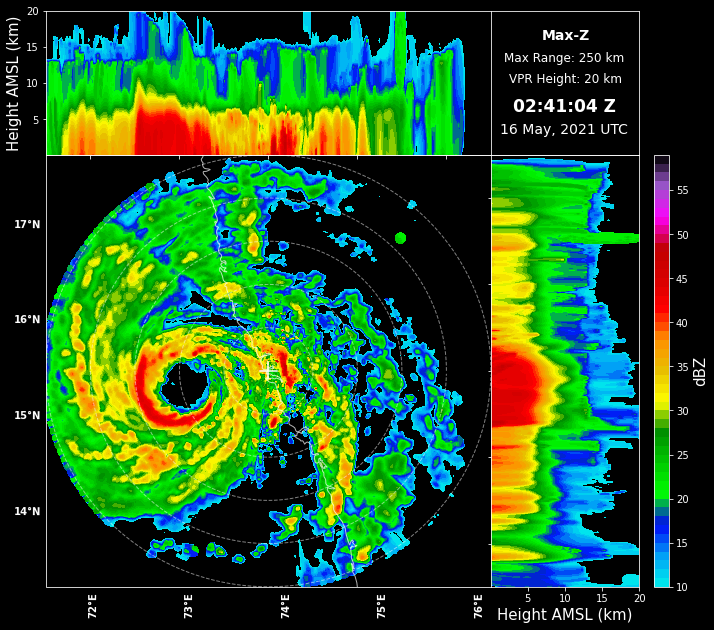
Detailed and efficient way to use this toolkit
Release history Release notifications | RSS feed


Download files
Download the file for your platform. If you're not sure which to choose, learn more about installing packages.
Source Distribution
Built Distribution
Filter files by name, interpreter, ABI, and platform.
If you're not sure about the file name format, learn more about wheel file names.
Copy a direct link to the current filters
File details
Details for the file pyscancf-2.0.3.tar.gz.
File metadata
- Download URL: pyscancf-2.0.3.tar.gz
- Upload date:
- Size: 7.6 MB
- Tags: Source
- Uploaded using Trusted Publishing? No
- Uploaded via: twine/6.1.0 CPython/3.12.10
File hashes
| Algorithm | Hash digest | |
|---|---|---|
| SHA256 |
5257b0decd118ba104e0dbacaeded34f046e1e08bf5a37c19e89f2ba12a402ef
|
|
| MD5 |
80b70cde31288df7f60d8c5d00859ca6
|
|
| BLAKE2b-256 |
d3f1c32d4ae8acfb209278cb9a81ff7d37d41af5f9c6618d68d59552dfe556b1
|
File details
Details for the file pyscancf-2.0.3-py3-none-any.whl.
File metadata
- Download URL: pyscancf-2.0.3-py3-none-any.whl
- Upload date:
- Size: 18.1 kB
- Tags: Python 3
- Uploaded using Trusted Publishing? No
- Uploaded via: twine/6.1.0 CPython/3.12.10
File hashes
| Algorithm | Hash digest | |
|---|---|---|
| SHA256 |
3c0c09a68eaa9463af2f0a721c3e05f55ea93eff7bef8f16c17ce76bf7421106
|
|
| MD5 |
1d6efe93167f4426f596ae436d79de74
|
|
| BLAKE2b-256 |
3a6aff0c99f118f9fa4ea4c8f2c46fdbc697f735dafa5ea9af5eaa22c8aeb10d
|






