
English | 日本語 | 简体中文 | Français

Code quality analysis for Python in the age of AI coding.
Building with Cursor, Claude, or ChatGPT? pyscn keeps AI-generated code maintainable with structural analysis.






Quick Start
# Run analysis without installation
uvx pyscn@latest analyze .
# or
pipx run pyscn analyze .
Demo
Features
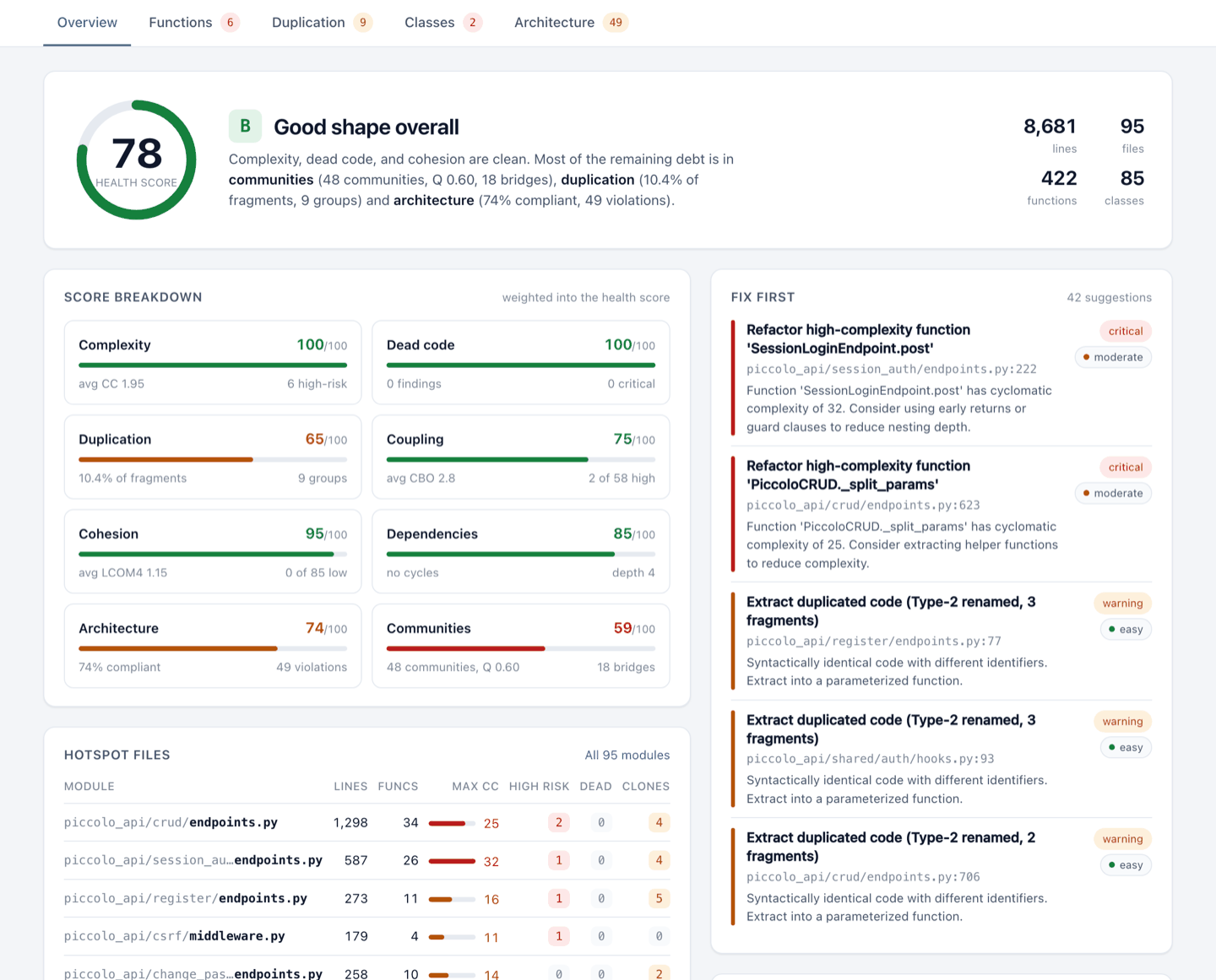
One command scores your whole codebase (0-100 with an A-F grade) and generates an HTML report that shows what to fix first.
pyscn looks at your code from five angles:
- 🧹 Dead code - unreachable code you can safely delete
- 📋 Duplicate code - copy-pasted and structurally similar code worth merging (Type 1-4 clone detection)
- 🌀 Complexity - functions and executable class suites that are hard to read and test (cyclomatic and cognitive complexity)
- 🔥 Module and directory hotspots - per-file quality and per-directory complexity rollups for prioritizing refactors
- 🏗️ Architecture - circular imports, layer rule violations (clean / layered / hexagonal / MVC presets), and auto-detected module communities that reveal how your code is actually structured
- 🧩 Class design - classes that do too much or depend on too much (CBO coupling, LCOM4 cohesion)
100,000+ lines/sec • Built with Go + tree-sitter
Working with other languages? pyscn is part of polyscan, code quality analyzers for JavaScript/TypeScript and more.
Polyscan for GitHub
Polyscan App files a weekly audit report as a GitHub Issue. Free for public repositories.
AI Agent Integration
pyscn ships Agent Skills that teach AI coding agents when and how to run each analysis: health checks, refactoring, architecture review, and CI-friendly reports.
Agent Skills (Recommended)
uvx add-skills ludo-technologies/pyscn
This installs the Skills into your project. They work with Claude Code, Cursor, Codex, Gemini CLI, and many other agents (add --agent cursor etc. to target one, --global for all projects).
Then just ask your agent:
-
"Analyze the code quality of the app/ directory"
-
"Find duplicate code and help me refactor it"
-
"Show me complex code and help me simplify it"
MCP Server (Optional)
For tighter integration, the bundled pyscn-mcp server exposes the same analyses as MCP tools to Claude Code, Cursor, ChatGPT, and other MCP clients.
Claude Code plugin (sets up the MCP server and the Skills together):
claude plugin marketplace add ludo-technologies/pyscn
claude plugin install pyscn-mcp@pyscn-marketplace
Manual setup for Claude Code:
claude mcp add pyscn-mcp uvx -- pyscn-mcp
Cursor / Claude Desktop: add to your MCP settings (~/.config/claude-desktop/config.json or Cursor settings):
{
  "mcpServers": {
    "pyscn-mcp": {
      "command": "uvx",
      "args": ["pyscn-mcp"],
      "env": {
        "PYSCN_CONFIG": "/path/to/.pyscn.toml"
      }
    }
  }
}
Dive deeper in mcp/README.md for setup walkthroughs and docs/MCP_INTEGRATION.md for architecture details.
Installation
# Install with pipx (recommended)
pipx install pyscn

# Or with uv
uv tool install pyscn
macOS Intel (x86_64): PyPI wheels are built for Apple Silicon only (the Intel wheel was dropped in v1.5.1), so
uvx,pipx,uv, andpipcannot install pyscn on Intel Macs. Usebrew install pyscnorgo install github.com/ludo-technologies/pyscn/cmd/pyscn@latestinstead.
Alternative installation methods
Build from source
git clone https://github.com/ludo-technologies/pyscn.git
cd pyscn
make build
Go install
go install github.com/ludo-technologies/pyscn/cmd/pyscn@latest
Common Commands
pyscn analyze
Run comprehensive analysis with HTML report
pyscn analyze .                              # All analyses with HTML report
pyscn analyze --json .                       # Generate JSON report
pyscn analyze --json --output - . | jq       # JSON report on stdout
pyscn analyze --json --html --no-open .      # JSON and HTML reports from one run
pyscn analyze --select complexity .          # Only complexity analysis
pyscn analyze --select deps .                # Only dependency analysis
pyscn analyze --select complexity,deps,deadcode . # Multiple analyses
pyscn analyze --skip-communities .           # Skip module community detection
pyscn check
Fast CI-friendly quality gate
pyscn check .                         # Quick pass/fail check
pyscn check --max-complexity 15 .     # Custom thresholds
pyscn check --max-cycles 0 .          # Only allow 0 cycle dependency
pyscn check --select deps .           # Check only for circular dependencies
pyscn check --select di .             # Detect DI anti-patterns (opt-in)
pyscn check --allow-circular-deps .   # Allow circular dependencies (warning only)
pyscn init
Create configuration file
pyscn init # Generate .pyscn.toml
💡 Run
pyscn --helporpyscn <command> --helpfor complete options
Configuration
Create a .pyscn.toml file or add [tool.pyscn] to your pyproject.toml:
# .pyscn.toml
[complexity]
max_complexity = 15

[dead_code]
min_severity = "warning"

[output]
directory = "reports"
⚙️ Run
pyscn initto generate a full configuration file with all available options
Documentation
📖 pyscn documentation site — installation, rule catalog, CLI reference, configuration, output specification
For contributors: Development Guide • Architecture • Testing
Enterprise Support
For commercial support, custom integrations, or consulting services, contact us at contact@ludo-tech.org
License
MIT License — see LICENSE
Built with ❤️ using Go and tree-sitter
1 maintainer

Metadata
1 maintainer
Release files for pyscn 1.32.3
For a detailed explanation of source distributions (sdists) and built distributions (wheels), please see the package formats documentation.
Built distributions (wheels)
| File | Reset | |||
|---|---|---|---|---|
| pyscn-1.32.3-py3-none-win_amd64.whl | Python 3 | none | Windows x86-64 | Details |
| pyscn-1.32.3-py3-none-manylinux_2_34_x86_64.whl | Python 3 | none | Linux glibc 2.34+ x86-64 | Details |
| pyscn-1.32.3-py3-none-manylinux_2_34_aarch64.whl | Python 3 | none | Linux glibc 2.34+ ARM64 | Details |
| pyscn-1.32.3-py3-none-macosx_11_0_arm64.whl | Python 3 | none | macOS 11.0+ ARM64 | Details |
Total release size: 43.9 MB
Release files / pyscn-1.32.3-py3-none-win_amd64.whl
| Download URL | pyscn-1.32.3-py3-none-win_amd64.whl |
|---|---|
| Size | 12.2 MB |
| Tags | Python 3 Windows x86-64 |
|
SHA-256 checksum How to use checksums |
1cb64dbc7021f90710344b3955779ea7ae734b58439ddd36c7db3ec97eba8115
|
|
BLAKE2b-256 checksum How to use checksums |
5f57d5702d251c3c779a26a9f7093aeaa6e99226ce27b6b3cf859eaa61827166
|
| Upload date | |
|
Uploaded using Trusted Publishing? What is trusted publishing? |
No |
| Uploaded via |
twine/7.0.0 CPython/3.13.14
|
Release files / pyscn-1.32.3-py3-none-manylinux_2_34_x86_64.whl
| Download URL | pyscn-1.32.3-py3-none-manylinux_2_34_x86_64.whl |
|---|---|
| Size | 11.2 MB |
| Tags | Linux glibc 2.34+ x86-64 Python 3 |
|
SHA-256 checksum How to use checksums |
ecfea507916bc25e12d1479ae617f9017fcb291de05faefda14cd7a907b3bc70
|
|
BLAKE2b-256 checksum How to use checksums |
d2b240db0ee8e17cbfa08e79e43d4b41b1fbf99ec0ef1fc5994afa1357b4af90
|
| Upload date | |
|
Uploaded using Trusted Publishing? What is trusted publishing? |
No |
| Uploaded via |
twine/7.0.0 CPython/3.13.14
|
Release files / pyscn-1.32.3-py3-none-manylinux_2_34_aarch64.whl
| Download URL | pyscn-1.32.3-py3-none-manylinux_2_34_aarch64.whl |
|---|---|
| Size | 10.1 MB |
| Tags | Linux glibc 2.34+ ARM64 Python 3 |
|
SHA-256 checksum How to use checksums |
604cb5e9524e637ccfd92c34af4d399ba5dac988be67520423c95eb7c027e21f
|
|
BLAKE2b-256 checksum How to use checksums |
db8e8b4c12473d1492b16e4899784e862fa29aa75063d431272c81730e786542
|
| Upload date | |
|
Uploaded using Trusted Publishing? What is trusted publishing? |
No |
| Uploaded via |
twine/7.0.0 CPython/3.13.14
|
Release files / pyscn-1.32.3-py3-none-macosx_11_0_arm64.whl
| Download URL | pyscn-1.32.3-py3-none-macosx_11_0_arm64.whl |
|---|---|
| Size | 10.3 MB |
| Tags | Python 3 macOS 11.0+ ARM64 |
|
SHA-256 checksum How to use checksums |
3285bc1b7ffe3091edc1c4b2ff1c08a4c4682d3589790eb51cd41b69e1fb0347
|
|
BLAKE2b-256 checksum How to use checksums |
76c551abe43b910c99e603fb8281ad107a2e114974dfb6cd1fa89b2ac0f28dd1
|
| Upload date | |
|
Uploaded using Trusted Publishing? What is trusted publishing? |
No |
| Uploaded via |
twine/7.0.0 CPython/3.13.14
|














