
PySide Widget Reloader
pyside-widget-reloader is a Python development utility that automatically reload PySide widgets whenever their module file is modified. This can be incredibly useful during the development of graphical user interfaces (GUIs) with PySide, as it eliminates the need for manual reloading of widgets or restarting the application when making changes to the widget files.
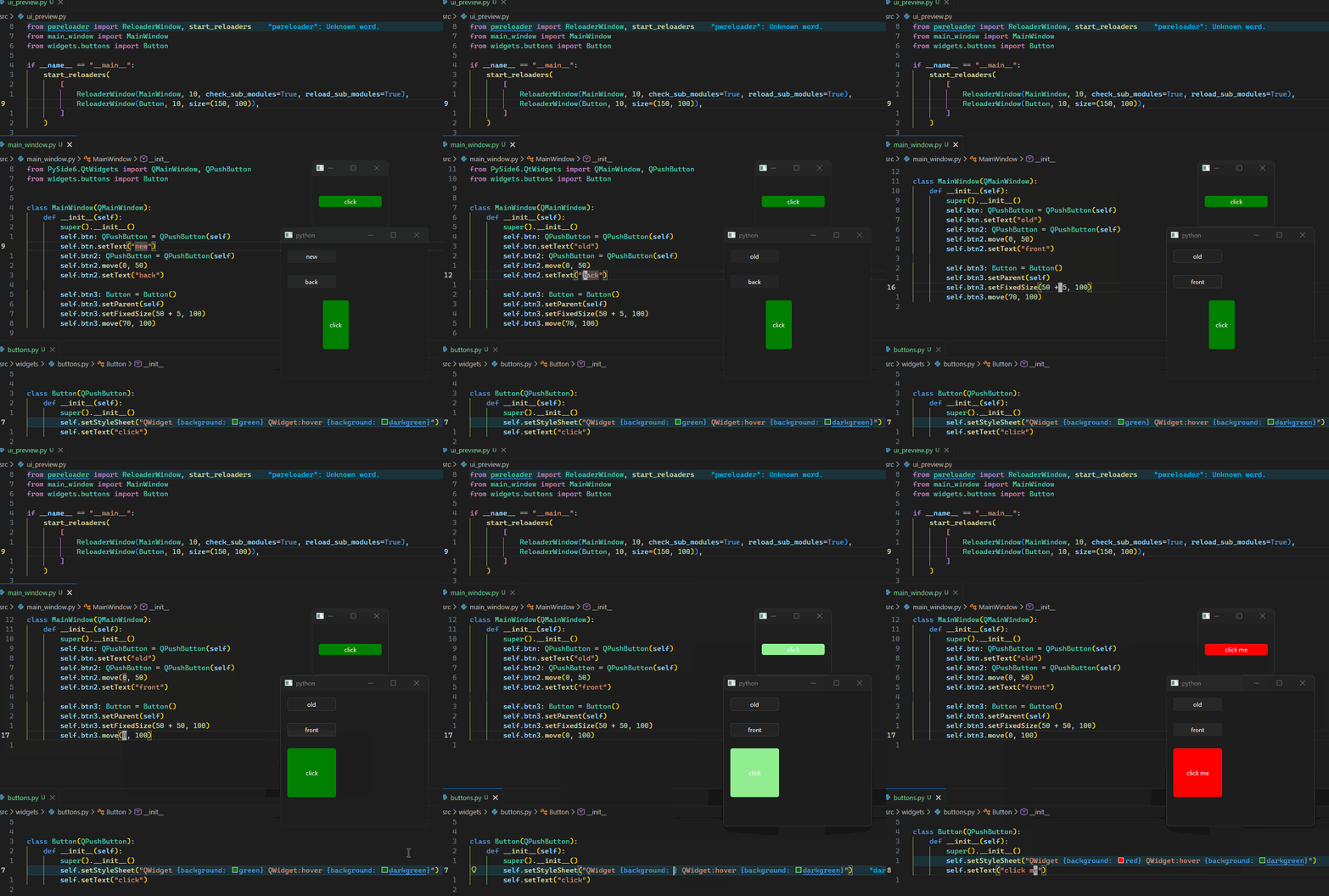
🚀 Features
- Hot reload PySide widgets without restarting your application.
- Recursive module watching detect changes in a widget’s module and its submodules.
📦 Installation
pip install pyside-widget-reloader
🧩 Usage
Basic Example
from pwreloader import start_reloaders, ReloaderWindow
from myproject.widgets import MyWidget

start_reloaders(
  [ReloaderWindow(MyWidget, 1000)]
)
start_reloaders()
Starts all reloaders. Call this with a list of ReloaderWindows.
ReloaderWindow(WidgetClass, 1000)
This manages reloading of your widget. Pass the widget class (not an instance) that you want to reload and interval in milliseconds.
⚙️ How It Works
The reloader isolates each widget in its own child process, each running its own QApplication instance. This ensures clean reloading without interfering with the main development environment.
🔄 File‑Change Detection
- At a user‑specified interval (in milliseconds), the system scans the source file of the widget’s module.
- It computes a hash of the source (optionally using a minified version to ignore changes that don't affect actual behavior, such as whitespace, comments, or variable name changes).
- If the hash changes, the module is marked for reload.
- Optionally, a ruff check can be performed; the reload proceeds only if the check passes.
🧭 Module Reload Logic
- The system can check only the current module, or current module + submodules, depending on settings.
- check_sub_modules=True: submodules are scanned for changes when scanning the main module, but only the main module is reloaded.
- reload_sub_modules=True: both changed submodules and the main module are reloaded.
- Parent modules of the widget's module also be reloaded.
🪄 Widget Reconstruction
Once the required modules are reloaded:
- The old widget instance is removed from the window.
- A new instance of the widget class is created.
- The new widget is inserted into the window, replacing the previous one.
This provides a near‑instant feedback loop for UI development across isolated processes.
🛣️ Roadmap
Compatibility
- Support latest Python versions.
- Support latest PySide versions.
- Add PyQt compatibility.
- Ensure dependencies (e.g., ruff, python‑minifier) are compatible across supported environments.
- Add automated CI (e.g., GitHub Actions) to test matrix of Python × PySide × PyQt.
File & Module Scanning System
- Add ability to scan specific files for reload events.
- Allow users to include/exclude files or directories from scanning.
- Provide fine‑grained rules linking file changes to specific module reloads.
- Implement a mapping system: file → module(s) to reload.
🤝 Contributing
Contributions are welcome! Feel free to open issues, submit PRs, or discuss ideas.
📄 License
MIT License
1 maintainer

Release files for pyside-widget-reloader 0.0.4
For a detailed explanation of source distributions (sdists) and built distributions (wheels), please see the package formats documentation.
Source distribution (sdist)
| File | Size | Uploaded | |
|---|---|---|---|
| pyside_widget_reloader-0.0.4.tar.gz | 11.9 kB | Details |
Built distribution (wheel)
| File | Interpreter | ABI | Platform | Reset |
|---|---|---|---|---|
| pyside_widget_reloader-0.0.4-py3-none-any.whl | Python 3 | none | any | Details |
Total release size: 23.6 kB
Release files / pyside_widget_reloader-0.0.4.tar.gz
| Download URL | pyside_widget_reloader-0.0.4.tar.gz |
|---|---|
| Size | 11.9 kB |
| Tags | Source |
|
SHA-256 checksum How to use checksums |
e74b2152fd10fa44ab722eebd9b0a63dcbead0c27ba7dcc35ffe01f379c1b4fc
|
|
BLAKE2b-256 checksum How to use checksums |
5a91ac158152dab9aa040b3d0c30855338a8f735d21f9777c76b41f321837e14
|
| Upload date | |
|
Uploaded using Trusted Publishing? What is trusted publishing? |
Yes |
| Uploaded via |
uv/0.12.1 {"installer":{"name":"uv","version":"0.12.1","subcommand":["publish"]},"python":null,"implementation":{"name":null,"version":null},"distro":{"name":"Ubuntu","version":"24.04","id":"noble","libc":null},"system":{"name":null,"release":null},"cpu":null,"openssl_version":null,"setuptools_version":null,"rustc_version":null,"ci":true}
|
Release files / pyside_widget_reloader-0.0.4-py3-none-any.whl
| Download URL | pyside_widget_reloader-0.0.4-py3-none-any.whl |
|---|---|
| Size | 11.7 kB |
| Tags | Python 3 |
|
SHA-256 checksum How to use checksums |
3d1e1a482610667ee2363e4c9fc8331343f7be147d61113ff927cf2e25ed305e
|
|
BLAKE2b-256 checksum How to use checksums |
fb52b25cbab3358f60af5f11744759969956f1da67ba59643fe5829ebfc33f79
|
| Upload date | |
|
Uploaded using Trusted Publishing? What is trusted publishing? |
Yes |
| Uploaded via |
uv/0.12.1 {"installer":{"name":"uv","version":"0.12.1","subcommand":["publish"]},"python":null,"implementation":{"name":null,"version":null},"distro":{"name":"Ubuntu","version":"24.04","id":"noble","libc":null},"system":{"name":null,"release":null},"cpu":null,"openssl_version":null,"setuptools_version":null,"rustc_version":null,"ci":true}
|














