
PySimpleGUI-HowDoI
Introduction
This package contains a GUI front-end to the AMAZING tool, HowDoI. You can ask this tool any programming question and it will tap into the enormous database of programming questions and answers, StackOverflow.
This program takes you question and returns CODE as a response.
The way it works is that it searches StackOverflow, gets the results and then finds the highest voted answer. From that answer it takes the code it finds and that is what is returned to you. It works shockingly well.
To learn more about HowDoI, visit their GitHub site: https://github.com/gleitz/howdoi
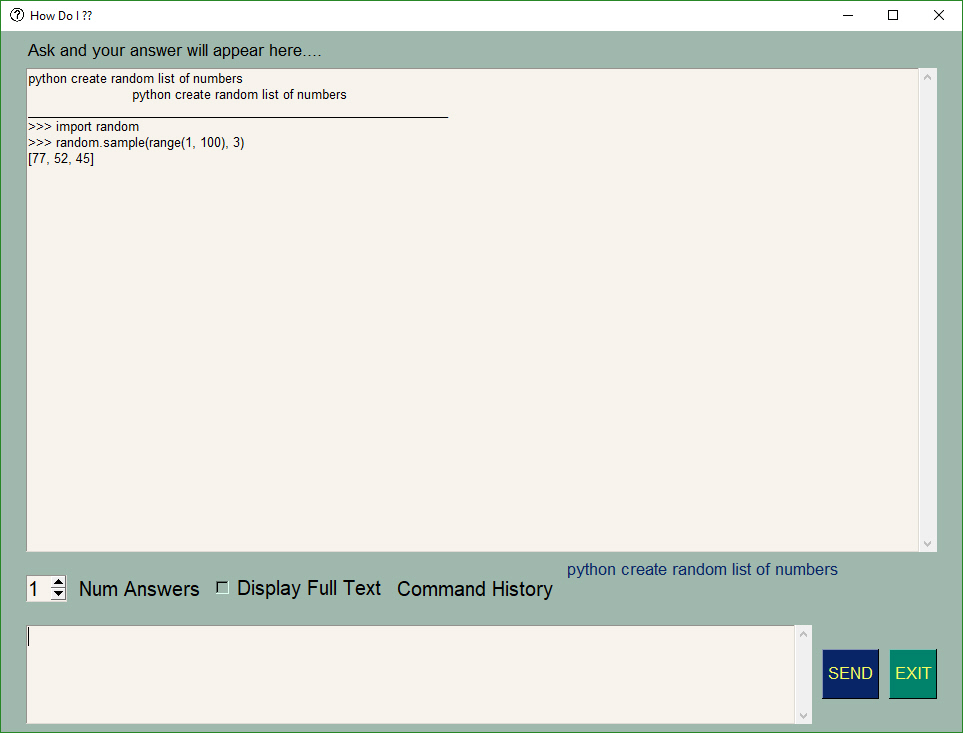
Check out this example. This was not rehearsed. While typing this readme, an example was needed and a random question, that I've never asked before, was posed. Once again this program delivered a great answer.
You can copy and paste the solution right into your code if you wish.
Installing
When you install PySimpleGUI-HowDoI, it will install the other components that it requires. To install, on windows, type this into a command prompt:
pip install pysimplegui-howdoi
Running the GUI Program
Afer your Pip install completes you can run the program. Do run it, type this into your command prompt:
python -m pysimplegui-howdoi.pysimplegui-howdoi
Once running you simply type in your question and press enter or click the "SEND" button. If you want to ask a question again, you can use the arrow keys or your mouse wheel to access the history of questions you've previously asked.
Ask ANY question you want for ANY programming language. I recommend starting the question with the programming language.
PySimpleGUI Project
This program was built as a sample application of the PySimpleGUI GUI Framework. It quickly became a tool I was unable to live without. I've been trying for some time to bring it to life for others to try.
Windows Only?
This has only been tested using Windows. I have not gotten it to work under Linux. The linkage between the program and the howdoI package was messed up on Linux. If you're able to get a Linux version running, please let me know at info@PySimpleGUI.org
1 maintainer

Metadata
1 maintainer
Release files for pysimplegui-howdoi 1.3.0
For a detailed explanation of source distributions (sdists) and built distributions (wheels), please see the package formats documentation.
Source distribution (sdist)
| File | Size | Uploaded | |
|---|---|---|---|
| pysimplegui-howdoi-1.3.0.tar.gz | 3.9 kB | Details |
Built distribution (wheel)
| File | Interpreter | ABI | Platform | Reset |
|---|---|---|---|---|
| pysimplegui_howdoi-1.3.0-py3-none-any.whl | Python 3 | none | any | Details |
Total release size: 8.5 kB
Release files / pysimplegui-howdoi-1.3.0.tar.gz
| Download URL | pysimplegui-howdoi-1.3.0.tar.gz |
|---|---|
| Size | 3.9 kB |
| Tags | Source |
|
SHA-256 checksum How to use checksums |
9802c244a98189caa358da71d67983d79980e5e7ec588102f567e42063bd69d6
|
|
BLAKE2b-256 checksum How to use checksums |
256b78090d23e8a84b94e6e47a6f8b0ec95d203bb8e95883d9357bd2b82b89af
|
| Upload date | |
|
Uploaded using Trusted Publishing? What is trusted publishing? |
No |
| Uploaded via |
twine/1.11.0 pkginfo/1.4.2 requests/2.18.4 setuptools/40.4.3 requests-toolbelt/0.8.0 tqdm/4.19.2 CPython/3.6.2
|
Release files / pysimplegui_howdoi-1.3.0-py3-none-any.whl
| Download URL | pysimplegui_howdoi-1.3.0-py3-none-any.whl |
|---|---|
| Size | 4.6 kB |
| Tags | Python 3 |
|
SHA-256 checksum How to use checksums |
e97b49088f93911350955708ff5fc3652619861395077a0341e4c275447dd4d7
|
|
BLAKE2b-256 checksum How to use checksums |
9e1d3c22be3334ddf0a2c873a17fa5959315b5289ac45b0839f8caac860124c8
|
| Upload date | |
|
Uploaded using Trusted Publishing? What is trusted publishing? |
No |
| Uploaded via |
twine/1.11.0 pkginfo/1.4.2 requests/2.18.4 setuptools/40.4.3 requests-toolbelt/0.8.0 tqdm/4.19.2 CPython/3.6.2
|














