
A realtime physiological sensing and edge AI processing framework

Project description

Heterogeneous Edge Realtime Measurement and Execution System
A Unified Open-Source Framework for Realtime Multimodal Physiological Sensing, Edge AI, and Intervention in Closed-Loop Smart Healthcare Applications



Quickstart • Docs • GUI • Showcase • Cite • Contact
HERMES for the Greek mythology analogy of the god of communication and speed, protector of information, the gods' herald. He embodies the nature of smooth and reliable communication. His role accurately resonates with the vision of this framework: facilitate reliable and fast exchange of continuously generated multimodal physiological and external data across distributed wireless and wired multi-sensor hosts for synchronized realtime data collection, in-the-loop AI stream processing, and analysis, in intelligent med- and health-tech (wearable) applications.
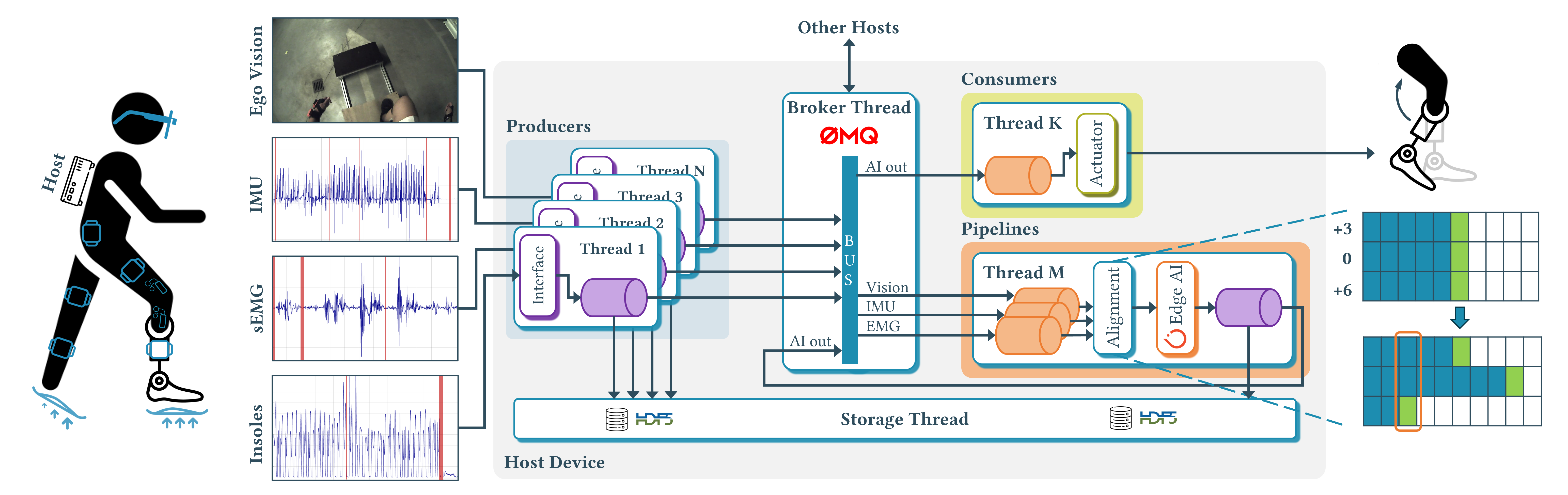
HERMES offers out-of-the-box streaming integrations to a number of commercial sensor devices and systems, high resolution cameras, templates for extension with custom user devices, and a ready-made wrapper for easy PyTorch AI model insertion. It reliably and synchronously captures heterogeneous data across distributed interconnected devices on a local network in a continuous manner, and enables realtime AI processing at the edge toward personalized intelligent closed-loop interventions of the user. All continuously acquired data is periodically flushed to disk for as long as the system has disk space, as MKV/MP4 and HDF5 files, for video and sensor data, respectively.
Quickstart
Core
Create a Python 3 virtual environment python -m venv .venv (python >= 3.7).
Activate it with .venv/bin/activate for Linux or .venv\Scripts\activate for Windows.
Single-command install HERMES into your project along other dependendices.
pip install pysio-hermes
Extra
All the integrated, validated and supported sensor devices are separately installable as pysio-hermes-<subpackage_name>, like:
pip install pysio-hermes-torch
Will install the AI processing subpackage to wrap user-specified PyTorch models.
List of supported devices (continuously updated)
Some subpackages require OEM software installation, check each below for detailed prerequisites.torchWrapper for PyTorch AI modelspupillabsPupil Labs Core smartglassesbaslerBasler camerasdotsMovella DOTs IMUsmvnXsens MVN Analyze MoCap suitawindaXsens Awinda IMUscometaCometa WavePlus sEMGmoticonMoticon OpenGo pressure insolestmsiTMSi SAGA physiological signalsviconVicon Nexus capture systemmoxyMoxy muscle oxygenation monitor
The following subpackages are in development.
FFmpeg (Optional)
If dealing with video or audio, you will have to install FFmpeg.
Make a copy of the examples/video_codec_<type>.yml, that matches your video encoding hardware (AMD or Intel CPU, or an NVIDIA GPU), as examples/video_codec.yml
Windows
- Download the full build with shared libraries from gyan.dev.
- Unpack the archive into the desired folder, like
C:\Program Files\ffmpeg. - Add path to the FFmpeg binaries to the
Pathenvironment variable manually, or via CMD.SETX PATH "%PATH%;C:\Program Files\ffmpeg\bin;C:\Program Files\ffmpeg" /M
- Open a new terminal window and check that FFmpeg can be correctly found by the system
where ffmpeg.
Linux
- Install with the package manager
sudo apt-get install ffmpeg. - Check that ffmpeg is on path
which ffmpeg.
Running
The system runs based on YAML configuration files, where connection to other hosts, and local or remote Producer's, Consumer's, Pipeline's.
Benchmarking
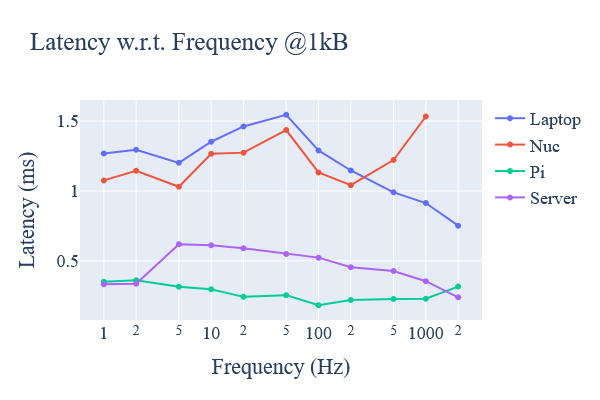
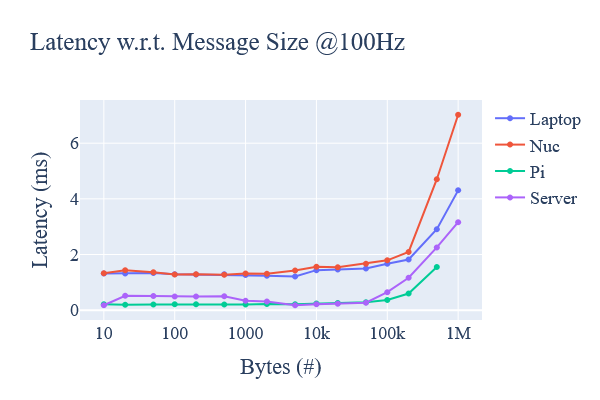
Latency
- Install Plotly into the current virtual environment
pip install plotly. - On each host device, run the latency evaluation automated script under
test/:cd test
astest_latency.batfor Windows or. test_latency.shfor Linux. - Gather generated text files from all tested devices and place in
test/data/latency/<device_name>subfolders in the following structure. The folder name will be used as the trace name of the corresponding series.root/ └───test └───data └───latency ├───laptop │ ├───latency_vs_frequency.txt │ └───latency_vs_msgsize.txt ├───nuc ├───pi └───server
- Visualize latencies by running
plot_latency.batfor Windows or. plot_latency.shfor Linux:
Documentation
Check out the full documentation site for more usage examples, architecture overview, detailed extension guide, and FAQs.
Data Annotation
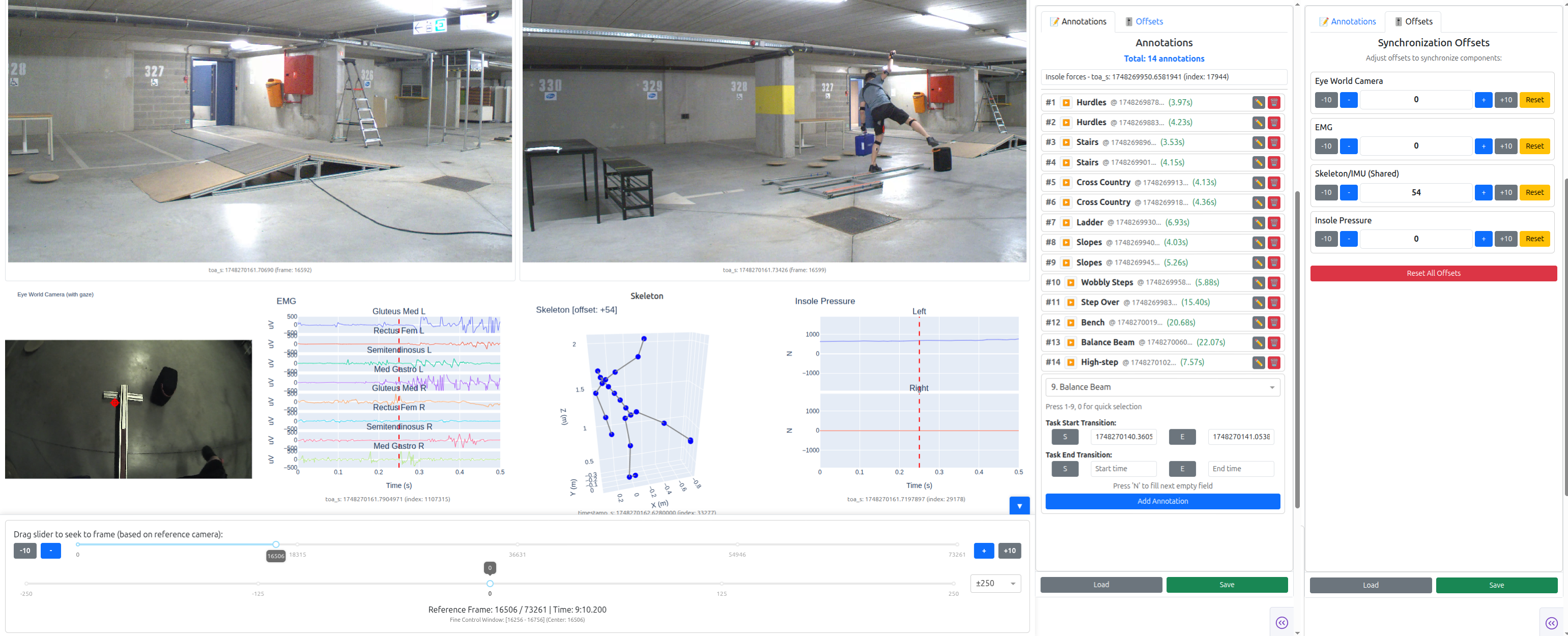
We developed PysioViz a complementary dashboard based on Dash Plotly for analysis and annotation of the collected multimodal data. We use it ourselves to generate ground truth labels for the AI training workflows. Check it out and leave feedback!
Showcase
These are some of our own projects enabled by HERMES to excite you to adopt it in your smart closed-looop healthtech usecases.
AI-enabled intent prediction for high-level locomotion mode selection in a smart leg prosthesis
Realtime automated cueing for freezing-of-gait Parkinson's patients in free-living conditions
Personalized level of assistance in prolong use rehabilitation and support exoskeletons
License
This sourcecode is licensed under the MIT license - see the LICENSE file for details.
The project's logo is distributed under the CC BY-NC-ND 4.0 license - see the LOGO-LICENSE.
Citation
When using in your project, research, or product, please cite the following and notify us so we can update the index of success stories enabled by HERMES.
Acknowledgement
This project was primarily written by Maxim Yudayev while at the Department of Electrical Engineering, KU Leuven.
This study was funded, in part, by the AidWear project funded by the Federal Public Service for Policy and Support, the AID-FOG project by the Michael J. Fox Foundation for Parkinson’s Research under Grant No.: MJFF-024628, the strategic basic research project RevalExo (S001024N) funded by the Research Foundation Flanders, and the Flemish Government under the Flanders AI Research Program (FAIR).
HERMES is a "Ship of Theseus"[1] of ActionSense that started as a fork and became a complete architectural rewrite of the system from the ground up to bridge the fundamental gaps in the state-of-the-art, and to match our research group's needs in realtime deployments and reliable data acquisition. Although there is no part of ActionSense in HERMES, we believe that its authors deserve recognition as inspiration for our system.
Special thanks for contributions, usage, bug reports, good times, and feature requests to Juha Carlon (KU Leuven), Vayalet Stefanova (KU Leuven), Diwas Lamsal (KU Leuven), Stefano Nuzzo (VUB), Léonore Foguenne (ULiège).
Release history Release notifications | RSS feed


Download files
Download the file for your platform. If you're not sure which to choose, learn more about installing packages.
Source Distribution
Built Distribution
Filter files by name, interpreter, ABI, and platform.
If you're not sure about the file name format, learn more about wheel file names.
Copy a direct link to the current filters
File details
Details for the file pysio_hermes-0.1.6.tar.gz.
File metadata
- Download URL: pysio_hermes-0.1.6.tar.gz
- Upload date:
- Size: 69.3 kB
- Tags: Source
- Uploaded using Trusted Publishing? No
- Uploaded via: twine/6.2.0 CPython/3.14.0
File hashes
| Algorithm | Hash digest | |
|---|---|---|
| SHA256 |
4a31ea92f9518d31f497f7e9c86ebadaecbed1040238560016a49ffa32d3c422
|
|
| MD5 |
8ad0bf9c14e3ed87ae6e8b2a7dc8a45c
|
|
| BLAKE2b-256 |
183896af95377bfe3815719f5da0fc2755e83cf1ab0463d3106688bdf068804b
|
File details
Details for the file pysio_hermes-0.1.6-py3-none-any.whl.
File metadata
- Download URL: pysio_hermes-0.1.6-py3-none-any.whl
- Upload date:
- Size: 106.3 kB
- Tags: Python 3
- Uploaded using Trusted Publishing? No
- Uploaded via: twine/6.2.0 CPython/3.14.0
File hashes
| Algorithm | Hash digest | |
|---|---|---|
| SHA256 |
fc758b097d14c656e5e4faec80fdea896314d6eecb682064286ee701c7b6754c
|
|
| MD5 |
25df5cb1c89ace4108fa833186b994b7
|
|
| BLAKE2b-256 |
be066cb0bab68087cf591c9317d780336e6fe7b5c1b1da12b6fe2a5efd6828d9
|






