
A Python library for Minecraft skins with support for slim models and overlay layers

Reason this release was yanked:
Unstable
Project description
pyskin
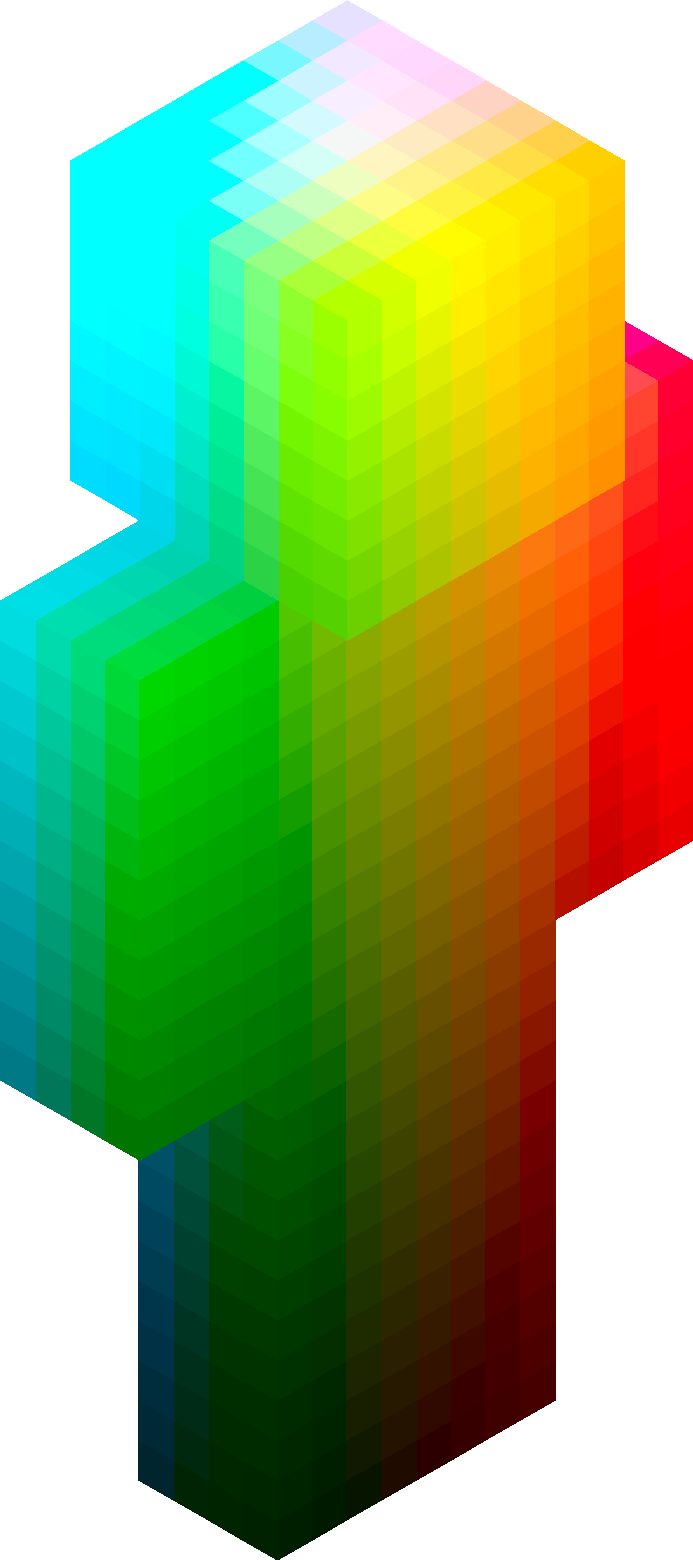
A Python library for Minecraft skins.
- Load skins from a file, or start from scratch
- Index with 3D coordinates to get/set skin pixel color
- Operate at the skin level, the body part level, or even just one face
- Generate skin images for use in-game
- Render isometric ("angled/tilted view", like above) images of your skin
- Support for slim (Alex) and classic (Steve) skin models
- Full support for second layer (overlay) rendering
Installation
pip install pyskin
Quickstart
Creating/Loading/Saving a skin
from pyskin import Skin

# make a new skin
new_skin = Skin.new()
new_skin.to_image().save("blank.png")

# or load a skin from disk
loaded_skin = Skin.from_path("my_skin.png")
loaded_skin.to_image().save("copy.png")
Rendering Isometric Images
You can render isometric images with the CLI tool:
pyskin render steve.png -o render.png
# see help with `pyskin render --help`
Or, here'e the API interface:
from pyskin import Skin, Perspective

skin = Skin.from_path("steve.png")

# create a perspective from which to view the render
perspective = Perspective(
  x="left",
  y="front",
  z="up",
  scaling_factor=5, # bigger numbers mean bigger image
)

# save the render (overlay layer enabled by default)
skin.to_isometric_image(perspective).save("render.png")

# or disable overlay rendering
skin.to_isometric_image(perspective, render_overlay=False).save("render_base.png")
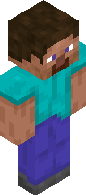
Outputted file:
Pixel Indexing
from pyskin import Skin

skin = Skin.from_path("steve.png")
magenta = (211, 54, 130, 255)  # RGBA

# get/set using entire skin's 3D coordinates
color = skin.get_color(4, 2, 0, "front") # somewhere on steve's right foot
print(f"Skin pixel at (4, 2, 0, 'front') was {color}")
skin.set_color(4, 2, 0, "front", magenta)

# get/set on just a head. coordinates become relative to just that part
color = skin.head.get_color(0, 1, 2, "left")
print(f"Head pixel at (0, 1, 2, 'left') was {color}")
skin.head.set_color(0, 1, 2, "left", magenta)

# or finally, just on one face. faces only have two dimensions
# NOTE: Face does not necessarily mean just a character's face! It just
# refers to the side of a cubiod, which all body parts are in Minecraft
color = skin.left_arm.up.get_color(5, 5)
print(f"Left arm up pixel at (5, 5) was {color}")
skin.head.set_color(0, 1, 2, "left", magenta)

skin.to_image().save("some_magenta.png")
Here's an animated visualization of equivalent ways to access a certain pixel:

(This image was made with examples/index.py.)
Pixel Enumeration
from pyskin import Skin

skin = Skin.from_path("steve.png")

for (x, y, z), body_part_id, face_id, color in skin.enumerate_color():
  print(f"{x=}, {y=}, {z=}, {body_part_id=}, {face_id=}, {color=}")

for (x, y, z), face_id, color in skin.torso.enumerate_color():
  print(f"{x=}, {y=}, {z=}, {face_id=}, {color=}")

for (x, y), face_id, color in skin.torso.back.enumerate_color():
  print(f"{x=}, {y=}, {color=}")
Slim Skins (Alex Model)
from pyskin import Skin

# Load a slim skin (3-pixel wide arms)
slim_skin = Skin.from_path("alex_skin.png", slim=True)

# Create a new slim skin
new_slim_skin = Skin.new(slim=True)
Overlay Layer (Second Layer)
from pyskin import Skin

skin = Skin.from_path("skin_with_overlay.png")

# Access overlay body parts
head_overlay = skin.head_overlay
torso_overlay = skin.torso_overlay
left_arm_overlay = skin.left_arm_overlay
right_arm_overlay = skin.right_arm_overlay
left_leg_overlay = skin.left_leg_overlay
right_leg_overlay = skin.right_leg_overlay

# Get overlay part by ID
overlay = skin.get_overlay_part_for_id("head")

# Enumerate colors with overlay info
for (x, y, z), body_part_id, face_id, color, is_overlay in skin.enumerate_color_with_overlay():
    if is_overlay:
        print(f"Overlay pixel at ({x}, {y}, {z})")
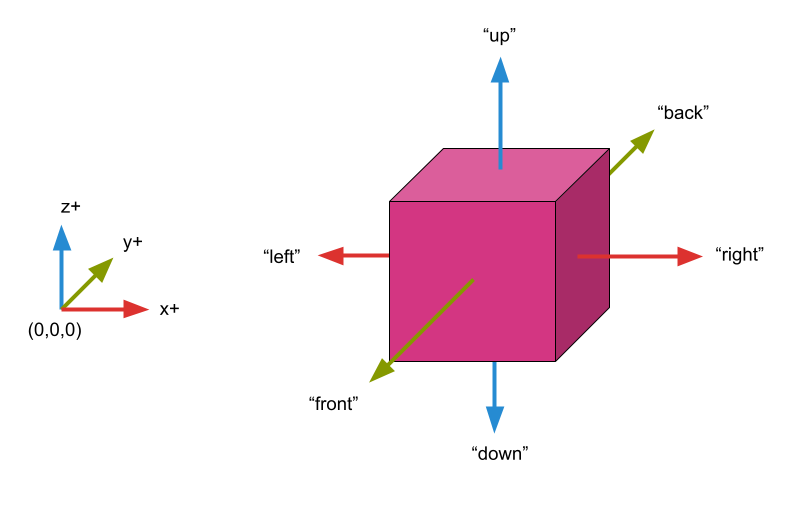
Coordinate system
pyskin uses a coordinate system with the origin at the left-down-front of the skin from the perspective of an observer looking at the skin.
FaceId
In some methods, a FaceId type is asked for or provided. These are string literals:
updownleftrightfrontback
BodyPartId
Similarly, body parts are string literals under BodyPartId:
headtorsoright_armleft_armright_legleft_leg
Body parts that are "left" or "right" follow the same perspective as before: from the observer's point of view.
API Reference
Skin Class
Constructor Methods
| Method | Description |
|---|---|
Skin.new(slim=False) |
Create a new blank skin |
Skin.filled(color, slim=False) |
Create a skin filled with a single color |
Skin.from_image(image, slim=False) |
Load a skin from a PIL Image |
Skin.from_path(path, slim=False) |
Load a skin from a file path |
Parameters
slim(bool): Set toTruefor Alex-style slim arms (3 pixels wide instead of 4)
Body Parts (Base Layer)
skin.head- Head body partskin.torso- Torso body partskin.left_arm- Left arm body partskin.right_arm- Right arm body partskin.left_leg- Left leg body partskin.right_leg- Right leg body part
Body Parts (Overlay Layer)
skin.head_overlay- Head overlay (hat layer)skin.torso_overlay- Torso overlay (jacket layer)skin.left_arm_overlay- Left arm overlay (sleeve)skin.right_arm_overlay- Right arm overlay (sleeve)skin.left_leg_overlay- Left leg overlay (pants layer)skin.right_leg_overlay- Right leg overlay (pants layer)
Properties
| Property | Return Type | Description |
|---|---|---|
skin.body_parts |
tuple[BodyPart, ...] |
All base layer body parts |
skin.overlay_parts |
tuple[BodyPart, ...] |
All overlay layer body parts |
skin.all_parts |
tuple[BodyPart, ...] |
All body parts (base + overlay) |
skin.slim |
bool |
Whether the skin uses slim arm dimensions |
skin.shape |
tuple[int, int, int] |
The overall skin dimensions |
Methods
| Method | Description |
|---|---|
skin.get_body_part_for_id(id) |
Get a base layer body part by ID |
skin.get_overlay_part_for_id(id) |
Get an overlay layer body part by ID |
skin.enumerate_color() |
Iterate over all base layer pixels |
skin.enumerate_color_with_overlay() |
Iterate over all pixels including overlay info |
skin.get_color(x, y, z, face) |
Get the color at a specific position |
skin.set_color(x, y, z, face, color) |
Set the color at a specific position |
skin.to_image() |
Convert the skin to a PIL Image |
skin.to_isometric_image(perspective, ...) |
Render an isometric view |
to_isometric_image() Parameters
| Parameter | Type | Default | Description |
|---|---|---|---|
perspective |
Perspective |
required | The viewing angle |
background_color |
tuple[int, int, int, int] |
None |
RGBA background color |
render_overlay |
bool |
True |
Whether to render the overlay layer |
Perspective Class
from pyskin import Perspective

perspective = Perspective(
    x="left",      # or "right"
    y="front",     # or "back"
    z="up",        # or "down"
    scaling_factor=10,  # pixels per voxel
)
Examples
You can find the skins/renders, and the code to produced them, in examples.
Changelog
v0.1.0
- Added support for slim (Alex) skin models with 3-pixel wide arms
- Added full support for second layer (overlay) rendering
- Added
overlay_parts,all_parts,get_overlay_part_for_id()methods - Added
enumerate_color_with_overlay()for iterating both layers - Added
render_overlayparameter toto_isometric_image() - Changed package name from
skinpytopyskin
Release history Release notifications | RSS feed


Download files
Download the file for your platform. If you're not sure which to choose, learn more about installing packages.
Source Distribution
Built Distribution
Filter files by name, interpreter, ABI, and platform.
If you're not sure about the file name format, learn more about wheel file names.
Copy a direct link to the current filters
File details
Details for the file pyskin-0.1.0.tar.gz.
File metadata
- Download URL: pyskin-0.1.0.tar.gz
- Upload date:
- Size: 240.7 kB
- Tags: Source
- Uploaded using Trusted Publishing? No
- Uploaded via: twine/6.2.0 CPython/3.12.10
File hashes
| Algorithm | Hash digest | |
|---|---|---|
| SHA256 |
427045062d003ec798489c7e814bfee7bd552e262fb72d9f0d8e8a4bb9994f58
|
|
| MD5 |
f7f2e3fb97e1281aa24325e2cea31f97
|
|
| BLAKE2b-256 |
3979b9eb5d31477a5a39116abee77f55237c2731a531f7bdb92e45f4c16df076
|
File details
Details for the file pyskin-0.1.0-py3-none-any.whl.
File metadata
- Download URL: pyskin-0.1.0-py3-none-any.whl
- Upload date:
- Size: 13.4 kB
- Tags: Python 3
- Uploaded using Trusted Publishing? No
- Uploaded via: twine/6.2.0 CPython/3.12.10
File hashes
| Algorithm | Hash digest | |
|---|---|---|
| SHA256 |
fac8d458845fffcaa7b2edd615fd71c9c4dc78592655ca271918e30a3f12f787
|
|
| MD5 |
14dc29f9cbd3e7dc4fce64d57d91b87d
|
|
| BLAKE2b-256 |
0c525cc7719d36417cfd3e50365cd1bb0a0062e9d02cb4baffbecbb1b7ef5cdc
|






