

Pyskyfire is a simulation framework for regeneratively cooled, liquid propellant rocket engines.
Model thrust-chamber thermodynamics, cooling channels, engine cycles, and get interactive engineering reports from a unified Python interface.





Documentation · Quick Start · PyPI

RL10A-3-3A thrust chamber reconstructed in Pyskyfire. 180 long tubes (red) run the
full chamber and throat; 180 short tubes (dark) start at the nozzle interlacing manifold.
Downstream of it the two sets alternate to give 360 passages, while only the long tubes
remain upstream.
Open the interactive model to rotate, pan, and zoom it yourself.
Description
Pyskyfire is an open-source Python package, meant as an alternative to RPA, NPSS, ESPSS and other regenerative cooling and engine cycle analysis software. The solver produces regenerative cooling and engine cycle results. Compare NASA and Pratt & Whitney with Pyskyfire in this RL10 case:
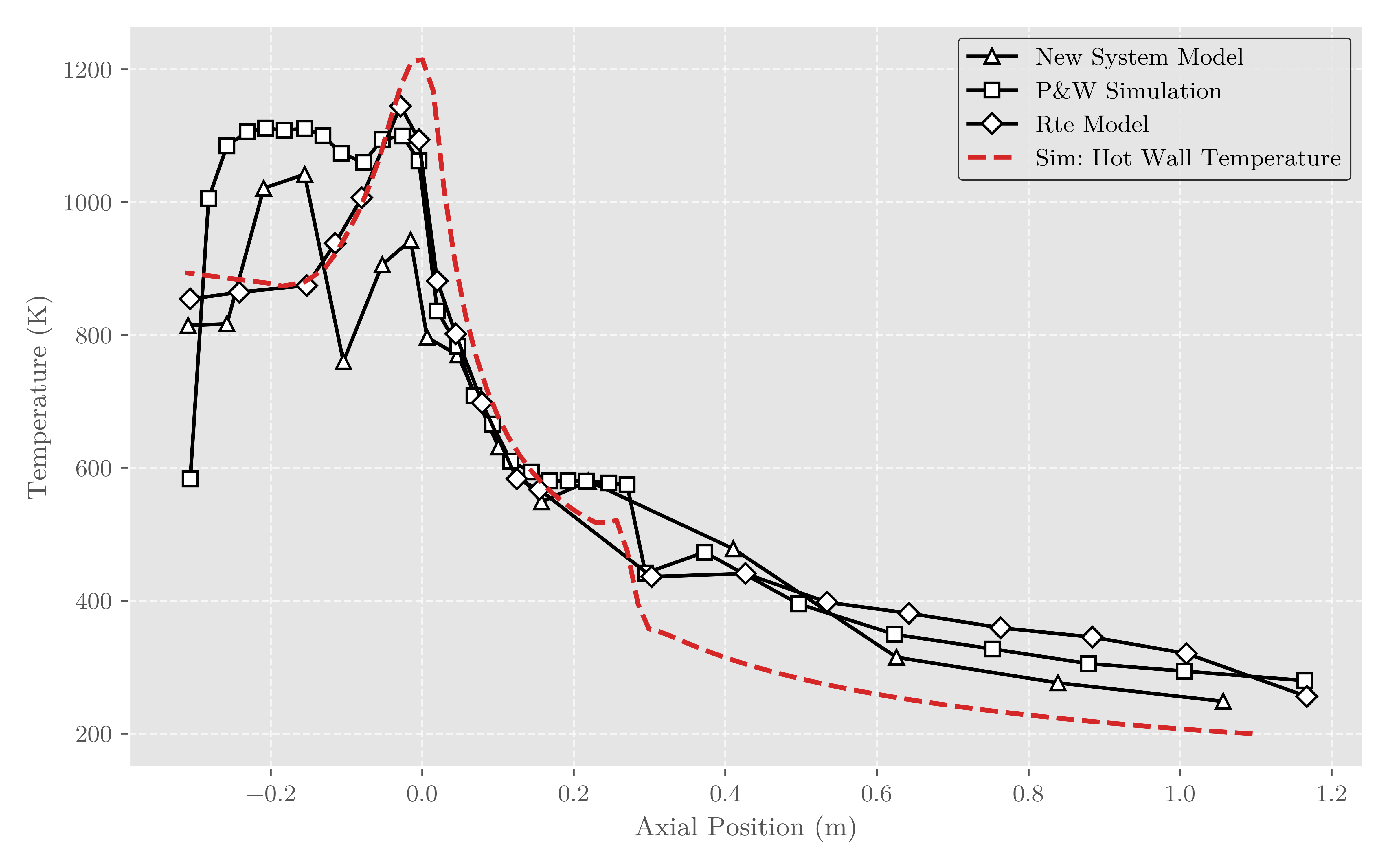
Open the interactive chart · Read the full RL10A-3-3A validation report
The first iteration of pyskyfire was written as part of the master's thesis of Ask Haugerud Hovik. Read my thesis. The motivation to start writing the software came purely from a curiosity standpoint and from an innate wish to spread the understanding of rocket engines and propel us further into the space age. Please use this software responsibly and make sure you, your team members and everyone else stay safe in your rocket engine endeavours.
Program Capabilities
- Full engine cycle solution, with pumps, turbines and regenerative cooling.
- Chemical-equilibrium and hot-gas property calculations
- Rao nozzle and combustion-chamber contour generation
- Multi-pass regenerative-cooling analysis
- Configurable channel geometry and wall materials
- Interactive 3D visualizations and HTML engineering reports
- Validation cases based on published engine data
- View the full overview of the capabilities of pyskyfire.
Documentation
Documentation for the project is available, and written in a pedagogic style using the Diátaxis framework.
Installation
The core package is available on PyPI and can be installed without the optional visualisation dependencies:
uv pip install pyskyfire
To include the interactive plots, 3D visualisations, and HTML reports, install the viz extra:
uv pip install "pyskyfire[viz]"
Using uv pip and not plain pip is optional. For the bleeding edge version, clone the repository and install the development environment. This includes the visualisation, test, and documentation dependencies. For example:
uv sync
Using the package
What is it like to use the package? Pyskyfire is an object-oriented library, so using it means creating a lot of objects and putting them together, for example:
import numpy as np
import pyskyfire as psf

# A wall, a channel cross section, and how the channels wrap the contour.
wall = psf.regen.Wall(material=psf.common.solids.StainlessSteel304, thickness=0.5e-3)
cross_section = psf.regen.CrossSectionSquared(blockage_ratio=0.1)
placement = psf.regen.SurfacePlacement(
    n_channel_positions=60,
    helix_angle=lambda x: np.radians(45),
)

# One regenerative cooling circuit, running from the nozzle exit to the injector.
cooling_circuit = psf.regen.CoolingCircuit(
    name="Cooling Pass",
    contour=contour,                      # from psf.regen.contour.get_contour(...)
    coolant_transport=coolant_transport,  # CoolProp-backed coolant properties
    cross_section=cross_section,
    span=[1.0, -1.0],
    placement=placement,
    walls=[wall],
    roughness=10e-6,
    channel_height=lambda x: 2e-3,
)

# The thrust chamber ties geometry, hot-gas properties, and cooling circuits together.
thrust_chamber = psf.regen.ThrustChamber(
    contour=contour,
    combustion_transport=aerothermodynamics,  # from psf.skycea.Aerothermodynamics
    cooling_circuits=[cooling_circuit],
    n_nodes=150,
)
Then this object can be used in a variety of ways. For the thrust chamber we created above, for example:
# Solve the coupled hot-gas, wall, and coolant problem along the circuit.
boundary_conditions = psf.regen.BoundaryConditions(
    T_coolant_in=273.15,
    p_coolant_in=23e5,
    mdot_coolant=aerothermodynamics.mdot_fu,
)

cooling_data = psf.regen.coupled_steady_heating_analysis(
    thrust_chamber,
    nodes=100,
    circuit_index=0,
    boundary_conditions=boundary_conditions,
)

# Plot a single result...
psf.viz.PlotWallTemperature(
    cooling_data, plot_hot=True, plot_coolant_wall=True
).save_html("wall-temperature.html")

# ...or collect several into one standalone, interactive HTML report.
report = psf.viz.Report("Minimal Engine")
tab = report.add_tab("Cooling Data")
tab.add_figure(psf.viz.PlotHeatFlux(cooling_data))
tab.add_figure(psf.viz.PlotCoolantTemperature(cooling_data))
report.save_html("engine-report.html")
Look in the documentation to get started with pyskyfire.
Contributing
Pyskyfire began as my master's thesis and is now developed in the open. I would like it to become something students and professionals build together, and I am happy to help contributors who are new to propulsion, to open source, or to both.
CONTRIBUTING.md covers development setup, testing, and the pull-request process. For anything substantial, please open an issue first so the approach can be discussed — and if you would rather talk it through before writing any code, that is welcome too.
1 maintainer

Download files
Download the file for your platform. If you're not sure which to choose, learn more about installing packages.
Source Distribution
Built Distribution
Filter files by name, interpreter, ABI, and platform.
If you're not sure about the file name format, learn more about wheel file names.
Copy a direct link to the current filters
File details
Details for the file pyskyfire-0.3.0.tar.gz.
File metadata
- Download URL: pyskyfire-0.3.0.tar.gz
- Upload date:
- Size: 533.0 kB
- Tags: Source
- Uploaded using Trusted Publishing? No
- Uploaded via:
uv/0.10.2 {"installer":{"name":"uv","version":"0.10.2","subcommand":["publish"]},"python":null,"implementation":{"name":null,"version":null},"distro":{"name":"Fedora Linux","version":"44","id":"","libc":null},"system":{"name":null,"release":null},"cpu":null,"openssl_version":null,"setuptools_version":null,"rustc_version":null,"ci":null}
File hashes
| Algorithm | Hash digest | |
|---|---|---|
| SHA256 |
5e17f98015645d4877497785aa36a371146384065a2035b932a4fd74032d1b4a
|
|
| MD5 |
026e257a5b467949c9ed5c03f20a0744
|
|
| BLAKE2b-256 |
6f28c6dc0cde9e36b15c1ae9765cb3930ae57792053c572903f906ebf2e90767
|
File details
Details for the file pyskyfire-0.3.0-py3-none-any.whl.
File metadata
- Download URL: pyskyfire-0.3.0-py3-none-any.whl
- Upload date:
- Size: 552.7 kB
- Tags: Python 3
- Uploaded using Trusted Publishing? No
- Uploaded via:
uv/0.10.2 {"installer":{"name":"uv","version":"0.10.2","subcommand":["publish"]},"python":null,"implementation":{"name":null,"version":null},"distro":{"name":"Fedora Linux","version":"44","id":"","libc":null},"system":{"name":null,"release":null},"cpu":null,"openssl_version":null,"setuptools_version":null,"rustc_version":null,"ci":null}
File hashes
| Algorithm | Hash digest | |
|---|---|---|
| SHA256 |
10d694ee4742304ac988dd709657a4e91cc2c84829a4fe16038c46d1b8cd2321
|
|
| MD5 |
07bb23d45b222bd03c6753395a082aac
|
|
| BLAKE2b-256 |
bb6c5e1ca8077670e31b1444e058ef777b420c53d500c1317e03f5e99b220b04
|














