
A library for discovering underperforming segments in machine learning models.

Project description
PySliceKit



PySliceKit is a Python library that helps you automatically discover exactly where your machine learning models are secretly failing.
Global metrics like 95% Accuracy or a low RMSE can be dangerously misleading. Your model might perform perfectly on the majority of your data, while severely underperforming on specific subgroups (e.g., specific age groups, geographic regions, or combined minority segments).
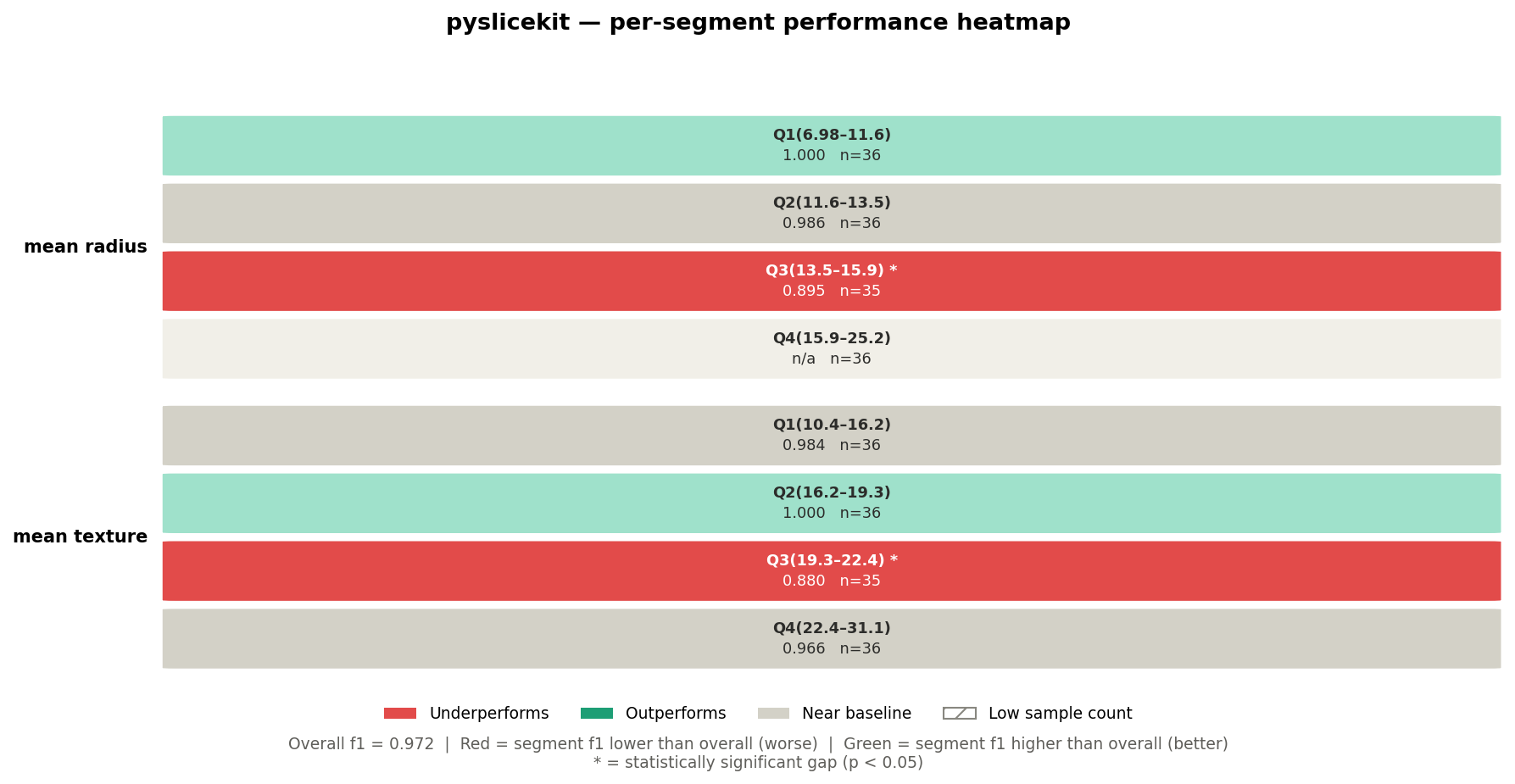
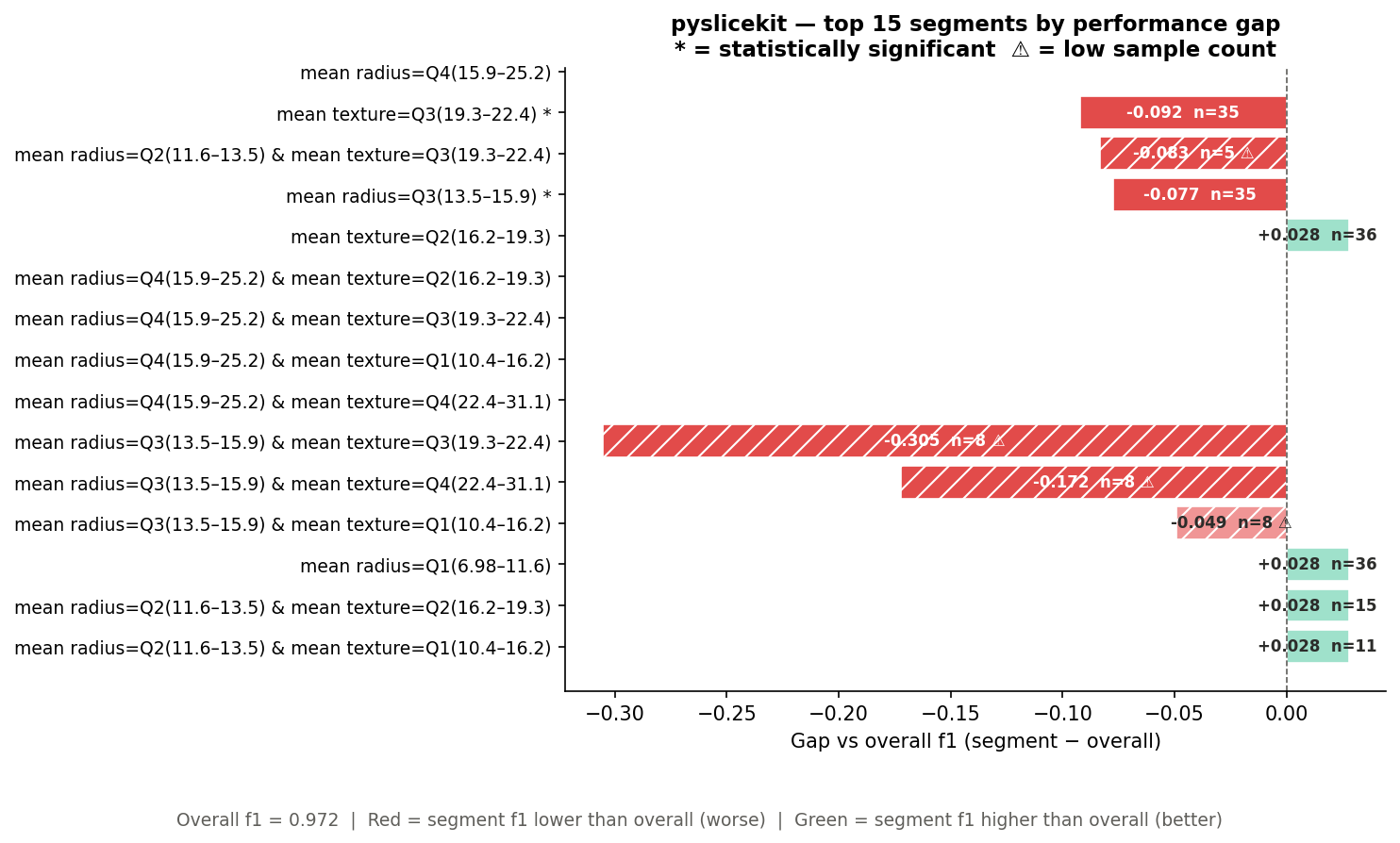
PySliceKit solves this by automatically "slicing" your feature dataset, evaluating your model's performance on every single subgroup, calculating statistical significance, and returning a beautiful heatmap and bar chart of your model's worst-performing blind spots.
Quick Links
- Documentation: AnshumanTiwari2006.github.io/PySliceKit
- Source Code: GitHub Repository
- Changelog: CHANGELOG.md
- Discussions: Community Board
- Issue Tracker: Bug Reports
Full Documentation
Read the full PySliceKit Documentation here for the Getting Started guide, complete User Guide, and comprehensive API Reference.
Quick Start
Installation
pip install pyslicekit
Usage
import pandas as pd
from sklearn.datasets import load_breast_cancer
from sklearn.linear_model import LogisticRegression
from sklearn.model_selection import train_test_split
import pyslicekit

# 1. Load data and train your model
data = load_breast_cancer(as_frame=True)
df = data.frame
X = df.drop(columns=['target'])
y = df['target']

X_train, X_test, y_train, y_test = train_test_split(X, y, test_size=0.25, random_state=42)
model = LogisticRegression(max_iter=5000)
model.fit(X_train, y_train)

# 2. Let PySliceKit find the blind spots!
results = pyslicekit.evaluate(
    model=model,
    df=X_test,
    y_true=y_test,
    y_pred=model.predict(X_test),
    slice_cols=["mean radius", "mean texture"],
    metric="f1"
)
What does this do?
When you call pyslicekit.evaluate(), the library automatically chunks your test dataset into subgroups (like specific age brackets and regions), evaluates your model's F1 score on each subgroup independently, and applies statistical tests (like a Z-Test or Fisher's Exact) to prove if the performance drop is mathematically significant.
What does the output show?
You will automatically receive two powerful visualizations. The Heatmap shows the raw gaps across all subgroups—the darker the red, the worse your model performs compared to its global average.
The Worst Segments Bar Chart automatically extracts and sorts the worst offenders. Statistically significant failures are solid red, while non-significant drops are faded, giving you a perfectly prioritized list of areas to fix.
Features
- Model Agnostic: Works with any model that has a
.predict()method (scikit-learn, XGBoost, PyTorch, etc.). - Automatic Statistics: Chooses between Z-tests, Fisher's Exact Test, and Bootstrap CIs based on your task type and sample sizes.
- Beautiful Visualizations: Instantly generates heatmaps and bar charts of your model's weak spots.
- Exporters: Easily export findings to JSON or CSV for audits or dashboards.
License
Licensed under the MIT License (See GitHub for details).
Release history Release notifications | RSS feed


Download files
Download the file for your platform. If you're not sure which to choose, learn more about installing packages.
Source Distribution
Built Distribution
Filter files by name, interpreter, ABI, and platform.
If you're not sure about the file name format, learn more about wheel file names.
Copy a direct link to the current filters
File details
Details for the file pyslicekit-0.1.1.tar.gz.
File metadata
- Download URL: pyslicekit-0.1.1.tar.gz
- Upload date:
- Size: 25.3 kB
- Tags: Source
- Uploaded using Trusted Publishing? No
- Uploaded via: twine/6.2.0 CPython/3.14.3
File hashes
| Algorithm | Hash digest | |
|---|---|---|
| SHA256 |
f89ecfa0afee60a2c6fe81a7e84d92f1636481343b305c2b92c31e9c9e03e3f5
|
|
| MD5 |
d1dcfb2dacd9c9e24679b77fec3fb5b0
|
|
| BLAKE2b-256 |
a9c54e932c26e2a27964b2e77013c1a22280844f50b0ff4bbca7b3d23ef24f39
|
File details
Details for the file pyslicekit-0.1.1-py3-none-any.whl.
File metadata
- Download URL: pyslicekit-0.1.1-py3-none-any.whl
- Upload date:
- Size: 24.3 kB
- Tags: Python 3
- Uploaded using Trusted Publishing? No
- Uploaded via: twine/6.2.0 CPython/3.14.3
File hashes
| Algorithm | Hash digest | |
|---|---|---|
| SHA256 |
e227d27143504aea0266c57c480fd683ec7eb484747307bfcdce3ea9ef67129f
|
|
| MD5 |
9623b59d64ec6d243771fa511ca25dd4
|
|
| BLAKE2b-256 |
d1809ea78450dc42aecd5819a09524cb399ef6349847c50357ee94e6b35ee284
|






