
🎨 SmartLogger
Beautiful, colorful logging for Python with zero configuration





Transform your boring Python logs into beautiful, colorful masterpieces!
✨ Why SmartLogger?
Transform Your Logs Instantly!
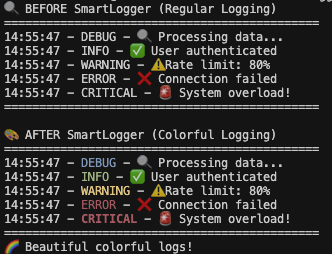
Just one line of code transforms boring logs into beautiful, colorful masterpieces!
Before SmartLogger:
2024-01-06 10:30:45 - myapp - DEBUG - Processing user data...
2024-01-06 10:30:45 - myapp - INFO - User authenticated successfully
2024-01-06 10:30:45 - myapp - WARNING - API rate limit approaching
2024-01-06 10:30:45 - myapp - ERROR - Database connection failed
2024-01-06 10:30:45 - myapp - CRITICAL - System shutting down
After SmartLogger:
import smartlogger.auto # One line = Colorful logs! 🎨
Your logs instantly become beautiful and easy to read with distinctive colors for each level!
🚀 Features
📦 Installation
🏎️ Quick Installpip install pysmartlogger
|
🔧 From Sourcegit clone https://github.com/DeepPythonist/smartlogger.git
cd smartlogger
pip install .
|
🚀 Quick Start
30-Second Setup
⚠️ IMPORTANT: Import Order Matters!
smartlogger.automust be imported immediately after importingloggingand before any logging configuration or usage.
# 1. Import logging first
import logging

# 2. Import SmartLogger IMMEDIATELY after logging (THIS IS CRITICAL!)
import smartlogger.auto

# 3. Now configure your logging (BasicConfig, handlers, etc.)
logging.basicConfig(level=logging.DEBUG)
logger = logging.getLogger(__name__)

# 4. Your logs are now colorful! 🎨
logger.debug("🔍 Debug: Investigating user behavior")
logger.info("✅ Info: User login successful")
logger.warning("⚠️ Warning: API rate limit at 80%")
logger.error("❌ Error: Payment processing failed")
logger.critical("🚨 Critical: Database connection lost!")
Advanced Usage
🎛️ Custom Configuration
import logging
from smartlogger.core.formatter import ColorFormatter
from smartlogger.core.handler import ColorHandler

# Create a custom logger with SmartLogger
logger = logging.getLogger('my_custom_app')
logger.setLevel(logging.DEBUG)

# Use SmartLogger's handler and formatter
handler = ColorHandler()
formatter = ColorFormatter(
    '%(asctime)s | %(name)s | %(levelname)s | %(message)s'
)
handler.setFormatter(formatter)
logger.addHandler(handler)

# Your beautiful custom logs!
logger.info("🎨 Custom formatting with colors!")
🏢 Enterprise Integration
# ⚠️ Remember: Import order is critical!
import logging
import smartlogger.auto  # ← Must be imported before any logging configuration!

# Now configure your existing enterprise logging setup
LOGGING_CONFIG = {
    'version': 1,
    'disable_existing_loggers': False,
    'formatters': {
        'standard': {
            'format': '%(asctime)s [%(levelname)s] %(name)s: %(message)s'
        },
    },
    'handlers': {
        'default': {
            'level': 'INFO',
            'formatter': 'standard',
            'class': 'logging.StreamHandler',
        },
    },
    'loggers': {
        '': {
            'handlers': ['default'],
            'level': 'INFO',
            'propagate': False
        }
    }
}

logging.config.dictConfig(LOGGING_CONFIG)

# SmartLogger automatically enhances ALL your existing loggers!
logger = logging.getLogger('enterprise.module')
logger.info("🏢 Enterprise logging is now colorful!")
🎨 Color Palette
| Log Level | Color | Visual | Use Case | Example |
|---|---|---|---|---|
| 🔵 DEBUG | Blue | 🔍 |
Development & debugging | "Processing user input: email@example.com" |
| 🟢 INFO | Green | ℹ️ |
General information | "User authenticated successfully" |
| 🟡 WARNING | Yellow | ⚠️ |
Potential issues | "API rate limit approaching (80%)" |
| 🔴 ERROR | Red | ❌ |
Actual errors | "Failed to connect to database" |
| 🔥 CRITICAL | Bright Red + Bold | 🚨 |
Urgent attention needed | "System memory critically low!" |
🌟 Real-world Examples
🚀 Web Application
import logging
import smartlogger.auto  # ← Immediately after logging import!
from flask import Flask

app = Flask(__name__)
logger = logging.getLogger('webapp')

@app.route('/users/<user_id>')
def get_user(user_id):
    logger.info(f"🔍 Fetching user data for ID: {user_id}")

    try:
        user = database.get_user(user_id)
        logger.info(f"✅ User found: {user.email}")
        return user.to_json()
    except UserNotFound:
        logger.warning(f"⚠️ User {user_id} not found in database")
        return {"error": "User not found"}, 404
    except DatabaseError as e:
        logger.error(f"❌ Database error: {e}")
        return {"error": "Internal server error"}, 500
🤖 Machine Learning Pipeline
import logging
import smartlogger.auto  # ← Import right after logging!

logger = logging.getLogger('ml_pipeline')

def train_model(dataset_path):
    logger.info(f"🚀 Starting model training with dataset: {dataset_path}")

    try:
        data = load_dataset(dataset_path)
        logger.info(f"📊 Dataset loaded: {len(data)} samples")

        if len(data) < 1000:
            logger.warning(f"⚠️ Small dataset detected ({len(data)} samples)")

        model = train_neural_network(data)
        accuracy = evaluate_model(model)

        if accuracy > 0.95:
            logger.info(f"🎯 Excellent model performance: {accuracy:.2%}")
        elif accuracy > 0.80:
            logger.warning(f"📈 Good model performance: {accuracy:.2%}")
        else:
            logger.error(f"📉 Poor model performance: {accuracy:.2%}")

    except Exception as e:
        logger.critical(f"🚨 Model training failed: {e}")
        raise
📊 Data Processing
import logging
import smartlogger.auto  # ← Critical: Import immediately after logging!
import pandas as pd

logger = logging.getLogger('data_processor')

def process_customer_data(file_path):
    logger.info(f"📁 Processing customer data from: {file_path}")

    try:
        df = pd.read_csv(file_path)
        logger.debug(f"🔍 Raw data shape: {df.shape}")

        # Data validation
        missing_data = df.isnull().sum().sum()
        if missing_data > 0:
            logger.warning(f"⚠️ Found {missing_data} missing values")

        # Process data
        cleaned_df = clean_data(df)
        logger.info(f"✅ Data cleaning completed: {cleaned_df.shape}")

        # Save results
        cleaned_df.to_csv('processed_data.csv')
        logger.info("💾 Processed data saved successfully")

    except FileNotFoundError:
        logger.error(f"❌ Data file not found: {file_path}")
    except pd.errors.EmptyDataError:
        logger.critical(f"🚨 Data file is empty: {file_path}")
🖥️ Compatibility Matrix
🌐 Terminal Support
| Terminal | Windows | macOS | Linux | Notes |
|---|---|---|---|---|
| Windows Terminal | ✅ | - | - | Full color support |
| PowerShell | ✅ | ✅ | ✅ | Core & 7+ |
| Command Prompt | ✅ | - | - | Windows 10+ |
| iTerm2 | - | ✅ | - | Recommended for macOS |
| Terminal.app | - | ✅ | - | Built-in macOS terminal |
| bash/zsh/fish | ✅ | ✅ | ✅ | Universal support |
🔬 How It Works
import logging
import smartlogger.auto  # ← This triggers the magic! 🪄
# IMPORTANT: Must be imported right after logging and before any configuration!
🔧 Technical Implementation
SmartLogger uses intelligent monkey-patching to enhance Python's logging module:
# 1. 🕵️ Environment Detection
def detect_color_support():
    """Detects if the current environment supports ANSI colors"""
    # Checks terminal type, environment variables, IDE support
    return is_terminal_supports_color()

# 2. 🎨 Smart Color Application
def apply_colors(log_record):
    """Applies appropriate colors based on log level"""
    if not supports_colors:
        return original_format(log_record)

    color = get_color_for_level(log_record.levelname)
    return f"{color}{log_record.levelname}{RESET}"

# 3. 🔄 Safe Monkey-Patching
def patch_logging():
    """Safely patches logging without breaking existing code"""
    original_formatter = logging.Formatter
    logging.Formatter = EnhancedColorFormatter
    # Maintains 100% backward compatibility!
Key Features:
- 🔍 Smart Detection: Automatically detects color support
- 🛡️ Safe Patching: Won't break existing logging configurations
- ⚡ Performance: Minimal overhead (~0.1ms per log message)
- 🔄 Reversible: Can be disabled at runtime if needed
🎯 Zero Dependencies Philosophy
SmartLogger is built with zero external dependencies by design:
- 📦 Pure Python: Only uses standard library modules
- 🚀 Fast Installation: No compilation or external packages
- 🔒 Secure: No third-party code vulnerabilities
- 📱 Lightweight: Total package size < 50KB
# Compare installation times:
pip install some-logging-lib    # Downloads 20+ dependencies 😴
pip install pysmartlogger      # Just SmartLogger! ⚡
🤝 Contributing
We love contributions! SmartLogger is an open-source project and we welcome contributions of all kinds.
🚀 How to Contribute
Quick Start for Contributors
-
🍴 Fork the repository
git clone https://github.com/DeepPythonist/smartlogger.git
cd smartlogger
-
🌟 Create a feature branch
git checkout -b feature/amazing-new-feature
-
🧪 Run tests
python -m pytest tests/ -v
python demo_smartlogger.py
-
📝 Make your changes and commit
git add .
git commit -m "✨ Add amazing new feature"
-
🚀 Push and create PR
git push origin feature/amazing-new-feature
# Then create a Pull Request on GitHub!
🎯 Areas We Need Help With
- 🌍 Cross-platform testing (especially Windows variations)
- 🎨 New color schemes and themes
- 📚 Documentation improvements
- 🐛 Bug reports and fixes
- 💡 Feature suggestions
📋 Development Guidelines
- ✅ Code style: We use
blackfor formatting - 🧪 Testing: Add tests for new features
- 📝 Documentation: Update README for new features
- 🔍 Type hints: Use type annotations where possible
⚠️ Common Mistakes
❓ FAQ
Q: Why is import order important?
A: SmartLogger uses monkey-patching to enhance Python's logging module. It must be imported immediately after logging and before any logging configuration to work properly:
# ✅ CORRECT ORDER
import logging
import smartlogger.auto  # ← Must be here!
logging.basicConfig()   # ← Configuration after SmartLogger

# ❌ WRONG ORDER
import logging
logging.basicConfig()   # ← Configuration before SmartLogger
import smartlogger.auto  # ← Too late! Colors won't work
Q: Does SmartLogger affect performance?
A: Minimal impact! SmartLogger adds ~0.1ms overhead per log message. Color detection is cached, so there's virtually no performance penalty after initialization.
Q: Can I use SmartLogger in production?
A: Absolutely! SmartLogger is designed for production use:
- 🛡️ Safe: Won't break existing logging
- 🚀 Zero dependencies: No external vulnerabilities
- ⚡ Performance optimized: Minimal overhead
- 🔄 Reversible: Can be disabled if needed
Q: What if my terminal doesn't support colors?
A: SmartLogger automatically detects color support and gracefully falls back to plain text in non-color environments. No configuration needed!
Q: Can I customize the colors?
A: Yes! You can customize colors using the advanced configuration:
from smartlogger.config.colors import Colors

# Customize colors
Colors.INFO = Colors.CYAN  # Make INFO messages cyan
Colors.DEBUG = Colors.MAGENTA  # Make DEBUG messages magenta
Q: Does it work with existing logging configurations?
A: Yes! SmartLogger is designed to work seamlessly with existing logging setups. Just add import smartlogger.auto and your existing loggers become colorful.
📄 License
MIT License - see LICENSE file for details.
Feel free to use SmartLogger in your projects, both personal and commercial!
👨💻 Author

Mohammad Rasol Esfandiari
🐍 Python Developer & Open Source Enthusiast



1 maintainer

Metadata
1 maintainer
Release files for pysmartlogger 1.3.0
For a detailed explanation of source distributions (sdists) and built distributions (wheels), please see the package formats documentation.
Source distribution (sdist)
| File | Size | Uploaded | |
|---|---|---|---|
| pysmartlogger-1.3.0.tar.gz | 25.6 kB | Details |
Built distribution (wheel)
| File | Interpreter | ABI | Platform | Reset |
|---|---|---|---|---|
| pysmartlogger-1.3.0-py3-none-any.whl | Python 3 | none | any | Details |
Total release size: 40.1 kB
Release files / pysmartlogger-1.3.0.tar.gz
| Download URL | pysmartlogger-1.3.0.tar.gz |
|---|---|
| Size | 25.6 kB |
| Tags | Source |
|
SHA-256 checksum How to use checksums |
c50c1a03a89c6e2de7e6e43004481ab0545209036c5e8655b4f2135c372535b9
|
|
BLAKE2b-256 checksum How to use checksums |
a8c6aede504006b77d645436ea534e19d68463f14a3508af425ff149d2a1a6a5
|
| Upload date | |
|
Uploaded using Trusted Publishing? What is trusted publishing? |
No |
| Uploaded via |
twine/6.1.0 CPython/3.12.4
|
Release files / pysmartlogger-1.3.0-py3-none-any.whl
| Download URL | pysmartlogger-1.3.0-py3-none-any.whl |
|---|---|
| Size | 14.5 kB |
| Tags | Python 3 |
|
SHA-256 checksum How to use checksums |
33043a12bc47babb4adb1a2a86f24e4060f9d863b911edff3dca77690da0b525
|
|
BLAKE2b-256 checksum How to use checksums |
f24e843661d6f3cb08a77aaf21b00ec7cebf82efb66f27392bb7f210cec28b78
|
| Upload date | |
|
Uploaded using Trusted Publishing? What is trusted publishing? |
No |
| Uploaded via |
twine/6.1.0 CPython/3.12.4
|














