
pysomo


pysomo (for solid modeling) is a small solid modeling library. This library allows you to create 3D models in Python and export them to various 3D file formats.
Requirements
pysomo creates an xcsg file, an XML file that can be parsed by the xcsg application to create export your models in various file formats. pysomo does not include xcsg, it can be downloaded separately: download xcsg.
Installation
- To install, simply run
pip install pysomo - To export from xcsg format to a 3D model file, the xcsg application must be in the same directory as your application.
Examples
Extrusion
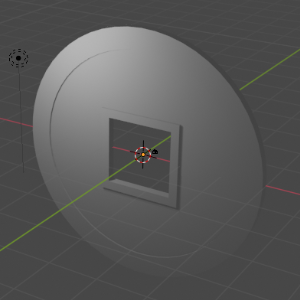
The following code creates a coin with a square hole in the middle.
import pysomo as somo


# First let's create the round part of the coin.
coin_circle = somo.Circle(30)
# This creates the base solid of the coin.
coin = coin_circle.linear_extrude(2)
# Create the solid to use as the extrusion. Note that we use the offset method
# to create a smaller circle from the base. This will give us the rim.
coin_extr = coin_circle.offset(-5, True).linear_extrude(1)


# Now we use the subtraction operator to extrude our shapes from the coin.
coin = coin - coin_extr.translate(0, 0, 1.5) - coin_extr.translate(0, 0, -0.5)


# Let's now create the square hole in the coin.
square = somo.Square(20)
square_rim = square.linear_extrude(2)
square_hole = square.offset(-2, False).linear_extrude(2)


# Our final coin is the base coin with a square removed.
coin = coin + square_rim - square_hole


# Now we export to a file. The Root is responsible for building the xcsg file.
root = somo.Root(coin)
# The Exporter reads the root file and uses the xcsg application.
somo.Exporter(r"coin.obj").export_obj(root)
This creates the coin below.
Stairs
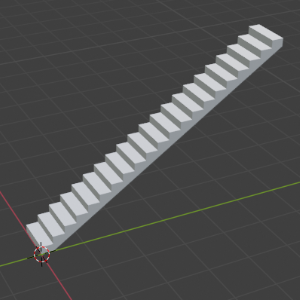
The following code builds a staircase up to the maximum height allowed by a building code, if we were to use the maximum step height allowed. It demonstrates modelisation via code. It also demonstrates that figures do not mutate when an operation is applied. Instead, every operation returns a new figure.
import pysomo as somo


def to_meters(inches):
    return 0.0254 * inches


# Let's say these are the building code requirements for stairs, in inches.
min_clear_width = to_meters(3 * 12)
max_stair_height = to_meters(163)
max_riser_height = to_meters(7 + 1 / 2)
min_tread_depth = to_meters(11)


# Build the staircase steps by union of every step.
step = somo.Cuboid(
    min_clear_width,
    max_riser_height,
    min_tread_depth,
    center='false')
steps = step  # Initially, the stairs are a single step
step_count = 1  # Number of steps in the stairs


# Let's keep adding steps while the height is code compliant.
while (step_count + 1) * max_riser_height < max_stair_height:
    # Note that every operation in fact returns a new solid and does not
    # modify the original step, so you can reuse solids for every translation.
    steps += step.translate(
        0,
        max_riser_height * step_count,
        min_tread_depth * step_count)
    step_count += 1


# Build the stringers. Vertices are calculated from the steps we built above.
stairs_height = max_riser_height * step_count
stairs_depth = min_tread_depth * step_count
vertices = [
    (min_clear_width, 0, 0),
    (min_clear_width, 0, min_tread_depth),
    (min_clear_width, stairs_height, stairs_depth),
    (min_clear_width, stairs_height - max_riser_height, stairs_depth),
    (0, 0, 0),
    (0, 0, min_tread_depth),
    (0, stairs_height, stairs_depth),
    (0, stairs_height - max_riser_height, stairs_depth),
]
stringers = somo.Polyhedron(vertices)


# The union of steps and stringers creates the stairwell.
root = somo.Root(steps + stringers)


# Export to obj format.
somo.Exporter(r"stairs.obj").export_obj(root)
This creates the staircase below.
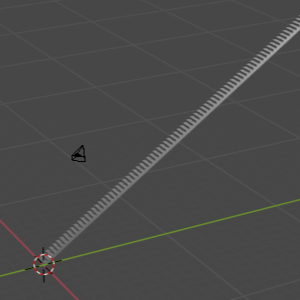
An advantage in this style of 3d modeling is the simplicity of changing your models through variables. Let's say we added a zero to the maximum height allowed:
1 maintainer

Metadata
1 maintainer
Release files for pysomo 0.0.6
For a detailed explanation of source distributions (sdists) and built distributions (wheels), please see the package formats documentation.
Source distribution (sdist)
| File | Size | Uploaded | |
|---|---|---|---|
| pysomo-0.0.6.tar.gz | 6.9 kB | Details |
Built distribution (wheel)
| File | Interpreter | ABI | Platform | Reset |
|---|---|---|---|---|
| pysomo-0.0.6-py3-none-any.whl | Python 3 | none | any | Details |
Total release size: 13.7 kB
Release files / pysomo-0.0.6.tar.gz
| Download URL | pysomo-0.0.6.tar.gz |
|---|---|
| Size | 6.9 kB |
| Tags | Source |
|
SHA-256 checksum How to use checksums |
249bdd14aa05d8b7f21c4f54a450df27dbafb29a04bd985cd38c8c79eac49468
|
|
BLAKE2b-256 checksum How to use checksums |
21eca82c42394a54e13cd3a4fa724e8c16151bf89c7e0bee8a220217f4cacaea
|
| Upload date | |
|
Uploaded using Trusted Publishing? What is trusted publishing? |
No |
| Uploaded via |
poetry/1.0.10 CPython/3.8.5 Windows/10
|
Release files / pysomo-0.0.6-py3-none-any.whl
| Download URL | pysomo-0.0.6-py3-none-any.whl |
|---|---|
| Size | 6.8 kB |
| Tags | Python 3 |
|
SHA-256 checksum How to use checksums |
40291beefb7268175c28a2a6fd0109998e44a6cc0cb99fe87ac85fd58568de21
|
|
BLAKE2b-256 checksum How to use checksums |
00242021929ba49ba11c931ea6136bdfd7200d5208a69f2a21343032ad498182
|
| Upload date | |
|
Uploaded using Trusted Publishing? What is trusted publishing? |
No |
| Uploaded via |
poetry/1.0.10 CPython/3.8.5 Windows/10
|













