
Explore data files with pyspark

Project description
Spark File Explorer
When developing spark applications I came across the growing number of data files that I create.
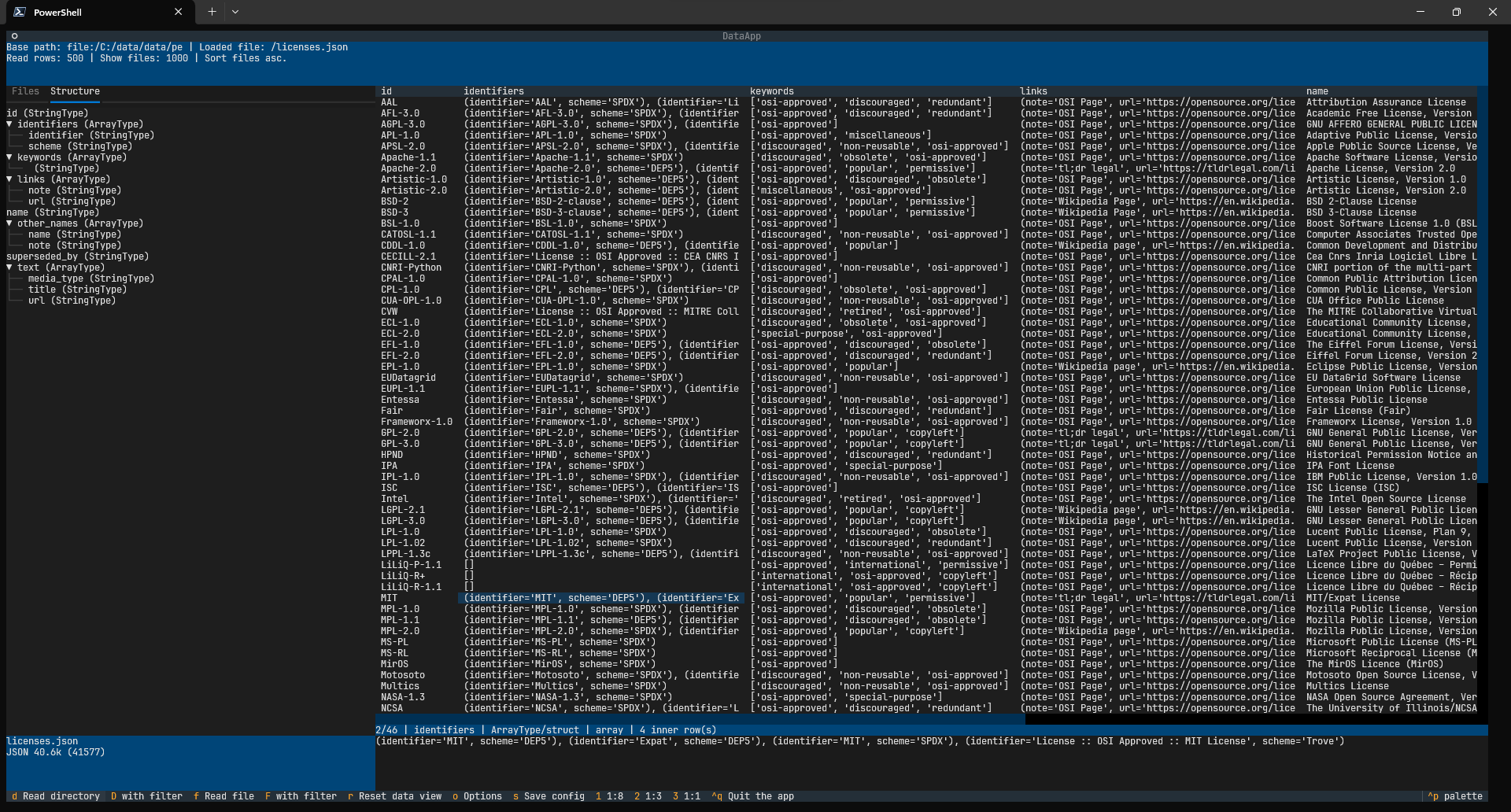
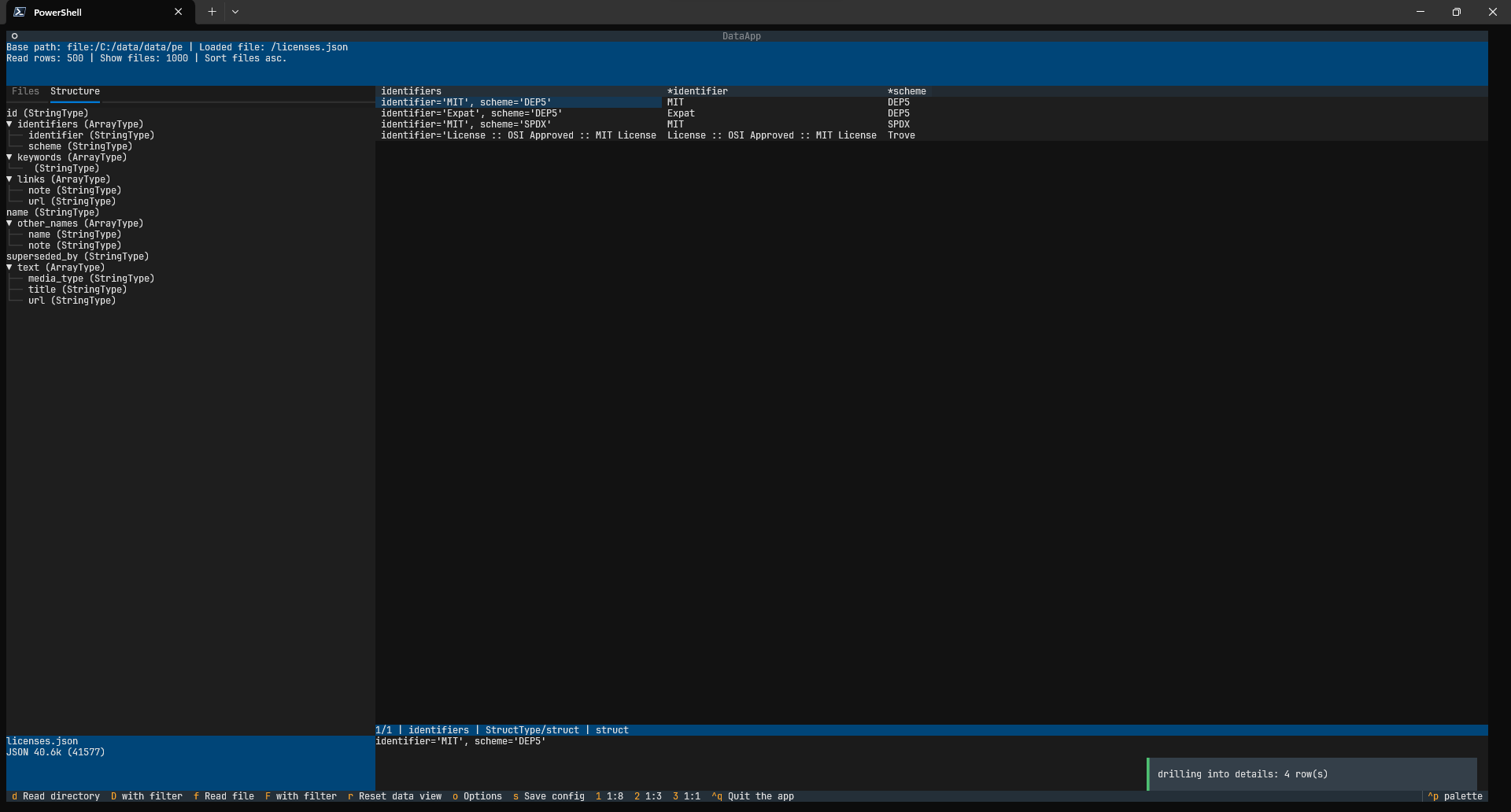
CSVs are fine but what about JSON and complex PARQUET files?
To open and explore a file I used Excel to view CSV files, text editors with plugins to view JSON files, but there was nothing handy to view PARQUETs. Event formatted JSONs were not always readable. What about viewing schemas?
Each time I had to use spark and write simple apps which was not a problem itself but was tedious and boring.
Why not a database?
Well, for tabular data there problems is already solved - just use your preferred database. Quite often we can load text files or even parquets directly to the database.
So what's the big deal?
Hierarchical data sets
Unfortunately the files I often deal with have hierarchical structure. They cannot be simply visualized as tables or rather some fields contain tables of other structures. Each of these structures is a table itself but how to load and explore such embedded tables in a database?
For Spark files use... Spark!
Hold on - since I generate files using Apache Spark, why can't I use it to explore them? I can easily handle complex structures and file types using built-in features. So all I need is to build a use interface to display directories, files and their contents.
Why console?
I use Kubernetes in production environment, I develop Spark applications locally or in VM. In all environments I would like to have one tool to rule them all.
I like console tools a lot, they require some sort of simplicity. They can run locally or over SSH connection on the remote cluster. Sounds perfect. All I needed was a console UI library, so I wouldn't have to reinvent the wheel.
Textual
What a great project textual is!
Years ago I used curses but textual is so superior to what I used back then. It has so many features packed in a friendly form of simple to use components. Highly recommended.
Usage
Install package with pip:
pip install pyspark-explorer
Run:
pyspark-explorer
You may wish to provide a base path upfront. It can be changed at any time (press o for Options).
For local files that could be for example:
# Linux
pyspark-explorer file:///home/myuser/datafiles/base_path
# Windows
pyspark-explorer file:/c:/datafiles/base_path
For remote location:
# Remote hdfs cluster
pyspark-explorer hdfs://somecluster/datafiles/base_path
Default path is set to /, which represents local root filesystem and works fine even in Windows thanks to Spark logics.
Configuration files are saved to your home directory (.pyspark-explorer subdirectory). These are json files so you are free to edit them.
Configuration
You may configure the program by creating JSON files in the .pyspark-explorer directory.
The default values are stored under DEFAULTxxxx global variables. You may override them by creating the following files:
config.json
{
    "base_path": "/",
    "file_limit": 300,
    "take_rows": 1000,
    "sort_files_desc": False,
    "sort_dirs_as_files": False,
}
spark-options.json
{
    "CSV": {"header": "false", "dateFormat": "yyyy-MM-dd", "timestampFormat": "yyyy-MM-dd HH:mm:ss", "delimiter": ";"},
    "JSON": {"dateFormat": "yyyy-MM-dd", "timestampFormat": "yyyy-MM-dd HH:mm:ss"},
    "config": {
        "spark.master": "local[1]",
        "spark.driver.memory": "1g"
    }
}
file-filters.json
{"filters": ["*"]}
spark-filters.json
{"filters": ["1=1"]}
So for example if you want to filter large files, you may wish want to increase memory limit from 1G to 8G and CPUs from 1 to 2. In such case create the spark-options.json file with the following contents:
{
  "config": {
    "spark.master": "local[2]",
    "spark.driver.memory": "8g"
  }
}
Spark limitations
Note that you will not be able to open any JSON file - only those with correct structure can be viewed. If you try to open a file which has an unacceptable structure, Spark will throw an error, e.g.:
Since Spark 2.3, the queries from raw JSON/CSV files are disallowed when the
referenced columns only include the internal corrupt record column
(named _corrupt_record by default). For example:
spark.read.schema(schema).csv(file).filter($"_corrupt_record".isNotNull).count()
and spark.read.schema(schema).csv(file).select("_corrupt_record").show().
Instead, you can cache or save the parsed results and then send the same query.
For example, val df = spark.read.schema(schema).csv(file).cache() and then
df.filter($"_corrupt_record".isNotNull).count().
or e.g.
[COLUMN_ALREADY_EXISTS] The column `event` already exists. Consider to choose another name or rename the existing column.
or e.g.
'NoneType' object has no attribute '__fields__'
etc.
You can find the log file in your home directory (.pyspark-explorer subdirectory).
Release history Release notifications | RSS feed


Download files
Download the file for your platform. If you're not sure which to choose, learn more about installing packages.
Source Distribution
Built Distribution
Filter files by name, interpreter, ABI, and platform.
If you're not sure about the file name format, learn more about wheel file names.
Copy a direct link to the current filters
File details
Details for the file pyspark_explorer-0.3.0.tar.gz.
File metadata
- Download URL: pyspark_explorer-0.3.0.tar.gz
- Upload date:
- Size: 21.3 kB
- Tags: Source
- Uploaded using Trusted Publishing? No
- Uploaded via: twine/6.2.0 CPython/3.14.0
File hashes
| Algorithm | Hash digest | |
|---|---|---|
| SHA256 |
5af5281cefb44b31bb3b4de39db22c98f55d7d0d4ddac6538b33e2b82d462ba3
|
|
| MD5 |
37cea4c98d35c5812a70a50b2eddf6c3
|
|
| BLAKE2b-256 |
e70c1d0b67eec25a0b8f880c2f49d177744f2466d175078d1c2fdaf4c0baf9a2
|
File details
Details for the file pyspark_explorer-0.3.0-py3-none-any.whl.
File metadata
- Download URL: pyspark_explorer-0.3.0-py3-none-any.whl
- Upload date:
- Size: 17.8 kB
- Tags: Python 3
- Uploaded using Trusted Publishing? No
- Uploaded via: twine/6.2.0 CPython/3.14.0
File hashes
| Algorithm | Hash digest | |
|---|---|---|
| SHA256 |
a82bf4e3056cb71b4f1f157a90a65a19dfc35ec66b2aa35d5a2847b33b014a33
|
|
| MD5 |
a1a8f0a321972ca55cc67f1f80612aab
|
|
| BLAKE2b-256 |
43f1496d46c4eecaec3488287879fcc57ef71f44fc0b21d54e5ff99cbda447e6
|






