
PySpecTrace: Python-based Graphical User Interface (GUI) for Real-time UV-Vis-NIR Spectroscopy Analysis
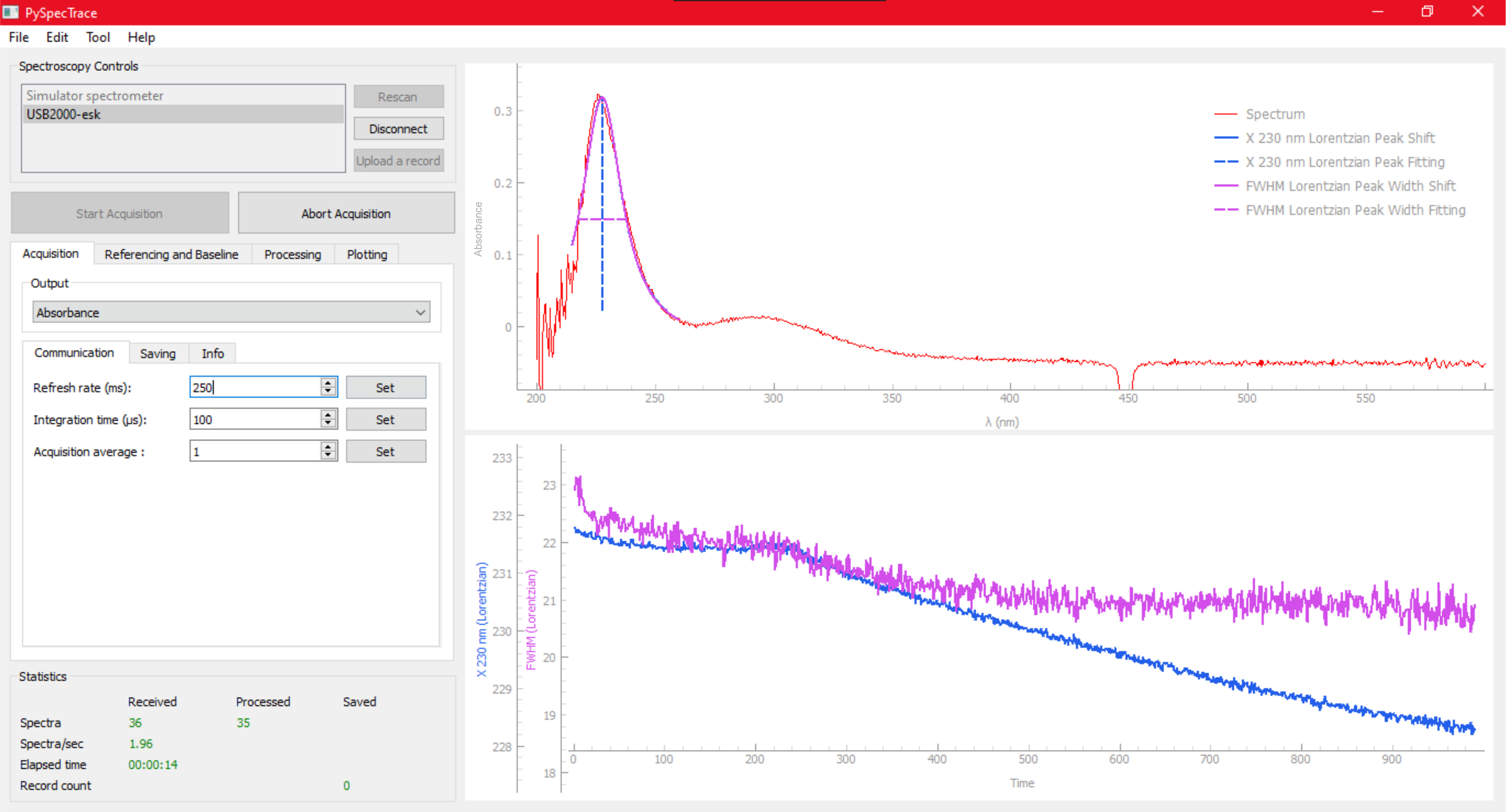
PySpecTrace is an open-source, Python-based graphical user interface (GUI) designed for real-time UV-visible-NIR spectroscopy data analysis. It addresses the limitations of proprietary spectrometer software by providing advanced, customizable, and real-time spectral tracking and analysis tools suitable for a wide range of scientific disciplines.
Installation
Open a terminal or Command Prompt then run the following command to install the latest version from PyPI:
pip install pyspectrace
Run the Application
After installation is complete, start the program with open terminal and write:
pyspectrace
Spectrometer SDK Setup
To connect the software with supported spectrometers, you must manually provide the required SDK files (DLLs/shared libraries). These SDKs are proprietary and must be obtained directly from the hardware manufacturers.
You can add SDK files from the application menu:
- Open
- Click menu bar
SDK. - Choose the vendor:
Ocean Optics,CNI Laser, orAvantes. - Select
Add ... DLLand choose the required.dllfile. - Close PySpecTrace then run again
PySpecTrace stores user-provided SDK files in the user data directory. This keeps the PyPI package free from proprietary SDK files.
Requirements
- Python 3.9 – 3.12
Notes for Avantes Spectrometer: If the spectrometer is still not detected after placing the SDK, please Install the official Avantes interface software from https://www.avantes.com/products/software/
Detailed steps for running documented in the Manual: PySpecTrace_Manual.pdf
If you encounter any issues or need assistance, we will do our best to help. Please feel free to contact us via the Corresponding Contact
Extra Documentation
- Zenodo archive: doi.org/10.5281/zenodo.18918222
- Repository: https://github.com/anamsigit/pyspectrace
- Supporting information: PySpecTrace_SI.pdf
- Demonstration video: Google drive
Key Features
- Real-time spectral visualization: Enables immediate monitoring of spectral changes during experiments.
- Dynamic spectral tracing and peak tracking: Utilizes adaptive fitting routines to identify and track spectral features live.
- Flexible configuration: User-friendly GUI includes panels for spectrometer connection, settings, data display, and analysis.
- Spectral post-processing: Offers robust data analysis capabilities for in-depth interpretation.
- Spectrometer Simulator: Supports testing without physical hardware, facilitating development and training.
- Modular and adaptable: Compatible with any spectrometer via appropriate driver interfaces; easily customizable for various experimental needs.
Architecture
- Built on a Model-View-Presenter (MVP) pattern for maintainability and scalability.
- Uses popular Python libraries including PyQt5, NumPy, SciPy, Pandas, Matplotlib, and PyQtGraph.
- This project has been tested with Python 3.9.13.
List of working spectrometers
PySpecTrace has been tested and working seamlessly with these commercial spectrometers (on Windows OS). Testing was performed using some instruments available from several research laboratories: Photonics Research Center of Indonesia; Chemistry Dept. of Chulalongkorn University; Electrical Eng. Dept. of Universiti Teknologi Malaysia; IMRAN, Tohoku University, Physics Dept. of Universitas Indonesia.
| Ocean Optics | Avantes | CNI |
|---|---|---|
| Maya PRO2000 | AvaSpec-ULS4096CL-EVO | Aurora 4000 |
| HR 4000CG-UV-NIR | AvaSpec-2048-USB2 | |
| USB4000 |
Please add to the list if you have found that it works in your spectrometer. It will be a nice information for new user.
Corresponding contact
- Feel free to contact us via Iwan Darmadi (email:iwan.darmadi@alumni.ui.ac.id) for technical support, bug reports, feature requests, or questions regarding
1 maintainer

Metadata
1 maintainer
Release files for pyspectrace 2.2.2
For a detailed explanation of source distributions (sdists) and built distributions (wheels), please see the package formats documentation.
Source distribution (sdist)
| File | Size | Uploaded | Provenance | |
|---|---|---|---|---|
| pyspectrace-2.2.2.tar.gz | 114.8 kB | Without provenance | Details |
Built distribution (wheel)
| File | Interpreter | ABI | Platform | Reset |
|---|---|---|---|---|
| pyspectrace-2.2.2-py3-none-any.whl | Python 3 | none | any | Details |
Total release size: 300.3 kB
Release files / pyspectrace-2.2.2.tar.gz
| Download URL | pyspectrace-2.2.2.tar.gz |
|---|---|
| Size | 114.8 kB |
| Tags | Source |
|
SHA-256 checksum How to use checksums |
b72de304e7190bb0dd1c523319279cfdbde3d803248f1fde804ab8447ddbe62c
|
|
BLAKE2b-256 checksum How to use checksums |
b1bdd1bc9ce0c7cc5c1d2294c5361b742918ea0fe52354fe5401c60a155f2710
|
| Upload date | |
|
Uploaded using Trusted Publishing? What is trusted publishing? |
No |
| Uploaded via |
twine/6.2.0 CPython/3.9.10
|
Release files / pyspectrace-2.2.2-py3-none-any.whl
| Download URL | pyspectrace-2.2.2-py3-none-any.whl |
|---|---|
| Size | 185.5 kB |
| Tags | Python 3 |
|
SHA-256 checksum How to use checksums |
3f5dcc2d40c3b2c68780ab685009927cc5e81e9a86b4a510ad4cf0e4c3c3f32d
|
|
BLAKE2b-256 checksum How to use checksums |
db43fdd7764a8584d81daefd4a5feb6701e6bc38341268380721f729a52cae47
|
| Upload date | |
|
Uploaded using Trusted Publishing? What is trusted publishing? |
No |
| Uploaded via |
twine/6.2.0 CPython/3.9.10
|
Security for pyspectrace 2.2.2
Provenance
Provenance describes where a file came from. On PyPI, provenance is shared via attestations, which provide a verifiable record of the build or publishing details. View details, limitations and caveats.
No provenance found
None of the files in this release were uploaded with provenance metadata.
A note on package security
PyPI is a repository for distributing packages, not a service for auditing them. While third-party security researchers and our staff do their best to detect and remove malicious packages, PyPI cannot guarantee the quality, security or suitability of any given package.
To learn more about protecting yourself from malicious actors, visit our package security documentation.














