
Pyspread is a non-traditional spreadsheet application that is based on and written in the programming language Python.


Project description
pyspread



pyspread is a non-traditional spreadsheet that is based on and written in the programming language Python.
It is released under the GPL v3. LICENSE
- Homepage: https://pyspread.gitlab.io/
- Repository: https://gitlab.com/pyspread/pyspread
- API Docs: https://pyspread.gitlab.io/pyspread/
Installation
It is recommended to install pyspread as a package that is provided for your operating system. The table below shows for which operating systems, pyspread is available in which version.
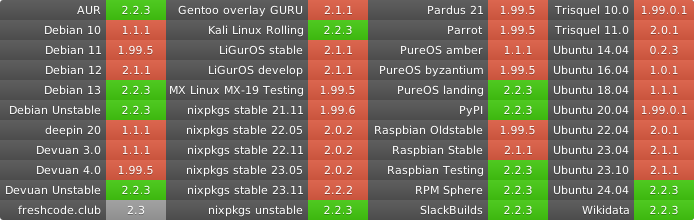
If pyspread is unavailable or outdated for your operating system, you can install it using one of the three methods below.
When using pip, a Python virtual environment (venv) is recommended. Some operating systems may nudge your towards this. pipx could be a solution if venv is no option for you.
Furthermore, note that the QtSvg extensions for PyQT are required. For some operating systems, they are packaged separately from PyQt. Please make sure QtSvg is installed on your system before using pip.
With pip
pip install pyspread
From git
It is assumed that python3 and git are installed.
Get sources and enter dir
git clone https://gitlab.com/pyspread/pyspread.git
# or
git clone git@gitlab.com:pyspread/pyspread.git
# then
cd pyspread
Install dependencies and pyspread
pip3 install -r requirements.txt
# or if pip3 is not present
pip install -r requirements.txt
# next
python3 setup.py install
Getting the bleeding edge version from the code repository
Note that there may unfixed bugs if you use the latest repository version.
You may want to check the CI, which comprises unit tests at
https://gitlab.com/pyspread/pyspread/pipelines.
Get the latest tarball or zip at https://gitlab.com/pyspread/pyspread or
clone the git repo at https://gitlab.com/pyspread/pyspread.git
Starting pyspread
With an installation via pip, distutils or your OS's installer, simply run
$ pyspread
from any directory.
In order to start pyspread without installation directly from the cloned repository or the extracted tarball or zip, run
$ ./pyspread/pyspread.py
or
$ python -m pyspread
inside the top directory.
Contact
For user questions or user feedback please use the delta chat channel pyspread-users.
Contribute
Issues
For contributions, patches, development discussions and ideas please create an issue using the pyspread issue tracker on gitlab.
Code
Commit your changes, push them into your fork and send a merge request. The fork documentation page gives an overview how to do this in gitlab.
You can find more more details about code organization here
Release history Release notifications | RSS feed


Download files
Download the file for your platform. If you're not sure which to choose, learn more about installing packages.
Source Distribution
Built Distribution
Filter files by name, interpreter, ABI, and platform.
If you're not sure about the file name format, learn more about wheel file names.
Copy a direct link to the current filters
File details
Details for the file pyspread-2.4.4.tar.gz.
File metadata
- Download URL: pyspread-2.4.4.tar.gz
- Upload date:
- Size: 2.3 MB
- Tags: Source
- Uploaded using Trusted Publishing? No
- Uploaded via: twine/6.1.0 CPython/3.13.5
File hashes
| Algorithm | Hash digest | |
|---|---|---|
| SHA256 |
60de8f41815638692801f85391986743b57ca80cd996d0b07a39ed1a432771d9
|
|
| MD5 |
02db8b3f33afe984272839263b67f394
|
|
| BLAKE2b-256 |
4bad8a3b108c7e08de1914b553a658adecdd561e2dd9704674592e356f8cd26f
|
File details
Details for the file pyspread-2.4.4-py3-none-any.whl.
File metadata
- Download URL: pyspread-2.4.4-py3-none-any.whl
- Upload date:
- Size: 1.7 MB
- Tags: Python 3
- Uploaded using Trusted Publishing? No
- Uploaded via: twine/6.1.0 CPython/3.13.5
File hashes
| Algorithm | Hash digest | |
|---|---|---|
| SHA256 |
fb007b7ea8f9af78f4bb61faf0e8facbcf57a73a9b691bdb9f86b064e18d6379
|
|
| MD5 |
c807719442aadc329ecceae59663a3c1
|
|
| BLAKE2b-256 |
eb1a8094b2fd762bb090546a59c6ee645f40ba6893ec76f348cece8b4eb6441c
|






