




Introduction
PyStack3D is a package dedicated to images correction intended -for instance- to FIB-SEM stack images postprocessing before image segmentation.
The pystack3d workflow includes the following process steps which can be activated or not and executed in any order:
croppingto reduce the image field of view to a ROI (Region Of Interest)background removalto reduce from polynomial approximations artefacts issued for instance from shadowing, charging, ...intensity rescalingto homogenize the 'gray' intensity distribution between successive frames/slicesregistrationto correct the images misalignment due to shifting, drift, rotation, ... during the images acquisitiondestripingto minimize artefacts like stripes that can appear in some image acquisition techniquesresamplingto correct non uniform spatial steps
An additional step named cropping_final can be used to eliminate artefacts produced near the edges during the image processing or to select another ROI at the end.
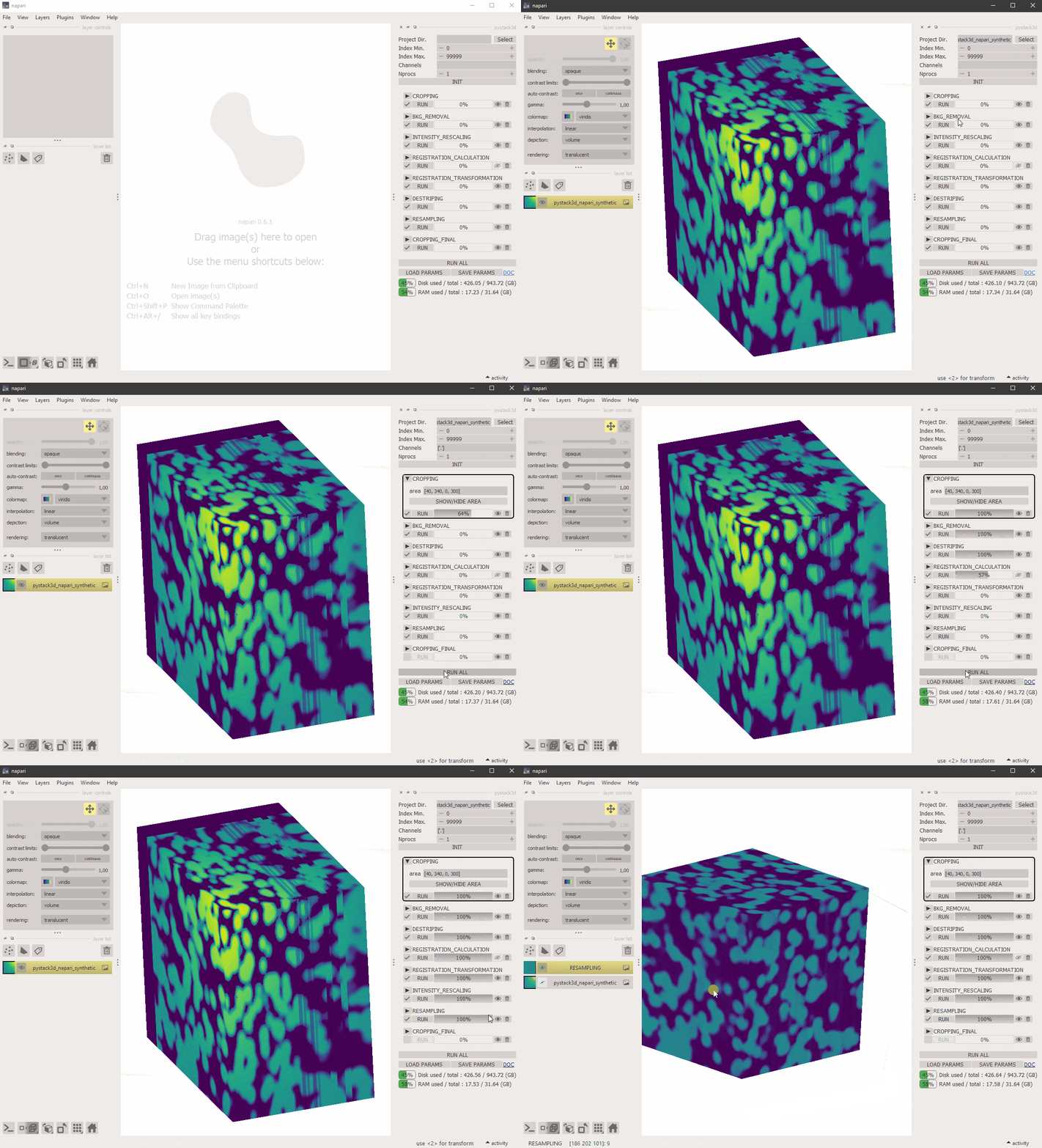
Pystack3d can be launched in scripting mode using .toml configuration files (see documentation), or through a dedicated GUI designed with Napari.
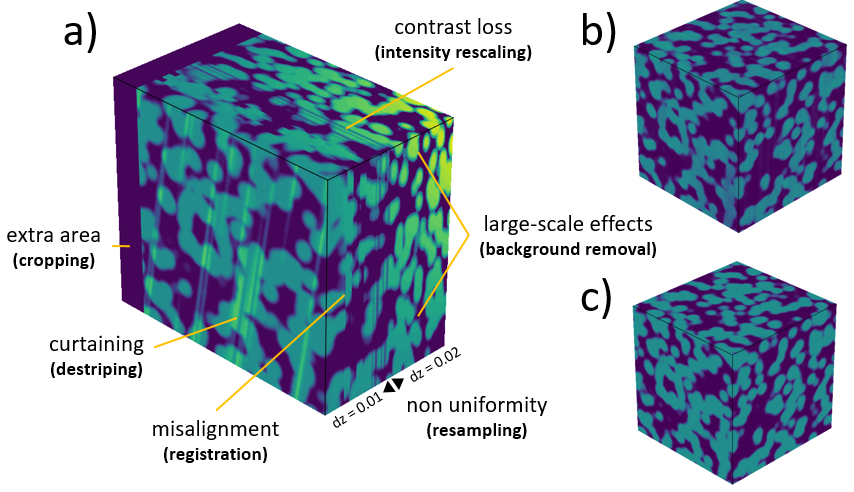
a) Synthetic case illustrating the defects to be removed by PyStack3D. b) Corrected stack. c) Ground truth.

Illustration of a FIB-SEM image correction using some of the PyStack3D process steps.
Installation
For a simple install (execution by scripts):
pip install pystack3d
For a GUI install and execution:
pip install pystack3d[gui]
pip install PyQt5           # or PyQt6, PySide2, PySide6, if no Qt backend have been already installed in your env.
pystack3d
(The GUI install required ~900MB free space on disk)
For a GPU acceleration during the destriping process:
python -m pyvsnr.install_cupy
Refer to pyvsnr for more details.
Tests and examples execution
For tests and examples execution, the full pystack3d project has to be installed via git:
git clone https://github.com/CEA-MetroCarac/pystack3d.git
cd [path_to_your_pystack3d_project]
Once the project has been cloned, the python environment has to be created and completed with the pytest package (for testing):
pip install .
pip install pytest
Then the tests and the examples can be executed as follows:
pytest
cd examples
python ex_synthetic_stack.py
python ex_real_stack.py
Usage
Refer to the PyStack3D documentation.
Contributing / Reporting an issue
Contributions and issue reporting are more than welcome! Please read through our Developers notes.
Acknowledgements
This work, carried out on the CEA - Platform for Nanocharacterisation (PFNC), was supported by the “Recherche Technologique de Base” program of the French National Research Agency (ANR).
Warm thanks to the JOSS reviewers (@kasasxav, @sklumpe and @xiuliren) and editor (@mstimberg) for their contributions to enhancing PyStack3D.
Citations
In case you use the results of this code in an article, please cite:
- Quéméré P., David T. (2024). PyStack3D: A Python package for fast image stack correction. Journal of Open Source Software. https://joss.theoj.org/papers/10.21105/joss.07079. (See the About section).
additional citations for the destriping:
-
Pavy K., Quéméré P. (2024). Pyvsnr 2.0.0. Zenodo. https://doi.org/10.5281/zenodo.10623640.
-
Fehrenbach J., Weiss P., Lorenzo C. (2012). Variational algorithms to remove stationary noise: applications to microscopy imaging. IEEE Transactions on Image Processing 21.10 (2012): 4420-4430.
additional citation for the registration:
- Thévenaz P., Ruttimann U.E., Unser M. (1998), A Pyramid Approach to Subpixel Registration Based on Intensity, IEEE Transactions on Image Processing, vol. 7, no. 1, pp. 27-41, January 1998.
1 maintainer

Metadata
1 maintainer
Release files for pystack3d 2026.2
For a detailed explanation of source distributions (sdists) and built distributions (wheels), please see the package formats documentation.
Source distribution (sdist)
| File | Size | Uploaded | |
|---|---|---|---|
| pystack3d-2026.2.tar.gz | 47.4 kB | Details |
Built distribution (wheel)
| File | Interpreter | ABI | Platform | Reset |
|---|---|---|---|---|
| pystack3d-2026.2-py3-none-any.whl | Python 3 | none | any | Details |
Total release size: 101.1 kB
Release files / pystack3d-2026.2.tar.gz
| Download URL | pystack3d-2026.2.tar.gz |
|---|---|
| Size | 47.4 kB |
| Tags | Source |
|
SHA-256 checksum How to use checksums |
15cb31a5ef2f8595ba36980b00c3af91a7c8ec9da1e95ac3b7c7343cae6d2596
|
|
BLAKE2b-256 checksum How to use checksums |
bf28394e792fba72bcef6c3a706caa217f2f58966dd0a7333274c9dfbd693d69
|
| Upload date | |
|
Uploaded using Trusted Publishing? What is trusted publishing? |
No |
| Uploaded via |
twine/6.1.0 CPython/3.13.12
|
Release files / pystack3d-2026.2-py3-none-any.whl
| Download URL | pystack3d-2026.2-py3-none-any.whl |
|---|---|
| Size | 53.7 kB |
| Tags | Python 3 |
|
SHA-256 checksum How to use checksums |
508a5507d58e4ce5b031b270b1b2b33a032a8c92a8b56d0e536e212434c6add9
|
|
BLAKE2b-256 checksum How to use checksums |
b497936e2d07391c44028affc9e5dc36b227942930ffff0185f6fd017d97895b
|
| Upload date | |
|
Uploaded using Trusted Publishing? What is trusted publishing? |
No |
| Uploaded via |
twine/6.1.0 CPython/3.13.12
|














