
PySubZone
Find the right subtitle. Download it. Get back to watching.



PySubZone is a Python library, command-line tool, and interactive terminal app for searching and downloading subtitles from SubZone, the Subf2m subtitle database.
Whether you need one subtitle or want to match subtitles for an entire video collection, PySubZone gives you a straightforward way to find the version that fits.
Inspired by PyAddic7, which works with addic7ed.com.
What can it do?
- Search titles — find movies and TV shows.
- Browse subtitle versions — see the uploads available for a title, with language filtering.
- Download subtitles — download a specific upload by reference or URL, or grab the newest uploads from a title page.
- Match video files automatically — search for suitable subtitles based on release names, including episode number, resolution, source, and release group.
- Discover languages — list every language the engine understands, with aliases and short codes.
- Script it — every command speaks
--json,subz autocan export a full result map, and the API ships type hints (py.typed) plus an async client. - Stay polite — built-in rate limiting and page caching keep request traffic friendly to the site.
- Use it your way — choose the Python API, the command-line interface, or the interactive terminal UI.
The CLI is built with Typer and Rich, while the interactive TUI is powered by Textual.
A note on responsible use: PySubZone accesses a public website for personal use. Please keep request rates reasonable and respect the source website's terms. Do not redistribute downloaded subtitles.
Packages
| Package | Purpose | PyPI |
|---|---|---|
PySubZone (pysubzone) |
Main Python API, CLI, and TUI package | pypi.org/project/pysubzone |
PySubF2M (pysubf2m) |
Compatibility package | coming soon |
Installation
Python 3.9 or newer is required.
Install the main package with pip:
pip install pysubzone
Or use pipx to install the command-line application in an isolated environment:
pipx install pysubzone
A compatibility package, PySubF2M (pysubf2m), is planned as a separate release.
After installing PySubZone, the subz command is available. You can also run it with:
python -m pysubzone
Quick start
Search for a title, inspect its subtitle versions, and download one:
# Search for a movie or show
subz search "dexter resurrection"

# Show the available Farsi subtitle versions
subz versions dexter-resurrection-season-2 -l fa

# Download a specific version
subz download dexter-resurrection-season-2/farsi_persian/3770171
Command-line reference
subz search QUERY [-l LANG] [--json]          Search titles
subz versions TITLE [-l LANG] [--json]        List subtitle uploads
subz title TITLE [--json]                     Title details + language overview
subz download REF [-o DIR] [--zip] [--json]   Download by reference, URL, or slug
subz url URL [-l LANG] [-n N] [--zip]         Download from a SubZone URL
subz filename FILE [-l LANG] [--no-download]  Find the best subtitle for one video
            [--min-score N]
subz auto PATH [-l LANG] [-o DIR] [--out-cwd]    Match videos in a folder
            [--min-score N] [--parallel 1-8] [--map-json FILE|-]
subz popular [--mode popular|latest]           Browse popular or latest uploads
            [-t all|film|series|music] [-p PAGE]
subz languages [--json]                        List known languages + aliases
subz config show|set|unset|path               Manage the config file
subz tui                                       Open the interactive interface
Global options:
--base-url— use a different base URL.--user-agent— set the HTTP user agent.--timeout— configure the request timeout.--retries— configure retry attempts.--min-interval— minimum seconds between HTTP requests (politeness rate limit).--cache-ttl— seconds to keep fetched pages in an in-memory cache.-v,--verbose— enable verbose output.
Every data command supports --json for scripting and automation.
Exit codes follow the PyAddic7 contract:
| Code | Meaning |
|---|---|
0 |
Success |
1 |
Nothing found |
2 |
Error |
Search and browse
# Search for a title
subz search "dexter resurrection"

# Search for titles with Farsi subtitles
subz search odyssey -l fa

# List Farsi subtitle versions for a title
subz versions dexter-resurrection-season-2 -l fa

# Title details: year, IMDb id and which languages have subtitles
subz title dexter-resurrection-season-2
subz title "dexter resurrection" --json

# Every language the engine understands, with short codes and aliases
subz languages
subz languages --json

# Browse popular movie uploads
subz popular -t film

# Browse the latest series uploads, page 2
subz popular --mode latest -t series -p 2
Download subtitles
A reference identifies one subtitle upload and follows this format:
<slug>/<lang>/<id>
You can copy a reference from a version listing.
# Download using a reference
subz download dexter-resurrection-season-2/farsi_persian/3770171

# Download using the full subtitle URL
subz download https://subzone.ir/subtitles/dexter-resurrection-season-2/farsi_persian/3770171

# Grab the two newest Farsi uploads from a title URL
subz url https://subzone.ir/subtitles/the-odyssey-2026 -l fa -n 2

# The language can also come straight from a language page URL
subz url https://subzone.ir/subtitles/arcane-league-of-legends-first-season/farsi_persian -n 3

# Grab all available uploads from that title URL
subz url https://subzone.ir/subtitles/the-odyssey-2026 -l fa -n 0

# Download by title slug
subz download the-odyssey-2026 -l en --zip --out ./downloads
By default, downloaded archives are extracted and subtitle files receive a language suffix, such as Movie.fa.srt (or retain the release name when the archive includes one).
When a multi-version grab hits a stale upload whose CDN file is gone (HTTP 404 or an S3 NoSuchKey response), that version is skipped with a warning and the rest of the grab continues; the command fails only when every requested version is dead.
Useful output options:
--zip— keep the original archive instead of extracting it.--no-suffix— do not append a language suffix.--lang-suffix XX— choose a custom language suffix.-o DIR/--out DIR— choose the output directory.
Automatically match a video collection
PySubZone can inspect video release names, search the site, score available subtitle versions, and download the best match.
# Find a subtitle for one video
subz filename "Dexter.Resurrection.S02E01.1080p.AMZN.WEB-DL-NTb.mkv"

# Preview matches in a folder without downloading
subz auto /media/shows -l fa --dry-run

# Download and extract subtitles beside the videos
subz auto /media/shows -l fa

# Save subtitles into a "subs" folder inside the videos folder
subz auto /media/shows -l fa -o subs

# Old behavior: resolve a relative output folder against the current directory
subz auto /media/shows -l fa -o subs --out-cwd
For each video, the release name is parsed for details such as the title, season and episode, resolution, source, and release group. Subtitle versions with conflicting episode numbers are rejected, exact release matches are preferred, and season packs can be used as fallbacks.
The output folder is controlled by -o/--out. A relative path is created inside the videos folder (each video's own folder), so -o subs collects subtitles in a subs folder next to the videos. An absolute path is used exactly as given. Without -o, subtitles are saved beside each video. To resolve relative paths against the current directory instead (the behavior up to v0.1.1), pass --out-cwd.
Quality and speed controls:
--min-score N— only download a match when its score is at leastN(0-100). Lower-scoring videos are reported asskippedin the summary but never abort the run. The default (0) accepts every best match, exactly like earlier releases.--parallel N(or-w) — download for up toNvideos concurrently (1-8). The default is sequential.
Both options can also be set permanently in the config file as defaults.min-score and defaults.workers.
For scripting, --map-json writes the complete per-video result map — every match, score, status and saved path, plus a summary — as JSON:
# Write the map to a file (same shape as --json, plus a summary object)
subz auto /media/shows -l fa --map-json results.json

# Or print the map to stdout instead of the table
subz auto /media/shows -l fa --map-json -
The JSON contains results (one object per video: video, title, ref, score, status, saved/error) and a summary (total, ok, skipped, not found, dry-run, error counts), together with the run's language, min_score, workers and dry_run settings.
A failed match does not stop the whole collection: unsuccessful files are included in the final summary.
Configuration file
Every command falls back to values stored in a small TOML file when the matching option is not given. Inspect and manage it from the CLI:
subz config path                 # print the file location
subz config show                 # list every stored value
subz config set defaults.language fa
subz config set defaults.min-score 60
subz config set defaults.workers 4
subz config set defaults.zip true
subz config unset defaults.zip   # fall back to the built-in default
The file lives at ~/.config/pysubzone/config.toml on Linux, ~/Library/Application Support/pysubzone/config.toml on macOS, and %APPDATA%\\pysubzone\\config.toml on Windows. Set the PYSUBZONE_CONFIG environment variable to use a different location.
Available keys:
| Key | Type | Effect |
|---|---|---|
defaults.language |
text | Default -l/--lang language (fa, en, tr, ...) |
defaults.out |
text | Default -o/--out output folder |
defaults.zip |
true/false | Keep archives instead of extracting (--zip) |
defaults.lang-suffix |
text | Custom language suffix for extracted files |
defaults.no-suffix |
true/false | Name files Movie.srt instead of Movie.fa.srt |
defaults.min-score |
integer 0-100 | Minimum auto-match score |
defaults.workers |
integer 1-8 | Parallel downloads for subz auto |
network.base-url |
text | Site base URL |
network.user-agent |
text | HTTP User-Agent header |
network.timeout |
number | HTTP timeout in seconds |
network.retries |
integer 0-10 | Retries per request |
network.verbose |
true/false | Log HTTP requests |
network.min-interval |
number 0-60 | Minimum seconds between HTTP requests (rate limit) |
network.cache-ttl |
number 0-3600 | Seconds to cache fetched pages in memory |
Command-line flags always win: an option given on the command line overrides the config file, which overrides the built-in default.
Interactive terminal interface
Prefer an interactive experience? Run:
subz tui
The TUI covers everything the CLI can do:
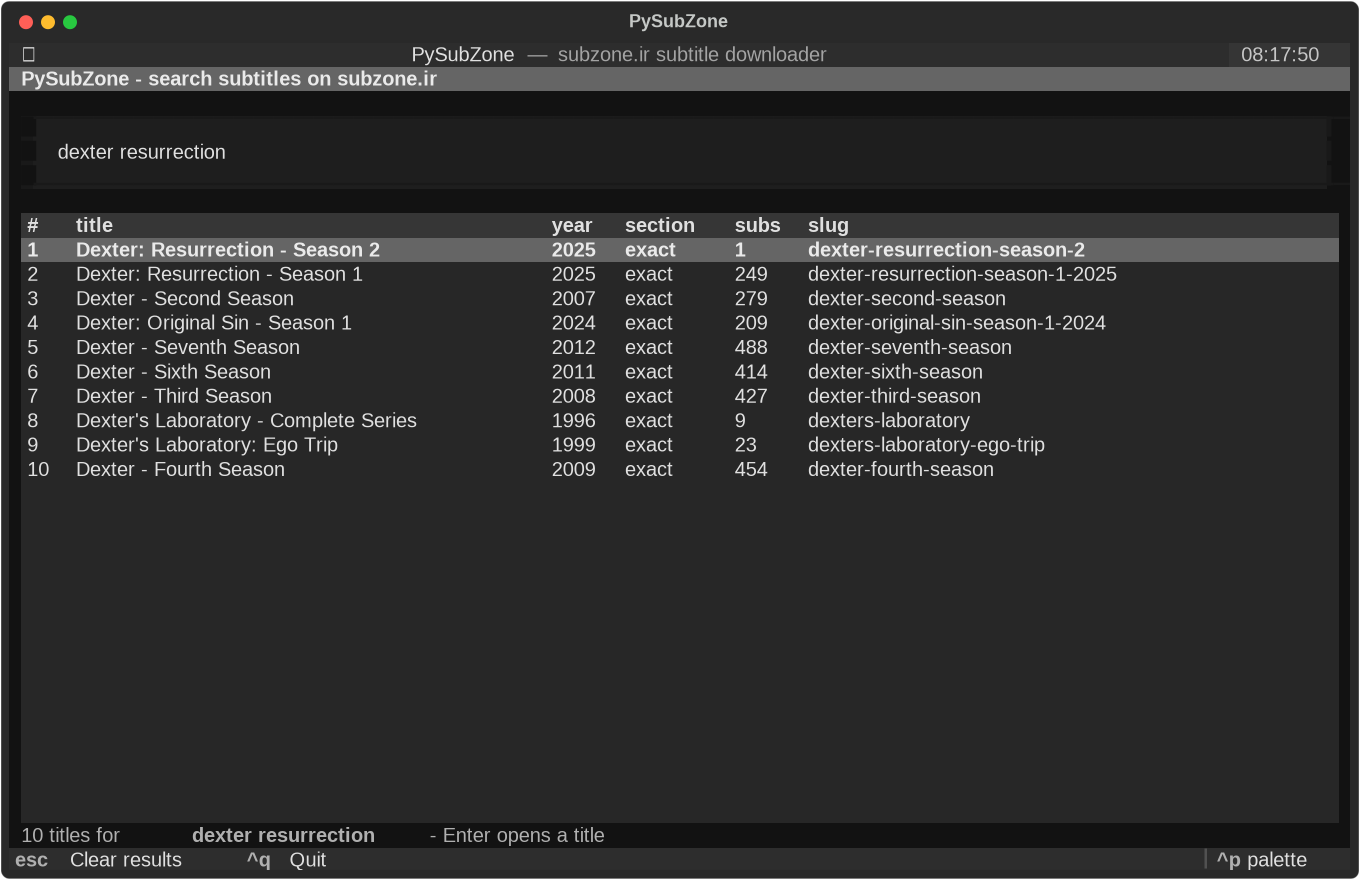
- Search — enter a query to see matching titles.
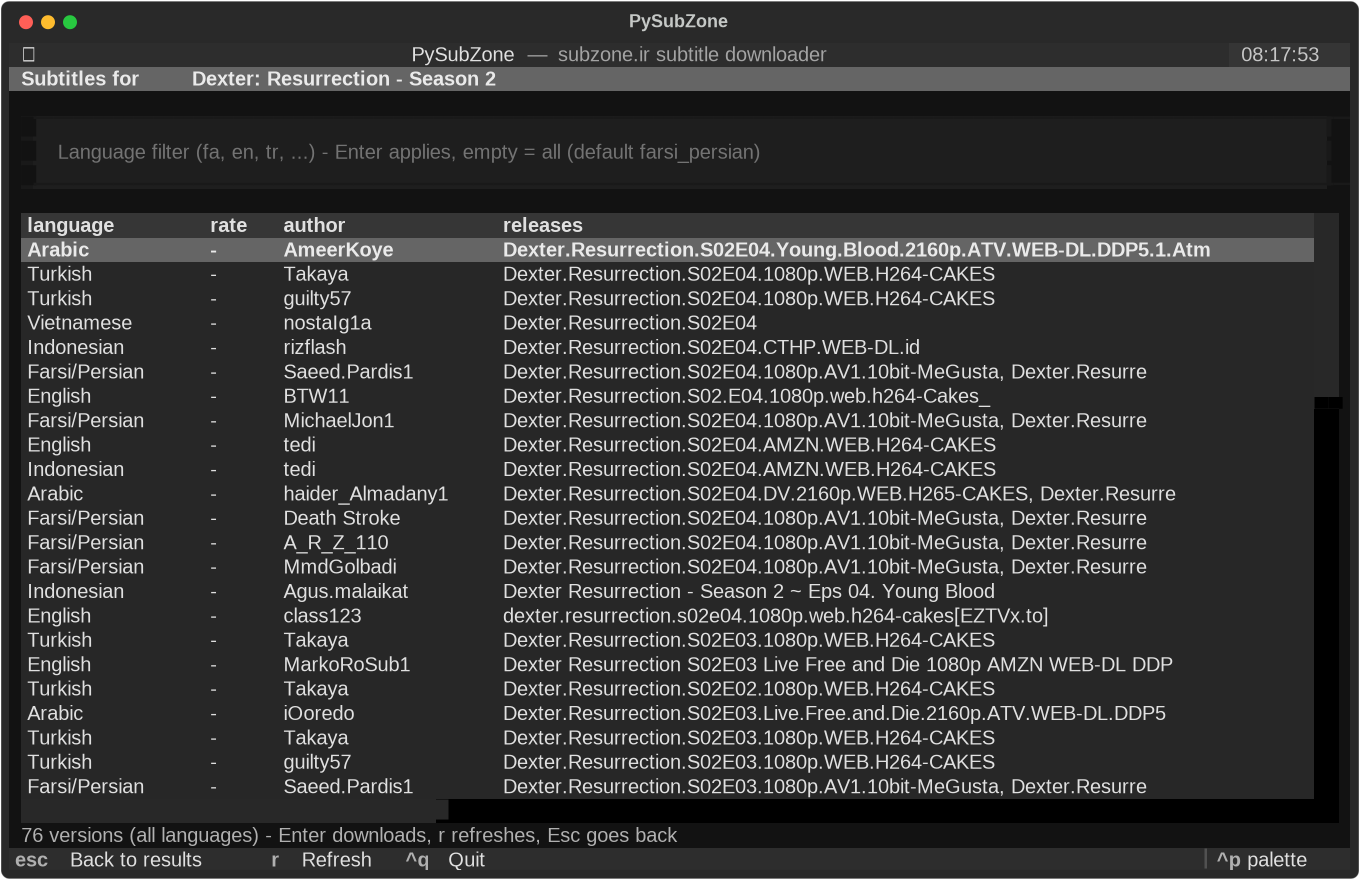
- Versions — select a title to browse its uploads, filter by language.
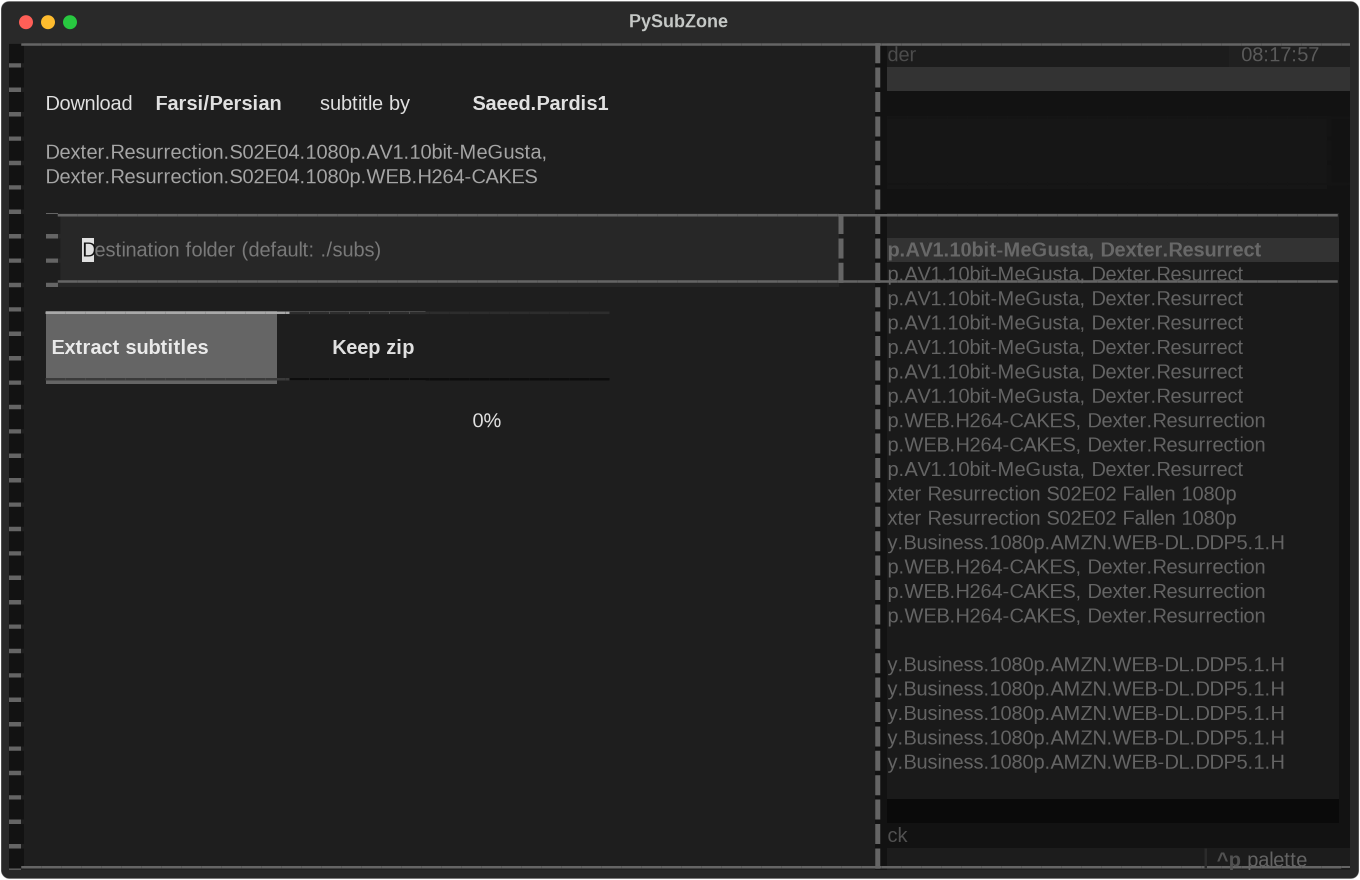
- Download dialog — pick a destination folder, optionally rename the output file in the Save as field, and choose to extract subtitles or keep the ZIP archive. A live progress bar tracks the download.
- Auto-match (
Ctrl+A) — thesubz autoflow: enter a folder, then dry-run or download matching subtitles for every video it contains. Selecting a matched row opens that title's version list, so you can pick another upload for a weak match. - Browse (
Ctrl+B) — thesubz popularflow: page through popular and latest uploads, filter by media type, and download directly.
The last destination folder and language filter are remembered between sessions (stored as settings.json next to the config file), so the download dialog and auto-match screen come back pre-filled.
Keyboard shortcuts
| Key | Action |
|---|---|
Ctrl+S |
Search screen |
Ctrl+A |
Auto-match screen |
Ctrl+B |
Browse screen |
Esc |
Go back or close the current view |
r |
Refresh versions / re-scan the folder |
p / l |
Browse: popular / latest uploads |
Left / Right |
Browse: previous / next page |
Ctrl+Q |
Quit |
TUI screenshots
| Search | Subtitle versions | Download |
|---|---|---|
 |
 |
 |
Python API
You can use PySubZone directly from your own Python projects:
from pysubzone import SubZoneClient

client = SubZoneClient(timeout=20)

# Search for titles
results = client.search("dexter resurrection")

# Find a title and list its Farsi subtitle versions
title = client.search_exact("Dexter Resurrection")
versions = client.title_versions(title.slug, "farsi_persian")

# Download the first version and extract it into ./subs
result = client.download(
    versions[0],
    dest_dir="subs",
    save_mode="extract",
)
print(result.srt_paths)

# Find the best subtitle for a video release name
best_title, version, score = client.best_for_file(
    "Breaking.Bad.S05E14.720p.BluRay.x264-DEMAND"
)

# Download the match and associate it with the video filename
client.download(
    version,
    dest_dir=".",
    save_mode="extract",
    target_video="Breaking.Bad.S05E14.mkv",
)

# Same download, but rename the output files yourself
client.download(
    version,
    dest_dir="subs",
    save_mode="extract",
    base_name="My Show S05E14",   # -> subs/My Show S05E14.fa.srt
)

# Download from a SubZone title URL
client.download_url(
    "/subtitles/the-odyssey-2026",
    lang="fa",
    limit=1,
    dest_dir="subs",
)

# Batch-download several versions; failures come back as exceptions,
# one bad item never aborts the rest of the batch
results = client.download_many(
    ["dexter-resurrection-season-2/farsi_persian/3770171",
     "the-odyssey-2026/farsi_persian/3768757"],
    dest_dir="subs",
    max_workers=2,                          # 1 = sequential (default)
    on_result=lambda index, outcome: print(index, outcome),
)
for result in results:
    if isinstance(result, Exception):
        print("failed:", result)
Tuning the match score
The auto-match ranking is built from weighted components (resolution, source, release group, token overlap, ...). Pass a ScoreWeights instance to emphasize what matters for your library:
from pysubzone import ScoreWeights, SubZoneClient

client = SubZoneClient()

# Release-group agreement matters more than resolution here
weights = ScoreWeights(resolution_match=10, group_match=50)
title, version, score = client.best_for_file(
    "Show.S01E01.1080p.WEB-DL-NTb",
    lang="fa",
    weights=weights,
)
ScoreWeights() with no arguments reproduces the built-in ranking exactly. The episode-mismatch hard reject is not a weight and always applies.
Rate limiting and caching
Two client options keep traffic friendly and fast — useful for long auto runs and batch scripts:
client = SubZoneClient(
    min_request_interval=0.5,   # >= 0.5s between HTTP requests
    cache_ttl=300,              # cache fetched pages for 5 minutes
    cache_size=256,             # pages kept in memory
)
Cached pages are returned instantly until they expire (clear_cache() drops them; downloads are never cached). The same values can be set globally via --min-interval / --cache-ttl or the network.min-interval / network.cache-ttl config keys.
Async client
AsyncSubZoneClient mirrors the full synchronous API and offloads every call to a worker thread, so it never blocks your event loop while still reusing the same scraping, retry, rate-limit and cache logic:
import asyncio
from pysubzone import AsyncSubZoneClient

async def main():
    async with AsyncSubZoneClient(min_request_interval=0.5, cache_ttl=300) as client:
        results = await client.search("dexter")
        page = await client.title(results[0].slug)
        versions = await client.title_versions(results[0].slug, "fa")
        await client.download(versions[0], dest_dir="subs")

asyncio.run(main())
The package ships a py.typed marker, so type checkers see the annotations of every public API.
All client exceptions derive from pysubzone.SubZoneError. Specific errors include NetworkError, TitleNotFoundError, NoSubtitleFoundError, and DownloadError.
How it works
The project is organized into a few focused modules:
src/pysubzone/
  client.py       HTTP client, retries, rate limiting, page cache, signed-CDN downloads
  async_client.py Async facade over the sync client (asyncio.to_thread)
  parsing.py      Search, title, version, and browse-page parsers
  models.py       Data models with as_dict() support for JSON output
  languages.py    Language slugs and aliases (fa, en, tr, ...)
  matcher.py      Release-name parsing and video-folder scanning
  scoring.py      Subtitle-version scoring for auto-match (ScoreWeights)
  config.py       TOML config file and remembered TUI settings
  cli.py          Typer command-line interface
  tui.py          Textual terminal interface
tests/            Offline tests using saved HTML fixtures
Website endpoints and client methods
| SubZone route | PySubZone method |
|---|---|
/subtitles/searchbytitle?query=... |
search(), search_exact() |
/subtitles/<slug> (optionally /<lang>) |
title(), title_versions() |
/subtitles/<slug>/<lang>/<id> |
get_version() |
/subtitles/<slug>/<lang>/<id>/download |
download() |
| `/browse/popular | latest/...` |
Downloads follow a redirect to a signed CDN URL. Before saving a download, PySubZone verifies the ZIP file signature. This helps detect stale uploads that return an S3 NoSuchKey XML response with HTTP 200; these are reported as DownloadError with a hint to try another version.
Development
Clone the repository, install the project in editable mode with development dependencies, and run the test suite:
pip install -e ".[dev]"
pytest
The test suite is designed to run offline. It uses saved HTML fixtures and synthetic release names, so tests do not need to access SubZone.
Support the project
If PySubZone saves you time or makes subtitle management easier, consider supporting its continued development. Donations are entirely optional — using the project, reporting bugs, sharing feedback, and contributing code are all valuable ways to help.
See DONATE.md for cryptocurrency donation options.
License
PySubZone is released under the MIT License. See LICENSE for the full license text.
1 maintainer

Metadata
1 maintainer
Release files for pysubzone 0.4.1
For a detailed explanation of source distributions (sdists) and built distributions (wheels), please see the package formats documentation.
Source distribution (sdist)
| File | Size | Uploaded | Provenance | Actions |
|---|---|---|---|---|
| pysubzone-0.4.1.tar.gz | 65.3 kB | Without provenance | Details for pysubzone-0.4.1.tar.gz |
Built distribution (wheel)
| File | Interpreter | ABI | Platform | Actions Reset |
|---|---|---|---|---|
| pysubzone-0.4.1-py3-none-any.whl | Python 3 | none | any | Details for pysubzone-0.4.1-py3-none-any.whl |
Total release size: 118.8 kB
Release files / pysubzone-0.4.1.tar.gz
| Download URL | pysubzone-0.4.1.tar.gz |
|---|---|
| Size | 65.3 kB |
| Tags | Source |
|
SHA-256 checksum How to use checksums |
3d8f26fbce4d40c0db6282c129b0359e72a9221b96bbb63d81ef284fe7d01018
|
|
BLAKE2b-256 checksum How to use checksums |
0383abaa87460c490055785b86c94d8f077968dacd21d194aad4a2d063168632
|
| Upload date | |
|
Uploaded using Trusted Publishing? What is trusted publishing? |
No |
| Uploaded via |
twine/7.0.0 CPython/3.12.16
|
Release files / pysubzone-0.4.1-py3-none-any.whl
| Download URL | pysubzone-0.4.1-py3-none-any.whl |
|---|---|
| Size | 53.5 kB |
| Tags | Python 3 |
|
SHA-256 checksum How to use checksums |
20cfd95b1523a5c40f1001d3369813b6cecdc050268edd6caf8d203ab35ab87d
|
|
BLAKE2b-256 checksum How to use checksums |
b3d4d1a45f64e0615f42d47c6260cbcd61c7413f7d60a950cb12830cdf3b4803
|
| Upload date | |
|
Uploaded using Trusted Publishing? What is trusted publishing? |
No |
| Uploaded via |
twine/7.0.0 CPython/3.12.16
|
Security for pysubzone 0.4.1
Provenance
Provenance describes where a file came from. On PyPI, provenance is shared via attestations, which provide a verifiable record of the build or publishing details. View details, limitations and caveats.
No provenance found
None of the files in this release were uploaded with provenance metadata.
A note on package security
PyPI is a repository for distributing packages, not a service for auditing them. While third-party security researchers and our staff do their best to detect and remove malicious packages, PyPI cannot guarantee the quality, security or suitability of any given package.
To learn more about protecting yourself from malicious actors, visit our package security documentation.














