
PySuricata








Exploratory Data Analysis for Python, Built on Streaming Algorithms
What It Does
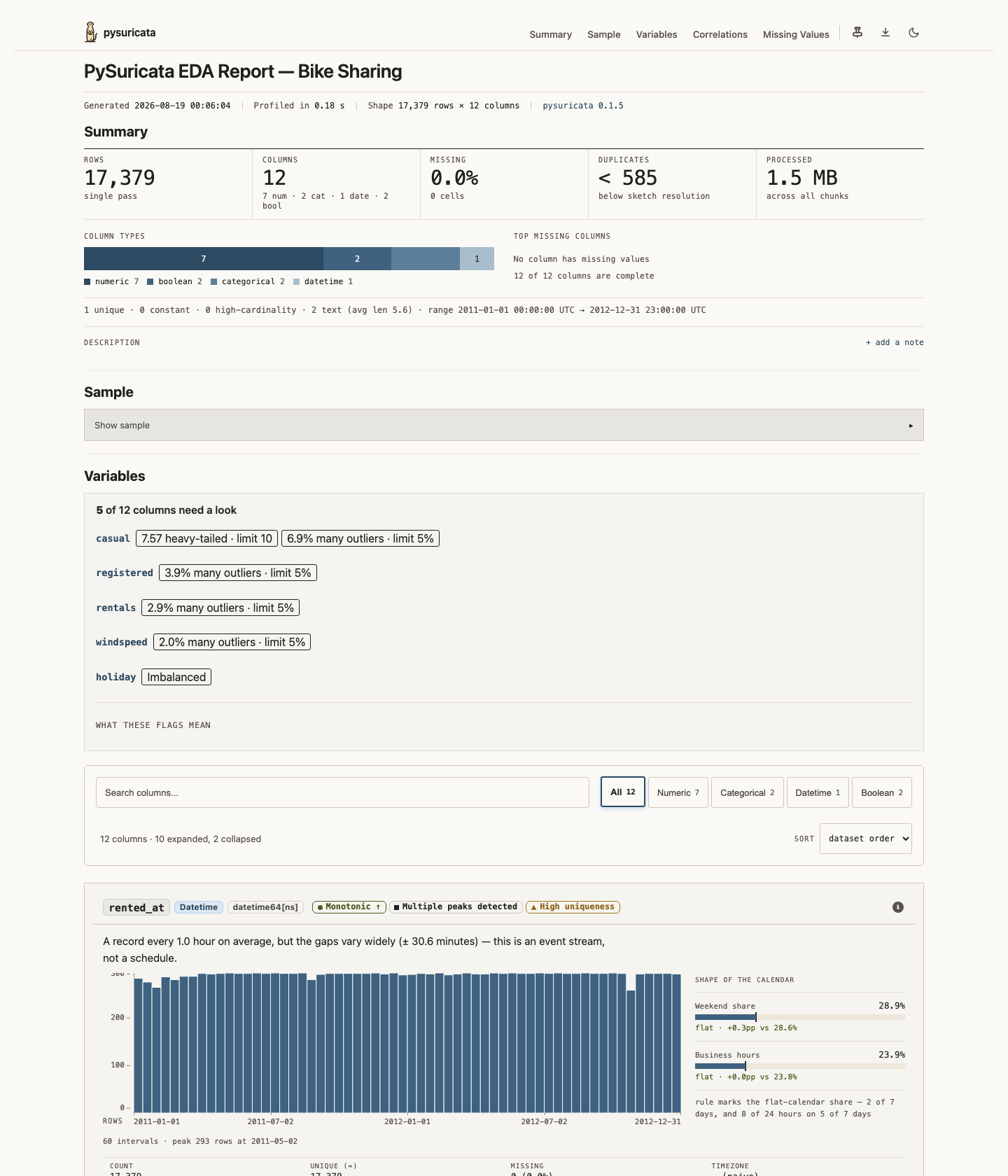
PySuricata generates self-contained HTML reports from pandas or polars DataFrames. Reports include per-column statistics, histograms, correlation chips, missing value analysis, and outlier detection.
Data is processed in chunks using streaming algorithms, so memory usage stays bounded in the number of rows — a million rows costs no more than twenty thousand. It is not bounded in the number of columns: each column keeps its own sketches for the whole run and gets its own card in the report, so both memory and report size grow linearly with the width of the frame. Measured at 20,000 rows: ~1.3 MB of RSS and ~59 KB of report per column, so a 600-column frame needs roughly 850 MB. See #207.
It also does two things a profiler usually does not: summarize() returns the same numbers as a versioned JSON payload with no HTML in the way, and pysuricata check compares a dataset against a stored baseline and exits non-zero when a threshold is crossed — so the same single pass can run in a notebook and in CI.
Quick Start
Installation
# using uv (recommended)
uv add pysuricata

# or using pip
pip install pysuricata
With polars support (optional):
uv add pysuricata[polars]
# or: pip install pysuricata[polars]
Generate a Report
import pandas as pd
from pysuricata import profile

url = "https://raw.githubusercontent.com/datasciencedojo/datasets/master/titanic.csv"
df = pd.read_csv(url)

report = profile(df)
report.save_html("titanic_report.html")
The examples below assume a df in scope. The Quick Start frame works, or anything of your own:
import numpy as np
import pandas as pd

rng = np.random.default_rng(0)
df = pd.DataFrame(
    {
        "age": rng.normal(30, 12, 800).round(1),
        "fare": rng.gamma(2, 20, 800).round(2),
        "sex": rng.choice(["male", "female"], 800),
        "booked": pd.date_range("2024-01-01", periods=800, freq="h"),
    }
)
Features
- Streaming architecture — Data is processed in configurable chunks, keeping memory bounded in rows (not in columns — see above). Useful for datasets with more rows than fit in RAM.
- Pandas and Polars — Works natively with
pandas.DataFrame,polars.DataFrameandpolars.LazyFrame, plus Parquet files, Arrow IPC files (.arrow,.feather,.ipc), DuckDB relations and Arrow batches. - Arrow is the boundary, not pandas — anything exporting the Arrow C stream interface (
__arrow_c_stream__) is profiled without materialising it, whatever library produced it. Arrow IPC is what R, Julia and Rust write, so a file from another runtime is read directly. - Self-contained HTML — Single file with inline CSS, JS, and SVG charts. No external assets needed.
- Configurable — Control chunk size, sample size, correlations and more with keyword options, a
preset=, or aProfileConfig. - Reproducible — Seeded random sampling produces deterministic results across runs.
- Typed — Ships
py.typed;summarize()returns a payload carrying aschema_version. - CLI tool —
profile,summarizeandcheckfrom the command line.
How It Works
PySuricata uses well-known streaming algorithms from the academic literature:
| Algorithm | Purpose | Time | Space |
|---|---|---|---|
| Welford/Pébay | Exact mean, variance, skewness, kurtosis | O(1) per value | O(1) |
| KMV sketch | Distinct count estimation (~2.2% error) | O(log k) per value | O(k) |
| Misra-Gries | Top-k frequent values | O(1) amortized | O(k) |
| Reservoir sampling | Uniform random sample for quantiles | O(1) per value | O(s) |
k = sketch size (max_uniques, default 2048), s = sample size (numeric_sample_size, default 20 000)
KMV's relative standard error is 1/sqrt(k - 2), which is where the ~2.2% comes from. Approximate values are labelled approximate in the report and carry their error bound rather than being printed as exact integers.
All statistics are computed in a single pass over the data.
What's in a Report
Each column is analyzed based on its type:
- Numeric — Mean, variance, skewness, kurtosis, quantiles, histogram, outlier detection (IQR, MAD, z-score), correlations
- Categorical — Top values, distinct count, entropy, Gini impurity, string length statistics
- DateTime — Temporal range, hour/day/month distributions, monotonicity detection
- Boolean — True/false ratios, entropy, balance score
Plus dataset-level metrics: row/column counts, memory usage, missing value percentages, and duplicate row estimates.
Streaming Large Datasets
Process datasets larger than RAM by passing a generator:
import pandas as pd
from pysuricata import profile

def read_in_chunks():
    for i in range(100):
        yield pd.read_parquet(f"data/part-{i}.parquet")

report = profile(read_in_chunks())
report.save_html("large_report.html")
A Parquet path, an Arrow IPC file, a DuckDB relation or an Arrow source can be streamed directly, without loading the whole thing:
import duckdb
from pysuricata import profile
from pysuricata.sources import stream_duckdb, stream_ipc, stream_parquet

report = profile(stream_parquet("data/events.parquet"))

# Written by arrow::write_ipc_file() in R, Arrow.write() in Julia, or the
# arrow crate in Rust. The framing is read from the file, not its extension.
report = profile(stream_ipc("data/events.arrow"))

relation = duckdb.connect("warehouse.db").sql("SELECT * FROM events")
report = profile(stream_duckdb(relation))
Statistics Only (No HTML)
Use summarize() for CI/CD quality checks. The payload carries a schema_version and is treated as a contract:
from pysuricata import summarize

stats = summarize(df)

assert stats["schema_version"] == 1
assert stats["dataset"]["missing_cells_pct"] < 5.0
assert stats["dataset"]["duplicate_rows_pct_est"] < 1.0

print(f"Mean age: {stats['columns']['age']['mean']:.1f}")
Comparing Two Datasets
compare() runs both through the same single pass and reports what moved:
from pysuricata import compare

last_week, this_week = df.iloc[:3], df.iloc[3:]
diff = compare(last_week, this_week).to_dict()
Configuration
Pass keyword options for the common cases:
from pysuricata import profile

report = profile(
    df,
    chunk_size=250_000,   # default 50_000
    sample=20_000,
    seed=42,
    correlations=True,
    title="My Analysis",
)
Or start from a preset — "fast" or "thorough":
from pysuricata import profile

report = profile(df, preset="fast")
For everything else, build a ProfileConfig. Keyword options and config= are mutually exclusive:
from pysuricata import profile, ProfileConfig

config = ProfileConfig()
config.compute.chunk_size = 250_000
config.compute.random_seed = 42
config.compute.corr_threshold = 0.5
config.render.title = "My Analysis"

report = profile(df, config=config)
See the Configuration Guide for all options.
CLI
# Generate an HTML report
pysuricata profile data.csv --output report.html

# Get JSON statistics
pysuricata summarize data.csv

# Compare against a stored baseline; exit non-zero when a threshold is crossed
pysuricata check data.csv --write-baseline baseline.json
pysuricata check data.csv --baseline baseline.json --max-missing-pct 5
check exits 0 on pass, 1 when a threshold is crossed, and 2 when the check could not run — so it drops into CI without a wrapper.
Documentation
Contributing
Contributions are welcome. See the Contributing Guide.
git clone https://github.com/alvarodiez20/pysuricata.git
cd pysuricata
uv sync --dev
uv run pytest
License
MIT License. See LICENSE for details.
Acknowledgments
Built using algorithms from:
- Welford, B.P. (1962) — Streaming moments
- Pébay, P. (2008) — Parallel merging of moments
- Bar-Yossef, Z. et al. (2002) — KMV distinct count estimation
- Misra, J. & Gries, D. (1982) — Streaming heavy hitters
Named after suricatas (meerkats) — small, vigilant animals that work cooperatively and thrive in harsh environments with limited resources.
1 maintainer

Download files
Download the file for your platform. If you're not sure which to choose, learn more about installing packages.
Source Distribution
Built Distribution
Filter files by name, interpreter, ABI, and platform.
If you're not sure about the file name format, learn more about wheel file names.
Copy a direct link to the current filters
File details
Details for the file pysuricata-0.1.3.tar.gz.
File metadata
- Download URL: pysuricata-0.1.3.tar.gz
- Upload date:
- Size: 923.1 kB
- Tags: Source
- Uploaded using Trusted Publishing? Yes
- Uploaded via:
twine/7.0.0 CPython/3.13.14
File hashes
| Algorithm | Hash digest | |
|---|---|---|
| SHA256 |
b05bb1bfeedf6d157a49f99e82720fd1330242fb5254d978e269c2bb9b63a247
|
|
| MD5 |
47c76f1b79c38580710ad5f97e44e332
|
|
| BLAKE2b-256 |
4142da509ddbedcc5d207e3ed1baf9b444842f7d87db50a14bf862fcb9767714
|
Provenance
The following attestation bundles were made for pysuricata-0.1.3.tar.gz:
Publisher:
cd.yml on alvarodiez20/pysuricata
-
Statement:
-
Statement type:
https://in-toto.io/Statement/v1 -
Predicate type:
https://docs.pypi.org/attestations/publish/v1 -
Subject name:
pysuricata-0.1.3.tar.gz -
Subject digest:
b05bb1bfeedf6d157a49f99e82720fd1330242fb5254d978e269c2bb9b63a247 - Sigstore transparency entry: 2501051054
- Sigstore integration time:
-
Permalink:
alvarodiez20/pysuricata@0c807dbac8031e06191f0664484ad18a49777732 -
Branch / Tag:
refs/tags/v0.1.3 - Owner: https://github.com/alvarodiez20
-
Access:
public
-
Token Issuer:
https://token.actions.githubusercontent.com -
Runner Environment:
github-hosted -
Publication workflow:
cd.yml@0c807dbac8031e06191f0664484ad18a49777732 -
Trigger Event:
push
-
Statement type:
File details
Details for the file pysuricata-0.1.3-py3-none-any.whl.
File metadata
- Download URL: pysuricata-0.1.3-py3-none-any.whl
- Upload date:
- Size: 680.6 kB
- Tags: Python 3
- Uploaded using Trusted Publishing? Yes
- Uploaded via:
twine/7.0.0 CPython/3.13.14
File hashes
| Algorithm | Hash digest | |
|---|---|---|
| SHA256 |
1992acf41d9937bc7f99d5005b4b51dc3a7e7918fe7fba617f4ef9182dcfe5c3
|
|
| MD5 |
a35b1c42e8ea2132fb6a4dc8922c645b
|
|
| BLAKE2b-256 |
5370ad835b3dff51abfae2f52dec18523af16771b8ba6040fb01e3163a11d9d2
|
Provenance
The following attestation bundles were made for pysuricata-0.1.3-py3-none-any.whl:
Publisher:
cd.yml on alvarodiez20/pysuricata
-
Statement:
-
Statement type:
https://in-toto.io/Statement/v1 -
Predicate type:
https://docs.pypi.org/attestations/publish/v1 -
Subject name:
pysuricata-0.1.3-py3-none-any.whl -
Subject digest:
1992acf41d9937bc7f99d5005b4b51dc3a7e7918fe7fba617f4ef9182dcfe5c3 - Sigstore transparency entry: 2501051094
- Sigstore integration time:
-
Permalink:
alvarodiez20/pysuricata@0c807dbac8031e06191f0664484ad18a49777732 -
Branch / Tag:
refs/tags/v0.1.3 - Owner: https://github.com/alvarodiez20
-
Access:
public
-
Token Issuer:
https://token.actions.githubusercontent.com -
Runner Environment:
github-hosted -
Publication workflow:
cd.yml@0c807dbac8031e06191f0664484ad18a49777732 -
Trigger Event:
push
-
Statement type:














