
Libsurvive is a set of tools and libraries that enable 6 dof tracking on lighthouse and vive based systems that is completely open source and can run on any device. It currently supports both SteamVR 1.0 and SteamVR 2.0 generation of devices and should support any tracked object commercially available.

Project description
libsurvive 



Libsurvive is a set of tools and libraries that enable 6 dof tracking on lighthouse and vive based systems that is completely open source and can run on any device. It currently supports both SteamVR 1.0 and SteamVR 2.0 generation of devices and should support any tracked object commercially available.
Since the focus is on tracking; it does not independently run the HMD. For an open souce stack that does that see monado
Most of the development is discussed on Discord. Join the chat and discussion in our discord!. There is also a matrix bridge available to join the discussion.
An example application is libsurvive running the controllers and HMD in Godot:
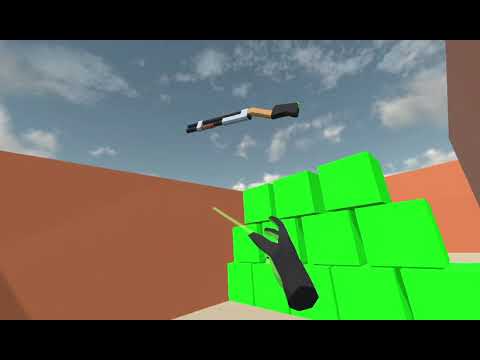
Table of Contents
Quick start
Debian
git clone git@github.com:cntools/libsurvive.git --recursive
cd libsurvive
sudo cp ./useful_files/81-vive.rules /etc/udev/rules.d/
sudo udevadm control --reload-rules && udevadm trigger
sudo apt-get install build-essential zlib1g-dev libx11-dev libusb-1.0-0-dev freeglut3-dev liblapacke-dev libopenblas-dev libatlas-base-dev cmake
make
Plug in a headset / tracker / controller / etc and run:
./bin/survive-cli
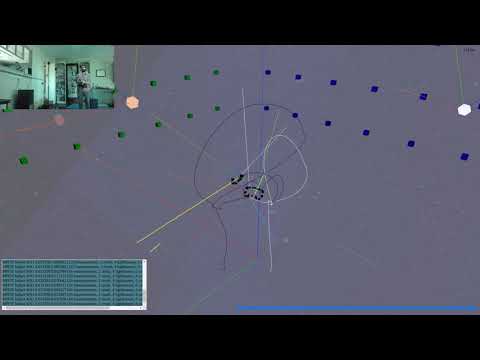
This should calibrate and display your setup.
For visualization, you can either download a binary of websocketd or enable the experimental apt source and use sudo apt install websocketd. After which you can run:
./bin/survive-websocketd & xdg-open ./tools/viz/index.html
Windows
If you have cmake installed on your path you can simply run the make.ps1 script by right clicking it and seleting Run with PowerShell.
A more manual approach is to open CMakeLists file in something like CMake GUI to build from source using one of the visual studio generators. This will also let you set various build options. The build uses NuGet to get the necessary development dependencies. After you generate the project, open the solution in visual studio and run build all.
Websocketd should work the same with with the visualization tool; assuming you put it somewhere in the system path. In the build binary folder (./build-win/Release if you built from make.ps1) there should be a survive-websocketd.ps1 which can be ran as a PowerShell file.
Probably the easiest way to get started with libsurvive on windows is to check out the release binaries.
Current Status
The tracking and device enumeration work fairly well at this point; but there isn't an extremely large testing base and the tools aren't as polished as the comparable ones bundled in SteamVR. Work is ongoing to quantify how accurate the tracking is and to improve the user experience.
Roadmap
A very loose collection of things that are on the short term agenda:
- Dynamic correction of calibration. This would detect and silently recalibrate lighthouses that might have moved. The end goal is to have a system where the user is never aware of any calibration requirements.
- An android binary / port
- Hard numbers on the accuracy and precision of libsurvive as a tracking system. If anyone wants to contribute time testing on a CNC please get in our discord
- Better handling of data starvation -- if the USB or radio connection stutters too long, the tracking will occasionally glitch out for a brief period.
- Use something like usbmon for windows
Getting Started
If you followed the quick start guide, you'll notice that the first thing you must do (for linux) is install udev rules:
sudo cp ./useful_files/81-vive.rules to /etc/udev/rules.d/
sudo udevadm control --reload-rules && udevadm trigger
This allows one to use those devices without having root. No such steps are necessary in windows.
After that, when you run survive-cli or survive-websocketd it should recognize any plugged in vive devices and start
calibrating and tracking those devices.
Important: Close SteamVR for best results. Depending on the system, libsurvive will either cause SteamVR to lose connection to the device or will compete for bandwidth with it
Calibration
Calibration is the process which establishes where the lighthouses are set up in relation to the tracked objects. The first time you run libsurvive, it can take up to ten seconds to communicate with the lighthouses and figure out where they are.
Calibration will continuously integrate objects data so long as they are momentarily stationary. Due to this, you might notice lighthouses shift slighty while it gets a good lock. Subsequent runs should shift much less.
Once you do this one time, it is saved in config.json in XDG_CONFIG_HOME/libsurvive. If you delete this file, it will simply
recalibrate; but it is faster to use the --force-calibrate flag. Some drivers change the name of this file -- notably recordings will instead use <event_file>.json.
If you have a large space, and you can not centrally locate a single device to 'see' all lighthouses, you can calibrate a few lighthouses and move the tracked object into the field of view of the uncalibrated lighthouse while keeping it in view of at least one of the calibrated ones. Set it down so it doesn't move; and the remaining lighthouse(s) should now calibrate.
Important: Resetting calibration automatically when a lighthouse is moved is being planned on but is not currently
available. If one of the calibrated lighthouses are moved, you either have to redo calibration by deleting the config.json
file or passing --force-calibrate into any of the libsurvive tools.
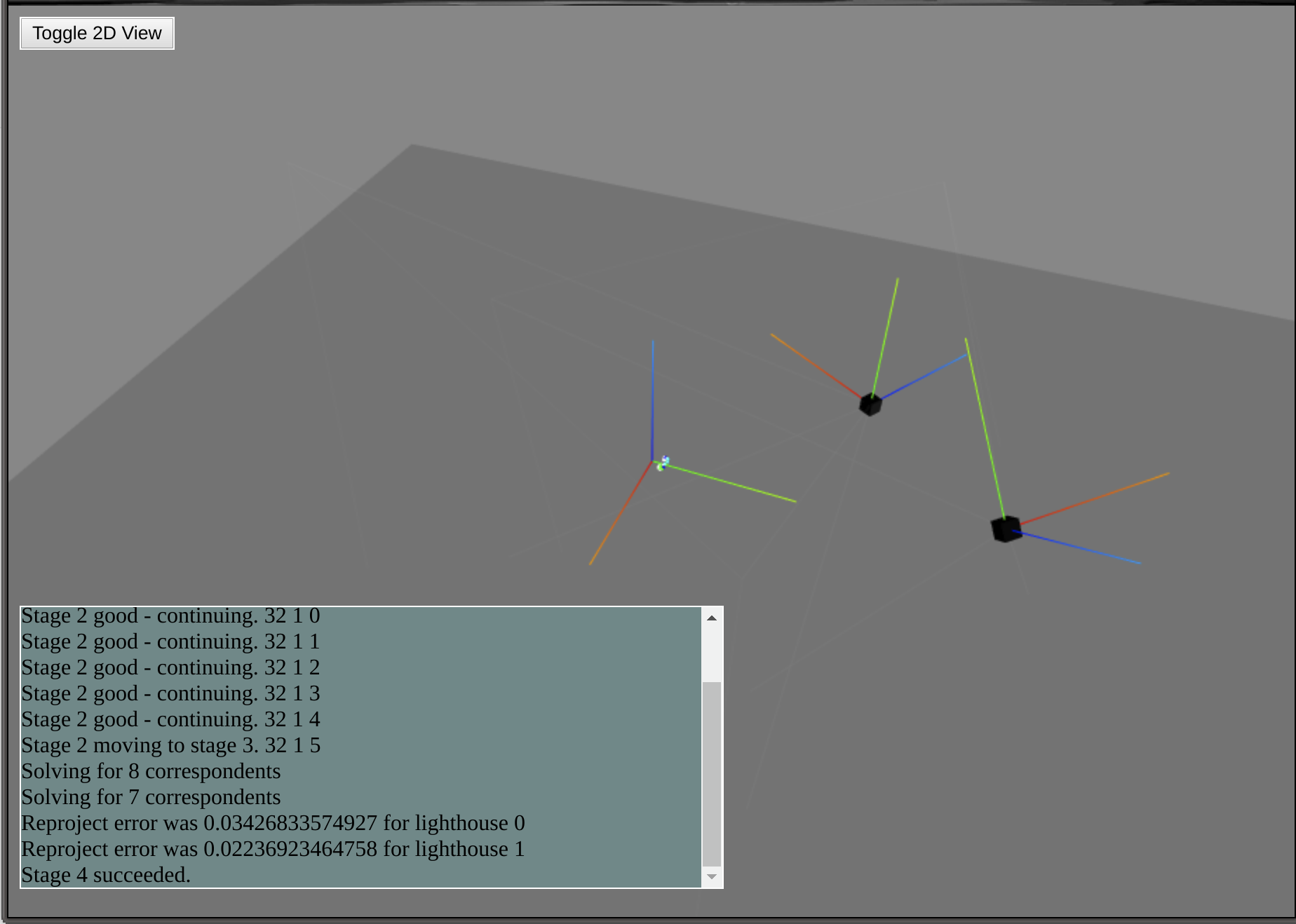
Visualization
The main visualization tool is a THREE.js page which is fed data through (websocketd)[http://websocketd.com/]. To use
this tool, run survive-websocketd [options] and open a web browser to ./tools/viz/index.html from the root of the
cloned repo.
libsurvive Tools
survive-cli- This is the main command line interface to the library; really just a very thin wrapper around the library.survive-websocketd- A script which runssurvive-clithroughwebsocketdwith all the appropriate flags set.sensors-readout- Display raw sensor information in a ncurses display
Using libsurvive in your own application
Lower level API
This section is mainly concerned about consuming data from the library; for information on how to provide data, see the drivers section.
The main way to extend and use libsurvive is to use the various callbacks exposed by the library to get information from the system. Use of libsurvive in this way is recommended if you need access to all data going in -- IMU data, individual light data, and/or final pose data. However care needs to be taken to not bog down the system. In general these callbacks are invoked from the thread collecting the data; so if you have unnecessary delays in processing data will be dropped which will cause poor tracking performance.
The full list of hooks is here. The function types are here.
You install your custom hook via:
<hook-name>_process_func survive_install_<hook-name>_fn(SurviveContext *ctx, <hook-name>_process_func fbp);
This returns the previously set function for that particular hook; which you can choose to call in your own callback. This
is somewhat more cumbersome than just having the callbacks return true or false; but allows the flexibility to call
the previously defined function before or after your code, or not at all.
These hooks are used internally within libsurvive; if you provide a hook and do not either call the previously defined or default function, some data will not make it to the posers.
SurviveContext and SurviveObject both have a user_ptr variable which is zero initialized and not used internally,
and is meant to be set by library consumers for their own purposes. This allows you to install the hook, and not resort
to using globals.
These interfaces are relatively stable, but aren't guaranteed to not change.
Have a look at the other libsurvive tools a the top level of the repository for example usage of the lower level API:
- survive-cli.c
- sensors-readout.c
- simple_pose_test.c
High level API
The high level Simple API is recommended for applications which just need position and velocity data as fast as they
can process that data. It has a few main advantages:
- User code runs in it's own thread; so you can't starve libsurvive of data
- Much more insulated against lower level API changes; so you can upgrade libsurvive versions more easily
The main loop logic tends to look like this in C:
while (survive_simple_wait_for_update(actx) && keepRunning) {
    for (const SurviveSimpleObject *it = survive_simple_get_next_updated(actx); it != 0;
         it = survive_simple_get_next_updated(actx)) {
        SurvivePose pose;
        uint32_t timecode = survive_simple_object_get_latest_pose(it, &pose);
        printf("%s %s (%u): %f %f %f %f %f %f %f\n", survive_simple_object_name(it),
               survive_simple_serial_number(it), timecode, pose.Pos[0], pose.Pos[1], pose.Pos[2], pose.Rot[0],
               pose.Rot[1], pose.Rot[2], pose.Rot[3]);
    }
}
Example code for the application interface can be found in api_example.c.
The full header for the simpler API is available here.
Python Bindings
Python bindings are available for python3 on windows and linux through https://pypi.org/project/pysurvive/. You can install them with
pip install pysurvive
To build the python bindings, run python setup.py install in the repo root. This should install the pysurvive package.
An example which streams poses out as they come in:
import pysurvive
import sys

actx = pysurvive.SimpleContext(sys.argv)

for obj in actx.Objects():
    print(obj.Name())

while actx.Running():
    updated = actx.NextUpdated()
    if updated:
        print(updated.Name(), updated.Pose())
There are more examples in ./bindings/python.
C# Bindings
The C# bindings wrap both the low level access API and the higher level simpler to use API. It is recommended to use the higher level API since the low level one relies heavily on callbacks and marshalling makes working with it prone to errors that are not always easy to solve.
Standard binaries are available at https://www.nuget.org/packages/libsurvive.net/. You can install them for a given C# project through the visual studio nuget manager tool.
Build the solution here with either visual studio or by running something like
dotnet build -c Release
from a terminal to generate the binary libsurvive.net.dll. This works in linux as well as windows; but the
filename still ends in dll. When you run against this binary, libsurvive.so needs to either be in the same directory
(with desired plugins), or on the system path.
The high level api is exposed through the libsurvive.SurviveAPI object. It's use is pretty easy; it can just poll for
updates to object positions or button events as in the Demo project:
using libsurvive;
using System;

namespace Demo
{

    class Program
    {
		static void Main() {
			string[] args = System.Environment.GetCommandLineArgs();
			var api = new SurviveAPI(args);

			while (api.WaitForUpdate()) {
				SurviveAPIOObject obj;
				while ((obj = api.GetNextUpdated()) != null) {
					Console.WriteLine(obj.Name + ": " + obj.LatestPose);
				}
			}

			api.Close();
		}
	}
}
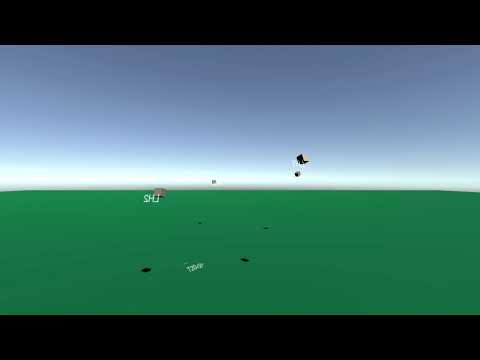
It's also meant to be easy to integrate into code bases based on frame updates; such as in the Unity example:
// Update is called once per frame
void Update() {
    var updated = survive?.GetNextUpdated();

    if (updated == null)
        return;

    var updatedObject = getObject(updated.Name);

    Vector3 newPosition = Vector3.zero;
    Quaternion newRotation = Quaternion.identity;
    SurvivePose pose = updated.LatestPose;
    newPosition.x = (float) pose.Pos[0];
    newPosition.y = (float) pose.Pos[1];
    newPosition.z = (float) pose.Pos[2];
    newRotation.w = (float) pose.Rot[0];
    newRotation.x = (float) pose.Rot[1];
    newRotation.y = (float) pose.Rot[2];
    newRotation.z = (float) pose.Rot[3];
    updatedObject.transform.localPosition = newPosition;
    updatedObject.transform.localRotation = newRotation;
}
Data recording
There are a lot of things that can go wrong to give bad tracking or calibration results, and given the wide variety of devices, configurations and use cases, it's extremely helpful when trying to resolve bugs if there is a data recording of the bug. This also can get added to our CI system to have automatic testing against that use case.
There are two mechanisms available for recording data: --record and --usbmon-record.
--record is available in every installation, and less setup to use so for pure tracking issues this is usually the
approach to take. However, if the issue is in parsing and understanding the low level data packes from the tracked device,
the --usbmon-record option might be more helpful.
Normal recording
When running any of the libsurvive tools, pass in --record <filename>.rec.gz. This will create a data log of everything
the system sees as it runs in that file. This records a large amount of data, so if it is allowed to run for a long time
that file might get very large.
To playback that file, run:
./survive-cli --playback <filename>.rec.gz
Raw USB recording
Occasionally, when dealing with new hardware or certain types of bugs that cause an issue in the USB layer, it is necessary to have a raw capture of the USB data seen / sent. The USBMON driver lets you do this.
Currently this driver is only available on linux and you must have libpcap installed -- sudo apt install libpcap-dev. You also need the usbmon kernel module installed; but many linux flavors come with that built in.
To start usbmon and prepare it for use for all users, run:
sudo modprobe usbmon
sudo setfacl -m u:$USER:r /dev/usbmon* # In sensitive environments, you can run survive-cli with sudo instead.
To capture usb data, run:
./survive-cli --usbmon-record <filename>.pcap.gz --htcvive <additional options>`
You can run that playback with:
./survive-cli --usbmon-playback <filename>.pcap.gz [--playback-factor x] <additional options>`
If you are sending this file for analysis, note that you need the accompanying *.usbdevs file with it to be useful. If you follow the *.pcap.gz convention, run something like
zip logs.zip *.pcap* config.json
and post the logs.zip to an issue or to discord.
This driver specifically only captures devices on a white list of VR equipment; but if you don't want to publish raw USB data to the internet, ask in discord for who to send it to in a private message.
Common command line flags
Libsurvive is very configurable, and contains a lot of command line options depending on the drivers and options given at build time.
It's recommended that you install the bash completion for libsurvive if you are working with the command line options:
sudo cp survive_autocomplete.sh /etc/bash_completion.d/.
The most useful command line option for debugging is --v -- this sets the reporting level. This verbosity level roughly follows this guideline:
--v 10- Statistics and information displayed either at the start or end of the application.--v 100- Information displayed at many common points while tracking--v 150- Information displayed for almost every pose output--v 250- Information displayed for almost all light data event in the system--v 1000- Everything.
Running at higher verbosity (>100) will make the visualization tool sluggish.
--force-calibrate: This reruns calibration but reuses OOTX; which makes it much faster to run.
--playback-factor: When playing back a recording, this will speed up the playback (0 is run everything as fast as possible) or slow it down (2 takes twice as much time)
--lighthouse-gen: Force the system to use a particular generation of lighthouse. Right now, sometimes the system misidentified lighthouse 1 (The purely square base stations) for lighthouse 2 (The rounded face base stations) or vice versa. As we find these cases, we are fixing them but this lets a misbehaving system be useful in the meantime.
Drivers
These are the different drivers for providing information into libsurvive. All of them are encapsulated in the src directory
with a driver_ prefix. Each driver can be specified with a --<driver-name> flag. You can disable a default driver (eg, htcvive) with
--no-<driver-name>.
htcvive- This is the main driver which provides data via USB connection to vive hardware.simulator- This simulates a device floating around while providing realistic light / IMU data into libsurvive. Useful for testing different features.playback- The playback driver is what enables record/playback functionality. It replays a file into the various data points.usbmon- USBmon can be ran concurrent with steamvr to allow both systems to use the tracked object data.openvr- This driver exposes external poses and velocities and can be ran withusbmonto compare the two systems.
Custom Drivers
Integrating a driver is meant to be relatively straight forward and the above mentioned ones are good references for how to do it.
The general approach is to compile to a shared object / DLL with the name of driver_<name>.so in the plugins folder.
The internals of libsurvive enumerate these plugins and run libsurvive registered function from the form:
int DriverRegExample(SurviveContext *ctx) {
    if(...error...) {
       return SURVIVE_DRIVER_ERROR;
    }
    return SURVIVE_DRIVER_NORMAL;
}
REGISTER_LINKTIME(DriverRegExample)
It isn't necessary for a driver to register anything else; but to be integrated into libsurvive the driver must either expose a poll / close function or a thread / close function.
The simpliest approach is a poll driver:
void survive_add_driver(SurviveContext *ctx, void *user_ptr, DeviceDriverCb poll, DeviceDriverCb close)
The poll function is called continuously while the system is running; and the close function is called at shutdown.
More versatile is a threaded driver:
bool *survive_add_threaded_driver(SurviveContext *ctx, void *driver_data, const char *name, void *(routine)(void *), DeviceDriverCb close);
This starts a thread with the given function and name.
In the threaded driver case, when accessing any members of SurviveContext or SurviveObject, you
must lock and release around that access with the following functions:
void survive_get_ctx_lock(SurviveContext *ctx);
void survive_release_ctx_lock(SurviveContext *ctx);
Improper locking or unlocking can result in race conditions or dead locks.
Within either the threaded function or the polling function, it is then up to the driver to call the appropriate
hook functions with whatever data they are exposing. Generally the driver will also call survive_create_device
and only concern itself with that device. More than one driver can be running at a time; but they all assume the same
lighthouse configuration.
A good example of this in action is driver_simulator.c which calls various light data and IMU callbacks
with a custom SurviveObject type. driver_openvr.cc demonstrates how to incorporate external position data into the
library.
FAQ
Other projects using libsurvive
- The Monado OpenXR runtime uses libsurvive as one of its HMD and controller drivers.
- OpenXR applications that run on Monado include the OpenXR plugin for Godot 3.x
- There is a very unofficial (and not upstreamable) OpenHMD/libsurvive fork that adds a libsurvive driver.
- This OpenHMD/libsurvive fork can be plugged into SteamVR-OpenHMD or used natively with the OpenHMD plugin for Godot 3.x.
Addendum and notes
Thanks to Mr. Faul for our logo! Special thanks to @nairol for an extreme amount of detail in reverse engineering the existing HTC Vive system on his https://github.com/nairol/LighthouseRedox project.
Release history Release notifications | RSS feed


Download files
Download the file for your platform. If you're not sure which to choose, learn more about installing packages.
Source Distributions
Built Distributions
Filter files by name, interpreter, ABI, and platform.
If you're not sure about the file name format, learn more about wheel file names.
Copy a direct link to the current filters
File details
Details for the file pysurvive-1.1.19-cp310-cp310-win_amd64.whl.
File metadata
- Download URL: pysurvive-1.1.19-cp310-cp310-win_amd64.whl
- Upload date:
- Size: 1.4 MB
- Tags: CPython 3.10, Windows x86-64
- Uploaded using Trusted Publishing? No
- Uploaded via: twine/4.0.2 CPython/3.7.9
File hashes
| Algorithm | Hash digest | |
|---|---|---|
| SHA256 |
405f0c127f1802a97c825df558fe86b687a8c42189739726c6ae92f80af2c663
|
|
| MD5 |
43586be131727ec4ae61572199170084
|
|
| BLAKE2b-256 |
d23c20a3861024a2518ec2e8dff225781a6a8b24a291f5375d76c3fc5562ad19
|
File details
Details for the file pysurvive-1.1.19-cp310-cp310-manylinux_2_17_x86_64.manylinux2014_x86_64.whl.
File metadata
- Download URL: pysurvive-1.1.19-cp310-cp310-manylinux_2_17_x86_64.manylinux2014_x86_64.whl
- Upload date:
- Size: 3.2 MB
- Tags: CPython 3.10, manylinux: glibc 2.17+ x86-64
- Uploaded using Trusted Publishing? No
- Uploaded via: twine/4.0.2 CPython/3.7.15
File hashes
| Algorithm | Hash digest | |
|---|---|---|
| SHA256 |
94ecdfaa1158db139177f2a0631ae141939d3e3667800b6e3c8797137ca8bad5
|
|
| MD5 |
fa018bd22c4c28835b79c7bf869b4a92
|
|
| BLAKE2b-256 |
fcbd6be6c86b579e33a7f40e1aa14d5604ae6a6e3a6089466603b9ddfaf32637
|
File details
Details for the file pysurvive-1.1.19-cp310-cp310-manylinux_2_17_aarch64.manylinux2014_aarch64.whl.
File metadata
- Download URL: pysurvive-1.1.19-cp310-cp310-manylinux_2_17_aarch64.manylinux2014_aarch64.whl
- Upload date:
- Size: 2.9 MB
- Tags: CPython 3.10, manylinux: glibc 2.17+ ARM64
- Uploaded using Trusted Publishing? No
- Uploaded via: twine/4.0.2 CPython/3.7.15
File hashes
| Algorithm | Hash digest | |
|---|---|---|
| SHA256 |
c12291017e812ffcd1770a66d822c410fa6aba5fa4d1b255f78894d1ba4db361
|
|
| MD5 |
2de6b84ca981edef833af35c7dbee1a4
|
|
| BLAKE2b-256 |
da7735e0c4e103cd699596a3c42426ff92bc95bf7a0dc01425c888ea25eed401
|
File details
Details for the file pysurvive-1.1.19-cp39-cp39-win_amd64.whl.
File metadata
- Download URL: pysurvive-1.1.19-cp39-cp39-win_amd64.whl
- Upload date:
- Size: 1.4 MB
- Tags: CPython 3.9, Windows x86-64
- Uploaded using Trusted Publishing? No
- Uploaded via: twine/4.0.2 CPython/3.7.9
File hashes
| Algorithm | Hash digest | |
|---|---|---|
| SHA256 |
3ee14c9cd5988d75b30c50b1090db51b50cfc0b8f3b70b6dbfeeac039be074ff
|
|
| MD5 |
bf8988df133fe1567c67fd336e7d3962
|
|
| BLAKE2b-256 |
761643058a0d5f6cbccc5721a835ff5335817d485d2a14ecf48c3f734e3e89df
|
File details
Details for the file pysurvive-1.1.19-cp39-cp39-manylinux_2_17_x86_64.manylinux2014_x86_64.whl.
File metadata
- Download URL: pysurvive-1.1.19-cp39-cp39-manylinux_2_17_x86_64.manylinux2014_x86_64.whl
- Upload date:
- Size: 3.2 MB
- Tags: CPython 3.9, manylinux: glibc 2.17+ x86-64
- Uploaded using Trusted Publishing? No
- Uploaded via: twine/4.0.2 CPython/3.7.15
File hashes
| Algorithm | Hash digest | |
|---|---|---|
| SHA256 |
327d4c25adffbaf078ea5a1ba4bac0625af69f3ce4eab0ddf0d0967f6215d298
|
|
| MD5 |
e5caf361335679d2ff9505b934d2c150
|
|
| BLAKE2b-256 |
b59d9ff53c3e8f1f9c7e6b86c86ce62453a542a1065f3d41a791d357d2e6d4a9
|
File details
Details for the file pysurvive-1.1.19-cp39-cp39-manylinux_2_17_aarch64.manylinux2014_aarch64.whl.
File metadata
- Download URL: pysurvive-1.1.19-cp39-cp39-manylinux_2_17_aarch64.manylinux2014_aarch64.whl
- Upload date:
- Size: 2.9 MB
- Tags: CPython 3.9, manylinux: glibc 2.17+ ARM64
- Uploaded using Trusted Publishing? No
- Uploaded via: twine/4.0.2 CPython/3.7.15
File hashes
| Algorithm | Hash digest | |
|---|---|---|
| SHA256 |
8f21383133881ece4054ad4355324a09605e2bb97206d0be3e340af914306bad
|
|
| MD5 |
09a5aaa8d95de3a0eeb44a3021402273
|
|
| BLAKE2b-256 |
e07046777a2cec1dc15477bf41b8c96c4f5e2c89c341afba2cf34380772cc992
|
File details
Details for the file pysurvive-1.1.19-cp38-cp38-win_amd64.whl.
File metadata
- Download URL: pysurvive-1.1.19-cp38-cp38-win_amd64.whl
- Upload date:
- Size: 1.4 MB
- Tags: CPython 3.8, Windows x86-64
- Uploaded using Trusted Publishing? No
- Uploaded via: twine/4.0.2 CPython/3.7.9
File hashes
| Algorithm | Hash digest | |
|---|---|---|
| SHA256 |
b04cf5bea80a0b4940f9a532b264f3f2c9b83e57190c6520d987ef2edf464aae
|
|
| MD5 |
6a8be5c25e2edd164216951bf6c2e459
|
|
| BLAKE2b-256 |
6221bd17f79ba443aea5d97108242329c30d1bf4ff04ddb4622528509668b00c
|
File details
Details for the file pysurvive-1.1.19-cp38-cp38-manylinux_2_17_x86_64.manylinux2014_x86_64.whl.
File metadata
- Download URL: pysurvive-1.1.19-cp38-cp38-manylinux_2_17_x86_64.manylinux2014_x86_64.whl
- Upload date:
- Size: 3.2 MB
- Tags: CPython 3.8, manylinux: glibc 2.17+ x86-64
- Uploaded using Trusted Publishing? No
- Uploaded via: twine/4.0.2 CPython/3.7.15
File hashes
| Algorithm | Hash digest | |
|---|---|---|
| SHA256 |
f28cdd8418c19d7c4bbc92bf8b6e2c185a6f888973f3557fb0cb28eda83a27eb
|
|
| MD5 |
65615700cf5f00f0165e3520a55c1ee9
|
|
| BLAKE2b-256 |
ad72eb8796ff16f6452d5ed786c23270ca96be860c2fe129236a66adcfde4e5d
|
File details
Details for the file pysurvive-1.1.19-cp38-cp38-manylinux_2_17_aarch64.manylinux2014_aarch64.whl.
File metadata
- Download URL: pysurvive-1.1.19-cp38-cp38-manylinux_2_17_aarch64.manylinux2014_aarch64.whl
- Upload date:
- Size: 2.9 MB
- Tags: CPython 3.8, manylinux: glibc 2.17+ ARM64
- Uploaded using Trusted Publishing? No
- Uploaded via: twine/4.0.2 CPython/3.7.15
File hashes
| Algorithm | Hash digest | |
|---|---|---|
| SHA256 |
a069b9f33501ef88ab6946073d4d7cdcff715ff30c83d2d24bd993f0edbd2b49
|
|
| MD5 |
1a82488062a710d302c1a20c5ce66423
|
|
| BLAKE2b-256 |
1c7c46a1f78c1fcc42dfcbb89e2dbad84e1ab6c34c0c64f81d17f333062840b8
|
File details
Details for the file pysurvive-1.1.19-cp37-cp37m-win_amd64.whl.
File metadata
- Download URL: pysurvive-1.1.19-cp37-cp37m-win_amd64.whl
- Upload date:
- Size: 1.4 MB
- Tags: CPython 3.7m, Windows x86-64
- Uploaded using Trusted Publishing? No
- Uploaded via: twine/4.0.2 CPython/3.7.9
File hashes
| Algorithm | Hash digest | |
|---|---|---|
| SHA256 |
548eaea819cecfca0b86d4d7b1b1bc2e290674f6882a01159aedc7f730fc8b0c
|
|
| MD5 |
3c2b4a4f7c7e9cdc5046568498d9e9bb
|
|
| BLAKE2b-256 |
b5ccae1d1f3599931ff777a8f5b9d008d38a2206369316d9e1b5e5f1c5bb08d3
|
File details
Details for the file pysurvive-1.1.19-cp37-cp37m-manylinux_2_17_x86_64.manylinux2014_x86_64.whl.
File metadata
- Download URL: pysurvive-1.1.19-cp37-cp37m-manylinux_2_17_x86_64.manylinux2014_x86_64.whl
- Upload date:
- Size: 3.2 MB
- Tags: CPython 3.7m, manylinux: glibc 2.17+ x86-64
- Uploaded using Trusted Publishing? No
- Uploaded via: twine/4.0.2 CPython/3.7.15
File hashes
| Algorithm | Hash digest | |
|---|---|---|
| SHA256 |
366bd31bbcdc43aea2aaf050e9123b7178c2a0c5da1094facae0020bace1e586
|
|
| MD5 |
aa723e7e40985d3f9548db2a129ff506
|
|
| BLAKE2b-256 |
6b176bf1d3c4bccc1bd2ffd8a026771d77af36466b7b22e5c6e0d6802dfd2b50
|
File details
Details for the file pysurvive-1.1.19-cp37-cp37m-manylinux_2_17_aarch64.manylinux2014_aarch64.whl.
File metadata
- Download URL: pysurvive-1.1.19-cp37-cp37m-manylinux_2_17_aarch64.manylinux2014_aarch64.whl
- Upload date:
- Size: 2.9 MB
- Tags: CPython 3.7m, manylinux: glibc 2.17+ ARM64
- Uploaded using Trusted Publishing? No
- Uploaded via: twine/4.0.2 CPython/3.7.15
File hashes
| Algorithm | Hash digest | |
|---|---|---|
| SHA256 |
05c5f71e3ec4ed0af837c8f964cc5c80a89499482c7870501289e448a37fef28
|
|
| MD5 |
520e12bd6923ae24cab24669806748c9
|
|
| BLAKE2b-256 |
5e130baa8f91dd882520f9ed7e0b95f7839910bd8ca866732b6f0840df99c9e3
|
File details
Details for the file pysurvive-1.1.19-cp36-cp36m-win_amd64.whl.
File metadata
- Download URL: pysurvive-1.1.19-cp36-cp36m-win_amd64.whl
- Upload date:
- Size: 1.4 MB
- Tags: CPython 3.6m, Windows x86-64
- Uploaded using Trusted Publishing? No
- Uploaded via: twine/4.0.2 CPython/3.7.9
File hashes
| Algorithm | Hash digest | |
|---|---|---|
| SHA256 |
0377422b43538c28f6158b804bf3a6bd0960a148a52a83f75ac60fcb60b3413f
|
|
| MD5 |
570cd2b019e0e2dbe7ba9e8331e08395
|
|
| BLAKE2b-256 |
9eb623a205f33fa41cd37d19ba2b1c4bb285fc86e4df79179a62784e0152dc38
|
File details
Details for the file pysurvive-1.1.19-cp36-cp36m-manylinux_2_17_x86_64.manylinux2014_x86_64.whl.
File metadata
- Download URL: pysurvive-1.1.19-cp36-cp36m-manylinux_2_17_x86_64.manylinux2014_x86_64.whl
- Upload date:
- Size: 3.2 MB
- Tags: CPython 3.6m, manylinux: glibc 2.17+ x86-64
- Uploaded using Trusted Publishing? No
- Uploaded via: twine/4.0.2 CPython/3.7.15
File hashes
| Algorithm | Hash digest | |
|---|---|---|
| SHA256 |
62b7f2a53642b9376d310f74a6e5cbcd4116e7c7b2b6e7bb36ce3f099a00e791
|
|
| MD5 |
5215e50a917712234608e18e5d27f116
|
|
| BLAKE2b-256 |
a324dd6eaf21f4ccd2947af5d118b5adf4729db82558b4027d05158d7c1d08b1
|
File details
Details for the file pysurvive-1.1.19-cp36-cp36m-manylinux_2_17_aarch64.manylinux2014_aarch64.whl.
File metadata
- Download URL: pysurvive-1.1.19-cp36-cp36m-manylinux_2_17_aarch64.manylinux2014_aarch64.whl
- Upload date:
- Size: 2.9 MB
- Tags: CPython 3.6m, manylinux: glibc 2.17+ ARM64
- Uploaded using Trusted Publishing? No
- Uploaded via: twine/4.0.2 CPython/3.7.15
File hashes
| Algorithm | Hash digest | |
|---|---|---|
| SHA256 |
b4e8902b1f3ae7c0f0566d7f86a807d8260315a71ca2217b4b02dcd66de7338d
|
|
| MD5 |
3fb02db1287dbbb589e3e994982244f0
|
|
| BLAKE2b-256 |
132366b7351778ef3b1e17421f7913c000748b36069135221d2d15b98d4e3aa3
|






