
Python wrapper for api with a swagger

Project description
PYSwaggerAPIWrap

Description
PYSwaggerAPIWrap is a Python package designed to streamline interaction with online APIs that expose Swagger documentation. With PYSwaggerAPIWrap, you can easily generate Python wrappers for any API documented via Swagger, making it simpler to integrate and utilize APIs in your code.
Features
- Universal Support: Compatible with any API that uses Swagger for documentation.
- Automatic Generation: Automatically creates the necessary Python classes and methods for API interaction.
- Easy Integration: Seamlessly integrate API calls into your Python project with an intuitive interface.
- Error Handling: Manages API call errors and provides clear, helpful messages.
Python Version
The version of Python used for the package is Python 3.9.7, but there are no specific constraints on the Python version.
Installation
You can install PYSwaggerAPIWrap using pip:
pip install pyswaggerapiwrap
Complete Tutorial
For a complete tutorial, please refer to the notebook available at this link: Tutorial
Http client
The following lines of code import the HttpClient class from the PySwaggerAPIWrap.http_client module and set up an HTTP client with a specific endpoint and authentication token.
from pyswaggerapiwrap.http_client import HttpClient

ENDPOINT = "https://petstore.swagger.io/v2"
AUTH_TOKEN = "special-key"

http_client = HttpClient(base_url=ENDPOINT, auth_token=AUTH_TOKEN)
The http_client module allows you to make classic HTTP requests using the requests library. It supports both POST and GET methods for interacting with web services.
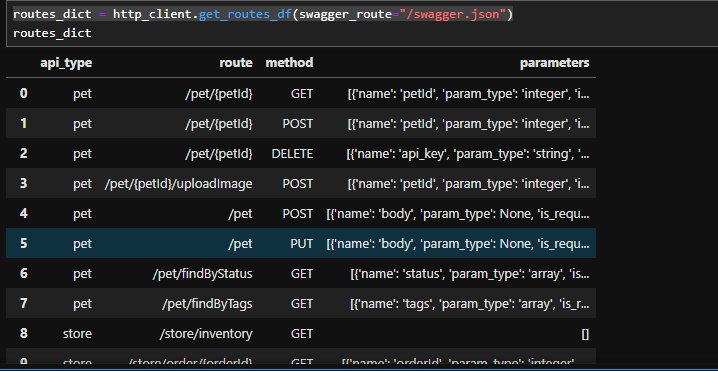
Using this class, we can retrieve a pandas DataFrame containing all the information from the Swagger documentation with the following method:
routes_dict = http_client.get_routes_df(swagger_route="/swagger.json")
API DataFrame Filter
Through the API filter class, we can wrap this dictionary to navigate through all the APIs and find the one we are interested in.
First, we create the object by passing the DataFrame as follows:
from pyswaggerapiwrap.api_filter import APIDataFrameFilter

api_filter = APIDataFrameFilter(routes_dict)
filter method
We can use the filter method to filter our APIs in several ways:
- By api_type: In this case, the APIs are divided based on the first key. For example, in the APIs from the notebook (“https://petstore.swagger.io/v2”), we have pet, user, and store.
- By route_pattern: This allows us to retrieve all APIs that contain the specified string within their route.
- By method: We can filter by HTTP methods such as GET and POST.
api_filter.filter(method="GET", api_type="pet", route_pattern="id")

Api as attributes
Additionally, the api_filter class dynamically allows the indexing of APIs, where various APIs are assigned through a tree structure within the object. This means we can access:
api_filter.store
and we will have all the APIs with api_type equal to store. Furthermore, we can index the APIs directly as attributes. In this case, the actual API names are modified to comply with class attribute rules. To understand, let’s show an example:
The API located at the route "store/inventory" and of type GET can be accessed with the following command:
api_filter.store.get_inventory
The API names follow these rules:
- They start with the method: get, post, etc.
- Slashes / are replaced with underscores _.
- Attributes such as {petId} are replaced with with__petId.
To clarify, let’s provide another example:
The API located at the route "/pet/{petId}/uploadImage" and of type POST can be accessed through the api_filter object as follows:
api_filter.pet.post_with_petId_uploadImage
Run API
To call an API once we have identified the one we are interested in, we simply call the run method. This method dynamically takes both path and query parameters as inputs.
To understand, let’s show two examples:
1. method=GET, route="/store/inventory"
data = api_filter.store.get_inventory.run(http_client)
data
{
  "totvs": 5,
  "sold": 10,
  "string": 623,
  "unavailable": 2,
  "invalid_status": 2,
  "pending": 14,
  "available": 306,
  "peric": 18
}
2. method=GET, route="/pet/{petId}"
data = api_filter.pet.get_with_petId.run(http_client=http_client, petId=1)
data
{
  "id": 1,
  "category": {
    "id": 1,
    "name": "string"
  },
  "name": "doggie",
  "photoUrls": ["string"],
  "tags": [
    {
      "id": 1,
      "name": "string"
    }
  ],
  "status": "available"
}
Save and reload the status
PySwaggerAPIWrap allows you to save the state of the package so that you don't have to wrap the documentation from the swagger each time but load it from file directly. Of course, if the API state changes, you will have to save the updated state again.
Example of Use
Below you will find an explanation of how to do it (find the same example in the notebook called status_save_and_reload).
First, let's go configure the variables as done in the previous tutorial:
ENDPOINT = "https://petstore.swagger.io/v2"
AUTH_TOKEN = "special-key"

http_client = HttpClient(base_url=ENDPOINT, auth_token=AUTH_TOKEN)
routes_dict = http_client.get_routes_df(swagger_route="/swagger.json")

api_filter = APIDataFrameFilter(routes_dict)
Save the status
from pyswaggerapiwrap.status import Status, save_status, load_status

file_path = os.path.join("resources", "saved_data", "status.psw")
save_status(file_path, http_client=http_client, routes_dict=routes_dict)
Similarly, we can reload status in this way:
new_api_filter, new_http_client = load_status(file_path)
Compared original objects with the reloaded objects
- Run original api
api_filter.store.get_inventory.run(http_client)
{'sold': 9,
 '66363': 2,
 'BPksnQx1oalC9IhhUfUc4lpFlfB0rht0N8IJsBgthNaqdrj43uk0YX48yzYadN81gZAYYDEjTBaqMOhLogiBmZbAoh1sVuN77FPmnKSpMrgsv3lsBFbFyNOBRbY4QllcbvR6OtnK0gsYKmp2uaGwx9E5dWLSd0KcT2O6jfWBqlf1WUXOJ3y1tSevyIN2RBio2Pv4VQqV4g2qFmiMeCLnESxnLY4Y37PbS4d8sGyp9HmdYGSPcABDQUZhjzva7qI': 2,
 'string': 262,
 'pKEOm5831.422150269268744D4W': 2,
 '46673': 2,
 'pending': 3,
 'available': 349,
 '6RVyxbvDJeoCKjOfsGaGPvABhe4c8FdSO14XolrcUVZR4eczMiL0JSll02CbDLzry9B21plW5mO9j7RmDdKAUFZ35mjVJuB39kZUdzvHsltJ4HwzeYV29U2Qdy8ICD9d4HBEbc8VR0qkwettCs7N5tp9HB9cpZq15lf5wiVu3qpJWiqQqLNMmC1ITLUK26JCkr0WOYpJKKyulerTdx36PLzsVKGaJDVnzQ16jOOAYqQI5UjICxTWvYYYjvtoH401CvYrYivyu2LQmPOcKxe4YUtAbzKbHYl8V3yTINJKzlpmviHgEkkJNbk3HpBvobnpyG27Gi92fubcXvGpfDXIMftwRMTWsEbIfoS89KvjXMoXTRNV91D1s974yLatX4R7qw05bGCHT1S7wig6MpAdhBKABTqw9Zd0854QfdyGDR9XCwc2NUoAfSlIC5nKLDzBNBujQw0W7TIHZq3aaSvwEtUxBouXAnHGkK6i31irXIRDJvQrTq9nfKRWamCh2JyCIQ4MHqJ9qW8ONGgxYMGTeCYmAzDzoF5fciFLSgYGYC7R2ntr6JYH3RcIh64O92VPZnhUMwhivVkdofQUCuXemQqp1uwBsERVOKoEaoRQbkUl5PZw7I7cCc8THLddOr5aH0dWoZ4QuwxwlDD3WvlvC9Y70NRYdiPYUIPJzc9VHKGVfZYzRKC8TBBarqFQOKU0hLiVcrSSeqkml0GyAnglvEoXmxO78imPk6V3QACkBbO60JrWX7V91eimlg3dWmnggGLVPTXZeoL0bmGNgq8PGgnhuvr0AHchSqrxx2BQF0wyv6npnT80NEW6fEdLd17X1AsVVd8FLAdAD3trMJikzoE8LkGKsHS2S3MDY6WhpIXwkXoEIECu18tG3gVonMIdKJzQwkouIL6tzQBViSp8DBmxKfnkssPdIUCTHTxUwd6wOgWlgJoAqO4u7cquxDg4rQjXhqdeGY2PScKpc3H9Y0VfD12r1HTABAEDoMR6': 2,
 'wlcwbJFw1P': 2,
 'oNw0': 12,
 'peric': 1,
 'fT42D6BZdm': 1,
 'SOLD': 1,
 '=2': 2,
 'invalid_status': 1,
 ':2': 2,
 '8ENF31Ir0tRE0lnm1jPgXzIr4DU8DfOjzVlZP8YoVGSBsdvTltw8G19o9n5DQed0N1spqY98Aix2Bvi2iX3NuwYvIiPe1CNCBzzqXL25MH5YXEbtHnvS4Us4VSUUDMlXJNpHbWrPId4aQ9r8xsZPht2yXnLTfKbb5YKaj7ordOOFE0BQTyBjxJ589H2JdoOEuxle5lwceB2BRHQVW2xRWrwBXany3OxBAezieFyFjh5bMSbabpTHCXdFuUKoDdAGxOWrsXcsCYFiFEoO1EArxYUcZsgk4l0IPvOauVmKOvhlE3xhyW3L7H1IZGTRsrpaVwAvofNi3W4rKrbRS2Fcv56374lNcrnxJsE1N3BaLzBWfej8WCXjIhZxEkkZsSDz1P5cAF0yegCSrxvQss21rDiWmnfYB58ouXrJBw0sMa7tbSHzIJJ2ZyALXCQrcdkSmLDtg4IiTb3WgmuogJ2oe4tK2j21bbTgA8j6HwENOWVRDctSwJ3hXxu8jPhyNaxxLz8VMiaunNksQdMTZjBsbpeM53WEbrKLpNCTEqTQJpDxJ2cgZOpfiqh3YW54raVy94iqhIEcDvszynU4wJzkryRT7SFOIqpDrBvCdPSEwqcnBzqajIvCIka9CS7fl3o0uOyLVBoADrApxuuSxqB4EKggBCwnL5nw5hUoQ3MGExBUTDJ8BUrIETCIyaGrkYawPmkJbow8IkZy1d9g3tqpk2Qj2PdD3OGFo3SruYuwwdeSnkBKqPzLclh11xIehM8DrZRgADyCeusL5VPFFWKYKIXDEa7Fk5My74JG9Wqenn20IHY3FlGbLodUJQqZn7arh0htQoGUn2iHJJrKVzysgBVGKZmQtsA8UfmcdQyE2yqvdXSb68MMKqm3EZ9Gf3dIseQF5TZoEpi1ad9uewofRAAhwTo7V4uBobGHLawazVeL2xYGt8Emryk9v563lXSDkCo6nF5JnsDWgOK7GvRxh8DcuwofaWE03Q1p0pkD': 2,
 'j8rUgCA680.50590458135171.60975683573379370N77C': 2}
- Run reloaded api
new_api_filter.store.get_inventory.run(new_http_client)
{'sold': 9,
 '66363': 2,
 'BPksnQx1oalC9IhhUfUc4lpFlfB0rht0N8IJsBgthNaqdrj43uk0YX48yzYadN81gZAYYDEjTBaqMOhLogiBmZbAoh1sVuN77FPmnKSpMrgsv3lsBFbFyNOBRbY4QllcbvR6OtnK0gsYKmp2uaGwx9E5dWLSd0KcT2O6jfWBqlf1WUXOJ3y1tSevyIN2RBio2Pv4VQqV4g2qFmiMeCLnESxnLY4Y37PbS4d8sGyp9HmdYGSPcABDQUZhjzva7qI': 2,
 'string': 264,
 'pKEOm5831.422150269268744D4W': 2,
 '46673': 2,
 'pending': 3,
 'available': 349,
 '6RVyxbvDJeoCKjOfsGaGPvABhe4c8FdSO14XolrcUVZR4eczMiL0JSll02CbDLzry9B21plW5mO9j7RmDdKAUFZ35mjVJuB39kZUdzvHsltJ4HwzeYV29U2Qdy8ICD9d4HBEbc8VR0qkwettCs7N5tp9HB9cpZq15lf5wiVu3qpJWiqQqLNMmC1ITLUK26JCkr0WOYpJKKyulerTdx36PLzsVKGaJDVnzQ16jOOAYqQI5UjICxTWvYYYjvtoH401CvYrYivyu2LQmPOcKxe4YUtAbzKbHYl8V3yTINJKzlpmviHgEkkJNbk3HpBvobnpyG27Gi92fubcXvGpfDXIMftwRMTWsEbIfoS89KvjXMoXTRNV91D1s974yLatX4R7qw05bGCHT1S7wig6MpAdhBKABTqw9Zd0854QfdyGDR9XCwc2NUoAfSlIC5nKLDzBNBujQw0W7TIHZq3aaSvwEtUxBouXAnHGkK6i31irXIRDJvQrTq9nfKRWamCh2JyCIQ4MHqJ9qW8ONGgxYMGTeCYmAzDzoF5fciFLSgYGYC7R2ntr6JYH3RcIh64O92VPZnhUMwhivVkdofQUCuXemQqp1uwBsERVOKoEaoRQbkUl5PZw7I7cCc8THLddOr5aH0dWoZ4QuwxwlDD3WvlvC9Y70NRYdiPYUIPJzc9VHKGVfZYzRKC8TBBarqFQOKU0hLiVcrSSeqkml0GyAnglvEoXmxO78imPk6V3QACkBbO60JrWX7V91eimlg3dWmnggGLVPTXZeoL0bmGNgq8PGgnhuvr0AHchSqrxx2BQF0wyv6npnT80NEW6fEdLd17X1AsVVd8FLAdAD3trMJikzoE8LkGKsHS2S3MDY6WhpIXwkXoEIECu18tG3gVonMIdKJzQwkouIL6tzQBViSp8DBmxKfnkssPdIUCTHTxUwd6wOgWlgJoAqO4u7cquxDg4rQjXhqdeGY2PScKpc3H9Y0VfD12r1HTABAEDoMR6': 2,
 'wlcwbJFw1P': 2,
 'oNw0': 12,
 'peric': 1,
 'fT42D6BZdm': 1,
 'SOLD': 1,
 '=2': 2,
 'invalid_status': 1,
 ':2': 2,
 '8ENF31Ir0tRE0lnm1jPgXzIr4DU8DfOjzVlZP8YoVGSBsdvTltw8G19o9n5DQed0N1spqY98Aix2Bvi2iX3NuwYvIiPe1CNCBzzqXL25MH5YXEbtHnvS4Us4VSUUDMlXJNpHbWrPId4aQ9r8xsZPht2yXnLTfKbb5YKaj7ordOOFE0BQTyBjxJ589H2JdoOEuxle5lwceB2BRHQVW2xRWrwBXany3OxBAezieFyFjh5bMSbabpTHCXdFuUKoDdAGxOWrsXcsCYFiFEoO1EArxYUcZsgk4l0IPvOauVmKOvhlE3xhyW3L7H1IZGTRsrpaVwAvofNi3W4rKrbRS2Fcv56374lNcrnxJsE1N3BaLzBWfej8WCXjIhZxEkkZsSDz1P5cAF0yegCSrxvQss21rDiWmnfYB58ouXrJBw0sMa7tbSHzIJJ2ZyALXCQrcdkSmLDtg4IiTb3WgmuogJ2oe4tK2j21bbTgA8j6HwENOWVRDctSwJ3hXxu8jPhyNaxxLz8VMiaunNksQdMTZjBsbpeM53WEbrKLpNCTEqTQJpDxJ2cgZOpfiqh3YW54raVy94iqhIEcDvszynU4wJzkryRT7SFOIqpDrBvCdPSEwqcnBzqajIvCIka9CS7fl3o0uOyLVBoADrApxuuSxqB4EKggBCwnL5nw5hUoQ3MGExBUTDJ8BUrIETCIyaGrkYawPmkJbow8IkZy1d9g3tqpk2Qj2PdD3OGFo3SruYuwwdeSnkBKqPzLclh11xIehM8DrZRgADyCeusL5VPFFWKYKIXDEa7Fk5My74JG9Wqenn20IHY3FlGbLodUJQqZn7arh0htQoGUn2iHJJrKVzysgBVGKZmQtsA8UfmcdQyE2yqvdXSb68MMKqm3EZ9Gf3dIseQF5TZoEpi1ad9uewofRAAhwTo7V4uBobGHLawazVeL2xYGt8Emryk9v563lXSDkCo6nF5JnsDWgOK7GvRxh8DcuwofaWE03Q1p0pkD': 2,
 'j8rUgCA680.50590458135171.60975683573379370N77C': 2}
Release history Release notifications | RSS feed


Download files
Download the file for your platform. If you're not sure which to choose, learn more about installing packages.
Source Distribution
Built Distribution
Filter files by name, interpreter, ABI, and platform.
If you're not sure about the file name format, learn more about wheel file names.
Copy a direct link to the current filters
File details
Details for the file pyswaggerapiwrap-0.1.7.tar.gz.
File metadata
- Download URL: pyswaggerapiwrap-0.1.7.tar.gz
- Upload date:
- Size: 17.8 kB
- Tags: Source
- Uploaded using Trusted Publishing? No
- Uploaded via: poetry/1.8.3 CPython/3.9.19 Linux/6.5.0-1024-azure
File hashes
| Algorithm | Hash digest | |
|---|---|---|
| SHA256 |
9640f526b807aa80582f07beacd6145dfe37aa65d0e0599fec55bf364ba6a553
|
|
| MD5 |
7deda574db52e2f4bc8ec0e87f78d1bb
|
|
| BLAKE2b-256 |
909e69f4a654a2766d358ccd0e70b9bddc2a9fcb5204522ae7a408e6b2570a7a
|
File details
Details for the file pyswaggerapiwrap-0.1.7-py3-none-any.whl.
File metadata
- Download URL: pyswaggerapiwrap-0.1.7-py3-none-any.whl
- Upload date:
- Size: 15.9 kB
- Tags: Python 3
- Uploaded using Trusted Publishing? No
- Uploaded via: poetry/1.8.3 CPython/3.9.19 Linux/6.5.0-1024-azure
File hashes
| Algorithm | Hash digest | |
|---|---|---|
| SHA256 |
266903f8aa4a85bf2d7b2c324caacdd39871e77b335e51ba0858cc7e99fd6452
|
|
| MD5 |
2279926fc4fead6a2670d9190d12d577
|
|
| BLAKE2b-256 |
e8f5c9d45f0c77c96503f1be4479a61f537abbbda90524957d1e00dd6b383af1
|






